1. Вступ
Thank you for choosing the TELESTAR TOP 250 DAB+/Internet Radio. This manual provides essential information for setting up, operating, and maintaining your device. Please read it thoroughly before use to ensure proper functionality and safety.
2. Інформація про безпеку
Завжди дотримуйтесь основних запобіжних заходів під час використання цього виробу, щоб зменшити ризик пожежі, ураження електричним струмом та травмування.
- Не піддавайте пристрій впливу дощу або вологи.
- Не відкривайте casing; звертайтеся до кваліфікованого персоналу з усіма видами обслуговування.
- Забезпечте належну вентиляцію навколо пристрою.
- Використовуйте лише наданий адаптер живлення.
- Тримайте пристрій подалі від джерел тепла та прямих сонячних променів.
3. Вміст упаковки
Обережно розпакуйте коробку та переконайтеся, що всі предмети є в наявності:
- TELESTAR TOP 250 Unit
- External Power Adapter DC 15 Volt / 1.5 A
- Screw-on Telescopic Antenna
- Remote Control with Battery (CR2025)
- Посібник користувача (цей документ)

Image: Contents of the TELESTAR TOP 250 package, including the radio unit, remote control, power adapter, and antenna.
4. Продукт закінчивсяview
4.1 Передня панель
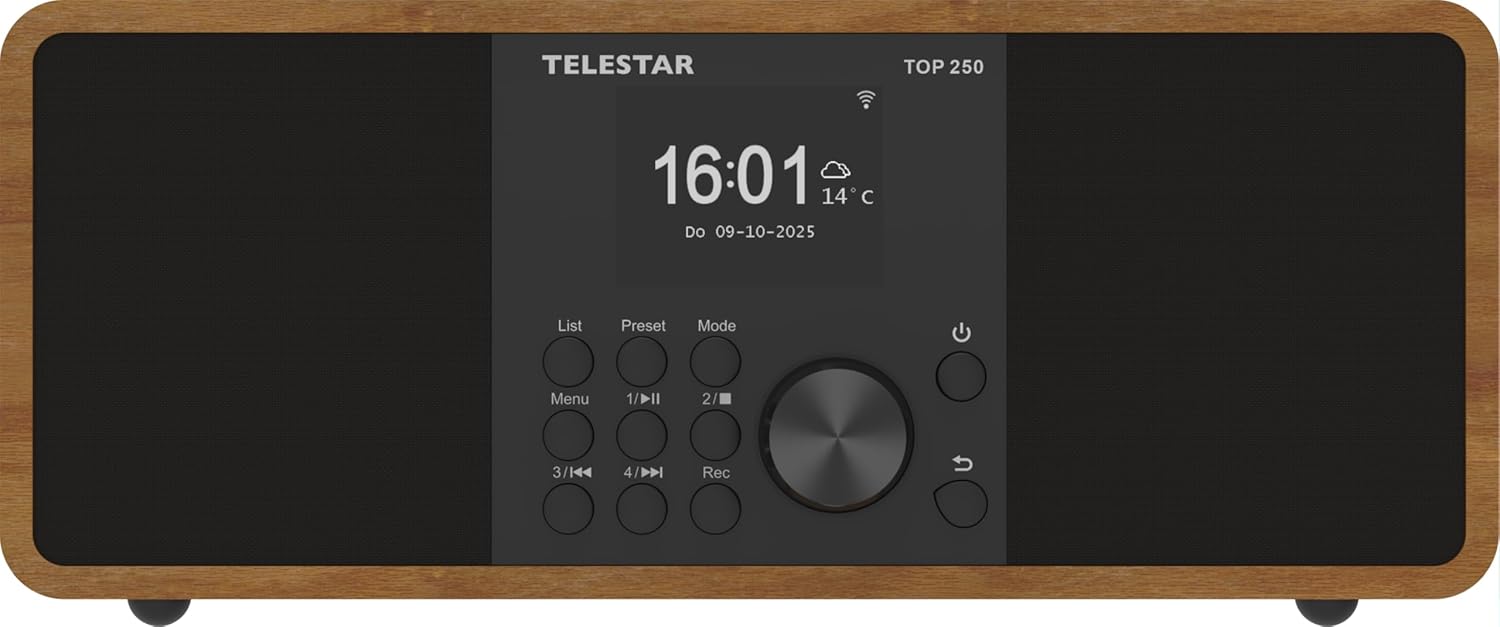
Зображення: спереду view of the TELESTAR TOP 250, highlighting the central display, navigation knob, and various control buttons.
- Дисплей: Large 6.1 cm illuminated color display for information and menu navigation.
- Ручка управління: Used for volume adjustment and menu navigation.
- Direct Selection Buttons (1-4): For quick access to favorite stations or functions.
- Кнопка меню: Доступ до головного меню.
- Кнопка режиму: Switches between different operating modes (DAB+, FM, Internet Radio, Bluetooth, USB).
- Кнопка живлення: Вмикає/вимикає пристрій або переводить його в режим очікування.
4.2 Задня панель
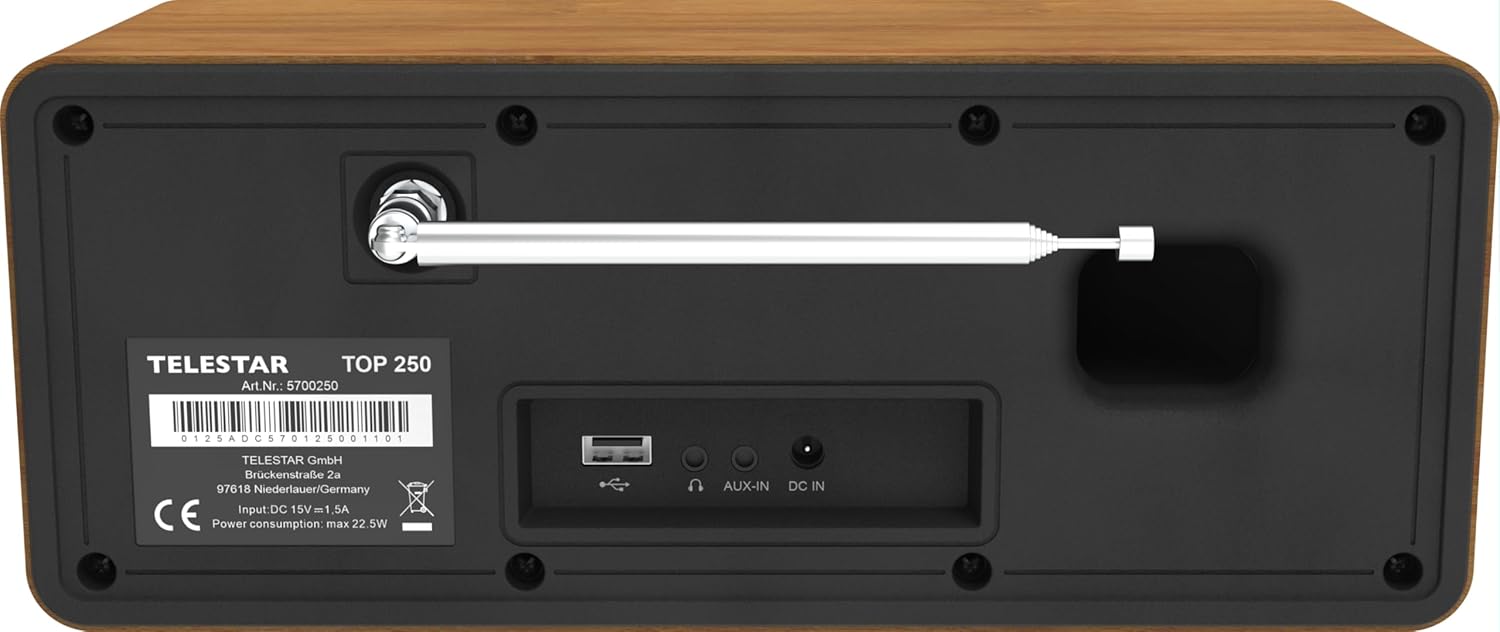
Image: Rear panel of the TELESTAR TOP 250, detailing the screw-on antenna connector, USB 2.0 port, 3.5mm AUX-in, headphone jack, and DC power input.
- Роз'єм антени: For the screw-on telescopic antenna.
- Порт USB 2.0: For USB media playback and recording.
- AUX-in (3.5 mm): Підключіть зовнішні аудіопристрої.
- Роз'єм для навушників: Для приватного прослуховування.
- DC IN: Вхід живлення для зовнішнього адаптера живлення.
4.3 Пульт дистанційного керування

Image: The remote control for the TELESTAR TOP 250, showing buttons for power, mode selection, equalizer, volume control, navigation, direct presets, and recording.
The remote control allows convenient operation of all functions from a distance. Ensure the CR2025 battery is correctly inserted.
5. Налаштування
5.1 Підключення живлення
- Connect the external power adapter to the DC IN port on the rear of the unit.
- Підключіть адаптер живлення до відповідної розетки.
5.2 Підключення антени
Screw the telescopic antenna firmly into the antenna connector on the rear panel. Extend the antenna for optimal reception of DAB+ and FM signals.
5.3 Початкове налаштування
- Натисніть кнопку живлення, щоб увімкнути пристрій.
- The display will guide you through the initial setup process, including language selection and network configuration.
- For Internet Radio, select your Wi-Fi network and enter the password.
- The radio will automatically scan for available DAB+ and FM stations.
6. Інструкція з експлуатації
6.1 DAB+ радіо
Select DAB+ mode using the Mode button. The radio will automatically scan for and list available DAB+ stations. Use the control knob or navigation buttons to browse and select stations.
6.2 FM-радіо
Select FM mode using the Mode button. Use the control knob to tune to stations or perform an auto-scan for available FM frequencies.
6.3 Інтернет-радіо
Select Internet Radio mode. Ensure the device is connected to a Wi-Fi network. You can browse stations by genre, location, or search for specific stations. The device supports thousands of internet radio stations worldwide.
6.4 Потокове передавання аудіо через Bluetooth
The TELESTAR TOP 250 supports both Bluetooth reception and transmission.
- Receive Function: Pair your smartphone or other Bluetooth device with the TOP 250 to stream audio wirelessly to the radio's speakers.
- Send Function: Transmit the currently playing radio station (DAB+, FM, Internet Radio) via Bluetooth to your wireless headphones or external Bluetooth speakers.
6.5 Відтворення та запис через USB
Insert a USB memory stick into the USB 2.0 port on the rear panel.
- Відтворення через USB: Радіо може відтворювати аудіо files stored on the USB stick. Navigate through your files using the control knob and display.
- USB-запис: Record radio broadcasts directly to the USB stick. You can initiate direct recording or program recordings for specific times and durations.
6.6 Будильник і таймер сну
- Будильник: Set up to 5 programmable alarms. Choose to wake up to various sounds, DAB+, FM, or Internet Radio. Alarms can be set for once, daily, weekdays, or weekends.
- Таймер сну: Встановіть таймер, щоб радіо автоматично вимикалося через певний період.
6.7 Нічний режим
The night mode function allows you to dim or turn off the display illumination for a set period, preventing disturbance during sleep. This function can be individually adjusted for standby and operation modes.
6.8 Керування програмами
Control your TELESTAR TOP 250 using the dedicated Soundmate app, available for iOS and Android devices. The app provides full control over the radio's functions without additional cost.
6.9 Emergency Alarm System (ASA)
The integrated ASA emergency alarm system allows the radio to automatically transmit official alert messages in case of catastrophes. The device will activate from standby mode, and alerts may also be sent via SMS (multilingual).
7. Технічне обслуговування
- Прибирання: Використовуйте м’яку суху тканину для очищення пристрою. Не використовуйте абразивні засоби для чищення або розчинники.
- Антена: Обережно поводьтеся з телескопічною антеною, щоб уникнути пошкоджень.
- Оновлення програмного забезпечення: Periodically check for software updates through the system settings to ensure optimal performance and new features.
8. Вирішення проблем
| проблема | Можлива причина | Рішення |
|---|---|---|
| Немає живлення | Адаптер живлення не підключений; розетка не працює. | Перевірте підключення живлення; спробуйте іншу розетку. |
| Поганий прийом DAB+/FM | Antenna not extended or positioned correctly; weak signal. | Extend and adjust the telescopic antenna; try repositioning the radio. |
| Інтернет-радіо не підключається | Неправильний пароль Wi-Fi; слабкий сигнал Wi-Fi; проблема з маршрутизатором. | Verify Wi-Fi password; move radio closer to router; restart router. |
| Проблеми зі створенням пари Bluetooth | Device not in pairing mode; too far from radio. | Ensure both devices are in pairing mode; bring devices closer. |
| Ні звуку | Volume too low; mute activated; incorrect source selected. | Increase volume; check mute status; select correct input source. |
9. Технічні характеристики

Image: Product dimensions of the TELESTAR TOP 250.
| Особливість | Деталь |
|---|---|
| Виробник | ТЕЛЕСТАР |
| Номер моделі | 5701250 |
| Розміри продукту (Д x Ш x В) | 27.6 х 13 х 11.8 см |
| вага | 1.44 кг |
| Колір | Деревина |
| Технологія підключення | Aux, Bluetooth, Wi-Fi |
| Технологія тюнера | DAB+, Internet Radio, FM |
| Джерело живлення | Corded Electric (DC 15V / 1.5A) |
| Аудіовихід | 2 x 10 Watt (20 W total) Stereo |
| Особливості | Integrated Clock, USB Recording, USB Media Player, Emergency Alarm System (ASA), Alarm Clock, Sleep Timer, Night Mode, App Control |
| Дисплей | 6.1 cm illuminated color display with dimmer |
10. Гарантія та підтримка
For warranty information and technical support, please refer to the official TELESTAR webсайт або зверніться до місцевого дилера. Зберігайте чек про покупку як підтвердження покупки.
Manufacturer: TELESTAR GmbH
Webсайт: www.telestar.de