1. Вступ
This manual provides instructions for the VINABTY LP-099 replacement remote control, designed for use with Lonpoo LP-099 DVD Players and other compatible models. This remote offers a lightweight and ergonomic design for comfortable handling, serving as an ideal replacement for your original or broken remote control.
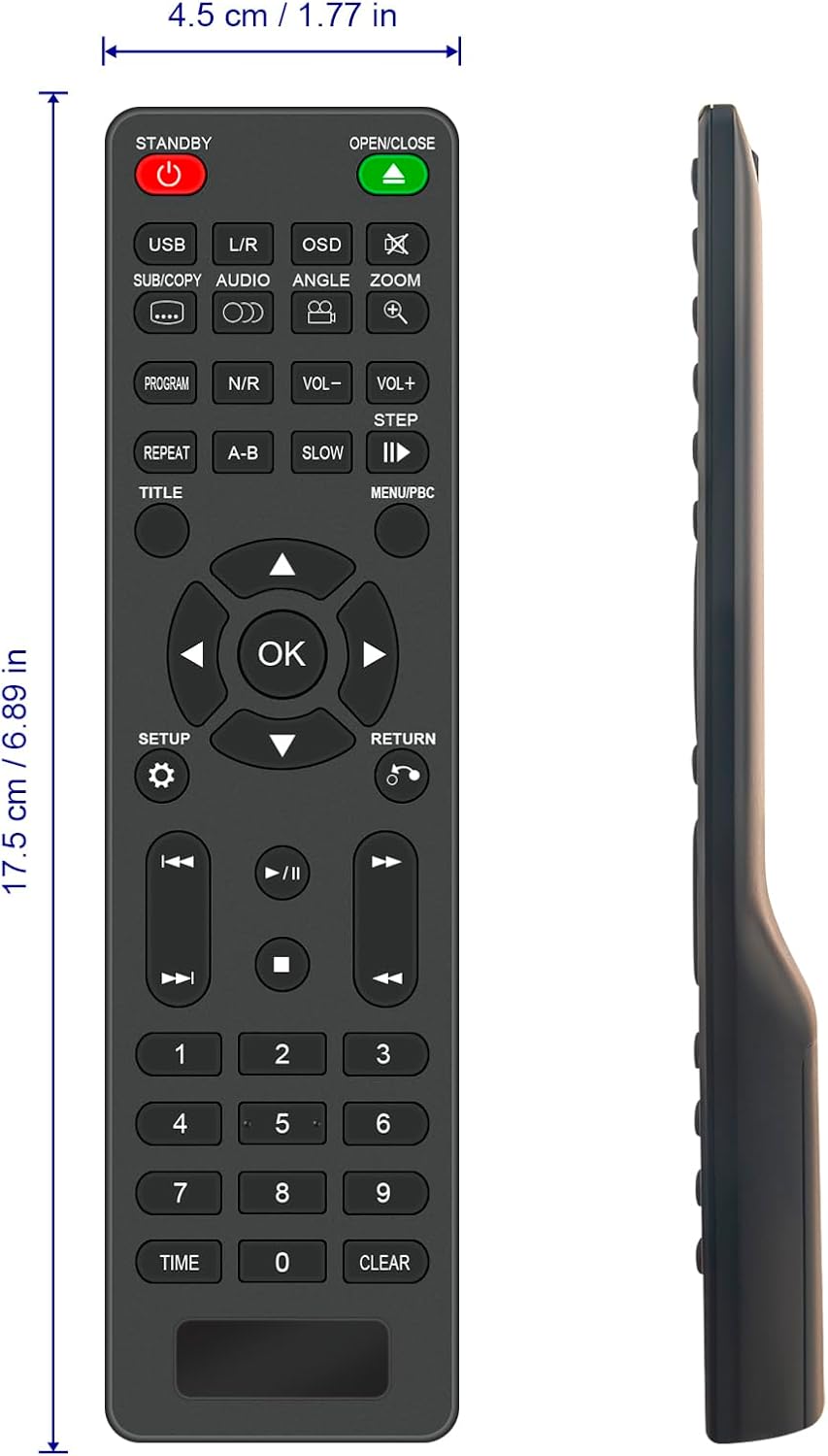
малюнок 1.1: Фронт view of the VINABTY LP-099 Remote Control, showing its layout and approximate dimensions (17.5 cm / 6.89 in length, 4.5 cm / 1.77 in width).
2. Налаштування: Встановлення батареї
The VINABTY LP-099 remote control requires two AAA alkaline batteries (not included) for operation. No programming or setup is required; simply insert the batteries to begin use.
- Знайдіть батарейний відсік на задній панелі пульта дистанційного керування.
- Посуньте кришку відсіку для батарейок вниз або натисніть на засувку та підніміть її, щоб відкрити.
- Вставте дві лужні батарейки типу AAA, переконавшись, що позитивний (+) та негативний (-) полюси правильно збігаються з позначками всередині відсіку.
- Встановіть кришку відсіку для батарейок, зсунувши її на місце до клацання.
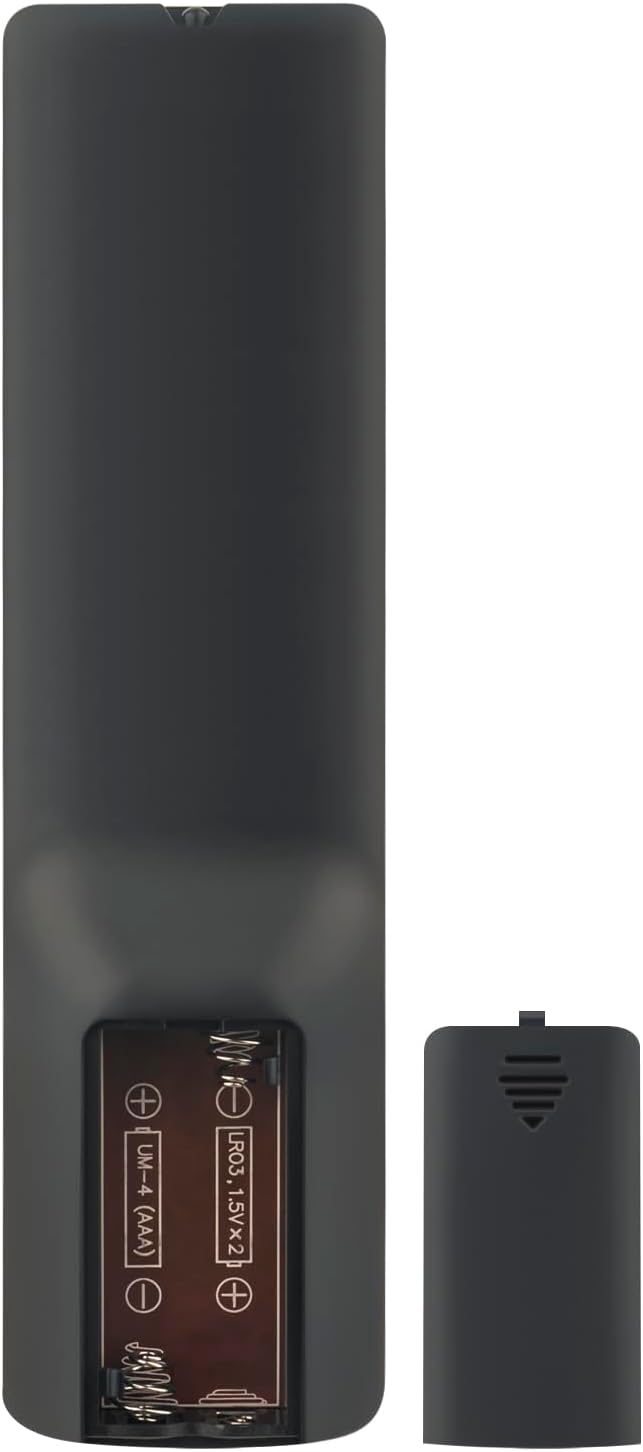
малюнок 2.1: Задня view of the remote control with the battery compartment open, illustrating the correct orientation for AAA battery insertion.
3. Operating Instructions: Button Functions
Familiarize yourself with the buttons on your VINABTY LP-099 remote control to effectively operate your Lonpoo DVD Player.

малюнок 3.1: Під кутом view of the remote control, highlighting the button layout for various functions.
- STANDBY (Power Button): Вмикає або вимикає DVD-програвач.
- ВІДКРИТИ/ЗАКРИТИ: Відкриває або закриває лоток для дисків.
- USB: Switches input to USB mode for media playback from a USB device.
- L/R (Audio Left/Right): Adjusts audio channels or settings.
- OSD (екранний дисплей): Displays information or menus on the screen.
- SUB/COPY: Selects subtitle tracks or initiates a copy function.
- АУДІО: Cycles through available audio tracks or languages.
- КУТ: Змінює viewing angle on compatible DVDs.
- ЗООМ: Збільшує або зменшує масштаб відтворення відео.
- ПРОГРАМА: Accesses the program menu to create a custom playback sequence.
- N/R (Noise Reduction): Activates or deactivates noise reduction features.
- ГУЧНІСТЬ- / ГУЧНІСТЬ+: Decreases or increases the volume level.
- КРОК: Advances playback frame by frame.
- ПОВТОР: Повторює поточну доріжку, розділ або весь диск.
- AB: Sets a start and end point for repeating a specific section.
- ПОВІЛЬНИЙ: Plays video in slow motion.
- PLAY/PAUSE (►/∥): Запуск або призупинення відтворення.
- НАЗВА: Повернення до меню назв DVD.
- MENU/PBC (Playback Control): Accesses the main menu or playback control menu.
- Directional Pad (▲ ▼ ◀ ►): Навігація в меню та параметрах.
- ОК: Підтверджує вибір у меню.
- НАЛАШТУВАННЯ: Доступ до меню налаштувань системи.
- ПОВЕРНЕННЯ: Повернення до попереднього меню або екрана.
- Previous/Next Track (◀◀, ►►): Перехід до попередньої або наступної доріжки/розділу.
- Fast Rewind/Fast Forward («, »): Rewinds or fast forwards playback.
- СТОП (■): Зупинка відтворення.
- Цифрова клавіатура (0-9): Enters track numbers, chapter numbers, or other numerical inputs.
- ЧАС: Displays or sets playback time.
- ОЧИСТИТИ: Очищає поточний ввід або вибір.
4. Технічне обслуговування
Щоб забезпечити довговічність та оптимальну роботу вашого пульта дистанційного керування, дотримуйтесь цих інструкцій з технічного обслуговування:
- Прибирання: Протріть пульт дистанційного керування м’якою сухою тканиною. Для стійкого бруду злегкаampПротріть тканину водою або м’яким миючим розчином, а потім негайно витріть насухо. Уникайте використання абразивних мийних засобів або розчинників.
- Заміна батареї: Replace batteries promptly when the remote's response becomes sluggish or it stops functioning. Always replace both batteries at the same time with new ones of the same type.
- Зберігання: If the remote control will not be used for an extended period, remove the batteries to prevent leakage and potential damage. Store in a cool, dry place away from direct sunlight.
- Уникайте пошкоджень: Do not drop the remote control, expose it to extreme temperatures, or immerse it in liquids.
5. Вирішення проблем
If you encounter issues with your VINABTY LP-099 remote control, refer to the following common solutions:
- Пульт не відповідає:
- Перевірте, чи правильно вставлені батарейки з дотриманням полярності (+/-).
- Замініть батарейки новими лужними батарейками типу AAA.
- Переконайтеся, що між пультом дистанційного керування та інфрачервоним датчиком DVD-програвача немає перешкод.
- Make sure you are within the effective operating range (up to 10 meters) and pointing the remote directly at the DVD player.
- Кнопки не працюють:
- If only specific buttons are not working, try cleaning the remote control as described in the Maintenance section.
- Ensure the remote is compatible with your specific Lonpoo DVD player model.
- Переривчаста робота:
- Це часто свідчить про низький заряд батареї. Замініть батареї.
- Check for strong light sources (like direct sunlight or bright fluorescent lights) that might interfere with the infrared signal.
6. Технічні характеристики
| Бренд: | ВІНАБТИ |
| модель: | ЛП-099 |
| Сумісні пристрої: | Lonpoo LP-099 DVD/Blu-Ray Player |
| Технологія підключення: | Інфрачервоний |
| Розміри (Д x Ш x В): | 18 x 7 x 1 см (приблизно 7.09 x 2.76 x 0.39 дюймів) |
| вага: | 60 грама (приблизно 2.12 унції) |
| колір: | чорний |
| Тип батареї: | AAA Alkaline (x2) |
| Батареї в комплекті: | немає |
| Максимальний діапазон: | 10 метрів |
| Особливість: | Ергономічний дизайн |
7. Гарантія та підтримка
Your VINABTY LP-099 remote control comes with a Гарантія 90 днів з дати покупки.
If you experience any issues with the product or require assistance, please do not hesitate to contact our customer support. We aim to respond to all inquiries within 24 hours.
Щоб отримати підтримку, зверніться до контактної інформації, наданої вашим продавцем, або до інформації, зазначеної на упаковці продукту.


