1. Вступ
This manual provides essential instructions for setting up, operating, and maintaining your CONSUMER CELLULAR Iris Connect smartphone. The Iris Connect is designed for reliable performance, featuring a 6.5-inch display, 32GB of storage, and running on Android 13. Please read this manual thoroughly to ensure proper use and to maximize your device's capabilities.
2. Що в коробці
Upon unboxing your CONSUMER CELLULAR Iris Connect, verify that all the following items are included:
- CONSUMER CELLULAR Iris Connect Smartphone
- USB кабель
- Короткий посібник
3. Пристрій закінчивсяview
Familiarize yourself with the physical components of your Iris Connect smartphone.

малюнок 3.1: Спереду і ззаду view of the Iris Connect smartphone, highlighting its sleek design and camera placement.

малюнок 3.2: Фронт view of the Iris Connect, showcasing the 6.5-inch display and front-facing camera.
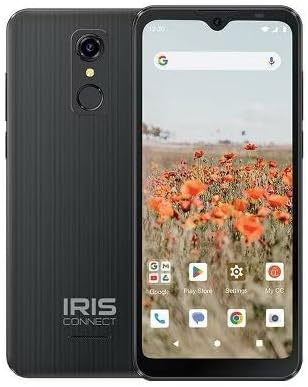
малюнок 3.3: Назад view of the Iris Connect, showing the main camera, flash, and fingerprint sensor.
Ключові компоненти:
- 6.5-дюймовий дисплей: High Definition+ screen for clear visuals.
- Фронтальна камера (8 МП): Розташований у верхній частині дисплея для селфі та відеодзвінків.
- Основна камера (13 МП): Located on the rear, for high-resolution photos and videos.
- Сканер відбитків пальців: Integrated on the rear for secure unlocking.
- Кнопка живлення: Typically on the right side, used to turn the device on/off or wake/sleep the screen.
- Кнопки гучності: Поруч із кнопкою живлення, для регулювання рівня гучності.
- Порт USB-C: Внизу, для заряджання та передачі даних.
- 3.5 мм аудіороз’єм: Для підключення навушників.
4. Налаштування
4.1. Встановлення SIM-картки та картки MicroSD
- Знайдіть лоток для SIM-картки на боковій стороні пристрою.
- Insert the SIM ejector tool (not included, use a thin paperclip) into the small hole next to the tray and press gently until the tray pops out.
- Place your Nano-SIM card(s) into the designated slots with the gold contacts facing down.
- If desired, insert a microSD card (up to 256GB) into its dedicated slot for expanded storage.
- Обережно вставте лоток назад у пристрій, доки він не зафіксується на місці почувши клацання.
4.2. Початкове увімкнення та майстер налаштування
- Натисніть і утримуйте Кнопка живлення поки екран не засвітиться.
- Дотримуйтесь інструкцій на екрані, щоб вибрати мову, підключитися до мережі Wi-Fi та налаштувати обліковий запис Google.
- You may be prompted to transfer data from an old device or set up security features like the fingerprint scanner.
4.3. Зарядка пристрою
Before first use, it is recommended to fully charge your device. The Iris Connect features a 3500 mAh battery with an approximate charging time of 2.5 hours.
- Підключіть USB-кабель до порту USB-C у нижній частині телефону.
- Connect the other end of the USB cable to a compatible power adapter (not included) and plug it into a wall outlet.
- Індикатор заряджання з’явиться на екрані.
5. Інструкція з експлуатації
5.1. Основна навігація
- Торкніться: Торкніться значка, щоб відкрити програму або вибрати елемент.
- Проведіть пальцем: Проведіть пальцем по екрану, щоб прокручувати або переходити між екранами.
- Щіпка: Використовуйте два пальці, щоб збільшувати або зменшувати масштаб фотографій та web сторінки.
- Головний екран: Центральний центр для ваших програм та віджетів.
- Ящик програм: Проведіть пальцем вгору з головного екрана, щоб отримати доступ до всіх встановлених програм.
5.2. Здійснення дзвінків
- Торкніться Телефон значок на головному екрані або в панелі програм.
- Введіть номер телефону за допомогою клавіатури набору номера або виберіть контакт з адресної книги.
- Торкніться Телефонуйте кнопку, щоб розпочати дзвінок.
5.3. Надсилання повідомлень
- Відкрийте Повідомлення додаток
- Торкніться Розпочати чат or Нове повідомлення значок.
- Введіть номер одержувача або виберіть його з контактів, а потім напишіть повідомлення.
- Торкніться Надіслати кнопку.
5.4. Підключення до Wi-Fi
- Перейти до Налаштування > Мережа та Інтернет > Інтернет.
- Увімкнути/вимкнути Wi-Fi On.
- Виберіть потрібну мережу Wi-Fi зі списку та введіть пароль, якщо буде запропоновано.
5.5. Підключення Bluetooth
- Перейти до Налаштування > Підключені пристрої > Параметри підключення > Bluetooth.
- Увімкнути Bluetooth On.
- Виберіть З'єднайте новий пристрій and choose your desired device from the list. Follow any on-screen prompts to complete pairing.
5.6. Використання камери
The Iris Connect features a 13MP main camera and an 8MP front-facing camera.
- Відкрийте Камера додаток
- Торкніться затвор кнопку, щоб зробити фото.
- Switch between photo and video modes, or front and rear cameras, using the on-screen icons.
5.7. Сканер відбитків пальців
To set up the fingerprint scanner for secure unlocking:
- Перейти до Налаштування > Безпека та конфіденційність > Розблокування пристрою > Відбиток пальця.
- Дотримуйтесь інструкцій на екрані, щоб зареєструвати свій(і) відбиток(ки).
6. Технічне обслуговування
6.1. Очищення пристрою
To keep your device clean and functional:
- Використовуйте м’яку тканину без ворсу для протирання екрана та корпусу.
- Уникайте використання агресивних хімікатів, абразивних мийних засобів або аерозольних спреїв.
- Переконайтеся, що порти чисті від пилу та сміття.
6.2. Догляд за акумулятором
To optimize your battery life (up to 26 hours of use):
- Уникайте екстремальних температур.
- Не залишайте пристрій заряджатися на тривалий час після повної зарядки.
- Налаштуйте яскравість екрана та закривайте невикористовувані програми для економії заряду.
6.3. Оновлення програмного забезпечення
Regularly check for software updates to ensure your device has the latest features and security patches:
- Перейти до Налаштування > система > Оновлення системи.
- Дотримуйтесь інструкцій на екрані, щоб завантажити та встановити всі доступні оновлення.
7. Вирішення проблем
This section addresses common issues you might encounter with your Iris Connect smartphone.
- Пристрій не вмикається: Переконайтеся, що акумулятор заряджений. Підключіть зарядний пристрій і зачекайте кілька хвилин, перш ніж спробувати знову ввімкнути живлення.
- Немає сигналу мережі: Check if your SIM card is correctly inserted. Verify that Airplane Mode is off (swipe down from the top of the screen to check quick settings). Contact your service provider if the issue persists.
- Збої або зависання програм: Try restarting the app. If the issue continues, restart the phone. You may also clear the app's cache or data via Налаштування > програми > [Назва програми] > Пам'ять і кеш.
- Повільна продуктивність: Close unused apps, clear cache, or consider uninstalling rarely used applications to free up storage.
- Unable to connect to Wi-Fi/Bluetooth: Ensure Wi-Fi/Bluetooth is enabled in settings. Try forgetting the network/device and reconnecting. Restart your phone and the router/Bluetooth device.
- Forgot screen lock password/pattern: Якщо у вас підключено обліковий запис Google, ви можете скинути його налаштування. В іншому випадку може знадобитися скидання до заводських (це призведе до видалення всіх даних).
For more complex issues, please refer to the official CONSUMER CELLULAR support resources or contact their customer service.
8. Технічні характеристики
Detailed technical specifications for the CONSUMER CELLULAR Iris Connect smartphone (Model: SH4650).
| Особливість | Специфікація |
|---|---|
| Назва моделі | Ірис Коннект |
| Номер моделі | SH4650 |
| Операційна система | Android 13.0 |
| Розмір дисплея | 6.5 дюймів |
| Роздільна здатність дисплея | 1440 х 810 |
| Модель процесора | Snapdragon 710 |
| Швидкість ЦП | 2 ГГц |
| Розмір встановленої оперативної пам'яті | 3 ГБ |
| Внутрішня пам'ять | 32 ГБ |
| Розширюване сховище | До 256 Гб через microSD |
| Основна камера | 13 Мп |
| Фронтальна камера | 8 Мп |
| Ємність акумулятора | 3500 міліamp години |
| Номінальна потужність батареї | 3600 (likely Wh or similar unit, as mAh is 3500) |
| Час зарядки | 2.5 години |
| Підключення | 4G LTE, Bluetooth, Wi-Fi |
| Особливості | Dual Camera, Expandable Storage, Fingerprint Scanner, Long Battery Life |
| Аудіороз'єм | 3.5 міліметрів |
| Розміри | 8 x 6 x 3 дюймів |
| Вага товару | 6.5 унції |
9. Гарантія та підтримка
For information regarding your product's warranty, please refer to the warranty card included with your purchase or visit the official CONSUMER CELLULAR website. For technical assistance, troubleshooting beyond this manual, or customer service inquiries, please contact CONSUMER CELLULAR support directly.
CONSUMER CELLULAR Official Webсайт: www.consumercellular.com


