1. Вступ
The HTVRONT Phone Case Heat Press Machine is an advanced auto 3D vacuum heat press designed for sublimation printing on various items, including phone cases, badges, and coasters. It features precise temperature control and a universal mold compatible with popular iPhone models, ensuring high-quality, full-surface transfers with vibrant colors.
This manual provides detailed instructions for the safe and effective use of your HTVRONT heat press machine. Please read it thoroughly before operation.

Image: The HTVRONT Phone Case Heat Press Machine in lavender purple, shown with included accessories such as a phone case fixture, heat-resistant gloves, and sublimation film.
2. Інформація про безпеку
Завжди дотримуйтесь наступних запобіжних заходів, щоб запобігти травмуванню або пошкодженню машини:
- Keep hands and fingers away from the heating plates during operation. The plates reach high temperatures.
- Use heat-resistant gloves when handling hot items or components.
- Переконайтеся, що машина розташована на стійкій, термостійкій поверхні.
- Не використовуйте машину поблизу легкозаймистих матеріалів.
- Від’єднуйте машину від розетки, коли вона не використовується або перед чищенням.
- Не занурюйте машину у воду чи будь-яку іншу рідину.
- Зберігати в недоступному для дітей місці.
- Only use the machine for its intended purpose as described in this manual.
3. Компоненти продукту
The HTVRONT Phone Case Heat Press Kit includes the following items:
- HTVRONT H17 Phone Case Heat Press (x1)
- Phone Case Fixture Set (x1)
- Badge Fixture Set (x1)
- Sublimation Film (A4) (x5)
- Heat-resistant Gloves (x1 pair)
- Sublimation Badge (58 mm) (x3)
- Tweezers (x1)
- Heat-resistant Tape (x1)

Image: A visual representation of all components included in the HTVRONT Phone Case Heat Press Kit, neatly arranged with quantities.
4. Налаштування
Виконайте такі кроки, щоб налаштувати термопрес:
- Розпакувати: Обережно вийміть усі компоненти з упаковки. Зберігайте упаковку для подальшого зберігання або транспортування.
- Розміщення: Place the heat press machine on a flat, stable, and heat-resistant surface. Ensure there is adequate ventilation around the machine.
- Підключення живлення: Підключіть шнур живлення до заземленої електричної розетки. Переконайтеся, що гучністьtage відповідає вимогам машини.
- Початковий огляд: Before first use, inspect the machine for any visible damage. Do not operate if damage is present.
5. Інструкція з експлуатації
5.1 Basic Operation (Quick Start Guide)
The HTVRONT heat press is designed for ease of use, even for beginners. Follow these general steps for heat transfer:
- Power On and Set Parameters: Turn on the machine and use the control panel to set the desired temperature and time according to your material's requirements.
- Preheat and Mount: Place the appropriate fixture (e.g., phone case fixture) into the device. Allow the machine to preheat. Once preheated, mount the item (e.g., phone case) onto the fixture.
- Apply Sublimation Film: Carefully place the printed sublimation film with your design onto the item. Ensure proper alignment.
- Begin Transfer: Close the lid to initiate the heat transfer process. The machine will automatically apply 3D vacuum pressure.
- Completion and Peel: Once the transfer is complete, the machine will signal. Open the lid and carefully peel off the sublimation film while the item is still hot, using heat-resistant gloves.

Image: A visual guide illustrating the four key steps of the 6-minute heat press process, from setting parameters to peeling the film.
5.2 Material-Specific Settings (Quick Reference Chart)
Refer to the table below for recommended temperature and time settings for common sublimation materials:
| Підкладка | матеріал | Інструмент | Upper Heat Plate Temp | Lower Heat Plate Temp | Час попереднього розігріву | Час передачі | Метод пілінгу |
|---|---|---|---|---|---|---|---|
| Чохол для телефону | ТПУ/ПК | Universal phone case fixture set | 135°C/275°F | 135°C/275°F | 2-10с | 300-350с | Гарячий пілінг |
| Бейдж | метал | Набір кріплень для значків | 140°C/285°F | 140°C/285°F | 2-10с | 330с | Гарячий пілінг |
| Керамічна тарілка | Керамічний | Опорна плита | 140°C/285°F | 140°C/285°F | 2-10с | 300с | Гарячий пілінг |
| Підстаканник | Шкіра | Опорна плита | 135°C/275°F | 125°C/255°F | 2-10с | 300с | Гарячий пілінг |
| Брелок | МДФ | Опорна плита | 135°C/275°F | 135°C/275°F | 2-10с | 300с | Гарячий пілінг |
Table: Quick Reference Chart for recommended heat press settings based on substrate material.
5.3 Universal Mold and Compatibility
The HTVRONT H17 features an adjustable phone case mold designed for compatibility with a wide range of iPhone models (iPhone 12 and above). This single fixture reduces the need for multiple molds.

Image: Illustration showing the heat press's universal adaptation for different iPhone models, highlighting its versatility.
The phone case fixture set includes a main fixture, lens pads, and filler blocks to ensure a snug fit for various phone sizes. Refer to the Model Compatibility Chart for specific recommendations:
| Модель | Lens Pad | Блок наповнювача | Модель | Lens Pad | Блок наповнювача |
|---|---|---|---|---|---|
| iPhone 16 | І-9 | ② + ③ | iPhone 14 Pro | І-4 | ② + ③ |
| iPhone 16 Plus | І-9 | ① + ② + ③ + ④ + ⑤ | iPhone 14 Pro Max | І-4 | ① + ② + ③ + ④ + ⑤ |
| iPhone 16 Pro | І-8 | ② + ③ | iPhone 13 | І-2 | ② + ③ |
| iPhone 16 Pro Max | І-8 | ① + ② + ③ + ④ + ⑤ | iPhone 13 Pro | І-3 | ② + ③ |
| iPhone 15 | І-6 | ② + ③ | iPhone 13 Pro Max | І-3 | ① + ② + ③ + ④ + ⑤ |
| iPhone 15 Plus | І-6 | ① + ② + ③ + ④ + ⑤ | iPhone 12 | \ | ② + ③ |
| iPhone 15 Pro | І-7 | ② + ③ | iPhone 12 Pro | І-1 | ② + ③ |
| iPhone 15 Pro Max | І-7 | ① + ② + ③ + ④ + ⑤ | iPhone 12 Pro Max | І-1 | ① + ② + ③ + ④ + ⑤ |
| iPhone 14 | І-5 | ② + ③ | |||
| iPhone 14 Plus | І-5 | ① + ② + ③ + ④ + ⑤ |
Table: Model Compatibility Chart for iPhone models, indicating recommended Lens Pad and Filler Block combinations.
5.4 Smart Alignment Feature
The machine is equipped with phone-specific templates and pattern adjustment tools within its software. This feature ensures perfect alignment and complete coverage of your design, significantly improving the accuracy and efficiency of your creative process.
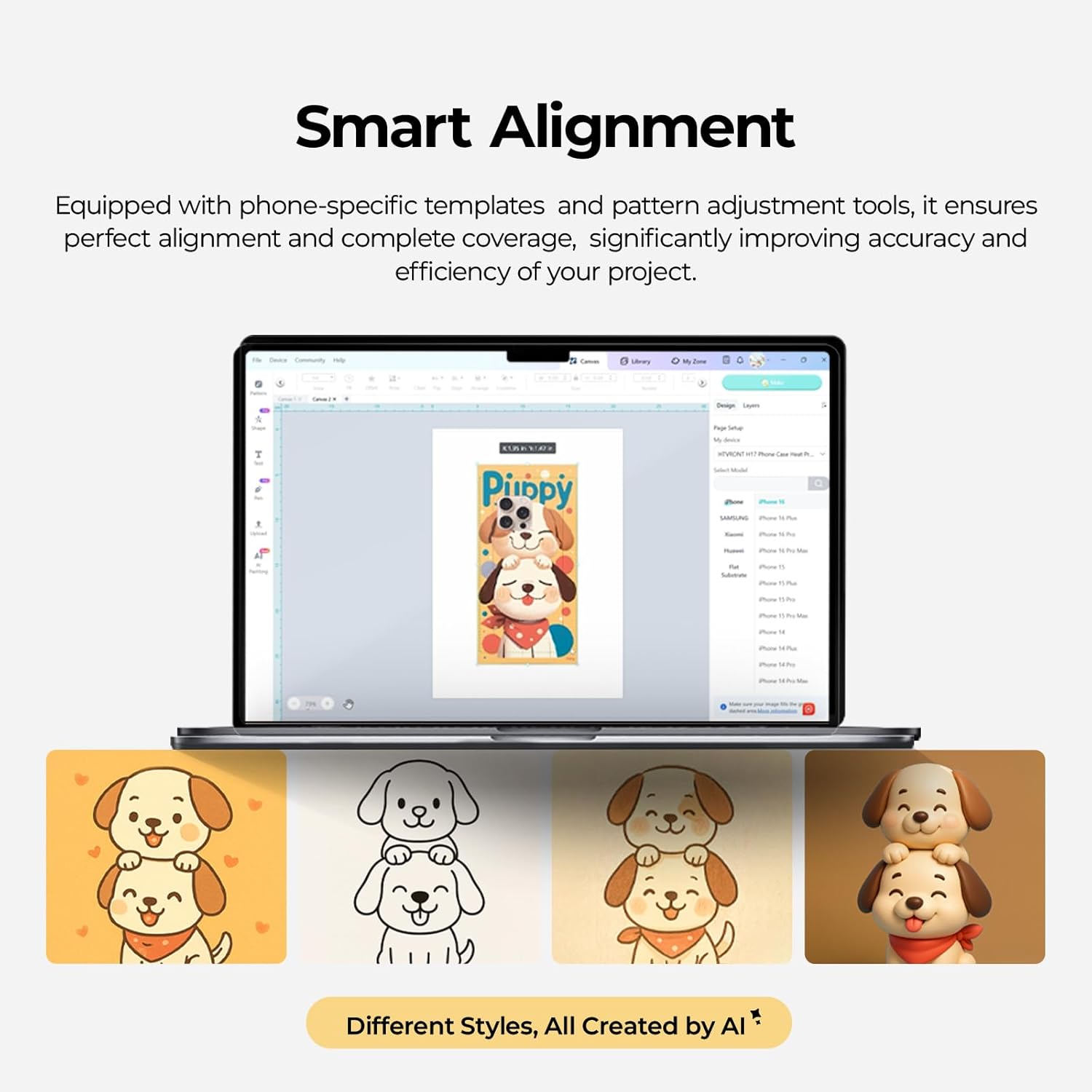
Image: A screenshot of the Smart Alignment software interface, demonstrating how users can adjust pattern size and position for perfect alignment on phone cases.
6. Технічне обслуговування
Proper maintenance ensures the longevity and optimal performance of your HTVRONT heat press machine:
- Прибирання: After each use, allow the machine to cool completely. Wipe down the heating plates and exterior with a soft, damp тканина. Не використовуйте абразивні засоби чи розчинники.
- Догляд за приладом: Clean the phone case and badge fixtures regularly to prevent residue buildup.
- Зберігання: Store the machine in a dry, dust-free environment when not in use. Keep it in its original packaging if possible to protect it from damage.
- Огляд: Periodically check the power cord for any signs of damage. If damaged, contact customer support for assistance.
7. Вирішення проблем
У цьому розділі розглядаються поширені проблеми, з якими ви можете зіткнутися. Якщо у вас проблеми, не перелічені тут, зверніться до служби підтримки клієнтів.
- Машина не вмикається:
- Переконайтеся, що шнур живлення надійно підключено як до пристрою, так і до справної електричної розетки.
- Перевірте, чи вимикач живлення знаходиться в положенні «Увімк.».
- Перевірте справність електричної розетки, підключивши інший пристрій.
- Uneven Heat Transfer/Faded Design:
- Confirm that the temperature and time settings are correct for your specific material (refer to the Quick Reference Chart).
- Ensure the sublimation film is properly aligned and securely taped to the item.
- Check that the item is placed correctly and snugly within the fixture.
- Ensure the item has a sublimation coating, as this machine is only suitable for such items.
- Машина не нагрівається:
- Verify the temperature setting is not at 0 or minimum.
- Allow sufficient time for the machine to preheat to the set temperature.
- Якщо проблема не зникне, зверніться в службу підтримки.
- Надмірний шум:
- The machine operates quietly, typically below 65 dB. If unusual loud noises occur, discontinue use and contact support.
8. Технічні характеристики
- Номер моделі: RY-SJKJ-0651-US
- Бренд: HTVRONT
- матеріал: метал
- колір: Лавандово-фіолетовий
- Вага товару: 15.22 фунта (приблизно 6.9 кг)
- Розміри продукту: 1.2 см (Д) x 1 см (Ш) x 0.8 см (В)
- Рівень шуму: <65 dB (Quiet Operation)
- Рекомендоване використання: Sublimation Phone Cases, Badges, Coasters, Keychains, Slates
- Технологія: Auto 3D Vacuum Heat Press
- Контроль температури: Precise digital control
- Сумісність: Universal mold for iPhone 12 and above models
9. Гарантія та підтримка
HTVRONT is committed to providing excellent customer service. If you have any questions or require assistance with your Phone Case Heat Press Machine, please do not hesitate to contact us.
- Підтримка клієнтів: We provide 24/7 customer support to assist with any issues or inquiries.
- Інформація про гарантію: For detailed warranty terms and conditions, please refer to the warranty card included with your product or contact HTVRONT customer service directly.
Thank you for choosing HTVRONT. We hope you enjoy creating with your new heat press machine!


