1. Вступ
The ATOMSTACK R8 Rotary Chuck is an advanced accessory designed to expand the capabilities of your laser engraving machine. It specializes in engraving a wide variety of irregular cylindrical objects, providing precision and versatility for your creative projects. This device allows for engraving on items such as balls, rings, spherical objects, and cups with handles, which are typically challenging for standard flatbed engravers.
Key features include a powerful high-torque motor for high-speed and accurate engraving, an adjustment angle of up to 180° and 360° rotation, and a durable high-hardness brass alloy claw for stable operation. The R8 Rotary Chuck is engineered for ease of use, requiring no complex installation, and boasts wide compatibility with popular laser engraving software and various machine brands.

Figure 1.1: ATOMSTACK R8 Rotary Chuck with included accessories, including the main unit, various chuck jaws, and height-adjustable feet.
2. Налаштування та встановлення
The ATOMSTACK R8 Rotary Chuck is designed for immediate use with minimal setup. It features a high-strength aluminum alloy structure that requires no complex assembly out of the box.
2.1 Початкове розміщення
Place the rotary chuck on a stable, level surface within your laser engraving machine's working area. Ensure there is sufficient clearance for the object to be engraved and for the laser module to move freely.
2.2 Connecting to the Engraver
To integrate the rotary chuck with your engraving machine, simply replace the Y-axis terminal of your engraver with the rotary chuck's connection. This creates a seamless connection, allowing the engraver's software to control the rotary motion.

Figure 2.1: USB connection setup for the R8 Rotary Chuck, enabling automatic roller processing mode in the engraving software.
2.3 Adjusting Height with Foot Pads
The package includes four 100mm high foot pads. These are used to raise your laser engraving machine, ensuring proper alignment and clearance when working with the rotary chuck, especially for larger or taller objects. Position these pads securely under the corners of your engraving machine.
2.4 Конфігурація програмного забезпечення
Before operating, it is crucial to change the configuration parameters within your laser engraving software (e.g., LaserGRBL, LightBurn) to recognize and properly control the rotary chuck. Refer to your software's specific documentation for detailed instructions on rotary axis setup.
3. Інструкція з експлуатації
The ATOMSTACK R8 Rotary Chuck is designed for precise engraving on various cylindrical and irregular objects. Follow these guidelines for optimal performance.
3.1 Завантаження матеріалів
The chuck's jaws are easily adjustable without tools. Securely clamp your cylindrical object (e.g., tumblers, pens, bottles) into the chuck. Ensure the object is centered and firmly held to prevent slippage during engraving.

Малюнок 3.1: Впрample of engraving on regular cylindrical objects such as tumblers and cans.
3.2 Engraving Irregular Objects
For irregular cylindrical objects like wine bottles or uniquely shaped containers, the R8 Rotary Chuck offers an adjustment angle of up to 180° and a 360° rotation capability. This flexibility allows you to position the object optimally for engraving, ensuring the laser can reach all necessary surfaces.

Figure 3.2: Demonstration of engraving on irregular cylindrical objects like bottles and glasses.
3.3 Using Special-Shaped Material Fixtures
The R8 Rotary Chuck is equipped with three sets of fixtures designed to adapt to multiple special-shaped materials, including objects with handles or spherical items. Select the appropriate fixture set for your material to ensure secure holding and accurate engraving.

Figure 3.3: The R8 Rotary Chuck demonstrating its ability to hold and engrave objects with handles and spherical items using specialized fixtures.
3.4 Регулювання кута
The device allows for 30° elevation and 180° horizontal rotation, providing multiple angles to suit different materials and engraving requirements. Adjust these angles manually to achieve the desired laser path on complex surfaces.
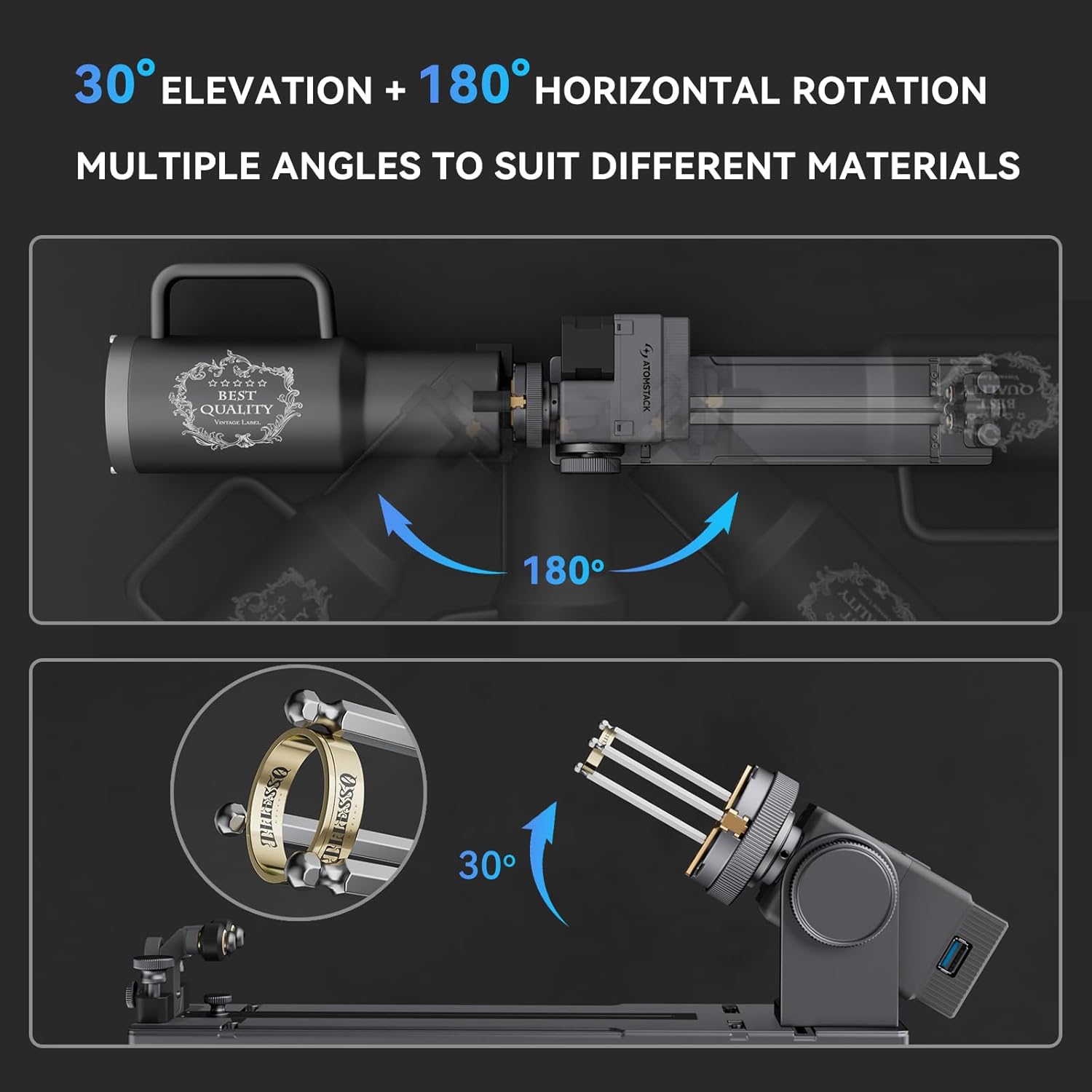
Figure 3.4: Illustrates the 30° elevation and 180° horizontal rotation capabilities of the R8 Rotary Chuck for versatile engraving.
3.5 Сумісність
The R8 Rotary Chuck is highly adaptable and compatible with 95% of desktop laser engraving machines. It works seamlessly with popular software such as LaserGRBL and LightBurn, and is compatible with various brands including ATOMSTACK, Creality, XTOOL, ORTUR, Sculpfun, Genmitsu, LONGER, Twotrees, and ATEZR.
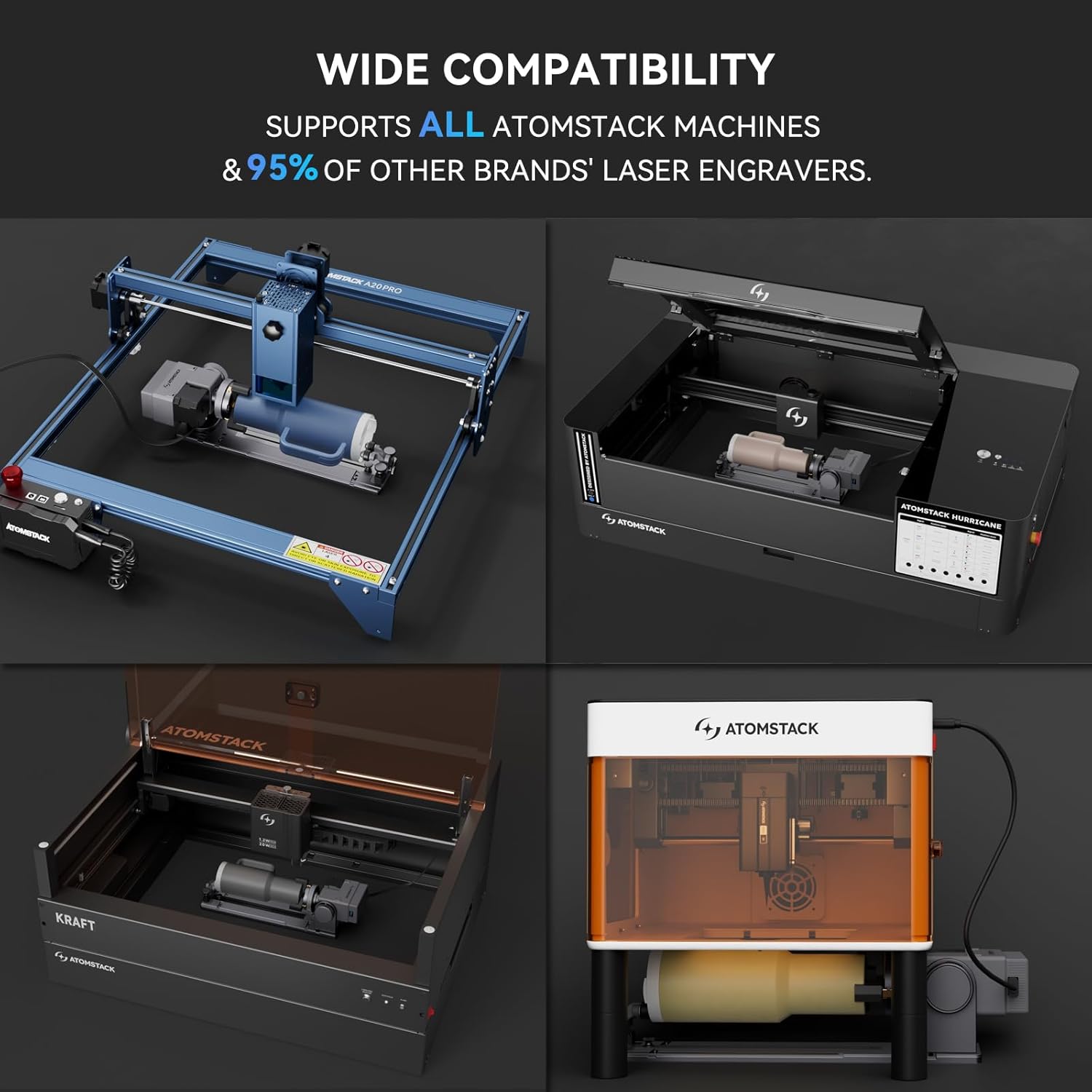
Figure 3.5: The R8 Rotary Chuck shown integrated with different models of laser engraving machines, highlighting its broad compatibility.
4. Технічне обслуговування
To ensure the longevity and optimal performance of your ATOMSTACK R8 Rotary Chuck, regular maintenance is recommended.
- Прибирання: Periodically clean the chuck jaws and the main body of the rotary chuck to remove any dust, debris, or material residue from engraving. Use a soft, dry cloth. Avoid using abrasive cleaners or solvents that could damage the finish or internal components.
- Огляд: Regularly inspect the moving parts, such as the chuck mechanism and rotation components, for any signs of wear or damage. Ensure all screws and fasteners are secure.
- Змащення: If any moving parts feel stiff or noisy, a small amount of light machine oil can be applied to the appropriate points, taking care not to over-lubricate or get oil on electrical components.
- Зберігання: When not in use, store the rotary chuck in a clean, dry environment, away from direct sunlight and extreme temperatures.
5. Вирішення проблем
This section provides general guidance for common issues. For more complex problems, please refer to the support section.
- Engraving is not centered or distorted:
- Переконайтеся, що об'єкт надійно закріпленийamped and centered in the chuck.
- Verify that the software parameters for rotary engraving are correctly set (e.g., object diameter, steps per rotation).
- Check for any slippage of the object during engraving.
- Rotary chuck not responding:
- Confirm the USB connection to the engraver is secure.
- Ensure the Y-axis terminal replacement is correctly done.
- Check if the laser engraving software recognizes the rotary axis.
- Laser module hitting the object:
- Ensure the 100mm foot pads are correctly installed to raise the laser engraver.
- Adjust the height of the laser module if possible, or use shorter objects.
If you encounter any problems that cannot be resolved using the above steps, please contact ATOMSTACK customer service for assistance.
6. Технічні характеристики продукту
| Особливість | Деталь |
|---|---|
| Бренд | АТОМСТЕК |
| Номер моделі | R8+H5 |
| Розмір | Роторний патрон R8 |
| матеріал | Алюмінієвий сплав |
| Рекомендоване використання | Гравірування |
| Колір | Срібло |
| Вага товару | 2.04 кілограмів (4.49 фунти) |
| Розміри продукту (Д x Ш x В) | 11.8 x 9.84 x 5.12 дюймів |
| Особливості | Keyless Chuck, Variable Speed |
| Включені компоненти | Rotary Roller Set (R8 Rotary Chuck and high base) |
| Точність | 0.1 мм |
| Максимальна швидкість | 6000 мм/хв |
7. Гарантія та підтримка
ATOMSTACK provides comprehensive support for its products.
7.1 Quality Guarantee
The ATOMSTACK R8 Rotary Chuck comes with a one-year free maintenance period, including spare parts and technical support. This warranty covers defects in materials and workmanship under normal use.
7.2 Обслуговування клієнтів
If you encounter any problems during the use of your ATOMSTACK R8 Rotary Chuck, or require technical assistance, please contact our seller's customer service. Our professional technical and support teams are available to resolve any issues as quickly as possible.
For further information or to access additional resources, please visit the official ATOMSTACK website or your purchase platform's support page.


