вступ
This manual provides detailed instructions for the HOU Combo Keyboard Case, designed to enhance your iPad experience with a detachable keyboard, multi-touch trackpad, and comprehensive protection. Please read this manual thoroughly before using the product to ensure proper operation and longevity.
Сумісність
The HOU Combo Keyboard Case is compatible with the following 10.2-inch iPad models:
- iPad 9th Generation (2021): Model Numbers A2602, A2603, A2604, A2605
- iPad 8th Generation (2020): Model Numbers A2270, A2428, A2429, A2430
- iPad 7th Generation (2019): Model Numbers A2200, A2197, A2198

Figure 1: Visual guide to compatible iPad models.
Особливості продукту
- Магнітна знімна конструкція: The keyboard connects magnetically to the case, allowing for easy attachment and detachment. This enables independent use of the case and keyboard.
- 360° Rotating Stand: The integrated stand supports both landscape and portrait viewing modes, with adjustable angles from 90° to 170°.
- Комплексний захист: Constructed from high-strength silicone, the case provides 360° all-around protection for your iPad, including reinforced corners.
- Вбудований тримач для олівців: An elastic rear pen holder and magnetic pencil slot secure your Apple Pencil, preventing loss.
- High-Performance Keyboard: Features a 78-key layout with high-resilience keys for a comfortable typing experience.
- 7-кольорове підсвічування: The keyboard includes a 7-color backlight with three adjustable brightness levels for various lighting conditions.
- Responsive Multi-Touch Trackpad: A large, high-precision touchpad supports full iOS gestures for fluid navigation and multitasking.
- Надлегкий і портативний: The entire unit is designed for portability, with the case weighing only 290g and the total weight around 590g.
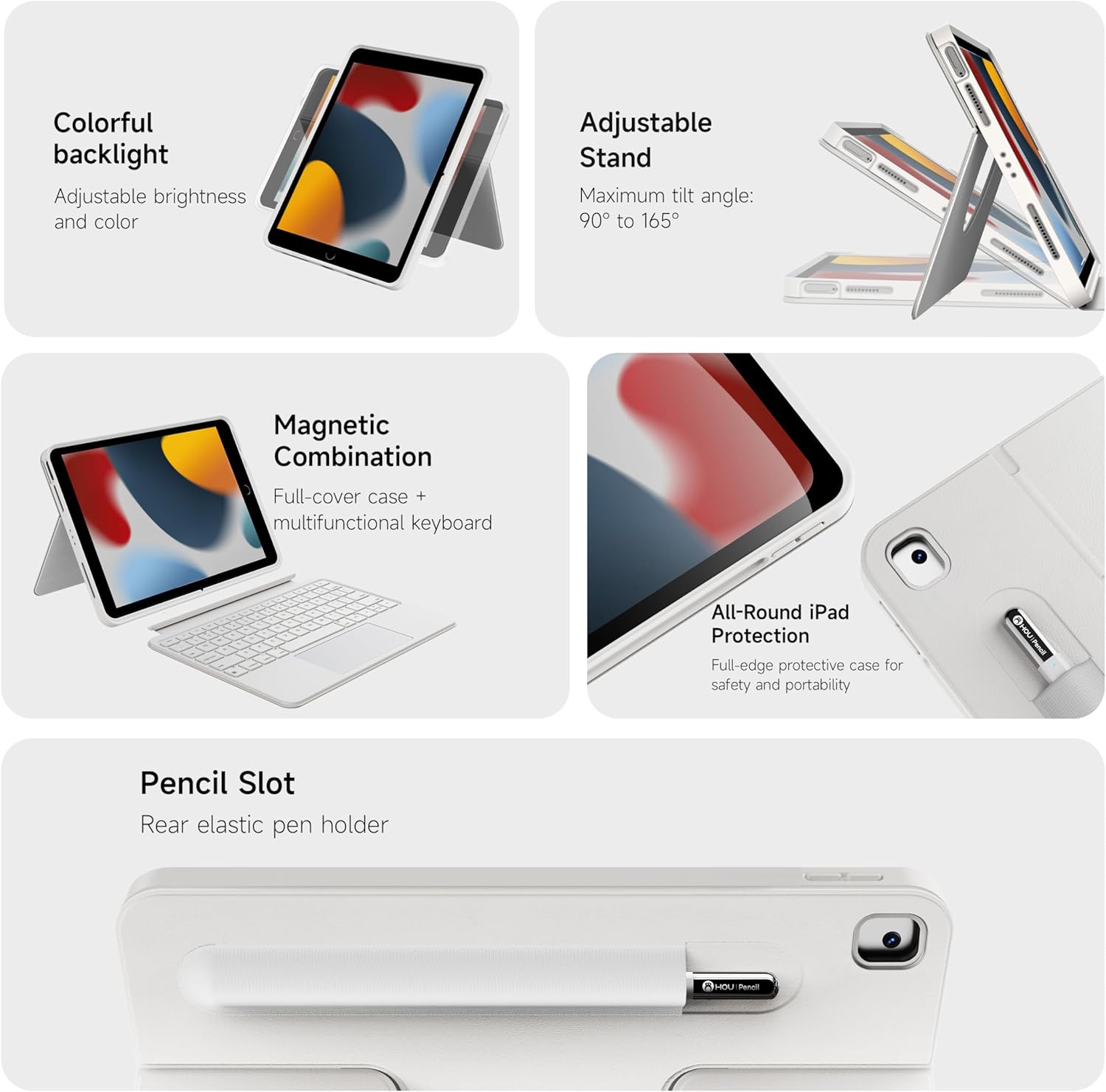
Малюнок 2: Закінченоview ключових характеристик продукту.

Малюнок 3: Детально view of keyboard and touchpad features.

Figure 4: The 78-key keyboard layout.
Інструкції з налаштування
- Зарядка клавіатури: Before first use, fully charge the keyboard using the provided USB-C cable. The charging port is located on the side of the keyboard.
- Insert iPad into Case: Carefully place your iPad into the protective silicone case, ensuring all ports and buttons align correctly with the case cutouts. The reinforced corners provide a snug fit and enhanced protection.
- Attach Keyboard (Optional): The keyboard attaches magnetically to the case. Simply align the keyboard with the bottom edge of the iPad case until it snaps into place.
- Увімкнення клавіатури: Locate the power switch on the side of the keyboard and slide it to the "On" position. A small indicator light will illuminate.
- Парування Bluetooth:
- На вашому iPad перейдіть у розділ «Налаштування» > «Bluetooth».
- Переконайтеся, що Bluetooth увімкнено.
- The iPad will search for nearby devices. Select "HOU Keyboard" (or similar name) from the list of available devices.
- Follow any on-screen prompts to complete the pairing process. Once paired, the keyboard will automatically connect to your iPad when powered on and within range.
Video 1: Demonstrates the setup and features of the HOU Combo Keyboard Case, including magnetic detachment, stand functionality, and keyboard operation.
Інструкція з експлуатації
- Using the Trackpad: The large multi-touch trackpad supports various iOS gestures for navigation, scrolling, and app control. Refer to your iPad's iOS settings for a full list of supported gestures.
- Adjusting Keyboard Backlight: Press the dedicated backlight key (often indicated by a light bulb icon) to cycle through 7 different colors and three brightness levels.
- Utilizing the 360° Rotating Stand: The integrated stand allows you to position your iPad in both landscape and portrait orientations. The stand can rotate 360 degrees and adjust angles from 90° to 170° for optimal viewінж.
- Detaching the Keyboard: To use your iPad as a tablet, simply pull the keyboard away from the magnetic connection. The case can be used independently.
- Securing Apple Pencil: Place your Apple Pencil in the elastic holder or magnetic slot on the back of the case for secure storage.

Малюнок 5: Впрamples of the keyboard case in use for productivity and leisure.

Figure 6: The ultra-light design of the keyboard case emphasizes its portability.

Figure 7: The keyboard case transforms your iPad into a functional laptop.
Технічне обслуговування
- Прибирання: Використовуйте м'який, damp cloth to wipe down the case and keyboard. Avoid harsh chemicals or abrasive materials. Ensure the keyboard is powered off before cleaning.
- Догляд за акумулятором: Щоб продовжити термін служби акумулятора, уникайте частого повного розряджання клавіатури. Регулярно заряджайте її, особливо якщо вона не використовуватиметься протягом тривалого часу.
- Зберігання: Коли клавіатура не використовується, зберігайте її в прохолодному, сухому місці, подалі від прямих сонячних променів та екстремальних температур.
Усунення несправностей
- Клавіатура не підключається:
- Переконайтеся, що клавіатура увімкнена та повністю заряджена.
- Перевірте налаштування Bluetooth вашого iPad, щоб переконатися, що клавіатура сполучена та підключена. Якщо ні, спробуйте повторити сполучення.
- Перезавантажте і iPad, і клавіатуру.
- Трекпад не реагує:
- Переконайтеся, що клавіатура підключена через Bluetooth.
- Check iPad settings for trackpad functionality.
- Очистіть поверхню трекпада, щоб видалити будь-яке сміття.
- Клавіші не реагують:
- Переконайтеся, що клавіатура увімкнена та підключена.
- Переконайтеся, що заряд батареї клавіатури не критично низький.
Технічні характеристики
| Особливість | Деталь |
|---|---|
| Бренд | HOU |
| Сумісні пристрої | iPad 9th, 8th, 7th Generation (10.2 inch) |
| Технологія підключення | Bluetooth |
| Опис клавіатури | Мультимедіа |
| Особливості | Backlit, Detachable Case, Hotkeys and Media Keys, Portable, Trackpad, 360° Rotatable Stand |
| Колір | White (RGB Backlighting) |
| матеріал | Силікон |
| Вага товару | 1.98 фунта (приблизно 0.9 кг) |
| Case Weight (approx.) | 0.64 фунта (приблизно 290 г) |
| Включені компоненти | Keyboard, Case |
Гарантія та підтримка
For warranty information and customer support, please refer to the product packaging or contact HOU customer service directly. Keep your purchase receipt for warranty claims.


