1. Вступ
Thank you for choosing the GTRACING Gaming Desk. This manual provides essential information for the safe and efficient assembly, operation, and maintenance of your new desk. Please read these instructions carefully before beginning assembly and retain them for future reference.
2. Важлива інформація з безпеки
Always assemble the desk according to the provided instructions. Be cautious when moving the desk, as it can be heavy and may pose a risk of injury if not handled properly.
- Перед використанням переконайтесь, що всі з’єднання надійно захищені.
- Do not overload the desk or monitor stand beyond the recommended weight capacity (300 lbs).
- Keep liquids away from electrical components (power outlets, USB ports, LED lights).
- Children should not climb on or play with the desk.
- Утилізуйте пакувальні матеріали відповідально.
3. Вміст упаковки
Verify that all components are present before assembly. If any parts are missing or damaged, please contact GTRACING customer support.
- Desk components (desktop panels, legs, monitor stand parts)
- Integrated power strip (2 AC outlets, 2 USB ports)
- Світлодіодна світлова стрічка
- Extended mouse pad
- Крючки для навушників (x2)
- Монтажна фурнітура (гвинти, болти тощо)
- Монтажний інструмент
- Інструкція з експлуатації
4. Інструкція зі складання
Assembly is required. Please follow the detailed step-by-step instructions provided in the separate assembly guide included with your package. All necessary tools are included.
- Розпакуйте всі компоненти та перевірте їх за списком вмісту упаковки.
- Визначте все обладнання та інструменти.
- Assemble the desk frame and legs.
- Attach the desktop panels.
- Встановіть підставку для монітора.
- Mount the integrated power strip.
- Attach the LED light strip.
- Install the headphone hooks.
- Place the extended mouse pad.

Image: All components of the GTRACING Gaming Desk laid out, ready for assembly. This includes the desktop pieces, legs, monitor stand, and various hardware.

Image: A fully assembled GTRACING Gaming Desk, showcasing the monitor stand, LED lighting, and carbon fiber texture.
5. Інструкція з експлуатації
5.1. Система світлодіодного освітлення
The GTRACING Gaming Desk features an integrated LED light strip to enhance your gaming or work environment. The LED lights offer 16 color changes and 6 dynamic modes.
- Connect the LED light strip to the designated power source.
- Use the included remote control to power on/off, change colors, and select dynamic modes.
- Ensure the remote control has a working battery and is pointed towards the LED receiver for optimal functionality.
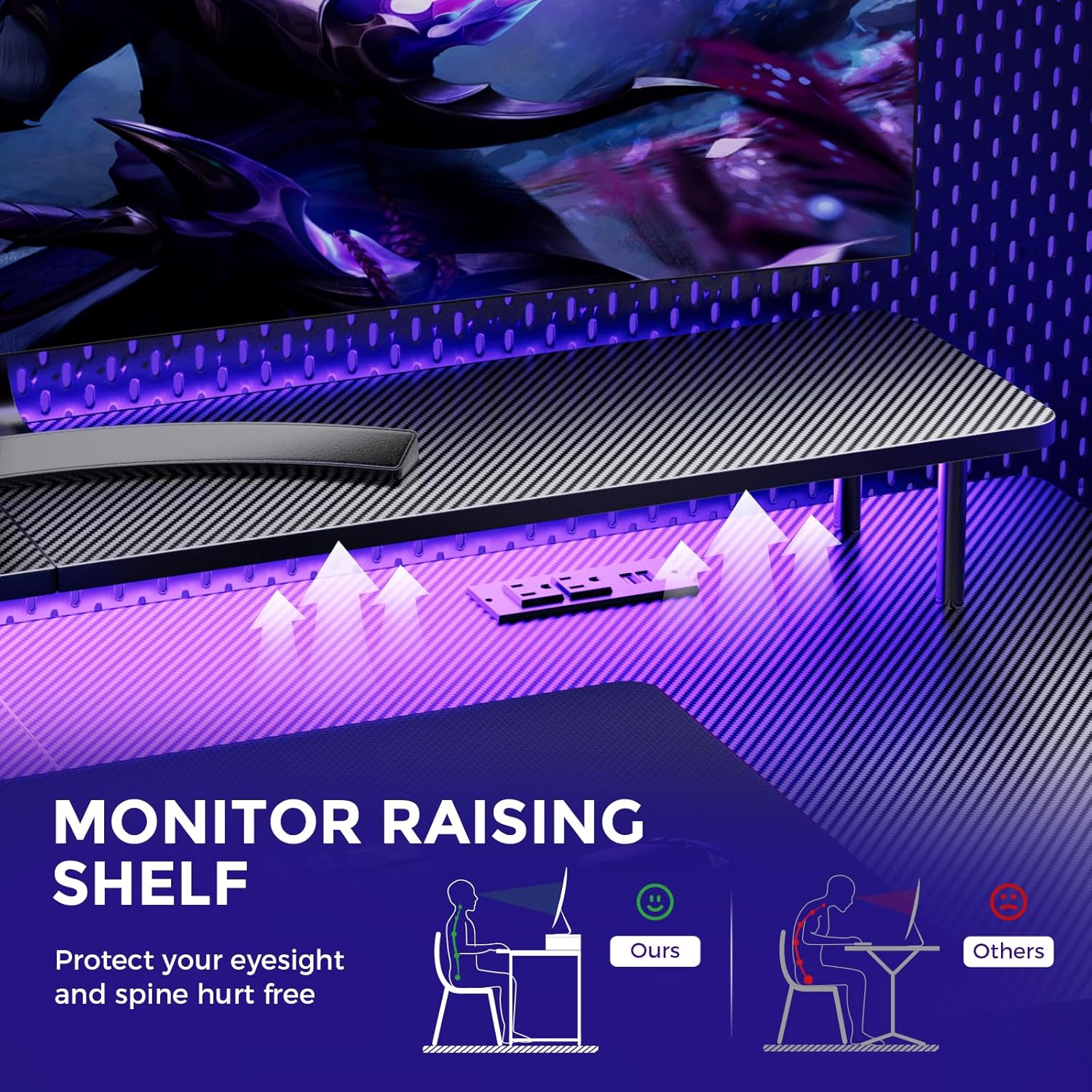
Image: A hand holding a remote control, demonstrating the control over the RGB LED light strip installed beneath the monitor stand of the desk.
Video: An official product video demonstrating the GTRACING 55 Inch Gaming Desk with LED Lights, showcasing its features and aesthetic appeal in a gaming setup.
5.2. Integrated Power Outlets & USB Ports
The desk includes a built-in power strip with 2 AC outlets (120V/12A) and 2 USB charging ports (5V/2A) for convenient device charging and power supply.
- Підключіть головний шнур живлення столу до розетки.
- Підключіть свої пристрої до розеток змінного струму або USB-портів за потреби.
- Avoid exceeding the maximum power rating of the outlets.

Зображення: Крупний план view of the recessed power strip on the desk, showing two AC outlets and two USB charging ports in use, charging a phone and earbuds.
5.3. Ergonomic Monitor Stand
The raised monitor stand positions your screen at eye level, promoting better posture and reducing neck strain during extended use. It also provides additional storage space.

Image: A diagram comparing correct ergonomic posture achieved with the monitor stand to incorrect posture without it, highlighting benefits for eyesight and spine.
6. Технічне обслуговування
- Прибирання: Wipe the carbon fiber surface with a soft, damp тканина. Уникайте агресивних хімікатів, які можуть пошкодити покриття.
- Обладнання: Periodically check all screws and bolts to ensure they remain tight. Tighten if necessary.
- Електричні компоненти: Keep the power outlets and USB ports free from dust and debris. Do not attempt to repair electrical components yourself.
7. Вирішення проблем
7.1. Світлодіодні індикатори не працюють або пульт дистанційного керування не реагує
- Перевірте підключення живлення: Ensure the LED light strip is securely plugged into the power source and the desk's main power cord is connected to a live wall outlet.
- Акумулятор дистанційного керування: Verify that the remote control has a fresh battery and is inserted correctly.
- Пряма видимість: Ensure there is a clear line of sight between the remote control and the LED receiver. Obstructions can block the signal.
- Ручне управління: If the remote is unresponsive, check if there's a manual button on the LED controller itself to cycle through modes or power on/off.
7.2. Desk Instability
- Затягніть обладнання: Re-check and tighten all assembly screws and bolts.
- Рівень поверхні: Переконайтеся, що стіл розташований на рівній, рівній поверхні.
8. Технічні характеристики
| Особливість | Деталь |
|---|---|
| Бренд | GTRACING |
| Номер моделі | 114vc07 |
| Розміри продукту | 24" Г x 55" Ш x 30" В |
| Колір | Чорний вуглець |
| Тип верхнього матеріалу | Вуглецеве волокно |
| Основний матеріал | Нержавіюча сталь |
| Рекомендована максимальна вага | 300 фунта |
| Інтегрований подовжувач живлення | 2 розетки змінного струму (120 В/12 А), 2 порти USB (5 В/2 А) |
| Особливості | Built-In USB Outlet, Ergonomic, Monitor Stand, LED Lights, Headphone Hook |
| Потрібна збірка | Так (інструменти в комплекті) |

Image: A detailed diagram illustrating the dimensions of the GTRACING Gaming Desk, including the main desktop and the monitor stand.
9. Гарантія та підтримка клієнтів
GTRACING is committed to providing high-quality products and customer satisfaction. For any questions, concerns, or missing parts, please contact our customer service team.
- Free Replacement/Refund: Протягом 30 днів з моменту покупки.
- Free Replacement/Repair: Within 1 year of purchase.
- Контактна інформація:
- Електронна пошта: info@gtracing.com
- Phone: 1-888-660-5669 (9:00-5:30 PST Mon-Fri)
- Webсайт: www.gtracing.com

Image: GTRACING customer service representatives ready to assist with product inquiries and support.


