1. Вступ
Thank you for choosing the Ewent EW3295 Backlit Wireless Keyboard. This full-size keyboard offers versatile connectivity options, including Bluetooth 5.0 and 2.4GHz wireless, allowing you to connect up to three devices simultaneously. Its slim design, silent keys, and adjustable backlight provide a comfortable and efficient typing experience. This manual provides detailed instructions for setup, operation, and maintenance to ensure optimal performance of your keyboard.

Figure 1.1: Slim and sturdy design of the EW3295 keyboard.
2. Ключові характеристики
- Wireless Multi-Device Connection: Connect up to 3 devices simultaneously via Bluetooth 5.0 (x2) or wireless 2.4 GHz. Easily switch between devices with just one button.
- Регульоване підсвічування: The keyboard's backlight is dimmable and can be turned off completely, ideal for various lighting conditions.
- Flat & Quiet Design: Flat, silent keys ensure a comfortable and low-noise typing experience, suitable for quiet environments.
- 12 мультимедійних клавіш: Quick access to functions like volume control, email, and other operations.
- Довговічна акумуляторна батарея: Equipped with a 300mAh lithium battery and intelligent energy-saving function for extended use.
- Широка сумісність: Compatible with Windows (XP, 7, 8.1, 10, 11) and Android, suitable for PCs, laptops, and tablets.
- Міцний і довговічний дизайн: Made of high-density polycarbonate, lightweight yet durable, with a compact design.
- Italian Layout: Features an Italian QWERTY keyboard layout.
3. Вміст упаковки
Будь ласка, перевірте вміст упаковки після розпакування:
- Ewent EW3295 Backlit Wireless Keyboard
- USB-A 2.4GHz Wireless Receiver
- Зарядний кабель від USB-C до USB-A
- Посібник користувача (цей документ)
4. Посібник із налаштування
4.1 Заряджання клавіатури
The EW3295 keyboard is equipped with a built-in rechargeable 300mAh lithium battery. Before first use, it is recommended to fully charge the keyboard.
- Locate the USB Type-C charging port on the rear panel of the keyboard.
- Connect one end of the provided USB-C charging cable to the keyboard's USB-C port.
- Connect the other end of the USB-A cable to a USB power source (e.g., computer USB port, USB wall adapter).
- The charging indicator light (if present) will illuminate during charging and turn off when fully charged. A full charge takes less than 1 hour and provides over 1 month of use.

Figure 4.1: Rear panel of the keyboard with charging port and receiver compartment.
4.2 Підключення клавіатури
The EW3295 keyboard supports three connection modes: 2.4GHz wireless and two Bluetooth 5.0 channels (BT1, BT2). You can connect up to three devices and switch between them.
4.2.1 Бездротове з'єднання 2.4 ГГц
- Locate the USB-A wireless receiver, typically stored in a compartment on the rear panel of the keyboard.
- Plug the USB-A receiver into an available USB port on your computer or device.
- Натисніть Fn + 1 keys on the keyboard to switch to 2.4GHz mode. The indicator light for channel 1 will illuminate.
- The keyboard should automatically connect to your device.

Figure 4.2: Ewent EW3295 keyboard and its USB wireless receiver.
4.2.2 Підключення Bluetooth (BT1 / BT2)
- Натисніть Fn + 2 keys to select Bluetooth channel 1 (BT1) or Fn + 3 keys to select Bluetooth channel 2 (BT2). The corresponding indicator light will flash, indicating pairing mode.
- На вашому пристрої (ПК, ноутбуці, планшеті) увімкніть Bluetooth та почніть пошук нових пристроїв.
- Select "EW3295" or a similar name from the list of available Bluetooth devices.
- Follow any on-screen prompts to complete the pairing process. Once connected, the indicator light will stop flashing and remain solid.
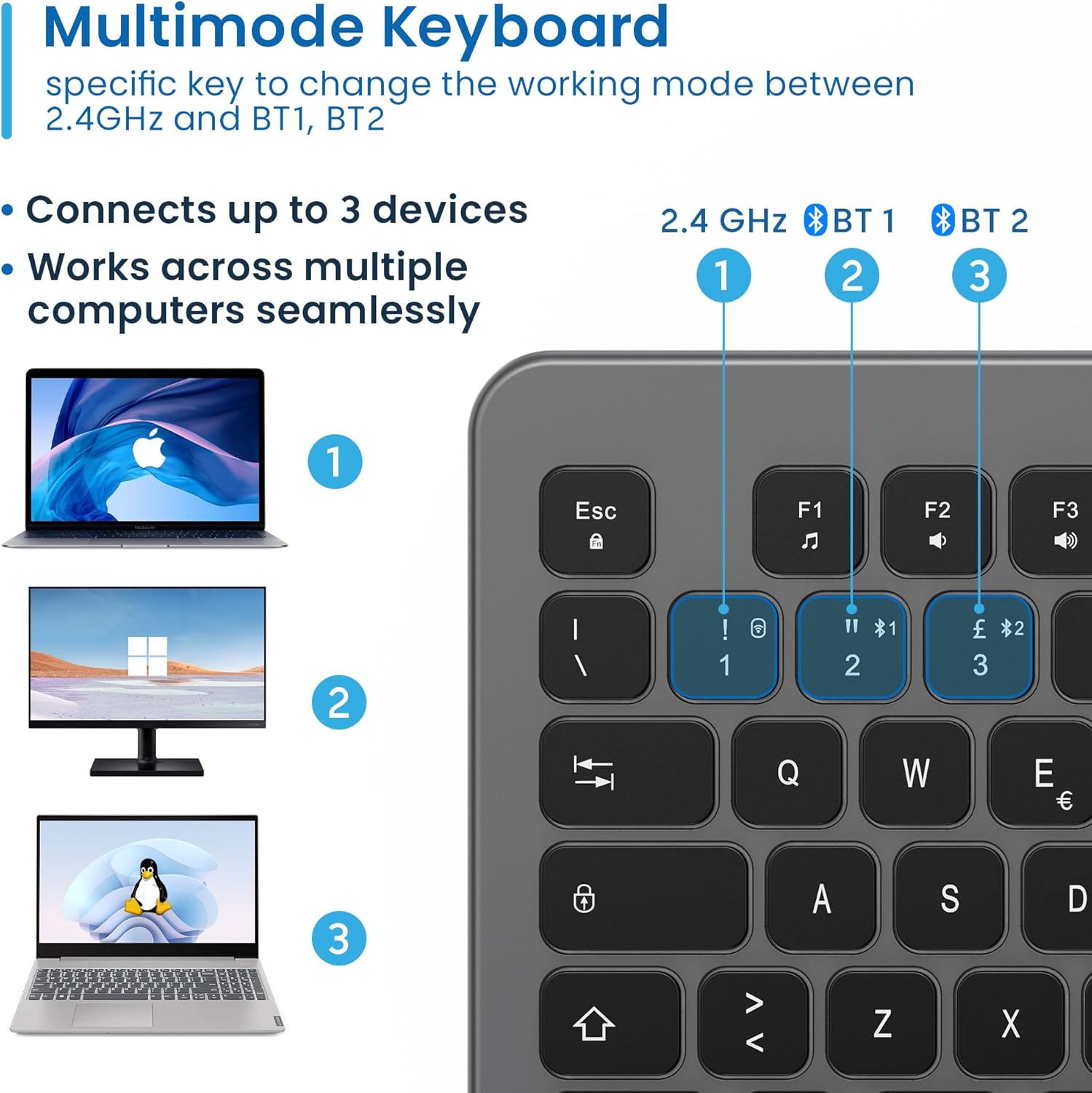
Figure 4.3: Multi-device connectivity options for the EW3295 keyboard.
4.2.3 Перемикання між підключеними пристроями
Once multiple devices are paired, you can easily switch between them:
- Прес Fn + 1 to switch to the 2.4GHz connected device.
- Прес Fn + 2 to switch to the Bluetooth 1 connected device.
- Прес Fn + 3 to switch to the Bluetooth 2 connected device.
5. Інструкція з експлуатації
5.1 Базове введення тексту
The EW3295 features a full-size Italian QWERTY layout. Its flat and silent keys provide a comfortable and precise typing experience, reducing noise in quiet environments.

Figure 5.1: Illuminated Italian QWERTY Keyboard Layout.

Figure 5.2: Silent keys for reduced noise.
5.2 Контроль підсвічування
The keyboard features an adjustable backlight for improved visibility in low-light conditions.
- Підсвічування ON/OFF: Натисніть Блок Scorr key (often labeled with a lightbulb icon) to toggle the backlight on or off.
- Backlight Brightness Up: Прес Fn + Pag ↑ щоб збільшити яскравість підсвічування.
- Backlight Brightness Down: Прес Fn + Pag ↓ щоб зменшити яскравість підсвічування.
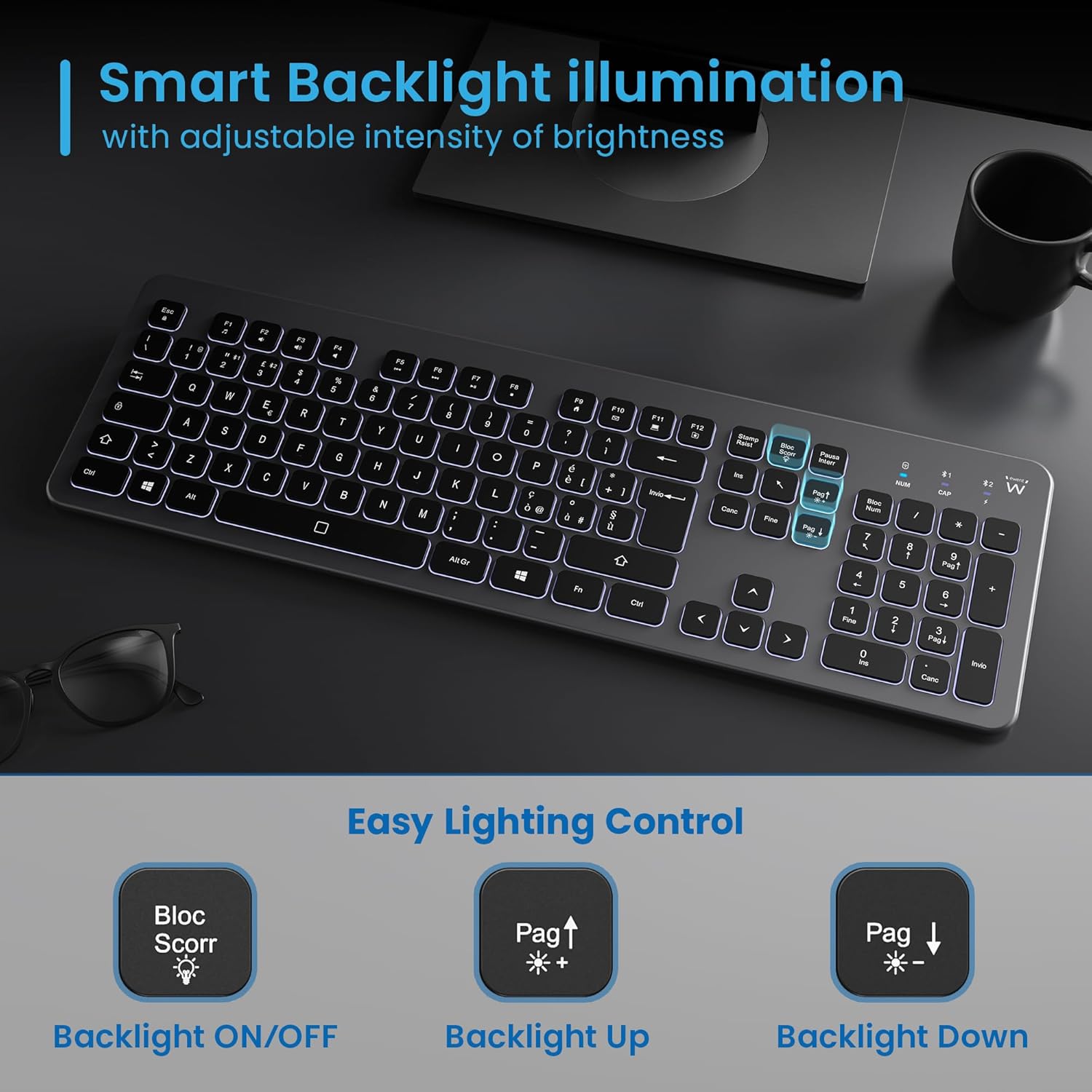
Figure 5.3: Backlight control keys.
5.3 мультимедійних клавіш
The keyboard includes 12 dedicated multimedia keys (F1-F12) that provide quick access to various functions. To use these functions, press the Fn клавішу одночасно з потрібною функціональною клавішею.
| Комбінація клавіш | функція |
|---|---|
| Fn + F1 | Медіаплеєр |
| Fn + F2 | Зменшення гучності |
| Fn + F3 | Збільшення гучності |
| Fn + F4 | Вимкнути звук |
| Fn + F5 | Попередній трек |
| Fn + F6 | Наступний трек |
| Fn + F7 | Відтворення/Пауза |
| Fn + F8 | СТІЙ |
| Fn + F9 | Домашня сторінка |
| Fn + F10 | Електронна пошта |
| Fn + F11 | Мій комп'ютер |
| Fn + F12 | Калькулятор |
6. Технічне обслуговування та догляд
Правильне обслуговування забезпечує довговічність та оптимальну роботу вашої клавіатури.
- Прибирання: Використовуйте м’яку, суху тканину без ворсу для очищення поверхні клавіатури. Для стійкого бруду злегкаampПротріть тканину водою або м’яким неабразивним засобом для чищення. Уникайте надмірного зволоження.
- Уникайте рідин: Do not spill liquids on the keyboard. In case of accidental spills, immediately disconnect the keyboard and allow it to dry completely before re-using.
- Зберігання: Якщо клавіатура не використовується протягом тривалого часу, зберігайте її в прохолодному, сухому місці, подалі від прямих сонячних променів та екстремальних температур.
- Догляд за акумулятором: To prolong battery life, avoid fully discharging the battery frequently. Charge the keyboard when the low battery indicator appears.
- Зберігання приймача: When transporting the keyboard, store the USB wireless receiver in its dedicated compartment on the rear panel to prevent loss.
7. Вирішення проблем
If you encounter issues with your EW3295 keyboard, please refer to the following common solutions:
| проблема | Можлива причина | Рішення |
|---|---|---|
| Клавіатура не реагує (2.4 ГГц) | Low battery; Receiver not plugged in; Incorrect channel selected. | Charge the keyboard; Ensure USB receiver is securely plugged in; Press Fn + 1 to select 2.4GHz mode. |
| Клавіатура не реагує (Bluetooth) | Low battery; Bluetooth not enabled on device; Not paired; Incorrect channel selected. | Charge the keyboard; Enable Bluetooth on your device; Re-pair the keyboard (see Section 4.2.2); Press Fn + 2 or Fn + 3 to select the correct Bluetooth channel. |
| Не працює підсвічування | Підсвічування вимкнено; низький заряд батареї. | Прес Блок Scorr to turn on/off; Increase brightness with Fn + Pag ↑; Charge the keyboard. |
| Клавіші залипають або не реагують | Dirt or debris under keys; Physical damage. | Clean the keyboard (see Section 6); If physical damage, contact support. |
| Короткий час автономної роботи | Frequent backlight use; Battery degradation over time. | Reduce backlight brightness or turn it off when not needed; Ensure full charge cycles. |
8. Технічні характеристики
| Особливість | Деталь |
|---|---|
| Назва моделі | Tastiera Wireless Retroilluminata EW3295 |
| Номер моделі товару | EW3295 |
| Бренд | Евент |
| Технологія підключення | Bluetooth 5.0 (x2), 2.4GHz Wireless |
| Опис клавіатури | Multimedia, Full-size, Italian Layout |
| Сумісні пристрої | PC (Windows XP, 7, 8.1, 10, 11), Android |
| Тип батареї | Літієва батарея ємністю 300 мАг |
| Підсвічування | Регульована інтенсивність |
| Розміри (Д x Ш x В) | прибл. 432 мм х 122 мм х 22 мм |
| вага | прибл. 390г |
| матеріал | High-density Polycarbonate |

Рисунок 8.1: Розміри та вага клавіатури.
9. Інформація про гарантію
Ewent products are designed and manufactured to the highest quality standards. This product is covered by a limited warranty from the date of purchase. Please refer to the warranty card included with your product or visit the official Ewent webДетальні гарантійні умови для вашого регіону див. на сайті. Гарантія зазвичай поширюється на дефекти матеріалів та виготовлення за умов нормального використання.
10. Підтримка клієнтів
For technical support, troubleshooting assistance, or any questions regarding your Ewent EW3295 keyboard, please contact Ewent customer support. You can typically find contact information (phone, email, support portal) on the official Ewent webсайту або в упаковці продукту.
Please have your product model number (EW3295) and purchase details ready when contacting support.


