1. Вступ
This manual provides detailed instructions for the MCHOSE X75 V2 Wireless Mechanical Keyboard and M7 Ultra Wireless Gaming Mouse. It covers setup, operation, maintenance, and troubleshooting to ensure optimal performance and longevity of your devices. Please read this manual thoroughly before using the products.
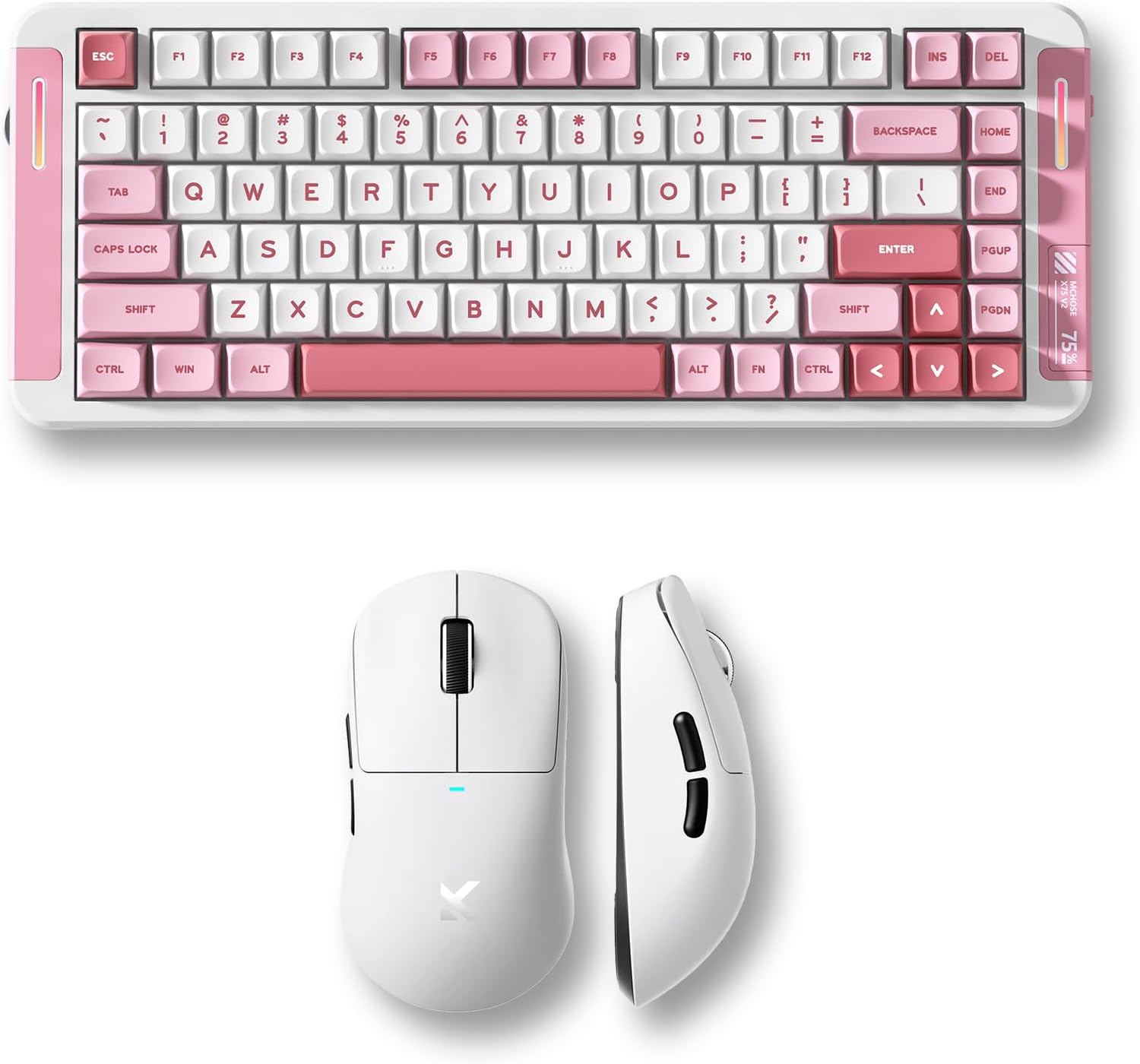
Image 1.1: MCHOSE X75 V2 Wireless Mechanical Keyboard (pink) and M7 Ultra Wireless Gaming Mouse (white) bundle.
2. Продукт закінчивсяview
2.1 MCHOSE X75 V2 Wireless Mechanical Keyboard
The MCHOSE X75 V2 is a 75% layout mechanical keyboard designed for both gaming and productivity. It features tri-mode connectivity, hot-swappable switches, and an ergonomic design.

Зображення 2.1: закінченоview of MCHOSE X75 V2 Mechanical Keyboard features, including 75% layout, full RGB backlit, 3 modes, 8000mAh battery, hot-swappable switches, 5-layer gasket, ergonomic design, MCHOSE HUB compatibility, and a multi-media knob.
Ключові характеристики:
- Компактний макет на 75%: 82 keys, saving desktop space while retaining essential keys.
- Трирежимне підключення: Bluetooth 5.0, 2.4GHz wireless, and USB wired connection.
- Hot-Swappable PCBA: Дозволяє легко замінити перемикач без паяння.
- Акумулятор 8000 мАг: Акумулятор високої ємності для тривалого бездротового використання.
- Embedded Multimedia Knob: For convenient media control.
- Ергономічний дизайн: Optimized typing angle for comfort.

Зображення 2.2: Детальний опис view of the MCHOSE X75 V2 Keyboard's ergonomic design, highlighting Type-C ports, embedded multimedia knob, USB receiver container, two-stage adjustable tilt legs, and 360-degree immersive lighting.

Image 2.3: Illustration of the MCHOSE X75 V2 Keyboard's hot-swappable PCBA, showing Hyacinth Linear Switches and compatibility with 3/5-pin switches and south-facing LEDs.
2.2 MCHOSE M7 Ultra Wireless Gaming Mouse
The MCHOSE M7 Ultra is a lightweight gaming mouse featuring TOPSPEED wireless technology and an 8K polling rate for precise and responsive control.

Зображення 2.4: закінченоview of MCHOSE M7 Ultra Gaming Mouse features, including 8K Hz Hyperpolling, Realtek Premium Processor, 55g ultra-lightweight design, PAW 3950 Sensor, MCHOSE Pro Optical Switches, 500mAh battery, ergonomic design, tri-mode connectivity, and MCHOSE CUSTOM DRIVER compatibility.
Ключові характеристики:
- TOPSPEED Wireless Technology: Ensures low latency wireless transmission.
- Подвійна швидкість опитування 8K: Wired 1K and wireless 8K polling for ultra-low latency (0.125ms).
- 55g Ultra Lightweight: Ергономічний дизайн для комфортного тривалого використання.
- PAW 3950 Sensor: High-precision optical sensor.
- MCHOSE Pro Optical Switches: Durable and responsive switches.
- Акумулятор 500 мАг: Provides reliable power for gaming sessions.

Image 2.5: Diagram illustrating the MCHOSE M7 Ultra Mouse's six programmable buttons: Left, Right, Middle, Mode Switch, Forward, Back, along with the Indicator Light, DPI Switch, and USB Dongle storage location.

Зображення 2.6: Розгорнуто view of the MCHOSE M7 Ultra Mouse, showing internal components such as MCHOSE Pro Optical Switches, Realtek Premium Processor, PAW 3950 Sensor, and 500mAh battery.

Image 2.7: MCHOSE M7 Ultra Mouse highlighting its 8K Hz Hyperpolling Rate and TOPSPEED Wireless Technology, with the NANO Wireless 8K Receiver shown.
3. Інструкції з налаштування
Before first use, ensure both the keyboard and mouse are fully charged.

Image 3.1: Illustration of the tri-mode connection options (BT 5.0, Wireless 2.4G, Type-C) and wide compatibility with various devices including phones, tablets, Switch, Xbox, and PS5.
3.1 MCHOSE X75 V2 Keyboard Setup
- Зарядка: Connect the keyboard to a USB power source using the provided Type-C cable. The indicator light will show charging status.
- Вибір режиму: Use the switch on the keyboard to select your desired connection mode:
- USB-дротовий: Connect the Type-C cable directly to your computer.
- Бездротовий зв'язок 2.4 ГГц: Insert the 2.4GHz USB receiver (located in the keyboard's storage compartment) into your computer's USB port. Switch the keyboard to 2.4G mode.
- Bluetooth: Switch the keyboard to BT mode. Press and hold FN + 1/2/3 to enter pairing mode. The indicator light will flash. Select 'MCHOSE X75 V2' from your device's Bluetooth settings.
- Початкове використання: Після підключення клавіатура готова до використання.
3.2 MCHOSE M7 Ultra Mouse Setup
- Зарядка: Connect the mouse to a USB power source using the provided Type-C cable. The indicator light will show charging status.
- Вибір режиму: Use the switch on the bottom of the mouse to select your desired connection mode:
- USB-дротовий: Connect the Type-C cable directly to your computer.
- Бездротовий зв'язок 2.4 ГГц: Remove the 2.4GHz USB dongle from its storage compartment on the mouse's underside and insert it into your computer's USB port. Switch the mouse to 2.4G mode.
- Bluetooth: Switch the mouse to BT mode. The indicator light will flash. Select 'MCHOSE M7 Ultra' from your device's Bluetooth settings.
- Регулювання DPI: Press the DPI switch button on the bottom of the mouse to cycle through preset DPI levels.
- Режими роботи: The M7 series offers two operating modes: Game-Enhancement Mode and Esports Mode. Refer to the operating instructions for switching between these modes.
4. Інструкція з експлуатації
4.1 MCHOSE X75 V2 Keyboard Operation
- Мультимедійна ручка: Rotate to adjust volume. Press to play/pause media. Specific functions may vary based on operating system.
- Функціональні клавіші (комбінації FN):
- FN + F1-F12: Access various multimedia and system functions. Refer to the keycap legends for specific actions.
- FN + Backlight Key: Cycle through RGB lighting effects.
- FN + клавіші зі стрілками: Adjust backlight brightness and speed.
- FN + 1/2/3: Перемикання між сполученими пристроями Bluetooth.
- Налаштування: Download the MCHOSE HUB software from the official MCHOSE website for advanced key remapping, macro creation, and RGB lighting customization.
4.2 MCHOSE M7 Ultra Mouse Operation
- Перемикання DPI: Press the dedicated DPI button on the underside of the mouse to cycle through predefined DPI settings. The indicator light may change color to reflect the current DPI level.
- Режими роботи: The M7 Ultra features Game-Enhancement Mode and Esports Mode. The mode switch button (if present, refer to Image 2.5) or specific software settings can be used to toggle between these modes for optimized performance.
- Програмовані кнопки: The six buttons (Left, Right, Middle, Mode Switch, Forward, Back) can be customized using the MCHOSE CUSTOM DRIVER software.
- Налаштування: Download the MCHOSE CUSTOM DRIVER software from the official MCHOSE website to customize button assignments, DPI levels, polling rate, and other performance settings.
5. Технічне обслуговування
Proper maintenance ensures the longevity and performance of your MCHOSE devices.
- Прибирання: Use a soft, dry cloth to wipe the surfaces of the keyboard and mouse. For stubborn dirt, a slightly damp Можна використовувати тканину, змочену м’яким милом, слідкуючи за тим, щоб рідина не потрапила всередину пристрою. Уникайте агресивних хімікатів або абразивних матеріалів.
- Очищення ковпачків клавіш (клавіатура): Keycaps can be carefully removed for deeper cleaning. Use a keycap puller to avoid damage. Clean keycaps with water and mild soap, then dry thoroughly before reattaching.
- Sensor Cleaning (Mouse): Використовуйте ватний тампон, злегка промокнітьampened with isopropyl alcohol to gently clean the optical sensor on the underside of the mouse.
- Догляд за акумулятором: Avoid fully discharging the battery frequently. For long-term storage, charge the devices to about 50% and store them in a cool, dry place.
- Зберігання: Store devices in a clean, dust-free environment when not in use.
6. Вирішення проблем
If you encounter issues with your MCHOSE keyboard or mouse, refer to the following common solutions:
6.1 Keyboard Troubleshooting
- Клавіатура не реагує:
- Переконайтеся, що клавіатура заряджена.
- Check the connection mode switch (USB, 2.4G, BT) and ensure it matches your connection method.
- Для частоти 2.4 ГГц переконайтеся, що USB-приймач надійно підключено.
- For Bluetooth, re-pair the device.
- Спробуйте підключитися через USB-кабель, щоб виключити проблеми з бездротовим з’єднанням.
- Ключі не реєструються:
- Check for physical obstructions under the keycap.
- If hot-swappable, ensure the switch is properly seated.
- Update keyboard firmware via MCHOSE HUB software.
- RGB-підсвічування не працює:
- Ensure lighting is enabled via FN combinations or MCHOSE HUB software.
- Check battery level; low battery may disable lighting.
6.2 Mouse Troubleshooting
- Mouse not moving/responding:
- Переконайтеся, що миша заряджена.
- Check the connection mode switch (USB, 2.4G, BT) and ensure it matches your connection method.
- For 2.4GHz, ensure the USB dongle is securely plugged in.
- For Bluetooth, re-pair the device.
- Очистіть оптичний датчик.
- Спробуйте підключитися через USB-кабель, щоб виключити проблеми з бездротовим з’єднанням.
- Inconsistent tracking:
- Очистіть оптичний датчик.
- Use on a clean, uniform mouse pad.
- Налаштуйте параметри DPI.
- Не працюють кнопки:
- Check button assignments in MCHOSE CUSTOM DRIVER software.
- Ensure no physical obstruction.
7. Технічні характеристики
7.1 MCHOSE X75 V2 Wireless Mechanical Keyboard
| Особливість | Специфікація |
|---|---|
| Макет | 75% (82 клавіша) |
| Підключення | Tri-Mode (USB-C, 2.4GHz Wireless, Bluetooth 5.0) |
| Перемикачі | Hot-Swappable (3/5-pin compatible) |
| Ємність акумулятора | 8000 мАг |
| Підсвічування | Повний RGB |
| Швидкість опитування | Standard (wired/wireless) |
| Особливості | Multimedia Knob, 5-Layer Gasket Structure, Ergonomic Design |
7.2 MCHOSE M7 Ultra Wireless Gaming Mouse
| Особливість | Специфікація |
|---|---|
| вага | 55 г (прибл.) |
| датчик | Оптичний датчик PAW 3950 |
| Перемикачі | MCHOSE Pro Optical Switches |
| Підключення | Tri-Mode (USB-C, 2.4GHz Wireless, Bluetooth) |
| Швидкість опитування | Wired 1K, Wireless 8K Hz Hyperpolling |
| Ємність акумулятора | 500 мАг |
| Особливості | TOPSPEED Wireless Technology, Ergonomic Design, Programmable Buttons |
8. Гарантія та підтримка
MCHOSE products come with a limited warranty. For detailed warranty information, please refer to the warranty card included with your product or visit the official MCHOSE website. For technical support, driver downloads, or further assistance, please visit the MCHOSE official support page or contact customer service.
Офіційний MCHOSE Webсайт: Магазин MCHOSE на Amazon