
вступ
Welcome to the Parsonver SR2 Smart Watch user manual. This guide provides detailed instructions on how to set up, operate, maintain, and troubleshoot your new smart watch. Please read this manual thoroughly to ensure optimal performance and longevity of your device.

Image: The Parsonver SR2 Smart Watch, showcasing its display with time, date, steps, and heart rate, alongside a smaller inset of its GPS tracking feature.
1. Налаштування
1.1 Вміст упаковки
Перш ніж почати, будь ласка, перевірте, чи всі предмети присутні у вашій упаковці:
- Розумний годинник Parsonver SR2
- Зарядний кабель
- Посібник користувача (цей документ)

Image: An illustration showing the Parsonver SR2 Smart Watch, its magnetic charging cable, and the included user manual.
1.2 Зарядка пристрою
Upon first use, fully charge your smart watch. Connect the magnetic charging cable to the charging contacts on the back of the watch and plug the USB end into a power adapter (not included) or a computer's USB port. A full charge typically takes approximately 2 hours.
Image: The Parsonver SR2 Smart Watch connected to its magnetic charging cable, displaying a 100% charge indicator.
1.3 Встановлення та сполучення програм
To unlock the full functionality of your Parsonver SR2 Smart Watch, download and install the companion application on your smartphone.
- Scan the QR code in the manual or search for the 'Parsonver' app in your phone's app store (Google Play Store for Android, Apple App Store for iPhone).
- Встановіть програму та створіть обліковий запис або увійдіть у систему.
- Переконайтеся, що Bluetooth увімкнено на вашому смартфоні.
- Open the Parsonver app, navigate to the device section, and follow the on-screen instructions to pair your SR2 Smart Watch.
- Grant all necessary permissions requested by the app for full functionality, including notifications and location services.
2. Керування смарт-годинником
2.1 Основна навігація
The Parsonver SR2 Smart Watch features a responsive touchscreen and dual physical buttons for intuitive control.
- Сенсорний екран: Проведіть пальцем ліворуч/праворуч, вгору/вниз, щоб переходити між меню та функціями. Торкніться, щоб вибрати.
- Верхня кнопка: Зазвичай використовується для повернення на головний екран або виведення пристрою з режиму сну.
- Нижня кнопка: Customizable. Can be set to quickly access workout modes or frequently used applications via the companion app.

Image: A close-up of the Parsonver SR2 Smart Watch highlighting its dual button design and a menu showing 'Exercise', 'Walking', and 'Treadmill' options.
2.2 Bluetooth Calling & Smart Notifications
The SR2 Smart Watch supports Bluetooth 5.3 for stable connectivity, allowing you to answer and make calls directly from your wrist and receive smart notifications.
- Відповідь/здійснення дзвінків: Once paired, incoming calls will display on your watch. You can answer or reject them. Use the integrated microphone and speaker for conversations.
- Розумні сповіщення: Receive alerts for calls, SMS, and various social media applications directly on your watch. Ensure app permissions are granted for notifications.
- Quick Call Replies: (Android only) Respond instantly to calls with pre-set messages.

Image: A person interacting with the Parsonver SR2 Smart Watch, showing a call screen with a dial pad and contact list, along with icons for various social media notifications.
2.3 Sports Modes & Built-in GPS
Track your fitness activities with over 100 sports modes and accurate built-in GPS.
- 100+ спортивних режимів: Select your activity from a wide range of sports to get precise tracking of duration, distance, calories burned, and heart rate zones.
- Вбудований GPS: Accurately record your workout routes without needing your phone. View detailed maps and statistics in the companion app after your activity.
- Розумне виявлення: The watch can automatically recognize when you are running, walking, or using a treadmill.

Image: A person running outdoors, with the Parsonver SR2 Smart Watch displaying a GPS-tracked route on its screen and a smartphone app showing detailed workout data including distance and time.
2.4 24-Hour Health Monitoring
Monitor your health metrics continuously with the SR2 Smart Watch.
- Монітор серцевого ритму: Tracks your heart rate throughout the day. Set custom alerts for high or low readings.
- Моніторинг сну: Analyzes your sleep patterns (deep sleep, light sleep, REM, awake time, sporadic naps) to provide insights into your sleep quality.
- Моніторинг кисню в крові (SpO2): Measures your blood oxygen levels, providing clear trends and real-time tracking.
- Моніторинг стресу: Understand your emotional fluctuations through data-driven body-mind analysis.
- Women's Health Companion: Provides data-driven cycle management features.

Image: A person sleeping, wearing the Parsonver SR2 Smart Watch, with graphics illustrating sleep monitoring, heart rate monitoring, stress monitoring, and blood oxygen monitoring features.
2.5 Watch Faces & DIY
Personalize your watch with a variety of watch faces or create your own.
- 100+ циферблатів: Choose from a wide selection of pre-installed watch faces to match your style.
- DIY Watch Faces: Use the companion app to upload your own photos and customize your watch face.

Image: The Parsonver SR2 Smart Watch displaying a custom watch face with a photo, surrounded by various other watch face designs and a smartphone screen showing the watch face synchronization interface.
2.6 Додаткові можливості
The SR2 Smart Watch offers a range of other useful functions:
- Світовий годинник
- Регулювання яскравості
- сигналізація
- Калькулятор
- Таймер
- Знайти мій телефон
- Lift-to-wake
- Секундомір
- Керування музикою
- Remote Camera Trigger
- Дихальні вправи
- Reminders (Handwashing, Medication, Event, Drinking, Standing)

Image: The Parsonver SR2 Smart Watch screen surrounded by icons representing various features like weather, music, camera control, alarm, and more.
3. Технічне обслуговування
3.1 Waterproof Rating (IP68)
The Parsonver SR2 Smart Watch is rated IP68 waterproof, meaning it is rigorously tested to withstand splashes, hand washing, face washing, and intense sweat. It is suitable for daily use and light water exposure.
Note: Avoid using the watch while showering, in saunas, or swimming, as hot water, steam, or prolonged submersion can compromise the seal and cause damage.

Image: A man kayaking on a river, wearing the Parsonver SR2 Smart Watch, illustrating its IP68 waterproof capability against splashes.
3.2 Очищення та догляд
- Регулярно чистіть годинник і ремінець м’якою губкоюamp тканина.
- Уникайте використання агресивних хімікатів, абразивних засобів для чищення або розчинників.
- Перед заряджанням переконайтеся, що зарядні контакти чисті та сухі, щоб запобігти корозії.
3.3 Догляд за акумулятором
- Регулярно заряджайте годинник, уникаючи повного розряду протягом тривалого часу.
- Зберігайте годинник у прохолодному, сухому місці, коли він не використовується.
- Typical battery life is 5-7 days with normal use, and up to 40 days in standby mode. Actual battery life may vary based on usage.
4. Вирішення проблем
If you encounter issues with your Parsonver SR2 Smart Watch, please refer to the following common solutions:
| Випуск | Можливе рішення |
|---|---|
| Годинник не вмикається | Переконайтеся, що годинник повністю заряджений. Підключіть його до зарядного пристрою щонайменше на 30 хвилин. |
| Не вдається підключити телефон | Ensure Bluetooth is enabled on your phone. Restart both the watch and phone. Make sure the watch is within Bluetooth range. Check app permissions. |
| Сповіщення не отримано | Verify that notification permissions are granted in the Parsonver app and your phone's settings. Ensure the app is running in the background. |
| Неточні дані про здоров'я | Переконайтеся, що годинник щільно прилягає до зап'ястя, не надто туго і не надто вільно. Очистіть датчик на задній панелі годинника. Уникайте надмірних рухів під час вимірювань. |
| GPS not tracking | Переконайтеся, що ви перебуваєте на відкритому просторі з вільним view of the sky. Wait for the watch to acquire a GPS signal before starting your activity. |
| Короткий час автономної роботи | Reduce screen brightness, disable 'Lift-to-wake' if not needed, limit continuous heart rate monitoring, and close unused apps on the watch. |
Якщо проблема не зникає, зверніться до служби підтримки клієнтів, щоб отримати подальшу допомогу.
5. Технічні характеристики
| Особливість | Деталь |
|---|---|
| Номер моделі | SR2 |
| Розміри продукту | 9.84 x 1.69 x 0.46 дюймів |
| Вага товару | 1.41 унції (40 грама) |
| Розмір екрана | 1.27 дюйма (розмір екрана для роботи стоячи) |
| Видима діагональ екрана | 2 дюймів / 4 см |
| Ємність пам'яті | 256 Мб |
| Бездротовий зв'язок | Bluetooth 5.3 |
| Введення людського інтерфейсу | Сенсорний екран |
| Міжнародний захист рейтингу | IP68 |
| Акумулятор | Потрібна 1 батарейка типу C (входить до комплекту) |
| Виробник | Парсонвер |
| Перша доступна дата | 12 жовтня 2025 р |
6. Гарантія та підтримка
6.1 Гарантія на виріб
Parsonver products are designed and manufactured to the highest quality standards. This product is covered by a limited warranty against defects in materials and workmanship. Please refer to the warranty card included in your package or contact Parsonver customer support for specific warranty terms and conditions.
6.2 Підтримка клієнтів
For any questions, technical assistance, or support needs, please contact Parsonver customer service. Our support team is available 24/7 to assist you.
- Інтернет-підтримка: Visit the official Parsonver website or contact us through the companion app for online assistance.
- Підтримка електронною поштою: Refer to your warranty card or product packaging for email contact information.
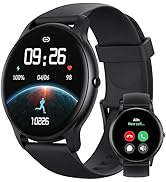
Image: An icon representing 24/7 online customer support, featuring a headset and chat bubbles.


