1. Вступ
This manual provides detailed instructions for the installation, operation, and maintenance of your GIGABYTE GA-B760M D3HP WIFI6 motherboard. Designed for optimal performance and reliability, this motherboard supports Intel Core 14th, 13th, and 12th generation CPUs and features DDR5 memory support, PCIe 4.0 M.2 connectors, and Wi-Fi 6 connectivity. Please read this manual thoroughly before beginning installation to ensure proper setup and to maximize the lifespan of your product.
2. Ключові характеристики
- Підтримка ЦП: Compatible with Intel Core 14th, 13th, and 12th generation processors.
- Проектування живлення: Features a 4+1+1 phase hybrid digital VRM solution for stable power delivery.
- Пам'ять: Supports Dual Channel DDR5 memory with 4 DIMM slots and XMP memory module support.
- Зберігання: Equipped with 2 PCIe 4.0 x4 M.2 connectors for high-speed storage.
- Мережа: Includes GbE LAN and Wi-Fi 6 802.11ax for fast and reliable network connectivity.
3. Налаштування та встановлення
Before installing the motherboard, ensure your system is powered off and disconnected from the power source. Handle the motherboard by its edges to avoid static discharge.
3.1 Розташування материнської плати
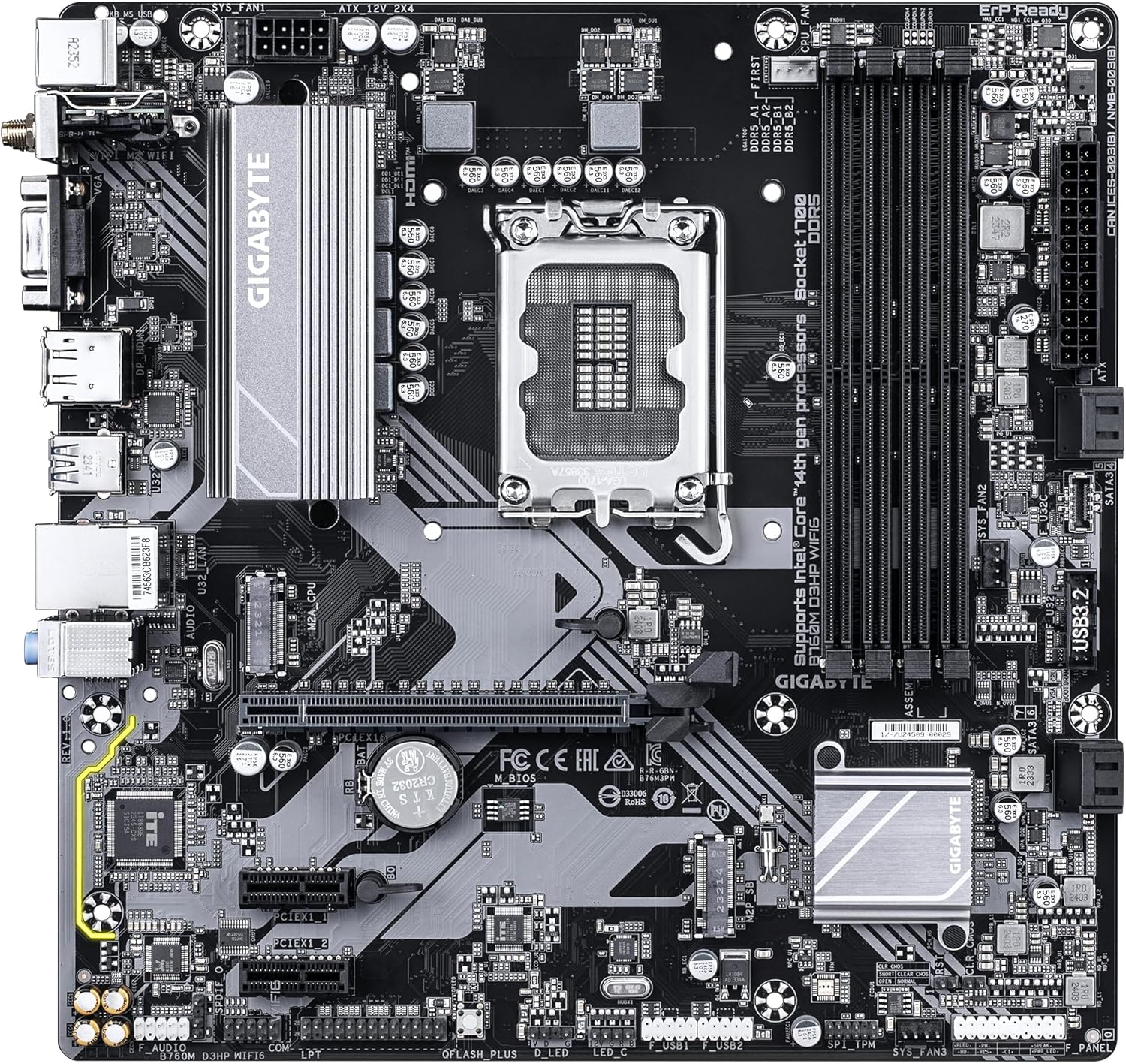
Familiarize yourself with the layout of the motherboard components before proceeding with installation.

малюнок 1: З верху до низу view of the GIGABYTE GA-B760M D3HP WIFI6 motherboard, showing the CPU socket, DIMM slots, PCIe slots, and various headers.
малюнок 2: Під кутом view of the GIGABYTE GA-B760M D3HP WIFI6 motherboard, highlighting the heatsinks and overall component placement.
3.2 Встановлення ЦП
- Знайдіть роз'єм процесора LGA 1700 на материнській платі.
- Відкрийте важіль роз'єму процесора та підніміть навантажувальну пластину.
- Carefully align the CPU with the socket, ensuring the triangular mark on the CPU matches the mark on the socket. Do not force the CPU into the socket.
- Опустіть вантажну платформу та закріпіть її важелем.
- Нанесіть термопасту на процесор та встановіть кулер процесора відповідно до інструкцій виробника.
3.3 Встановлення пам'яті (ОЗП)
- Locate the four DDR5 DIMM slots.
- Відкрийте затискачі з обох кінців гнізда DIMM.
- Зіставте виїмку на модулі пам'яті DDR5 з ключем у гнізді DIMM.
- Щільно вставте модуль пам’яті в слот, доки затискачі не зафіксуються. Переконайтеся, що обидва затискачі закриті.
- Для двоканальної конфігурації зверніться до посібника користувача материнської плати, щоб дізнатися про рекомендоване сполучення слотів.
3.4 Встановлення пристроїв зберігання даних (твердотільні накопичувачі M.2 та накопичувачі SATA)
- M.2 SSD: Locate the M.2 connectors. Remove the M.2 screw/standoff. Insert the M.2 SSD into the slot at a 30-degree angle. Push down the SSD and secure it with the screw/standoff.
- Накопичувачі SATA: Підключіть кабелі даних SATA від накопичувачів (HDD/SSD) до портів SATA на материнській платі. Підключіть кабелі живлення від блока живлення до накопичувачів.
3.5 Підключення живлення
- Підключіть 24-контактний основний роз'єм живлення ATX від блока живлення до відповідного порту на материнській платі.
- Connect the 8-pin ATX 12V CPU power connector to the port near the CPU socket.
3.6 Підключення передньої панелі та периферійних пристроїв
Connect your case's front panel connectors (power button, reset button, USB ports, audio jacks, LED indicators) to the corresponding headers on the motherboard. Refer to the motherboard's detailed manual for exact pin layouts.

малюнок 3: Rear I/O panel of the GIGABYTE GA-B760M D3HP WIFI6 motherboard, showing USB ports, display outputs, audio jacks, Ethernet, and Wi-Fi antenna connectors.
4. Інструкція з експлуатації
4.1 Налаштування BIOS
Upon first boot, you may need to enter the BIOS (Basic Input/Output System) to configure settings such as boot order, date/time, and enable specific features. To enter BIOS, press the DEL key repeatedly during startup. The GIGABYTE UEFI BIOS provides an intuitive graphical interface for configuration.
4.2 Встановлення драйвера
After installing your operating system, install the necessary drivers for the motherboard's components (chipset, audio, LAN, Wi-Fi, etc.). These drivers are typically provided on a support DVD or can be downloaded from the official GIGABYTE webсайт для вашої конкретної моделі материнської плати.
5. Технічне обслуговування
- Прибирання: Regularly clean dust from the motherboard and case fans using compressed air. Ensure the system is powered off and unplugged before cleaning.
- Оновлення BIOS: Періодично перевіряйте GIGABYTE website for BIOS updates. BIOS updates can improve system stability, compatibility, and performance. Follow the instructions provided by GIGABYTE carefully when updating the BIOS.
- Оновлення драйверів: Регулярно оновлюйте драйвери, щоб забезпечити оптимальну продуктивність та сумісність з новим програмним та апаратним забезпеченням.
6. Вирішення проблем
- Немає живлення:
- Перевірте всі підключення живлення (24-контактний ATX, 8-контактний процесор).
- Переконайтеся, що джерело живлення ввімкнено.
- Перевірте блок живлення за допомогою іншої системи або тестера блоків живлення.
- Немає дисплея:
- Ensure the monitor is connected to the graphics card (or integrated graphics port if no discrete GPU is used).
- Перевстановіть відеокарту та модулі пам'яті.
- Спробуйте завантажитися лише з однією планкою оперативної пам'яті.
- Нестабільність/збої системи:
- Перевірте температуру процесора та графічного процесора.
- Ensure all components are properly seated.
- Запустіть інструменти діагностики пам'яті, щоб перевірити наявність помилок оперативної пам'яті.
- Оновіть BIOS та драйвери.
- Проблеми з підключенням до мережі:
- For wired LAN, check the Ethernet cable and router connection.
- For Wi-Fi, ensure antennas are securely attached and drivers are installed.
- Перевірте мережеві налаштування в операційній системі.
7. Технічні характеристики
| Особливість | Деталь |
|---|---|
| Бренд | GIGABYTE |
| Назва моделі | B760M D3HP WIFI6 |
| Гніздо ЦП | LGA 1700 |
| Сумісні процесори | Intel Core 14th Gen, Intel Core 13th Gen, Intel Core 12th Gen |
| Тип чіпсета | Intel B760 |
| Технологія оперативної пам'яті | DDR5 |
| Тактова частота пам'яті | 5600 МГц |
| Сумісні пристрої | Personal Computer, Desktop Computer |
| Платформа | Вікна 10, Windows 11 |
| Розміри продукту | 9.61 x 9.61 x 1.38 дюймів |
| Вага товару | 2.2 фунта |
8. Гарантія та підтримка
Щоб отримати інформацію про гарантію та технічну підтримку, зверніться до офіційного веб-сайту GIGABYTE. website or contact GIGABYTE customer service. Keep your proof of purchase for warranty claims.
Офіційний представник GIGABYTE Webсайт: www.gigabyte.com


