1. Вступ
Thank you for choosing the Infiniity DM56 Sport Smartwatch. This device is designed to enhance your active lifestyle with advanced fitness tracking, health monitoring, and smart connectivity features. Equipped with a vibrant 1.43-inch AMOLED display, built-in GPS, and comprehensive health sensors, the DM56 is your reliable companion for both daily wear and intense workouts.
This manual provides detailed instructions on how to set up, operate, maintain, and troubleshoot your smartwatch to ensure optimal performance and longevity.

Зображення 1.1: спереду view of the Infiniity DM56 Sport Smartwatch, showcasinйого круглий AMOLED-дисплей та міцний дизайн.
2. Що в коробці
Upon opening your Infiniity DM56 Sport Smartwatch package, please ensure all the following items are present:
- Infiniity DM56 Sport Smartwatch
- Зарядний кабель
- Посібник користувача (цей документ)
3. Налаштування
3.1 Заряджання смарт-годинника
Before first use, fully charge your DM56 smartwatch. A full charge typically takes approximately 2 hours.
- Підключіть магнітний зарядний кабель до зарядних контактів на задній панелі смарт-годинника. Переконайтеся, що контакти правильно вирівняні.
- Підключіть USB-кінець зарядного кабелю до стандартного USB-адаптера живлення (рекомендовано 5 В/1 А) або USB-порту комп’ютера.
- The watch display will show a charging indicator. Once fully charged, the indicator will change or disappear.
3.2 Сполучення зі смартфоном
To unlock the full potential of your DM56 smartwatch, you need to pair it with your smartphone via Bluetooth using the dedicated companion application. The DM56 is compatible with Android 5.0+ and iOS 11 and above.
- Завантажте додаток: шукати the official Infiniity companion app (refer to the packaging or quick start guide for the exact app name) on the Google Play Store (for Android) or Apple App Store (for iOS) and install it.
- Увімкнути Bluetooth: Переконайтеся, що Bluetooth увімкнено на вашому смартфоні.
- Відкрийте додаток: Launch the companion app on your smartphone and follow the on-screen instructions to create an account or log in.
- Додати пристрій: У застосунку перейдіть до розділу «Додати пристрій» або «Підключити пристрій». Застосунок шукатиме доступні смарт-годинники.
- Select DM56: Select 'DM56' from the list of found devices. A pairing request may appear on both your phone and the watch. Confirm the pairing on both devices.
- Повне налаштування: Once paired, the app will guide you through initial settings, such as profile information, notification permissions, and data synchronization.
4. Керування смарт-годинником
4.1 Основна навігація
The DM56 features a responsive touchscreen and physical buttons for intuitive control.
- Сенсорний екран: Проведіть пальцем вгору, вниз, ліворуч або праворуч, щоб переходити між меню та сповіщеннями. Торкніться, щоб вибрати елементи.
- Фізичні кнопки: The watch has multiple buttons, typically labeled 'SPORT', 'SEL', 'BACK', and a dedicated 'GPS' button. Their functions may vary depending on the current screen or mode.
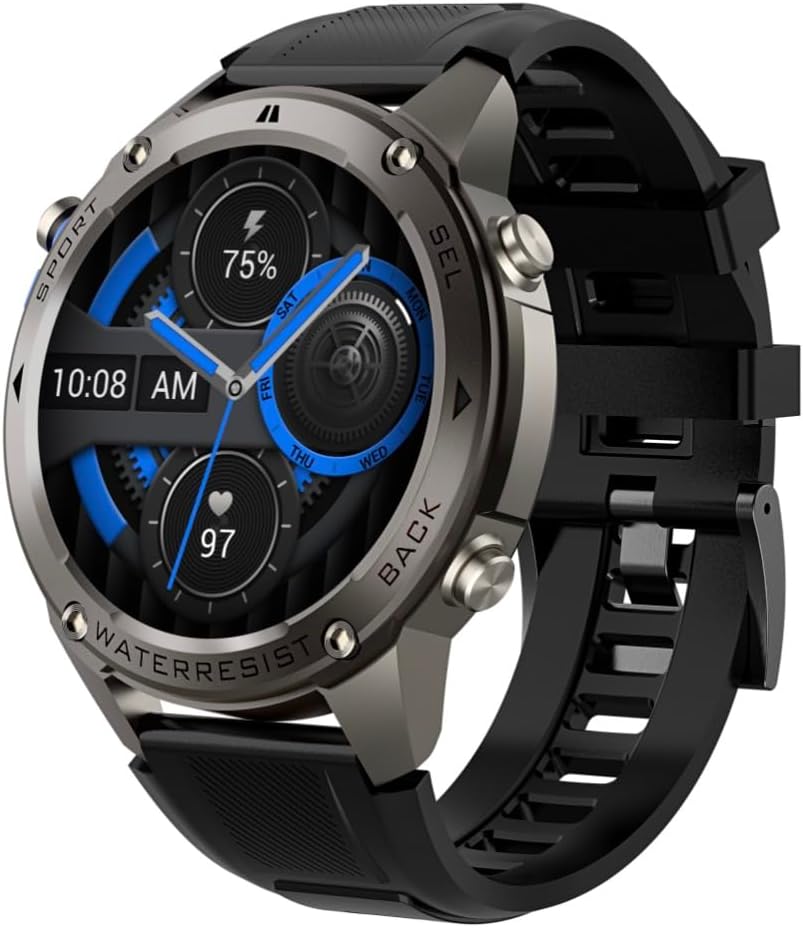
Зображення 4.1: Збоку view of the Infiniity DM56 Sport Smartwatch, highlighting the physical control buttons.
4.2 Функції дисплея
The 1.43-inch AMOLED display offers vibrant colors and deep blacks with a resolution of 466x466 pixels.
- Завжди включений дисплей: The DM56 supports Always-On Display functionality, allowing you to see the time and essential information at a glance without needing to raise your wrist or press a button. This feature can be configured in the watch settings.

Image 4.2: The Infiniity DM56 Sport Smartwatch display, showcasing a typical watch face with various data points.
4.3 Built-in GPS & Compass
The DM56 features dual-frequency GPS (L1+L5) and supports multiple satellite systems (GPS, GLONASS, BDS, Galileo, NAVIC, QZSS) for precise outdoor tracking. A built-in compass further aids navigation.
- GPS відстеження: When starting an outdoor activity (e.g., running, cycling), the watch will automatically attempt to acquire a GPS signal. Ensure you are in an open area for faster signal acquisition. Your route, distance, and pace will be recorded.
- Компас: Access the compass feature from the watch's menu to get real-time directional information.

Image 4.3: The Infiniity DM56 Sport Smartwatch from an angle, highlighting the dedicated GPS button on the side.

Зображення 4.4: Крупний план view of the GPS button on the Infiniity DM56 Sport Smartwatch, indicating its function.
4.4 All-Day Health Monitoring
The DM56 is equipped with the VC30F sensor for continuous health monitoring.
- Монітор серцевого ритму: Track your heart rate in real-time throughout the day. View your current heart rate on the watch face or in the dedicated heart rate app.
- Моніторинг кисню в крові (SpO2): Виміряйте рівень насичення крові киснем.
- Відстеження сну: The watch automatically monitors your sleep patterns, including deep sleep, light sleep, and awake times. View detailed sleep analysis in the companion app.
- Відстеження стресу: Слідкуйте за рівнем стресу протягом дня.
- Крокомір: Counts your daily steps, distance, and estimated calories burned.
Note: The Infiniity DM56 Smartwatch is NOT A MEDICAL DEVICE. All health monitoring data is for reference only and should not be used for medical diagnosis or treatment.
4.5 спортивних режимів
The DM56 offers over 170 customizable sports modes, with 14 built-in modes such as outdoor running, cycling, and swimming. You can add up to 10 additional modes manually via the companion app.
- Початок діяльності: Navigate to the 'Workout' or 'Sports' menu on the watch, select your desired activity, and tap to start.
- Під час діяльності: The watch will display real-time metrics such as duration, distance, heart rate, and calories burned.
- Ending Activity: Swipe or press the designated button to pause or end the activity. Your workout data will be saved and synchronized with the app.
4.6 Smart Notifications & Calls
Once paired with your smartphone, the DM56 can receive notifications and handle calls directly on your wrist.
- Сповіщення: Receive alerts for incoming calls, SMS messages, and app notifications (e.g., social media, email). Configure which app notifications you want to receive in the companion app.
- Make/Answer Call: The DM56 allows you to make and answer calls directly from the watch, utilizing its built-in microphone and speaker. Ensure the watch is connected to your phone via Bluetooth.
5. Технічне обслуговування
5.1 Рейтинг водонепроникності
The DM56 has a 5ATM waterproof rating, meaning it can withstand water pressures equivalent to a depth of 50 meters. This makes it suitable for swimming, showering, and other water-based activities. However, it is not recommended for diving or high-pressure water activities.
- Avoid exposing the watch to hot water, steam, or strong detergents.
- Після контакту з солоною водою промийте годинник прісною водою та ретельно висушіть його.
5.2 Очищення та догляд
Щоб підтримувати зовнішній вигляд та функціональність вашого смарт-годинника:
- Регулярно очищуйте корпус годинника та ремінець м’якою губкоюamp тканина.
- Перед заряджанням переконайтеся, що контакти для заряджання на задній панелі годинника чисті та сухі.
- Уникайте використання абразивних засобів чи розчинників.
5.3 Оптимізація часу роботи від батареї
The DM56 is powered by a 500mAh high-voltage battery, offering extended usage. To maximize battery life:
- Зменште яскравість екрана.
- Limit the use of Always-On Display if not essential.
- Вимкніть непотрібні сповіщення.
- Вимкніть безперервний моніторинг серцевого ритму, якщо він не потрібен цілодобово.
6. Вирішення проблем
If you encounter issues with your Infiniity DM56 smartwatch, try the following common solutions:
- Годинник не вмикається: Переконайтеся, що годинник повністю заряджений. Підключіть його до зарядного пристрою та зачекайте кілька хвилин, перш ніж спробувати знову його ввімкнути.
- Не вдається підключитися до телефону:
- Переконайтеся, що Bluetooth увімкнено на вашому телефоні та годиннику.
- Переконайтеся, що годинник знаходиться в зоні дії Bluetooth вашого телефону.
- Перезавантажте і годинник, і телефон.
- Очистіть кеш Bluetooth на телефоні (Android) або забудьте про пристрій і повторіть сполучення.
- Переконайтеся, що супутній додаток оновлено до останньої версії.
- Неточні дані про стан здоров'я:
- Переконайтеся, що годинник щільно прилягає до зап'ястя, не надто туго і не надто вільно.
- Очистіть датчик на задній панелі годинника.
- Note that environmental factors and individual physiology can affect readings. Remember, it is not a medical device.
- Не отримано сповіщень:
- Перевірте налаштування сповіщень у додатку-супутнику.
- Переконайтеся, що програма має необхідні дозволи на вашому телефоні (наприклад, доступ до сповіщень).
- Verify that the watch is connected to your phone.
- Короткий час автономної роботи: Зверніться до розділу 5.3 для отримання порад щодо оптимізації роботи акумулятора.
Якщо проблема не зникає після виконання цих кроків, зверніться до служби підтримки клієнтів для отримання додаткової допомоги.
7. Технічні характеристики
| Особливість | Специфікація |
|---|---|
| Номер моделі | DM 56 |
| Дисплей | 1.43-дюймовий AMOLED, 466x466 пікселів |
| Датчики | Heart Rate (VC30F), Accelerometer (STK8321), Magnetometer (Compass), Barometer+Altitude (SPL07-03) |
| Підключення | Bluetooth 5.3 |
| Ємність акумулятора | 500 мАг |
| Водонепроникний рівень | 5ATM |
| Сумісність | Android 5.0+ and iOS 11 and above |
| Вага товару | 3 унції |
| Розміри упаковки | 4.25 x 4.25 x 2.8 дюймів |
| Операційна система | Android Wear 2.7 (Note: This refers to the underlying OS, not necessarily full Android Wear functionality) |
| GPS | Built-in GPS (L1+L5 dual-frequency) |
| Форма | Круглий |
| Тип батареї | Nonstandard Battery, Lithium Ion |
8. Гарантія та підтримка
The Infiniity DM56 Sport Smartwatch comes with a standard manufacturer's warranty. Please refer to the warranty card included in your product packaging for specific terms and conditions, including warranty duration and coverage details.
For technical support, troubleshooting assistance beyond what is covered in this manual, or warranty claims, please contact Infiniity customer service through the contact information provided on the product packaging or the official Infiniity webсайт.
Будь ласка, збережіть підтвердження покупки для гарантійних цілей.


