1. Продукт закінчивсяview
The ORICO 40Gbps M.2 NVMe SSD Enclosure (Model CNM2-U4-GY) is designed for high-speed data transfer and external storage. It features a built-in cooling fan and an aluminum alloy shell to ensure optimal thermal management during intensive use. This enclosure supports M-Key NVMe SSDs and is compatible with various interfaces including USB4, Thunderbolt 4/3, USB 3.2, USB 3.1, and USB 3.0.

Зображення 1.1: закінченоview of the ORICO 40Gbps M.2 NVMe SSD Enclosure.
2. Вміст упаковки
Будь ласка, перевірте наявність усіх предметів у упаковці:
- 1 x ORICO 40Gbps NVMe SSD Enclosure
- 1 x 2-in-1 USB Cable (USB-C to USB-C 40Gbps, USB-C to USB-A 10Gbps)
- 1 х термосиліконова накладка
- 1 х викрутка
- Screws for SSD installation
- Посібник користувача

Image 2.1: Contents included in the ORICO NVMe SSD Enclosure package.
3. Технічні характеристики
| Особливість | опис |
|---|---|
| Номер моделі | CNM2-U4-GY |
| Інтерфейс | USB4 (40Gbps), Thunderbolt 4/3, USB 3.2/3.1/3.0 |
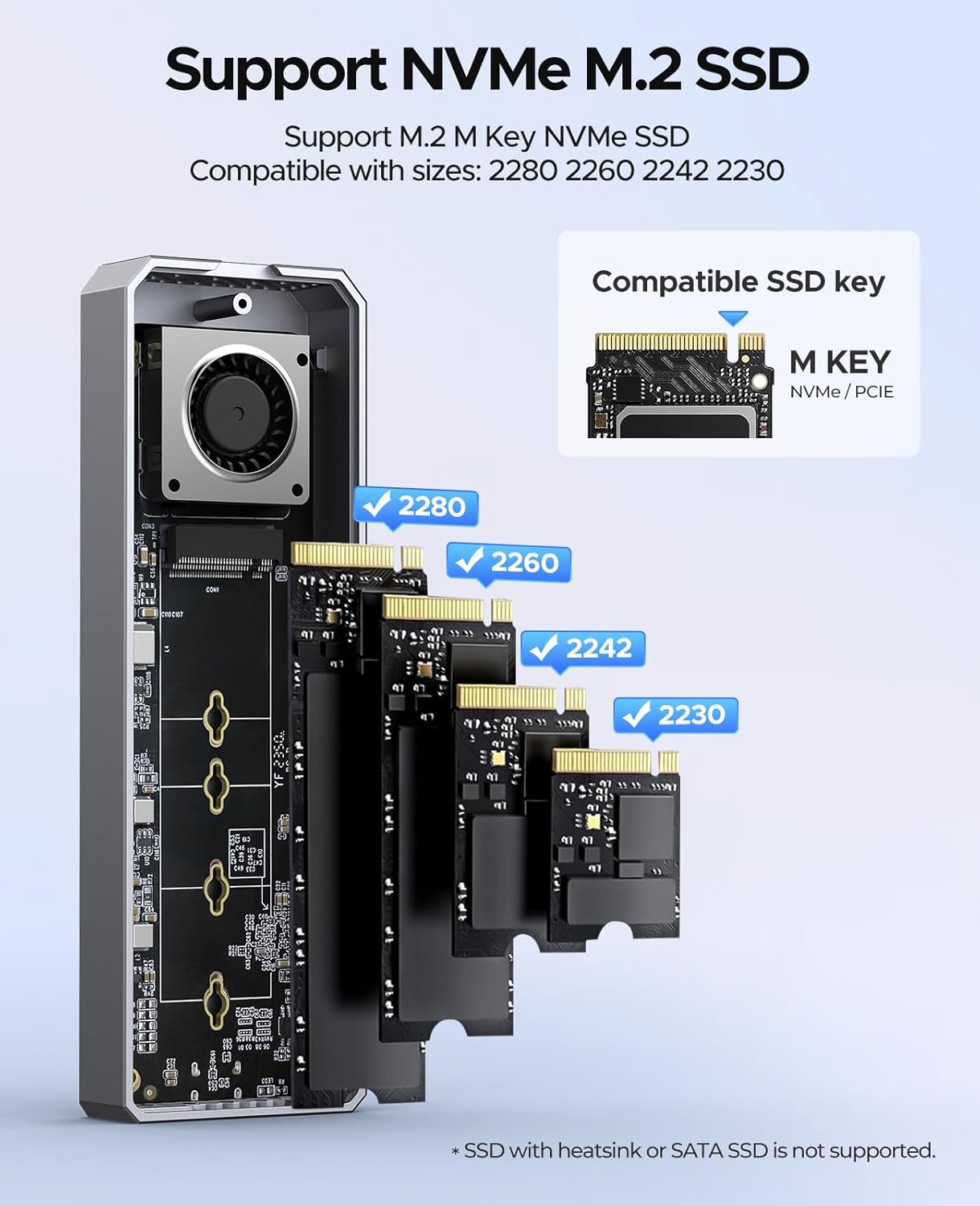
| Сумісність з SSD | M-Key 2230/2242/2260/2280 NVMe SSDs (up to 8TB) |
| Система охолодження | Built-in Fan, Aluminum Alloy Shell, Silicone Thermal Pads |
| Швидкість передачі даних | Up to 40Gbps (Read: 3500 MB/s, Write: 3000 MB/s) |
| Розміри (ДxШxВ) | 5.83 x 1.93 x 0.71 дюймів |
| вага | 9.1 унції |
| матеріал | Алюмінієвий сплав |
| Підтримувана ОС | Windows, macOS, Linux, Android |
Note: Not compatible with Intel CPUs prior to 12th Gen. Not recommended for SN750, 970 EVO Plus, or P3 SSDs. SATA SSDs are not supported.
4. Налаштування та встановлення
Виконайте такі дії, щоб встановити твердотільний накопичувач M.2 NVMe у корпус:
- Зніміть кришку: Use the provided screwdriver to unscrew the retaining screw and gently slide open the upper cover of the enclosure.
- Встановіть M.2 SSD: Insert your M.2 NVMe SSD into the M.2 interface at a 45-degree angle. Gently push down the SSD and secure it with the provided screw to fix it in place. Ensure the SSD is M-Key compatible and of size 2230, 2242, 2260, or 2280.
- Нанесення термопрокладки: Place the silicone thermal pad onto the installed SSD. This helps in heat dissipation.
- Повне встановлення: Close the upper cover and secure it with the retaining screw.

Image 4.1: Step-by-step guide for M.2 NVMe SSD installation.

Image 4.2: Supported M.2 NVMe SSD types and sizes.
5. Операція
Once the SSD is installed, connect the enclosure to your host device using the provided 2-in-1 USB cable. The enclosure is plug-and-play and does not require additional drivers for most operating systems.
5.1 Передача даних
Utilize the USB-C to USB-C cable for 40Gbps transfer speeds when connecting to compatible Thunderbolt 3/4 or USB4 ports. For devices with USB-A ports, use the USB-C to USB-A cable for speeds up to 10Gbps. The enclosure supports UASP and TRIM commands for optimized performance and SSD longevity.

Image 5.1: Enclosure connected to a laptop for data transfer.
5.2 Подача живлення
The USB-C to USB-C cable also supports 100W Power Delivery (PD) fast charging, allowing for simultaneous data transfer and device charging if your host device supports it.

Image 5.2: The versatile 2-in-1 data cable for the enclosure.
6. Система охолодження
The ORICO NVMe SSD Enclosure incorporates a multi-level cooling system to maintain optimal operating temperatures for your SSD, preventing performance throttling and ensuring stability during prolonged use.
- Вбудований вентилятор охолодження: An integrated fan actively circulates air to dissipate heat. The fan operates at 7000 RPM, producing approximately 40-60 decibels of sound.
- Корпус з алюмінієвого сплаву: The entire enclosure is constructed from aluminum alloy, which acts as a large heatsink to draw heat away from the SSD.
- Silicone Thermal Pads: These pads create direct contact between the SSD and the aluminum casing, enhancing thermal conductivity.
Зображення 6.1: Внутрішній view highlighting the built-in cooling fan.

Image 6.2: Illustration of the multi-level cooling design.
7. Сумісність
The enclosure offers broad compatibility with various devices and operating systems:
7.1 Host Device Compatibility
- Intel 12th Gen CPUs and later
- Apple M1/M2/M3/M4 chips
- AMD CPUs
- Compatible with devices featuring Thunderbolt 3/4, USB4, USB 3.2, USB 3.1, and USB 3.0 interfaces.
Note: Not compatible with Intel CPUs prior to 12th Gen, including older Apple devices.
7.2 Сумісність з операційними системами
- вікна
- macOS
- ОС iPad
- Linux
- Android

Зображення 7.1: закінченоview of device and system compatibility.
8. Вирішення проблем
If you encounter issues with your ORICO NVMe SSD Enclosure, consider the following:
- Enclosure Not Detected:
- Переконайтеся, що SSD правильно встановлено та закріплено в корпусі.
- Try connecting the enclosure to a different USB/Thunderbolt port on your device.
- Перевірте з іншим USB-кабелем, якщо він є.
- Verify that your host device's operating system is up to date and has the necessary drivers for USB/Thunderbolt.
- Перевірте «Керування дисками» (Windows) або «Дискову утиліту» (macOS), щоб побачити, чи диск розпізнано, але неініціалізовано або не відформатовано.
- Низька швидкість передачі даних:
- Ensure you are using a 40Gbps compatible port (Thunderbolt 3/4 or USB4) and the USB-C to USB-C cable for maximum speed.
- Confirm your SSD is capable of high speeds.
- Закрийте інші програми, які можуть споживати системні ресурси або операції вводу-виводу на диск.
- Check for background processes like antivirus scans.
- Перегрів:
- Ensure the thermal silicone pad is correctly placed on the SSD.
- Avoid obstructing the ventilation holes on the enclosure.
- While the fan helps, continuous heavy load can still generate heat. Allow the device to cool if it becomes excessively hot.
- SSD Not Supported:
- Confirm your SSD is an M-Key NVMe SSD and not a SATA M.2 SSD. SATA M.2 SSDs are not compatible.
- Refer to the specifications for specific SSD models that are not recommended (e.g., SN750, 970 EVO Plus, P3).
9. Гарантія та підтримка
Продукція ORICO зазвичай постачається з гарантією виробника. Будь ласка, зверніться до гарантійного талона, що додається до вашої упаковки, або відвідайте офіційний веб-сайт ORICO. webсайт для отримання детальних гарантійних умов.
For technical support, product inquiries, or warranty claims, please contact ORICO customer service through their official channels. Contact information can usually be found on the ORICO webсайту або в упаковці продукту.
When contacting support, please have your product model number (CNM2-U4-GY) and purchase information readily available.


