1. Вступ
This manual provides essential information for the installation, operation, and maintenance of your FSP VITA GM 650W ATX 3.1 PC Power Supply. Please read this manual thoroughly before installation to ensure proper and safe usage of the product. The FSP VITA GM 650W is designed to deliver stable and efficient power to your computer system, adhering to the ATX 3.1 and PCIe Gen 5.1 specifications.
2. Інформація про безпеку
Завжди дотримуйтесь наступних запобіжних заходів, щоб запобігти травмуванню або пошкодженню обладнання:
- Не відкривайте блок живлення. Висока гучністьtagприсутні всередині, а відкриття casing voids the warranty and poses a risk of electric shock.
- Встановлюйте блок живлення в добре провітрюваному приміщенні, подалі від джерел тепла, прямих сонячних променів та вологи.
- Ensure the power supply is correctly installed and secured in your PC case.
- Використовуйте лише модульні кабелі, що постачаються з блоком живлення. Використання несумісних кабелів може призвести до пошкодження.
- Підключіть блок живлення до заземленої електричної розетки.
- Disconnect the AC power cord from the wall outlet before installing or removing the power supply or any other components.
- Avoid placing heavy objects on the power supply or its cables.
- If the power supply is damaged or malfunctioning, discontinue use immediately and contact FSP support.
3. Вміст упаковки
Перевірте наявність усіх предметів у вашій упаковці:
- FSP VITA GM 650W ATX 3.1 PC Power Supply
- Modular Cable Set (Motherboard, CPU, PCIe, SATA, Peripheral)
- Шнур живлення змінного струму
- Монтажні гвинти
- Посібник користувача (цей документ)
4. Продукт закінчивсяview
The FSP VITA GM 650W is a high-efficiency power supply designed for modern PC systems. It features:
- Відповідність ATX 3.1: Designed to meet the latest Intel Power Design Guide ATX 3.1 specifications, ensuring compatibility with future hardware.
- Підтримка PCIe Gen 5.1: Ready for next-generation graphics cards.
- Золота сертифікація 80 PLUS: Achieves high efficiency, reducing power dissipation, heat, and noise.
- Synchronous Rectifier LLC Resonance Converter Topology: Reduces switching loss and enhances efficiency.
- +5V & 3.3V DC to DC Circuit Design: Improves efficiency and stabilizes output voltage.
- 105°C Japanese Bulk Capacitor: Ensures reliability and extended lifespan.

Рисунок 4.1: Передня сторона view of the FSP VITA GM 650W Power Supply, showcasinйого компактний дизайн та решітка вентилятора.
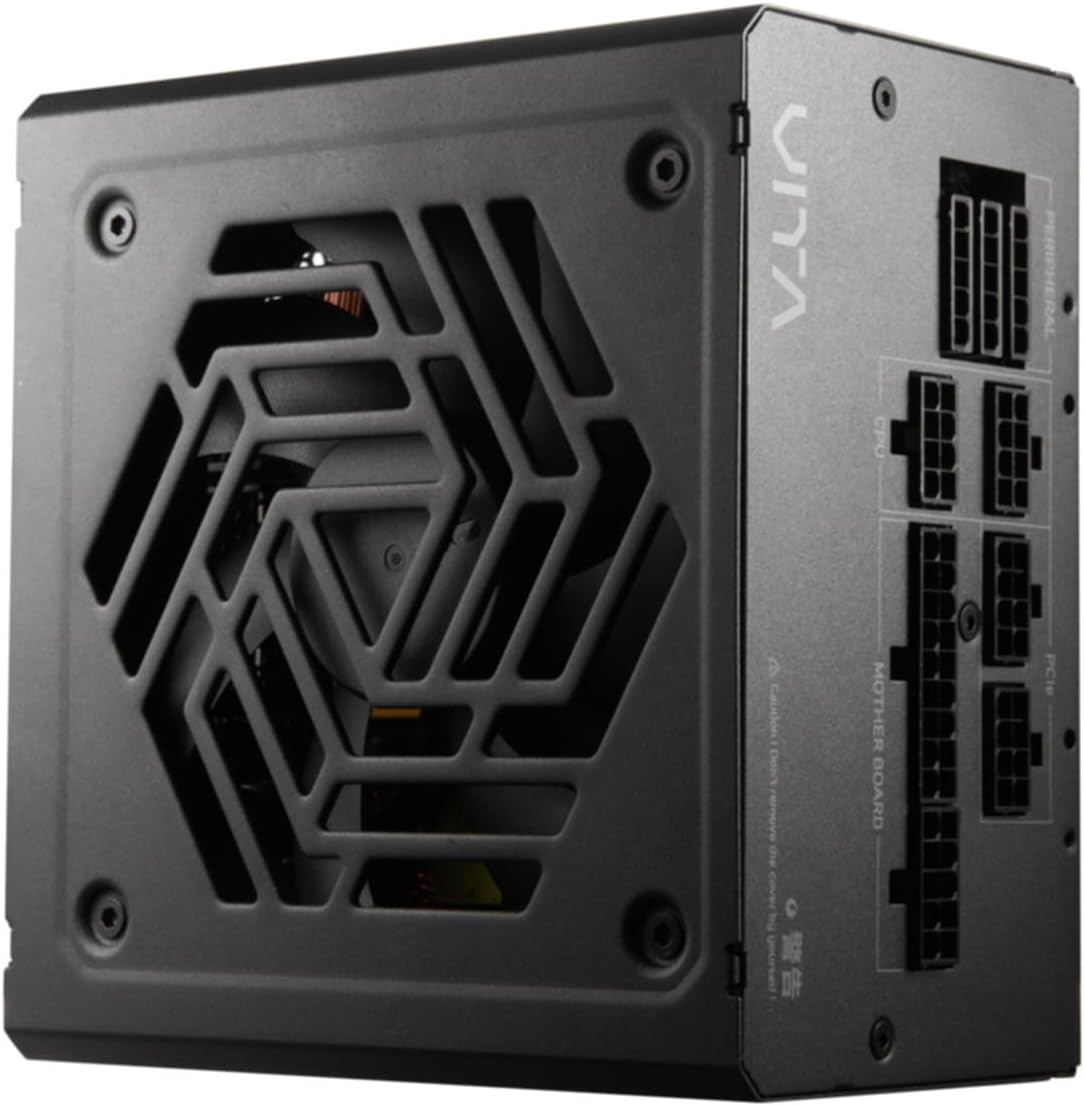
Рисунок 4.2: Зверху вниз view of the FSP VITA GM 650W Power Supply, highlighting the fan and ventilation design.

Малюнок 4.3: Сторона view of the FSP VITA GM 650W Power Supply, showing the FSP branding and VITA model name.
5. Налаштування та встановлення
Follow these steps to install your FSP VITA GM 650W power supply:
- Приготування:
- Вимкніть комп’ютер і від’єднайте шнур живлення змінного струму від розетки.
- Відкрийте корпус комп'ютера.
- If replacing an existing power supply, disconnect all cables from the old PSU and remove it from the case.
- Монтаж блоку живлення:
- Carefully place the FSP VITA GM 650W into the power supply bay of your PC case.
- Align the screw holes on the PSU with those on the case.
- Закріпіть джерело живлення за допомогою кріпильних гвинтів, що входять у комплект.
- Підключення модульних кабелів:
The FSP VITA GM 650W is a modular power supply. Connect only the cables required for your system components.

Figure 5.1: Modular cable connection panel. Ensure cables are firmly seated.
- Живлення материнської плати: Підключіть 24-контактний кабель ATX до материнської плати.
- Потужність ЦП: Connect the 4+4-pin or 8-pin EPS/ATX12V cable(s) to the CPU power connector(s) on your motherboard.
- Живлення PCIe: Connect the 6+2-pin PCIe cables to your graphics card(s).
- Живлення SATA: Підключіть кабелі живлення SATA до SSD, HDD та оптичних приводів.
- Peripheral Power: Connect 4-pin Molex cables to other peripherals as needed.
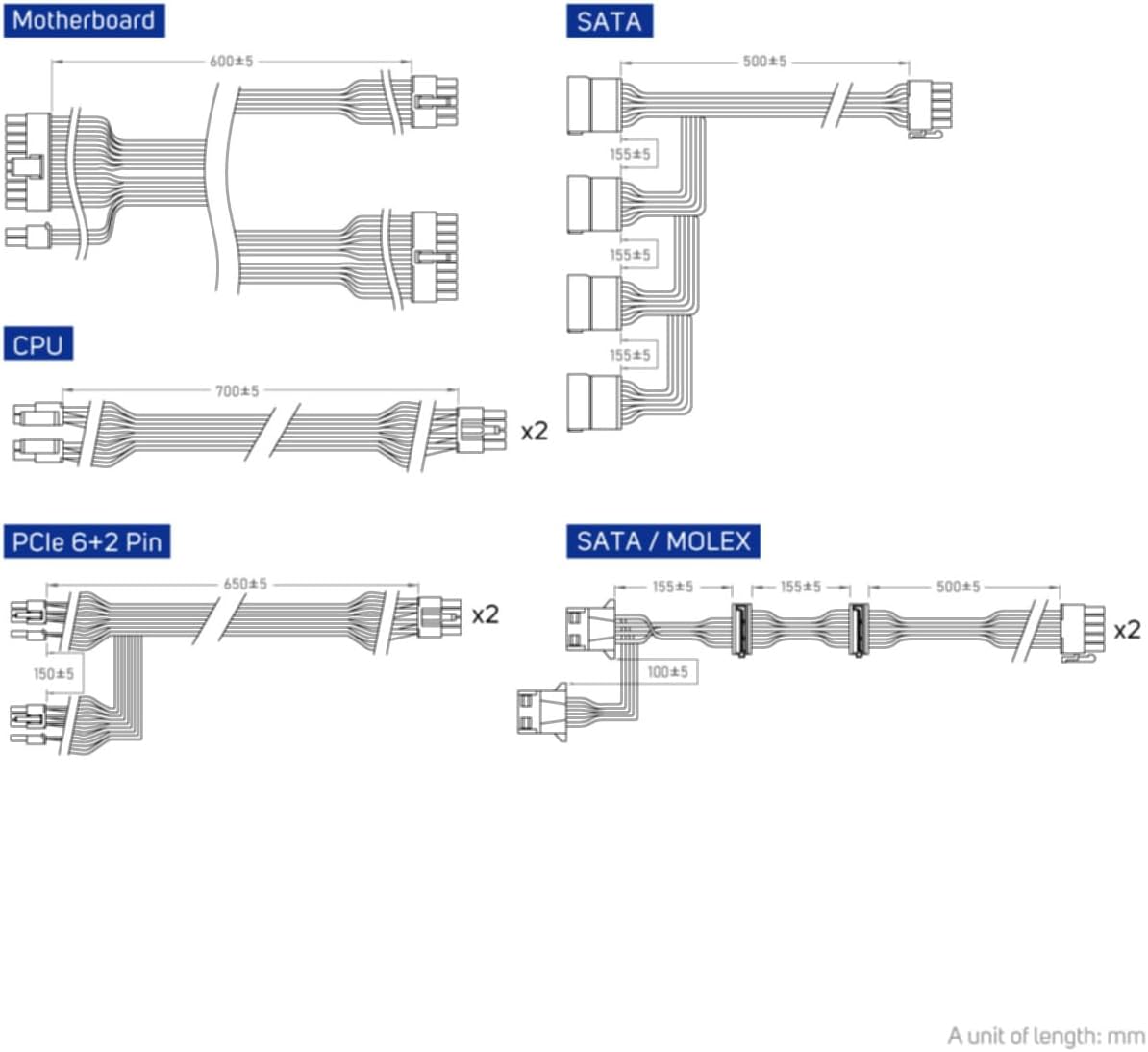
Figure 5.2: Diagram illustrating the various modular cables included and their approximate lengths (in mm).
- Остаточні перевірки:
- Ensure all cables are securely connected and routed to avoid obstructing airflow.
- Закрийте корпус комп'ютера.
- Підключіть шнур живлення змінного струму до джерела живлення, а потім до заземленої розетки.
6. Інструкція з експлуатації
After installation, you can power on your system:
- Ensure the power switch on the back of the power supply is in the "ON" (I) position.
- Натисніть кнопку живлення на корпусі комп'ютера.
- The power supply will provide stable power to your components.

Малюнок 6.1: Задня частина view of the power supply, showing the AC power input and the main power switch.
Bridge Time Importance: The FSP VITA GM 650W adheres to the recommended ATX 3.1 bridge time values. This feature ensures the power supply can maintain a stable output voltage for a critical duration after a power interruption, preventing system instability or damage during sudden power fluctuations or outagес.
7. Технічне обслуговування
To ensure optimal performance and longevity of your power supply:
- Очищення від пилу: Періодично очищайте пил з решітки вентилятора та вентиляційних отворів блока живлення за допомогою стисненого повітря. Перед чищенням переконайтеся, що система вимкнена та відключена від мережі.
- Управління кабелем: Maintain good cable management inside your PC case to ensure proper airflow and prevent overheating.
- Умови навколишнього середовища: Operate the power supply within recommended temperature and humidity ranges.
8. Вирішення проблем
If you encounter issues with your FSP VITA GM 650W power supply, refer to the following common problems and solutions:
| проблема | Можлива причина | Рішення |
|---|---|---|
| Система не вмикається. |
|
|
| Система вмикається, але одразу вимикається. |
|
|
| Незвичайні звуки з блоку живлення. |
|
|
If the problem persists after trying these solutions, please contact FSP customer support for further assistance.
9. Технічні характеристики
| Особливість | Деталь |
|---|---|
| Номер моделі | 790980 |
| Бренд | FSP |
| Wattage | 650 Вт |
| Версія ATX | 3.1 |
| Сертифікація ефективності | Золото 80 PLUS |
| Вага товару | 2.72 кілограмів (5.98 фунти) |
| Виробник | FSP |
| Дата першої доступності | 15 серпня 2024 р |
10. Гарантія та підтримка
For warranty information, technical support, or service inquiries, please refer to the official FSP webсайт або зверніться до їхнього відділу обслуговування клієнтів. Зберігайте чек про покупку для гарантійних випадків.
FSP Official Webсайт: www.fsp-group.com
11. Переробка та утилізація
Please dispose of this product responsibly. Electronic waste should not be disposed of with household waste. Contact your local authorities or recycling center for information on proper disposal methods for electronic components.


