1. Вступ
Thank you for choosing the VBESTLIFE Portable AM/FM/SW Radio. This device offers versatile audio entertainment with AM, FM, and Shortwave radio reception, Bluetooth connectivity, USB playback, and TF card support. Designed for portability and ease of use, it features dual 5W speakers for clear stereo sound and a rechargeable battery for extended listening. Please read this manual carefully to ensure proper operation and maintenance of your radio.

Image: The VBESTLIFE portable radio highlighting its 4-in-1 functionality, including FM radio, Bluetooth streaming, USB playback, and memory card support.
2. Інформація про безпеку
- Не піддавайте пристрій впливу дощу, вологи або екстремальних температур.
- Avoid disassembling or modifying the radio, as this may void the warranty and pose safety risks.
- Тримайте пристрій подалі від сильних магнітних полів.
- Використовуйте лише зазначений зарядний кабель та адаптер живлення, щоб запобігти пошкодженню.
- Протирайте пристрій м’якою сухою тканиною. Не використовуйте рідкі засоби для чищення.
3. Вміст упаковки
Будь ласка, перевірте упаковку на наявність наступних предметів:
- VBESTLIFE Portable AM/FM/SW Radio
- USB-кабель для зарядки
- Посібник користувача

Image: The VBESTLIFE portable radio shown alongside its included USB charging cable.
4. Продукт закінчивсяview
Familiarize yourself with the various components of your radio:
- Антена: Розширюється для покращення радіоприйому.
- Налаштування циферблата: Налаштовує радіочастоту.
- Регулювання гучності: Регулює рівень вихідного аудіо.
- Перемикач режимів: Switches between AM, FM, SW, Bluetooth, USB, and TF card modes.
- Порт USB: Для відтворення з USB-накопичувача.
- Слот для картки TF: Для відтворення з карт TF (MicroSD).
- DC 5V Charging Port (Type-C): Для підзарядки внутрішнього акумулятора.
- Світлодіодний індикатор: Shows charging status or power on.

Зображення: Детальний view of the radio's control panel, showing the TF card slot, USB port, DC 5V charging port, LED indicator, and mode selector switch.
5. Налаштування
5.1 Встановлення та заряджання акумулятора
The radio comes with a built-in rechargeable battery. Before first use, it is recommended to fully charge the battery.
- Locate the battery compartment on the back or bottom of the radio.
- If a removable battery is provided, ensure it is correctly inserted according to the polarity markings.
- Connect the supplied USB charging cable to the DC 5V Type-C port on the radio.
- Підключіть інший кінець USB-кабелю до сумісного USB-адаптера живлення (не входить до комплекту) або USB-порту комп’ютера.
- Світлодіодний індикатор світитиметься під час заряджання та вимкнеться або змінить колір після повного заряджання.
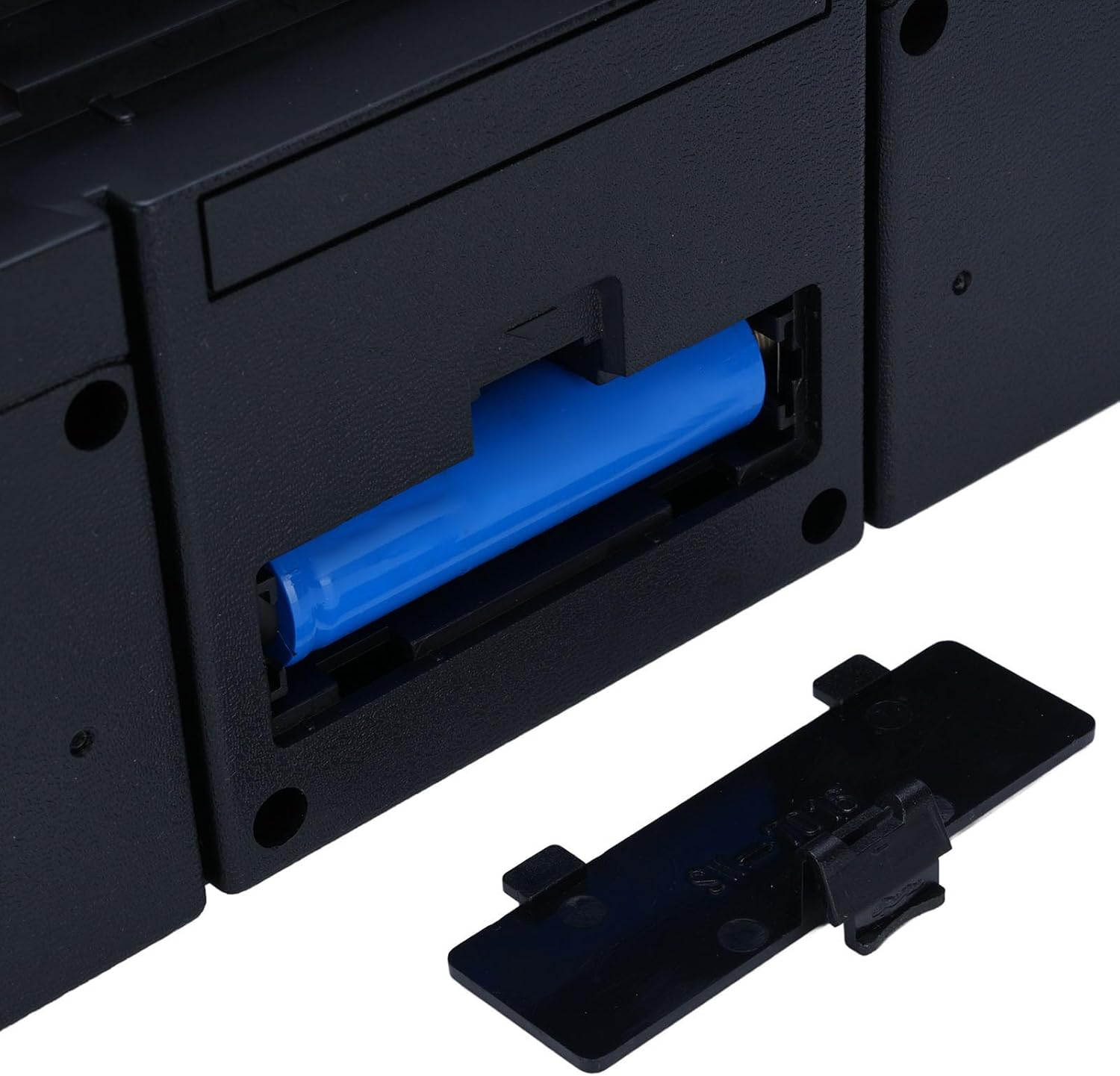
Image: The open battery compartment of the radio, showing a rechargeable battery inserted.
5.2 Початкове ввімкнення
After charging, turn the volume knob clockwise to power on the radio. The LED indicator will light up.
6. Інструкція з експлуатації
6.1 Увімкнення/вимкнення живлення та регулювання гучності
- Щоб увімкнути живлення, поверніть Ручка регулювання гучності за годинниковою стрілкою.
- Щоб вимкнути живлення, поверніть Ручка регулювання гучності counter-clockwise until it clicks.
- Відрегулюйте гучність, обертаючи Ручка регулювання гучності.
6.2 Вибір режиму
Використовуйте Перемикач режимів to choose between different audio sources:
- AM: Amplitude Modulation radio band.
- FM: Frequency Modulation radio band.
- SW: Shortwave radio band.
- BT (Bluetooth): Для бездротової потокової передачі аудіо із сумісних пристроїв.
- USB: Для відтворення аудіо files з флешки.
- TF: Для відтворення аудіо files from a TF (MicroSD) memory card.
6.3 Radio Tuning (AM/FM/SW)
- Розкладіть телескопічну антену для оптимального прийому, особливо для діапазонів FM та SW.
- Select the desired radio band (AM, FM, or SW) using the Перемикач режимів.
- Обертайте Циферблат налаштування to scan for radio stations.
- Відрегулюйте положення антени для отримання найчіткішого сигналу.

Image: The portable radio depicted in multiple environments, illustrating its enhanced FM reception capabilities for clear sound without interference.
6.4 Створення пари Bluetooth
- Перемкніть Перемикач режимів to 'BT' (Bluetooth). The radio will enter pairing mode, indicated by an audible prompt or flashing LED.
- На пристрої з підтримкою Bluetooth (наприклад, смартфоні, планшеті) увімкніть Bluetooth і знайдіть доступні пристрої.
- Select 'VBESTLIFE Radio' (or similar name) from the list of devices.
- Once paired, you will hear a confirmation sound, and you can now stream audio wirelessly to the radio.
6.5 Відтворення з USB/TF-картки
- Вставте USB флешку в порт USB або карту TF (MicroSD) у TF слот для карт.
- Перемкніть Перемикач режимів to 'USB' or 'TF' accordingly.
- The radio will automatically detect and begin playing audio fileз вставленого пристрою зберігання даних.
- Використовуйте кнопки керування відтворенням (якщо такі є), щоб перемикати треки або призупиняти/відтворювати.

Image: The portable radio being used in different locations, such as a living room, kitchen, and outdoors, demonstrating its versatility for enjoying music anywhere.
7. Технічне обслуговування
7.1 Очищення
Wipe the exterior of the radio with a soft, dry, lint-free cloth. Do not use abrasive cleaners, waxes, or solvents.
7.2 Зберігання
When not in use for extended periods, store the radio in a cool, dry place away from direct sunlight and extreme temperatures. It is advisable to partially charge the battery every few months to maintain its lifespan.
7.3 Догляд за акумулятором
To prolong battery life, avoid fully discharging the battery frequently. Recharge the battery when the low battery indicator appears or when audio quality degrades.
8. Вирішення проблем
| проблема | Можлива причина | Рішення |
|---|---|---|
| Немає живлення/Радіо не вмикається | Battery is discharged; Power switch is off | Charge the battery; Turn the volume knob clockwise to power on |
| Поганий радіоприйом | Антена не висунута; Зона слабкого сигналу; Перешкоди | Fully extend the antenna; Reposition the radio; Move away from electronic devices causing interference |
| No sound from Bluetooth/USB/TF | Incorrect mode selected; Volume too low; Device not paired (Bluetooth); File format not supported (USB/TF) | Select correct mode; Increase volume; Re-pair Bluetooth device; Ensure audio files у підтримуваному форматі |
| Пристрій Bluetooth не може підключитися | Radio not in pairing mode; Device too far; Bluetooth off on source device | Ensure radio is in BT mode; Keep devices within range (approx. 10m); Enable Bluetooth on your source device |
9. Технічні характеристики
- Номер моделі: VBESTLIFE9aykfdh76g-12
- Вихідна потужність: Подвійні динаміки 5 Вт
- Радіо діапазони: AM, FM, Пд-Зх
- FM частота: 87-108 МГц
- AM частота: 522-1710 кГц
- SW Frequency: 5.6-22 МГц
- Підключення: Bluetooth, USB, TF-карта
- Джерело живлення: Rechargeable Battery (AC/DC charging)
- Термін служби батареї: До 8 годин (приблизно)
- Розміри продукту: 9.44 см (Д) x 4.33 см (Ш) x 4.33 см (В)
- Вага товару: 1.84 фунта (835 грам)

Image: The portable radio on a table, emphasizing its extended entertainment time with approximately 8 hours of playback.
10. Гарантія та підтримка
This VBESTLIFE product is covered by a limited warranty. For specific warranty terms and conditions, please refer to the warranty card included with your purchase or contact your retailer. For technical support, troubleshooting assistance, or service inquiries, please contact VBESTLIFE customer service through the contact information provided on the product packaging or the official VBESTLIFE webсайт.