1. Вступ
Thank you for choosing the Hama Ultimate Pro Portable Bluetooth Speaker. This manual provides essential information for the safe and efficient use of your device. Please read it carefully before use and keep it for future reference.
Вміст упаковки:
- 1x Hama Ultimate Pro Portable Bluetooth Speaker
- 1x зарядний кабель USB-C
- 1x Ремінець для перенесення
- 1x Посібник користувача
2. Техніка безпеки
- Do not open the device. Incorrect assembly can lead to electric shock, fire, or damage.
- Keep the device away from extreme temperatures, direct sunlight, and humidity.
- This speaker is rated IPX6, meaning it is protected against strong continuous rain and splashing water. Do not submerge the speaker in water.
- Використовуйте для заряджання лише кабель USB-C, що постачається в комплекті.
- Не використовуйте пристрій, якщо він має видимі пошкодження.
- Protect the battery from overheating.
3. Продукт закінчивсяview
Familiarize yourself with the speaker's features and connections.

The Hama Ultimate Pro speaker highlights its key features: 24-hour battery life, IPX6 waterproof rating, Bluetooth connectivity, and 120W sound output.
Панель керування:

Детальний view of the speaker's top control panel, showing buttons for power, volume adjustment, play/pause, mode selection, and equalizer settings.
- Кнопка живлення: Натисніть і утримуйте, щоб увімкнути/вимкнути. Коротко натисніть, щоб перевірити стан батареї.
- Зменшення гучності (-): Зменшити гучність.
- Кнопка відтворення/паузи: Відтворити або призупинити аудіо.
- Збільшення гучності (+): Збільшити гучність.
- Кнопка режиму (M): Switch between input modes (Bluetooth, AUX, USB).
- Equalizer Button (EQ): Cycle through equalizer presets (Bass Sound, Power Sound, Balanced Sound).
Порти та підключення:

The speaker's rear port panel includes a USB-C charging port, a USB-A port for external devices, a reset button, and a 6.3mm jack input.
- Порт USB-C: For charging the speaker and for Power Bank output.
- Порт USB-A: For playing music from USB storage devices or for Power Bank output.
- AUX-вхід (роз'єм 3.5 мм): Для підключення зовнішніх аудіопристроїв за допомогою аудіокабелю 3.5 мм.
- Microphone/Guitar Input (6.3mm Jack): Для підключення мікрофона або гітари.
- Кнопка скидання: Use a thin object to press and reset the speaker if needed.
4. Налаштування
4.1 Заряджання динаміка
- Connect the supplied USB-C charging cable to the USB-C port on the speaker.
- Connect the other end of the USB-C cable to a suitable USB power adapter (not included). A 30W charger is recommended for fast charging.
- The charging indicator will show the charging status. The speaker is fully charged in approximately 2.5 hours.
4.2 Увімкнення/вимкнення
- To turn on: Press and hold the Power button for a few seconds until you hear an audible prompt.
- To turn off: Press and hold the Power button for a few seconds until you hear an audible prompt.
4.3 Створення пари Bluetooth
- Ensure the speaker is powered on and in Bluetooth mode (indicated by a flashing blue LED). If not, press the Mode button (M) to switch to Bluetooth mode.
- На вашому пристрої (смартфоні, планшеті, ноутбуці) увімкніть Bluetooth та знайдіть доступні пристрої.
- Select "Hama Ultimate Pro" from the list of devices.
- Once paired, the LED indicator will turn solid blue, and you will hear a confirmation sound.
4.4 Підключення через AUX-вхід
- Підключіть один кінець аудіокабелю 3.5 мм (не входить до комплекту) до вхідного порту AUX на динаміку.
- Підключіть інший кінець до аудіовиходу вашого зовнішнього пристрою.
- Press the Mode button (M) on the speaker to switch to AUX mode.
4.5 Connecting USB Storage
- Вставте USB-накопичувач із аудіо fileдо порту USB-A на динаміку.
- Press the Mode button (M) to switch to USB mode. The speaker will automatically begin playing audio from the USB drive.
4.6 Connecting Microphone or Guitar
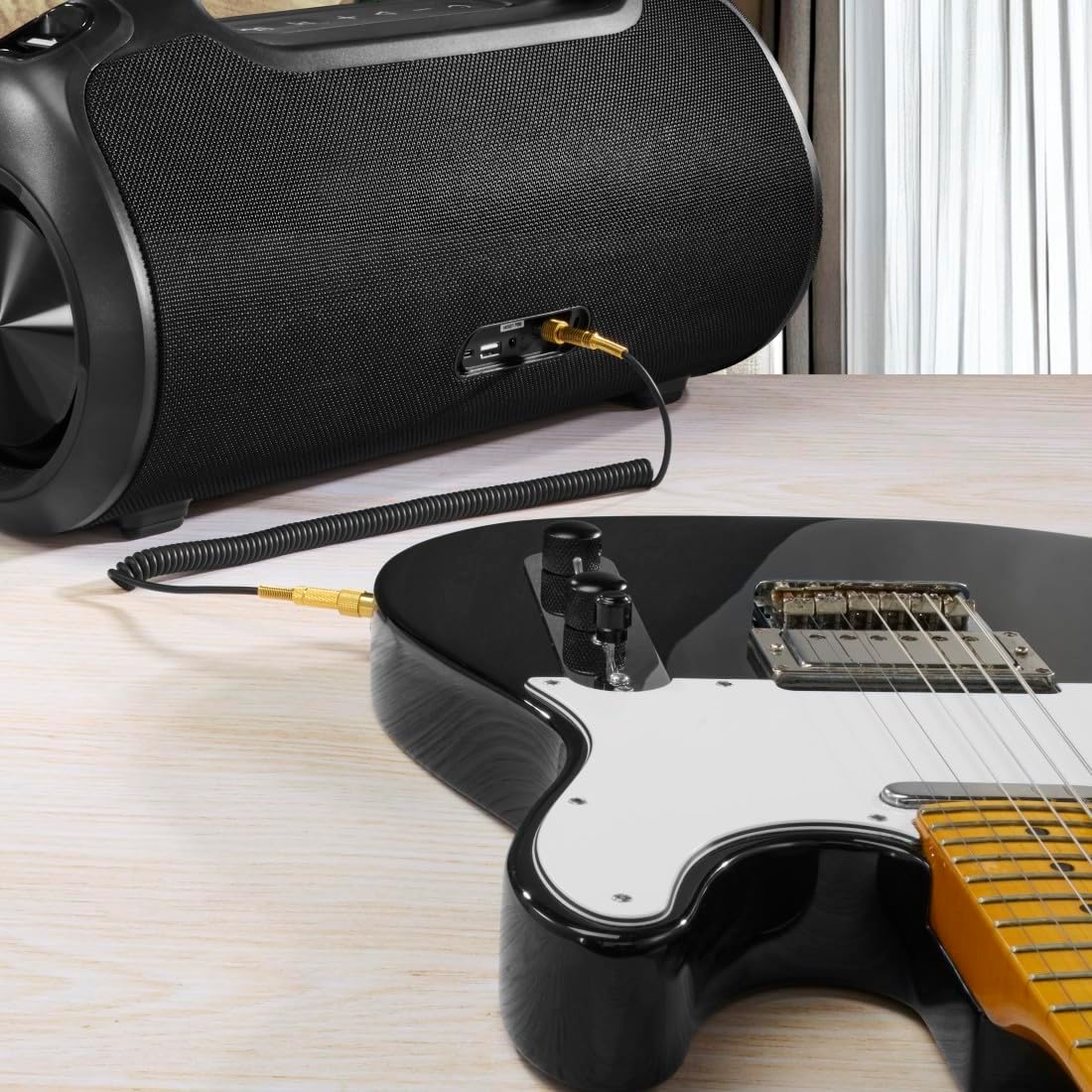
The speaker can be used as an amplifier by connecting an electric guitar via its 6.3mm jack input.

A microphone can be connected to the speaker's 6.3mm jack input for karaoke or public speaking.
- Connect your microphone or guitar to the 6.3mm jack input on the speaker.
- Adjust the volume on your connected device and the speaker as needed.
4.7 Сполучення справжнього бездротового стерео (TWS)
The Hama Ultimate Pro supports TWS for connecting two speakers for a stereo sound experience. Refer to the specific TWS pairing instructions in the full manual if available, as this feature typically involves pressing a dedicated TWS button on both speakers simultaneously.
5. Керування динаміком
5.1 Основні елементи керування відтворенням
- Відтворення/пауза: Короткочасно натисніть кнопку відтворення/пауза.
- Збільшення гучності: Коротко натисніть кнопку збільшення гучності (+).
- Зменшення гучності: Коротко натисніть кнопку зменшення гучності (-).
- Наступний трек: Тривале натискання кнопки збільшення гучності (+).
- Попередній трек: Тривало натисніть кнопку зменшення гучності (-).
5.2 Режими еквалайзера
The speaker offers three distinct equalizer modes to optimize your listening experience:
- Звук баса: Enhances low frequencies for a deeper bass response.
- Power Sound: Provides a balanced, powerful sound profile.
- Збалансований звук: Offers a neutral and clear audio output.
To switch between modes, short press the EQ button on the control panel.
5.3 Hama Smart Home App Control

The Hama Smart Home app allows for convenient control and customization of the speaker, including battery status and sound settings.
Download the "Hama Smart Home" app from your device's app store to access additional features:
- Custom equalizer settings.
- Change the speaker's name.
- View precise battery status in percentage.
- Remote control of playback and settings.
5.4 Функція зовнішнього зарядного пристрою

The speaker's integrated power bank allows you to charge external devices like smartphones via its USB-C or USB-A ports.
The Hama Ultimate Pro speaker features an integrated power bank function, allowing you to charge other devices:
- Connect your smartphone, tablet, or other USB-powered device to the USB-C or USB-A port on the speaker using a compatible charging cable.
- Внутрішній акумулятор динаміка почне заряджати підключений пристрій.
6. Технічне обслуговування
6.1 Очищення
The speaker has a resistant and washable surface. To clean:
- Ensure the speaker is turned off and all cables are disconnected.
- Використовуйте м'який, damp cloth to wipe the surface. Do not use harsh cleaning agents or solvents.
- Для стійкого бруду можна використовувати м’який мильний розчин, а потім протерти чистою ганчіркою.amp тканина.
- Allow the speaker to dry completely before use.
6.2 Зберігання
- Зберігайте динамік у прохолодному, сухому місці, подалі від прямих сонячних променів та екстремальних температур.
- Якщо акумулятор зберігатиметься протягом тривалого періоду, заряджайте його приблизно до 50% кожні кілька місяців, щоб підтримувати його в робочому стані.
6.3 Догляд за акумулятором
- Уникайте частого повного розряджання акумулятора.
- Do not expose the battery to heat sources or direct flame.
- Утилізуйте батареї згідно з місцевими правилами.
7. Вирішення проблем
Якщо у вас виникли проблеми з динаміком, зверніться до наступних поширених рішень:
- Немає живлення: Переконайтеся, що динамік заряджений. Підключіть його до джерела живлення за допомогою кабелю USB-C.
- Не вдається з’єднати пристрій через Bluetooth:
- Переконайтеся, що динамік перебуває в режимі сполучення Bluetooth (блимає синій світлодіод).
- Переконайтеся, що на вашому пристрої ввімкнено Bluetooth, і він знаходиться в межах 10 метрів від динаміка.
- Забудьте про динамік зі списку Bluetooth вашого пристрою та спробуйте знову підключитися.
- Перезапустіть динамік і пристрій.
- Немає звуку:
- Перевірте рівні гучності як на динаміку, так і на підключеному пристрої.
- Ensure the correct input mode (Bluetooth, AUX, USB) is selected on the speaker.
- Якщо ви використовуєте AUX, переконайтеся, що кабель повністю вставлений та справний.
- Проблеми із зарядкою:
- Verify the USB-C cable is not damaged and is properly connected.
- Спробуйте інший USB-адаптер живлення.
- Speaker Unresponsive: If the speaker becomes unresponsive, use a thin object (like a paperclip) to press the Reset button located on the port panel.
8. Технічні характеристики

Physical dimensions of the Hama Ultimate Pro speaker for reference.
| Номер моделі | 00188232 |
| Бренд | Хама |
| Колір | чорний |
| Технологія підключення | Bluetooth 5.3 |
| Максимальний діапазон | 10 метрів |
| Аудіосистема | Стерео |
| Max Music Power | 120 Вт |
| Тип батареї | Вбудований літій-іонний |
| Ємність акумулятора | 4500 мАг |
| Акумулятор Voltage | 11.4 В |
| Живлення батареї | 51.3 Вт·год |
| Максимальний термін служби батареї | 24 години |
| Час зарядки | прибл. 2.5 години |
| Підтримка USB PD | так |
| Рейтинг IP | IPX6 (Protection against strong continuous rain) |
| Розміри (Д x Ш x В) | 46.5 х 19.2 х 25.4 см |
| вага | 5200 г (5.2 кг) |
| Сумісні пристрої | MP3 Player, Personal Computer, Smartphone, Tablet, Television |
9. Гарантія
Hama GmbH & Co KG provides a warranty for this product. Please refer to the warranty card included in your package or visit the official Hama webсайт для отримання детальних гарантійних умов, що стосуються вашого регіону.
10. Підтримка
For technical support, troubleshooting assistance, or further inquiries, please contact Hama customer service. Contact details can typically be found on the official Hama webсайті або на упаковці продукту.
You can also visit the Hama website for FAQs and additional product information: www.hama.com