1. Вступ
Thank you for choosing the EvoFox Deathray v2 Pro Gaming Keyboard. This manual provides detailed instructions for setting up, operating, and maintaining your new gaming keyboard. Please read this manual carefully to ensure optimal performance and longevity of your device.
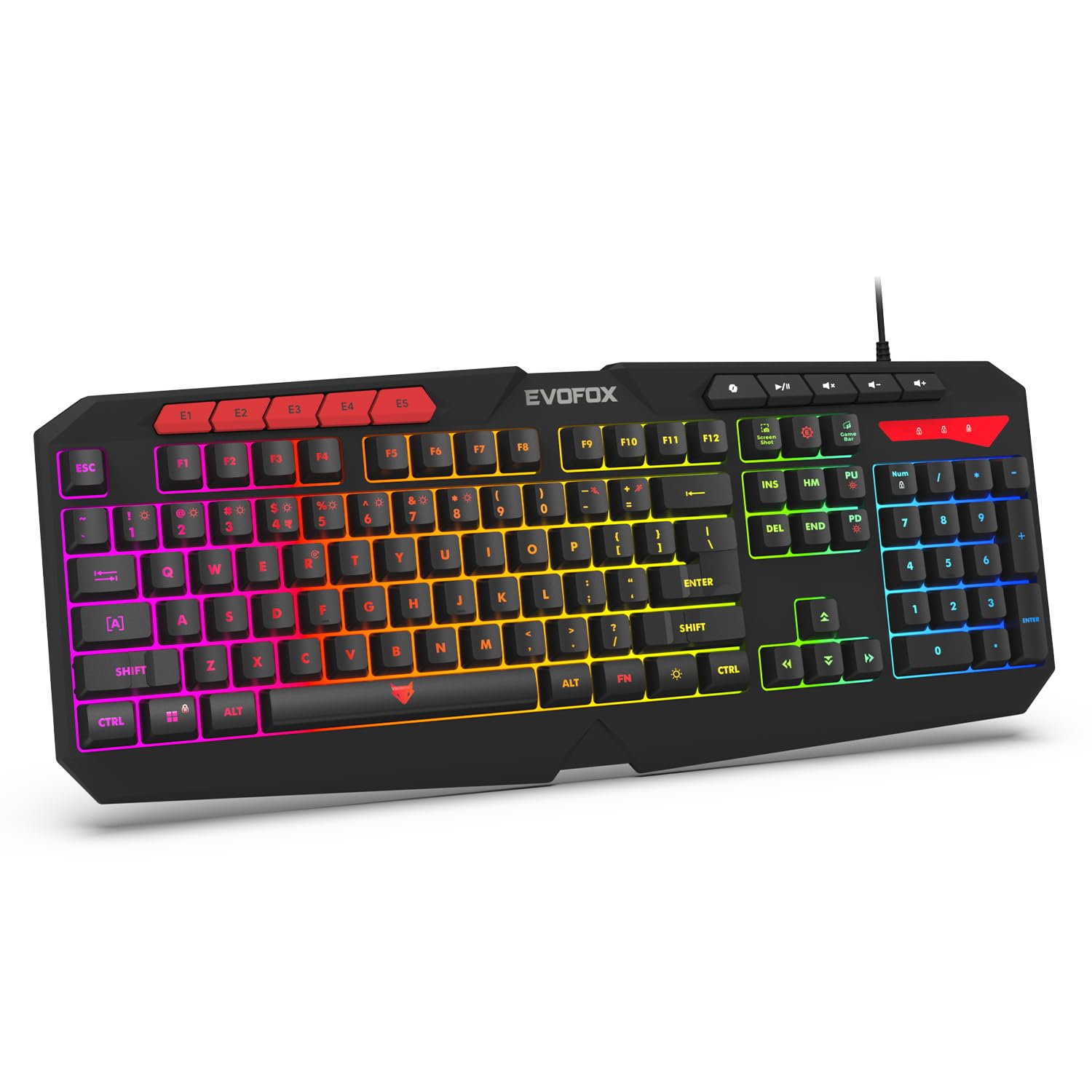
Image 1.1: EvoFox Deathray v2 Pro Gaming Keyboard overview.
2. Вміст упаковки
- EvoFox Deathray v2 Pro Gaming Keyboard
- Посібник користувача
3. Інструкції з налаштування
3.1 Підключення клавіатури
- Unpack the EvoFox Deathray v2 Pro Gaming Keyboard from its packaging.
- Знайдіть вільний USB-порт на вашому комп'ютері (ПК або ноутбуці).
- Підключіть USB-роз'єм клавіатури до USB-порту.
- The keyboard will automatically install the necessary drivers. This process may take a few moments.
- Once installed, the RGB backlighting will illuminate, indicating the keyboard is ready for use.
The keyboard features a durable 1.8m braided cable for reliable connectivity.

Image 3.1: Keyboard with durable braided cable and soft membrane keys.
4. Інструкція з експлуатації
4.1 Налаштування RGB-підсвічування
The EvoFox Deathray v2 Pro features 6-zone customizable RGB backlighting with 8 dynamic lighting modes. You can personalize your gaming setup for an immersive experience.
- Зміна режимів освітлення: Use the dedicated lighting control keys (often indicated by a sun or lightbulb icon, or through a combination with the Fn key) to cycle through the 8 available dynamic lighting modes.
- Спеціальне освітлення: Refer to the keyboard's software (if available, check the official EvoFox website) for advanced custom lighting profiles and per-key RGB customization.

Image 4.1: Keyboard showcasing 6-zone RGB backlighting with 7 lighting presets and 1 custom lighting option.

Image 4.2: Comparison illustrating the difference between RGB lighting with full color customization per zone and standard rainbow lighting with fixed color zones.
4.2 програмованих макроклавіш
The keyboard includes 5 programmable macro keys (E1-E5) to streamline your gameplay with customizable macros for lightning-fast responses. These keys allow you to record and assign complex sequences of commands to a single key press.
- Запис макросу: Typically, macro recording is initiated by a dedicated macro recording key (often labeled 'MR' or similar, or accessed via Fn key combination). Follow the on-screen prompts or software instructions to record your desired key sequence.
- Призначення макросів: Once recorded, assign the macro to one of the programmable macro keys (E1-E5) using the keyboard's software.

Image 4.3: Highlight of the 5 programmable macro keys (E1-E5) for executing complex commands.
4.3 Спеціальні функціональні клавіші
Access essential tools quickly with dedicated shortcuts for Screenshot, Macro Recording, and Xbox Game Bar. These functions are typically accessed via specific keys or Fn key combinations.
- Screenshot Key: Робить знімок екрана вашого дисплея.
- Macro Recording Key: Initiates macro recording.
- Xbox Game Bar Key: Opens the Xbox Game Bar interface for gaming features.
- Ключ другого пілота: Activates the Copilot feature (if supported by your operating system).

Image 4.4: Illustration of special function keys for Screenshot, Macro Recording, Xbox Game Bar, and Copilot.
4.4 Клавіші захисту від фантомного використання
The keyboard features 19 anti-ghosting keys, ensuring flawless input during high-stakes moments. This technology allows multiple key presses to be registered simultaneously and accurately, preventing missed commands.

Image 4.5: Keyboard layout highlighting the 19 anti-ghosting keys for precise, uninterrupted gameplay.
4.5 Ergonomic Full-Size Layout
Designed for comfort during extended gaming sessions, the keyboard features an ergonomic full-size layout with soft and silent membrane keys. This design aims to provide precision without sacrificing ease of use.
5. Технічне обслуговування
5.1 Очищення клавіатури
- Від’єднайте клавіатуру від комп’ютера перед чищенням.
- Злегка протріть м’якою тканиною без ворсу dampводою або м’яким миючим розчином, щоб протерти поверхню клавіатури.
- Для видалення пилу та сміття між клавішами використовуйте стиснене повітря.
- Уникайте використання агресивних хімікатів, абразивних засобів для чищення або розчинників, оскільки вони можуть пошкодити покриття клавіатури та підписи клавіш.
- Переконайтеся, що клавіатура повністю суха, перш ніж знову підключати її до комп’ютера.
6. Вирішення проблем
6.1 Клавіатура не реагує
- Перевірте підключення USB: Переконайтеся, що USB-кабель надійно підключено до робочого USB-порту вашого комп’ютера. Спробуйте інший USB-порт.
- Перезавантажте комп'ютер: Іноді простий перезапуск може вирішити проблеми з підключенням.
- Перевстановлення драйвера: If the issue persists, try uninstalling the keyboard drivers from your computer's Device Manager and then reconnecting the keyboard to allow for automatic reinstallation.
6.2 RGB-підсвічування не працює
- Перевірте налаштування яскравості: Ensure the brightness level is not set to minimum or off. Use the dedicated lighting control keys to adjust brightness.
- Режими циклу: Cycle through different RGB modes to see if any mode activates.
- Перевірка програмного забезпечення: Якщо використовується користувацький професіоналfiles, ensure the keyboard software is running and configured correctly.
6.3 Macro Keys Not Functioning
- Конфігурація програмного забезпечення: Verify that macros are correctly recorded and assigned to the desired keys within the keyboard's software.
- Software Running: Ensure the keyboard's macro software (if applicable) is running in the background.
7. Технічні характеристики
| Особливість | Специфікація |
|---|---|
| Бренд | ЕвоФокс |
| Модель | 498 |
| Розміри продукту | 44.7 х 17.2 х 2.6 см |
| Вага товару | 565 г |
| Апаратна платформа | вікна |
| Сумісні пристрої | Ноутбук, ПК |
| Особливості | Compact Design, Silent Membrane Keyboard, True Prims RGB |
| Опис клавіатури | Ігри |
| Тип роз'єму | USB |
| матеріал | ABS пластик |
| Країна походження | Китай |
8. Гарантія та підтримка
8.1 Інформація про гарантію
The EvoFox Deathray v2 Pro Gaming Keyboard typically comes with a 1 рік обмеженої гарантії з дати покупки. Ця гарантія поширюється на виробничі дефекти та гарантує належне функціонування виробу за умови нормального використання. Будь ласка, збережіть підтвердження покупки для пред'явлення претензій по гарантії.
8.2 Підтримка клієнтів
For technical assistance, warranty claims, or any product-related inquiries, please contact EvoFox customer support through their official website or the contact information provided with your product packaging. You may also refer to the Amkette helpline mentioned in some product documentation.


