1. Вступ
Дякуємо за покупкуasing the Surfola 15.6-inch HD Portable DVD Player, Model SD05W. This manual provides essential information for the safe and efficient use of your device. Please read it thoroughly before use and retain it for future reference.
2. Вміст упаковки
Переконайтеся, що всі перелічені нижче предмети входять до вашого пакету:
- Surfola 15.6-inch Portable DVD Player
- Пульт дистанційного керування
- AC Power Adapter (PSE certified, 100-240V global voltagсумісний)
- Car Charger (1.8m cable)
- 3-в-1 AV-кабель
- Посібник користувача
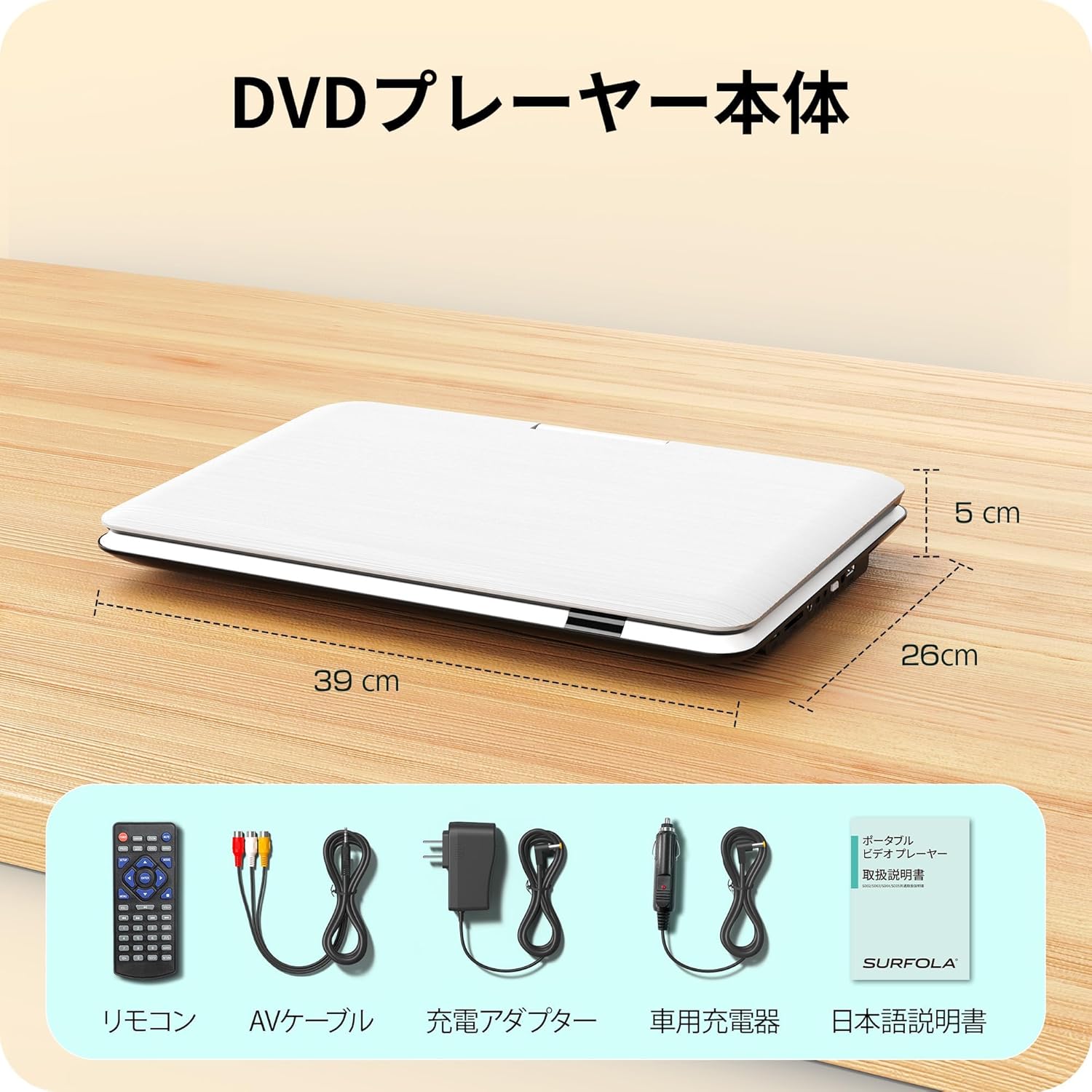
Image: Contents of the Surfola Portable DVD Player package, including the player, remote control, AV cable, AC adapter, car charger, and user manual.
3. Продукт закінчивсяview
Familiarize yourself with the various parts and connections of your portable DVD player.

Зображення: Збоку view of the Surfola Portable DVD Player showing various connection ports. These include a USB port, SD card slot, AV OUT, AV IN, DC IN, Power Switch, and Headphone Jack.
Ключові характеристики:
- 15.6-inch HD LCD Display: 1366x768 resolution for clear video playback.
- 270° Rotation & 180° Flip: Screen can be adjusted for optimal viewкути.
- Region-Free & CPRM Compatible: Plays DVDs from any region and supports CPRM content.
- Підтримка багатьох форматів: Plays video, music, and photo files from USB drives (up to 16GB) and SD cards. Supported formats include MPEG, MP3, JPG. (Note: Blu-ray discs and MP4 format are not supported.)
- Функція резюме: Automatically resumes playback from where it was last stopped.
- Кілька варіантів живлення: Built-in 5000mAh battery for up to 6 hours of playback, AC adapter (100-240V), and car charger (DC12V).
- AV Input/Output: Connect to a TV or projector for a larger screen experience.
4. Налаштування
4.1 Початкове ввімкнення
- Підключіть живлення: Use the provided AC adapter or car charger to power the device. For portable use, ensure the internal battery is charged.
- Увімкнути: Locate the power switch (usually on the side or back) and slide it to the "ON" position.

Image: A visual guide showing three simple steps: 1. Turn on the power, 2. Insert a DVD, 3. Video playback begins.
5. Інструкція з експлуатації
5.1 Основи відтворення DVD
- Open Disc Cover: Gently lift the disc cover.
- Вставити DVD: Place a DVD disc onto the spindle with the label side facing up. Ensure it is seated correctly.
- Close Disc Cover: Закрийте кришку диска.
- Відтворення: The player will automatically detect the disc and begin playback. Use the remote control or front panel buttons for play, pause, stop, and navigation.
5.2 Відтворення з USB/SD-карти
- Вставити медіафайл: Insert a USB flash drive (up to 16GB) into the USB port or an SD card into the SD card slot.
- Виберіть джерело: Use the "Source" or "Mode" button on the remote or player to select USB or SD mode.
- переглядати Files: Переглядайте свої files using the directional buttons and select the desired video, music, or photo file грати.
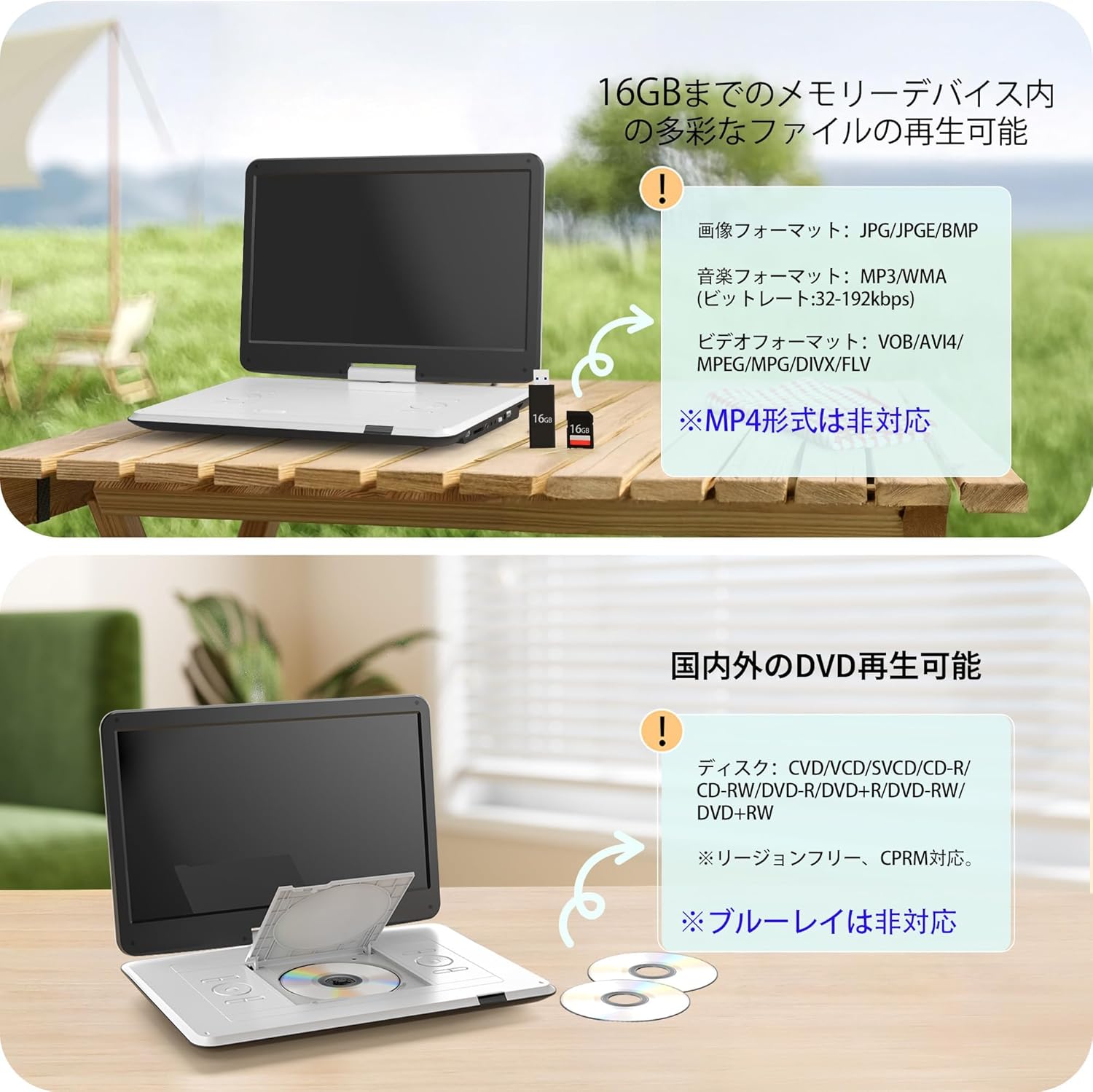
Image: The portable DVD player displaying content from a USB drive and SD card. Text indicates support for various image, music, and video formats, and notes that MP4 is not supported.
5.3 Налаштування екрана
The screen can be rotated 270 degrees and flipped 180 degrees for flexible viewing. Adjust the screen to your preferred angle for comfortable viewing in various environments, including in a car.

Image: Demonstrates the screen's ability to rotate 270 degrees and flip 180 degrees, showing various viewing configurations including a folded tablet-like mode.
5.4 Connecting to External Displays (TV/Projector)
Use the included 3-in-1 AV cable to connect your DVD player to a TV or projector for a larger viewнабутий досвід.
- Підключення AV-кабелю: Insert one end of the AV cable into the AV OUT port on the DVD player.
- Підключення до дисплея: Connect the other end of the AV cable to the corresponding AV IN ports (Yellow for Video, Red/White for Audio) on your TV or projector.
- Виберіть вхід: On your TV or projector, select the correct AV input source.

Image: The portable DVD player connected via AV cable to a television and a projector, demonstrating its capability to synchronize with external displays for a larger viewнабутий досвід.
5.5 Функція відновлення
The player features a resume function that allows it to automatically continue playback from the exact point where it was last stopped, even after powering off the device. This is useful for uninterrupted viewінж.

Image: A visual representation of the resume function, showing that playback continues from the last stopped position even after the device is powered off and on again.
6. Джерело живлення
Your Surfola Portable DVD Player offers three power options:
- Вбудована батарея: The 5000mAh internal battery provides up to 6 hours of continuous playback on a full charge.
- Адаптер змінного струму: Use the included AC power adapter for home use. It supports 100-240V, making it suitable for international travel.
- Автомобільний зарядний пристрій: The included 1.8m car charger connects to your vehicle's cigarette lighter socket (DC12V) for use on the go.
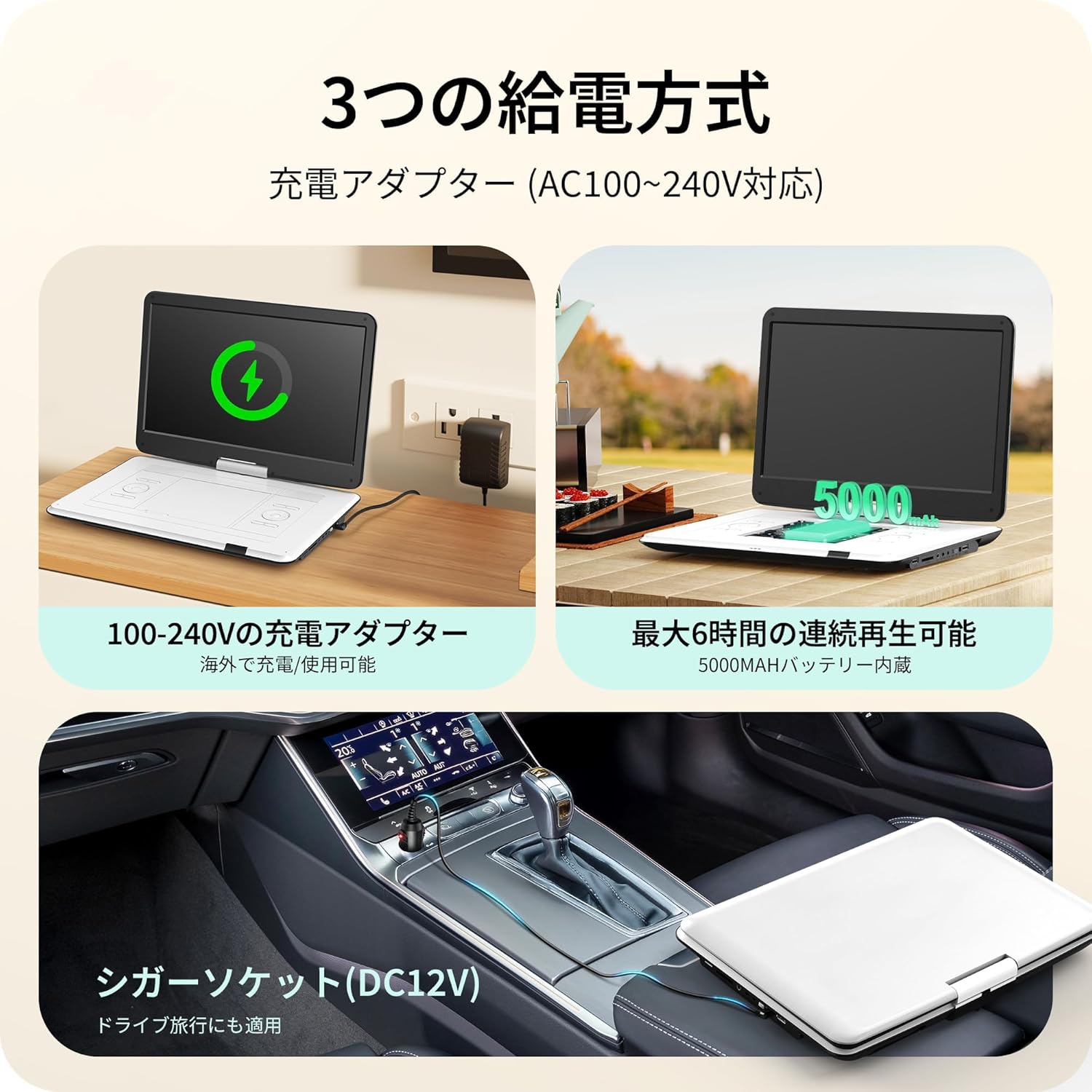
Image: Illustrates the three power supply methods: charging via AC adapter, continuous playback with the 5000mAh internal battery, and powering via car cigarette lighter socket.
7. Технічне обслуговування
- Очищення екрану: Використовуйте м’яку тканину без ворсу, щоб обережно протерти екран. Для стійких плям злегка протрітьampпротріть тканину водою або засобом для чищення екранів. Уникайте агресивних хімікатів.
- Cleaning the Disc Tray: Keep the disc tray free of dust and debris. Use a soft brush or compressed air if necessary.
- Зберігання: Коли програвач не використовується, зберігайте його в прохолодному, сухому місці, подалі від прямих сонячних променів та екстремальних температур.
- Догляд за акумулятором: Щоб продовжити термін служби акумулятора, уникайте частого повного розряджання акумулятора. Регулярно заряджайте його, навіть якщо він не використовується протягом тривалого часу.
8. Вирішення проблем
| проблема | Можлива причина | Рішення |
|---|---|---|
| Немає живлення | Battery drained, power adapter not connected, power switch off. | Charge the battery, ensure AC adapter/car charger is properly connected, turn power switch ON. |
| Диск не відтворюється | Disc inserted incorrectly, disc is dirty/scratched, unsupported disc type (e.g., Blu-ray). | Reinsert disc correctly, clean disc, try a different disc. Note that Blu-ray discs are not supported. |
| Ні звуку | Volume too low, headphones not connected properly, external speaker issue. | Increase volume, check headphone connection, ensure external speakers are working if connected. |
| No picture on external display | AV cable not connected correctly, incorrect input selected on TV/projector. | Check AV cable connections, select the correct AV input on your TV/projector. |
| USB/SD-картка не розпізнана | Unsupported format, card/drive capacity too large (over 16GB), media corrupted. | Ensure media is formatted correctly (e.g., FAT32), check capacity (max 16GB), try a different USB/SD card. |
9. Технічні характеристики
| Особливість | Деталь |
|---|---|
| Номер моделі | SD05W |
| Розмір екрана | 15.6 дюймів |
| Тип дисплея | ЖК |
| роздільна здатність | 1366 х 768 |
| Сумісність дисків | DVD, CVD, VCD, SVCD, CD-R, CD-RW, DVD-R, DVD-RW, DVD+RW (Region-Free, CPRM compatible) |
| Підтримка USB/SD-карт | До 16 ГБ |
| Supported Formats (USB/SD) | Video: MPEG, VOB, AVI, DIVX, FLV; Audio: MP3, WMA; Image: JPG, JPEG, BMP |
| Ємність акумулятора | 5000 мАг |
| Час безперервного відтворення | прибл. 6 години |
| Вхідна потужність | AC 100-240V (Adapter), DC 12V (Car Charger) |
| Підключення | USB, SD Card, AV IN, AV OUT, Headphone Jack |
| Розміри (прибл.) | 39 x 26 x 5 см (15.35 x 10.24 x 1.97 дюйма) |
| Вага (прибл.) | 1.8 кг (3.97 фунта) |
Note: Blu-ray discs and MP4 format are not supported.
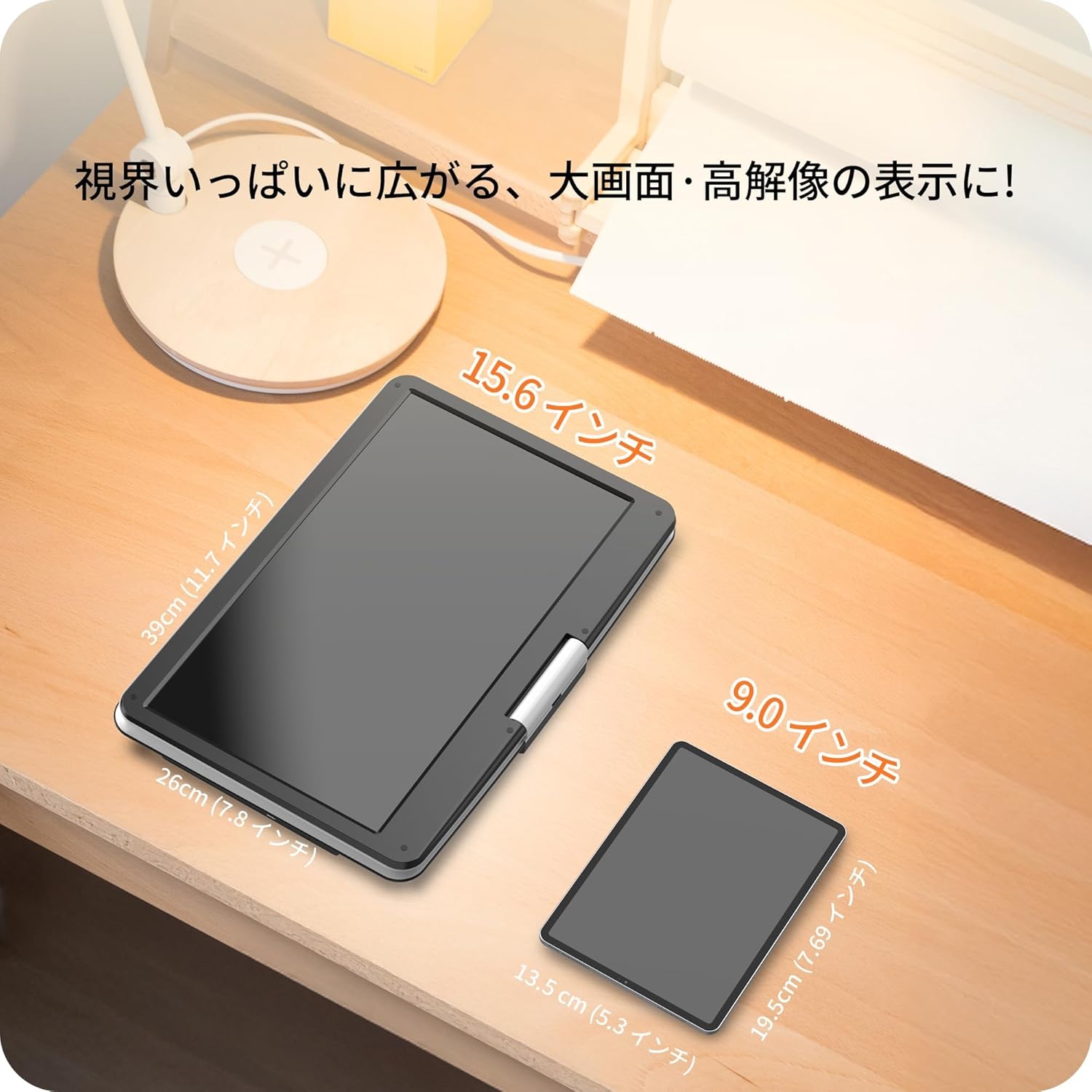
Image: A size comparison showing the 15.6-inch Surfola Portable DVD Player next to a smaller 9.0-inch player, highlighting its larger screen size.
10. Гарантія та підтримка
For warranty information and customer support, please refer to the contact details provided in your product packaging or visit the official Surfola webсайт. Зберігайте чек про покупку як підтвердження покупки для гарантійних претензій.
Виробник: Сурфола


