1. Продукт закінчивсяview
Оurlife Sports Action Camera is designed to capture clear and detailed images with 1080P HD video recording and 5MP photography. It is suitable for various activities, from outdoor sports to everyday moments, delivering vibrant and dynamic visuals. Its robust design, including a waterproof casing and wide-angle lens, makes it an ideal companion for adventurers.
Ключові характеристики:
- HD 1080P Video & 5MP Photography: Capture high-resolution videos and crisp still images.
- Водонепроникний дизайн: Designed for extreme sports, allowing use while surfing, swimming, or diving.
- 140° Ultra-Wide-Angle Lens: Охоплює ширше поле view for immersive footage.
- Довготривалий акумулятор ємністю 400 мАг: Supports extended shooting time.
- 2-Inch HD LCD Screen: Забезпечує чітке view for framing shots and playback.
- Зручний інтерфейс: Easy to operate for all users.

Figure 1.1: The Ourlife Sports Action Camera enclosed in its waterproof housing, ready for underwater use. The camera features an HD 1080P display and is designed for capturing dynamic visuals in various environments.
2. Що в коробці
Будь ласка, перевірте вміст вашої упаковки, щоб переконатися, що всі предмети присутні:
- Ourlife Sports Action Camera
- Водонепроникний корпус
- Ручка / кріплення на жердині
- Кліп 1
- Кріплення 1
- Кріплення 2
- Кріплення 3
- Кріплення 4
- Бинти
- Акумулятор (400mAh)
- Зарядний пристрій
- Посібник користувача (цей документ)
- Прай -бар

Figure 2.1: All included accessories and components for the Ourlife Sports Action Camera. This includes various mounts, the waterproof housing, battery, charger, and other essential items.
3. Посібник із налаштування
3.1 Заряджання батареї
- Insert the provided 400mAh rechargeable battery into the battery charger.
- Connect the battery charger to a power source using a compatible USB cable (not included) and adapter.
- The indicator light on the charger will show the charging status. Once fully charged, disconnect the charger.
3.2 Встановлення акумулятора та карти пам’яті
- Відкрийте кришку відсіку для батареї на камері.
- Insert the charged battery, ensuring the correct polarity.
- Locate the TF (microSD) card slot. Insert a compatible memory card (Class 10 or higher, up to 32GB recommended) until it clicks into place.
- Надійно закрийте кришку батарейного відсіку.
3.3 Attaching the Waterproof Housing and Mounts
- To use the camera underwater or in harsh environments, place it inside the waterproof housing. Ensure the housing is clean and free of debris, and the seal is properly seated.
- Close the housing latch firmly to create a watertight seal.
- Attach the desired mount (e.g., Handle Bar/Pole Mount, Clip, or other mounts) to the waterproof housing or directly to the camera if not using the housing, depending on your activity.
- Secure the mount using the provided screws or clips.

Figure 3.1: The camera in its waterproof housing, demonstrating its capability to be submerged up to 98 feet (approximately 30 meters). This housing protects the camera during water-based activities.
4. Інструкція з експлуатації
4.1 Увімкнення/вимкнення
- Щоб увімкнути: Press and hold the Power/Mode button (usually located on the front or top of the camera) for a few seconds until the screen lights up.
- Щоб вимкнути: Знову натисніть і утримуйте кнопку живлення/режиму, доки екран не вимкнеться.
4.2 Navigating the 2-Inch LCD Screen
The 2-inch HD LCD screen allows you to preview your shots, review фуtage, and navigate settings. Use the Power/Mode button to cycle through modes (Video, Photo, Playback, Settings) and the Up/Down buttons (if available) or Shutter button to select options within menus.
4.3 Запис відео та фотографування
- Режим відео: Once powered on, the camera typically defaults to video recording mode. Press the Shutter/OK button (usually on top) to start recording. Press it again to stop.
- Режим фото: Press the Power/Mode button repeatedly until the camera enters photo mode. Press the Shutter/OK button to take a picture.
- Режим відтворення: Switch to playback mode to review записані відео та фотографії на РК-екрані.
4.4 Using the 140° Wide-Angle Lens
The 140° wide-angle lens is automatically engaged, providing a broad field of view. This is ideal for capturing expansive landscapes, group shots, or immersive action footage where you want to include more of the surroundings.

Figure 4.1: Visual representation of the Ourlife Sports Action Camera highlighting its key features: 12MP image resolution, 140° wide-angle lens, waterproof capability, 2-inch LCD display, and 1080P Ultra HD video capture.
5. Технічне обслуговування
5.1 Cleaning the Camera and Housing
- Use a soft, lint-free cloth to clean the camera body and LCD screen. For stubborn smudges, slightly dampen тканину з водою.
- Для об’єктива використовуйте спеціальну серветку та розчин для чищення об’єктивів, щоб уникнути подряпин.
- After using the waterproof housing in saltwater, rinse it thoroughly with fresh water and let it air dry. Ensure no salt residue remains on the seals.
5.2 Догляд за акумулятором
- Перед першим використанням повністю зарядіть акумулятор.
- Уникайте регулярної повної розрядки акумулятора, щоб продовжити термін його служби.
- If storing the camera for an extended period, charge the battery to about 50% and remove it from the camera.
5.3 Зберігання
Store the camera and its accessories in a cool, dry place, away from direct sunlight and extreme temperatures. Keep it in its original packaging or a protective case to prevent damage.
6. Вирішення проблем
| проблема | Можлива причина | Рішення |
|---|---|---|
| Камера не вмикається. | Батарейка розряджена або неправильно вставлена. | Повністю зарядіть акумулятор. Переконайтеся, що акумулятор вставлено з дотриманням правильної полярності. |
| Не можна записувати відео або робити фотографії. | Карта пам’яті переповнена, пошкоджена або не вставлена. | Insert a compatible memory card. Format the memory card (this will erase all data). Delete unnecessary files. |
| Погана якість відео/фото. | Lens is dirty. Insufficient lighting. Incorrect settings. | Clean the lens. Ensure adequate lighting. Check camera settings for resolution and exposure. |
| Water leakage into housing. | Housing not properly sealed. Debris on seal. Damaged seal. | Ensure housing latch is firmly closed. Check for and remove any debris on the rubber seal. Inspect the seal for cracks or damage; replace if necessary. |
7. Технічні характеристики
| Бренд | Ourlякщо |
| Номер моделі | RXE123 |
| Роздільна здатність захоплення відео | 1080p HD |
| Роздільна здатність фото | 5 мегапікселів (МП) |
| Розмір екрана | 2-дюймовий РК-дисплей |
| Ширококутне поле зору View | 140° |
| Ємність акумулятора | 400 мАг |
| Тип флеш-пам'яті | TF (microSD) |
| Формат захоплення відео | AVI |
| Технологія фотосенсора | CCD |
| Максимальна фокусна відстань | 30 |
| Мінімальна фокусна відстань | 28 |
| Максимальна діафрагма | 2.8 ф |
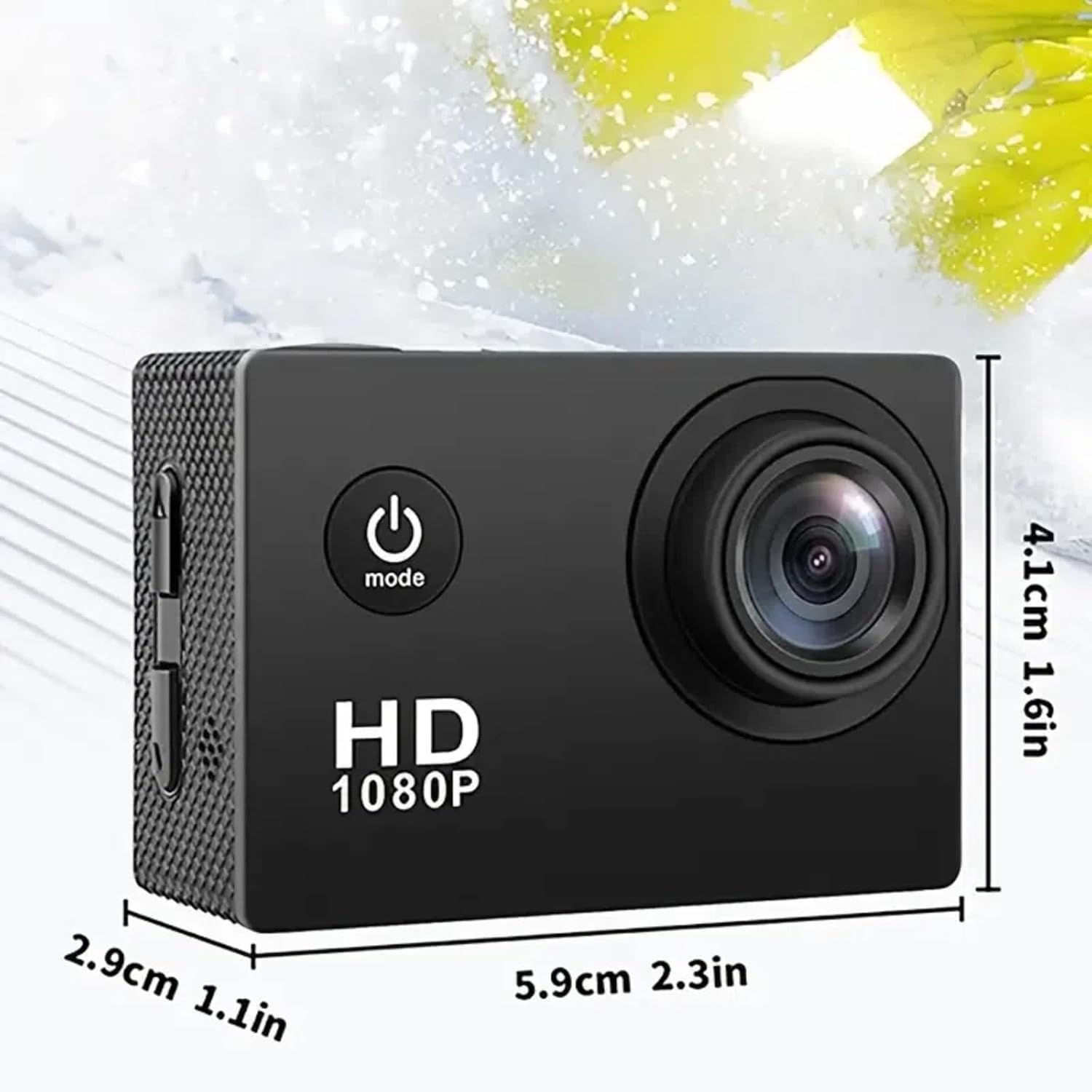
Figure 7.1: Physical dimensions of the Ourlife Sports Action Camera, showing its compact size for portability and ease of use.
8. Гарантія та підтримка
For warranty information, technical support, or service inquiries, please contact Ourlife customer support. Details can typically be found on the product packaging or the official Ourlякщо webсайт.
Будь ласка, збережіть чек про покупку для будь-яких гарантійних претензій.


