1. Продукт закінчивсяview
The Roborock Q7 L5+ is an advanced robot vacuum cleaner designed to provide efficient and thorough cleaning for your home. It combines powerful vacuuming with mopping capabilities and features an automatic emptying dock for convenience. This manual will guide you through its setup, operation, and maintenance.

Image 1.1: Roborock Q7 L5+ Robot Vacuum Cleaner and Auto-Empty Dock.
Вміст упаковки
- Робот-пилосос (1)
- Auto-Empty Dock (1)
- Dust Bags (2, one pre-installed)
- Кабель живлення (1)
- Модуль швабри (1)
- Waterproof Mat (1)
- Посібник користувача (1)
2. Налаштування
2.1 Unboxing and Dock Placement
- Акуратно вийміть усі компоненти з упаковки.
- Place the Auto-Empty Dock against a wall on a hard, level surface. Ensure there is at least 0.5 meters (1.6 feet) of clear space on both sides and 1.5 meters (4.9 feet) in front of the dock for optimal robot navigation.
- Підключіть кабель живлення до док-станції та вставте його в розетку.
2.2 Початкове заряджання
Place the robot vacuum onto the charging contacts of the Auto-Empty Dock. The robot will automatically begin charging. For first-time use, ensure the robot is fully charged before operation. The indicator light on the robot will show charging status.
2.3 Connecting to the Roborock App
- Download the Roborock app from your smartphone's app store (iOS or Android).
- Відкрийте застосунок і створіть обліковий запис або увійдіть у систему.
- Follow the in-app instructions to add your Roborock Q7 L5+ device. This typically involves pressing specific buttons on the robot to enter pairing mode and connecting to its temporary Wi-Fi network.
- Once connected, you can access all smart features, including mapping, scheduling, and cleaning mode selection.
3. Операція
3.1 Запуск та зупинка очищення
- Почати очищення: Press the power button on the robot or use the Roborock app to start a cleaning cycle. The robot will automatically map your home using LiDAR navigation and plan an optimized cleaning path.
- Пауза/Відновлення: Press any button on the robot or use the app to pause a cleaning cycle. Press again to resume.
- Повернення до доку: Press the home button on the robot or use the app to send the robot back to its Auto-Empty Dock for charging and dustbin emptying.

Image 3.1: Precision LiDAR Navigation for efficient path planning.
3.2 Режими та функції очищення
- Потужне всмоктування: The Q7 L5+ features 8000Pa HyperForce suction, effectively removing dust, debris, and pet hair from various floor types.

Image 3.2: 8000Pa HyperForce Suction for deep cleaning.
- Vacuum and Mop 2-in-1: The robot can vacuum and mop simultaneously. Adjust water flow levels via the app to suit different floor types.
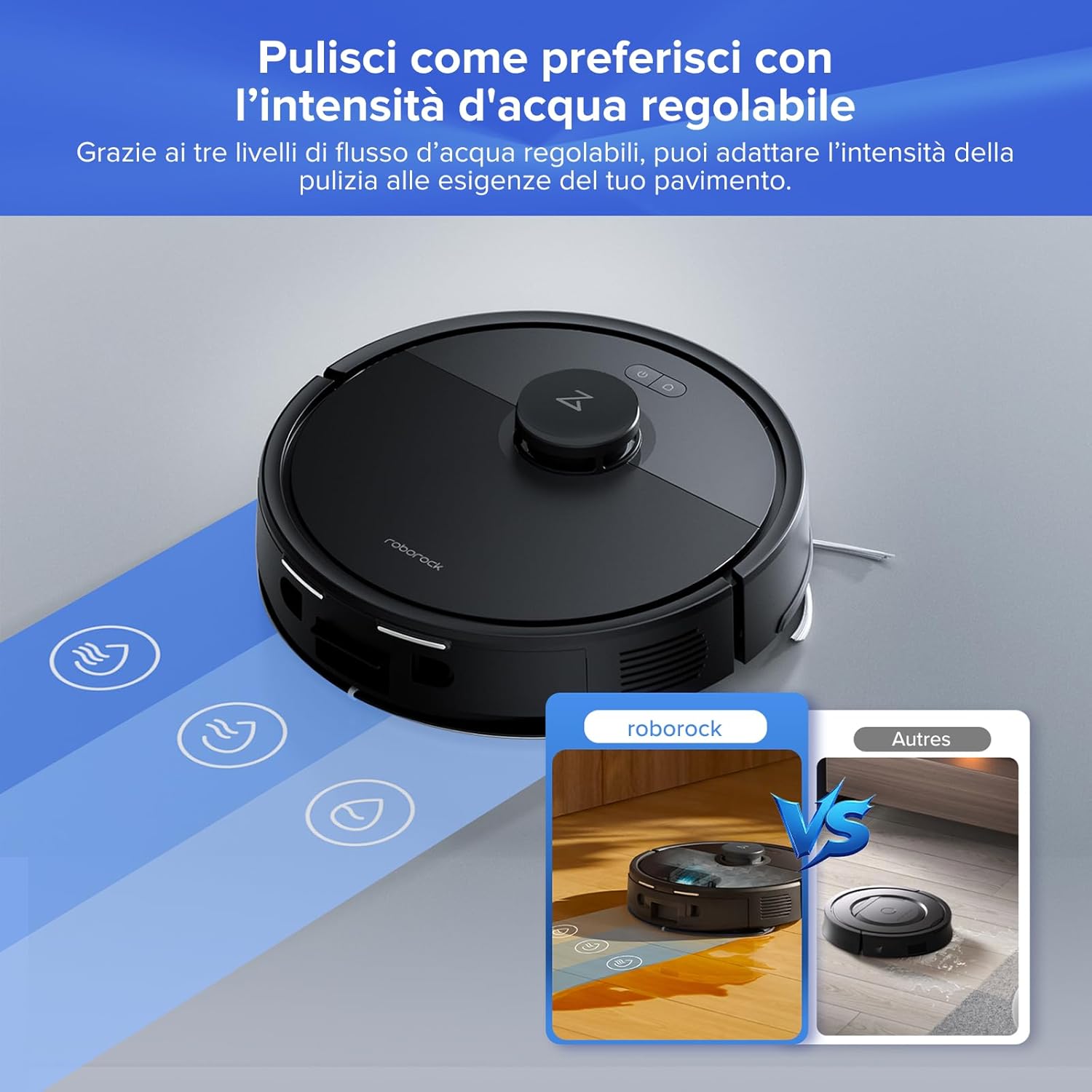
Image 3.3: Adjustable water levels for customized mopping.
- Carpet Boost: The robot automatically detects carpets and increases suction power for a deeper clean.
- Сходження на перешкоди: The Q7 L5+ can easily overcome obstacles, thresholds, and carpets up to 2 cm (0.8 inches) in height.
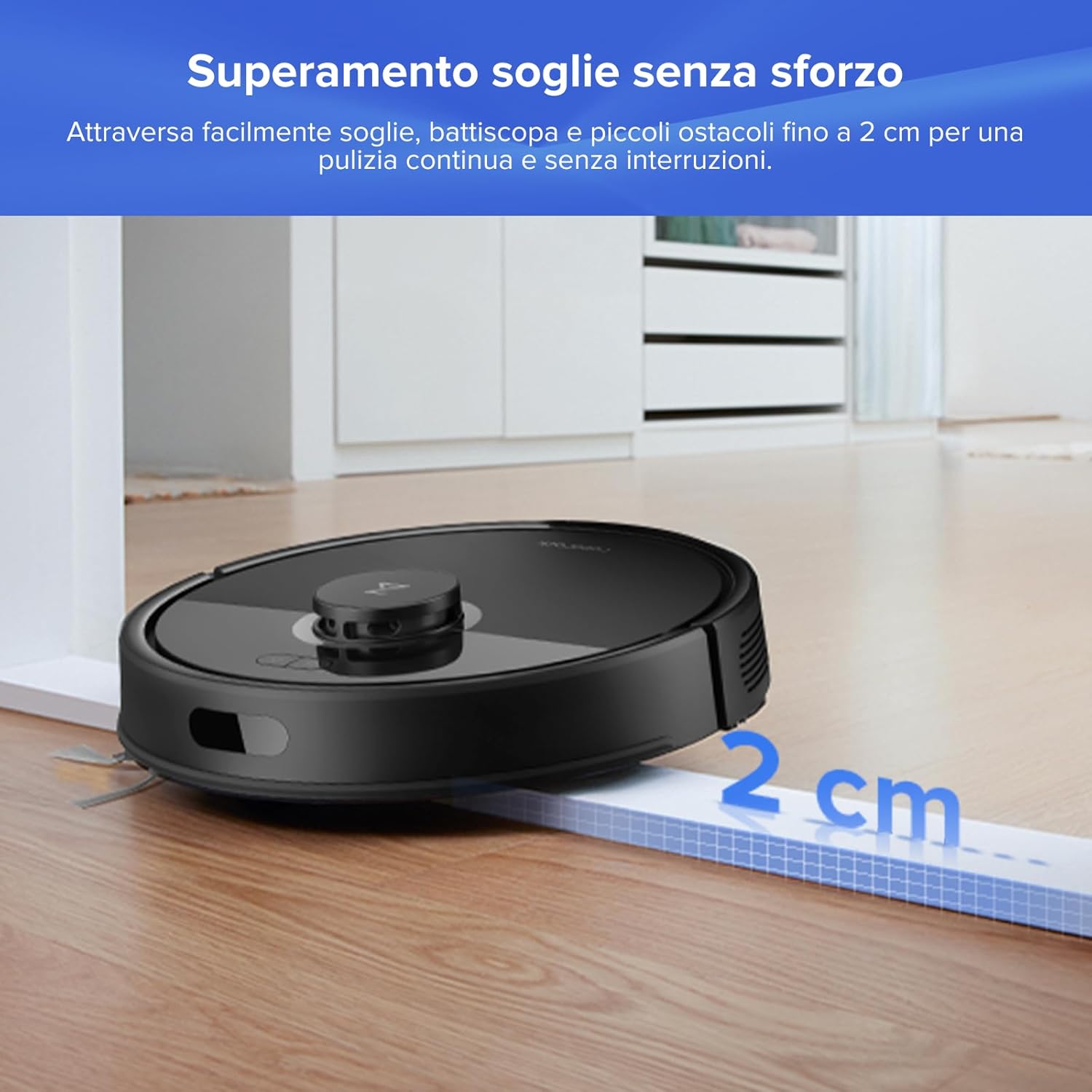
Image 3.4: Effortless obstacle climbing up to 2 cm.
3.3 Smart Features via Roborock App
- Багатоповерхове картографування: The robot can store up to 3 different floor maps, making it suitable for multi-level homes.
- Індивідуальне прибирання: Define specific rooms or areas for cleaning, set no-go zones, and virtual walls to restrict access.
- Планування: Program daily cleaning schedules to automate your cleaning routine.
- Голосове керування: Інтеграція з Amazon Alexa або Google Home для керування без використання рук.
- Блокування від дітей: Activate the child lock feature in the app to prevent accidental starts by children or pets.
- Зарядка в непіковий режим: Schedule charging during off-peak hours to save energy.

Image 3.5: Roborock App interface for comprehensive control.
4. Технічне обслуговування
Regular maintenance ensures optimal performance and extends the lifespan of your Roborock Q7 L5+.
4.1 Auto-Empty Dock and Dust Bag
- The Auto-Empty Dock automatically transfers dust from the robot's dustbin to a larger dust bag in the dock, allowing for up to 7 weeks of hands-free cleaning.
- Заміна мішка для пилу: When the dust bag is full (indicated by the app or dock light), open the dock's top cover, remove the full bag, and insert a new one. Ensure the bag is properly sealed before disposal.
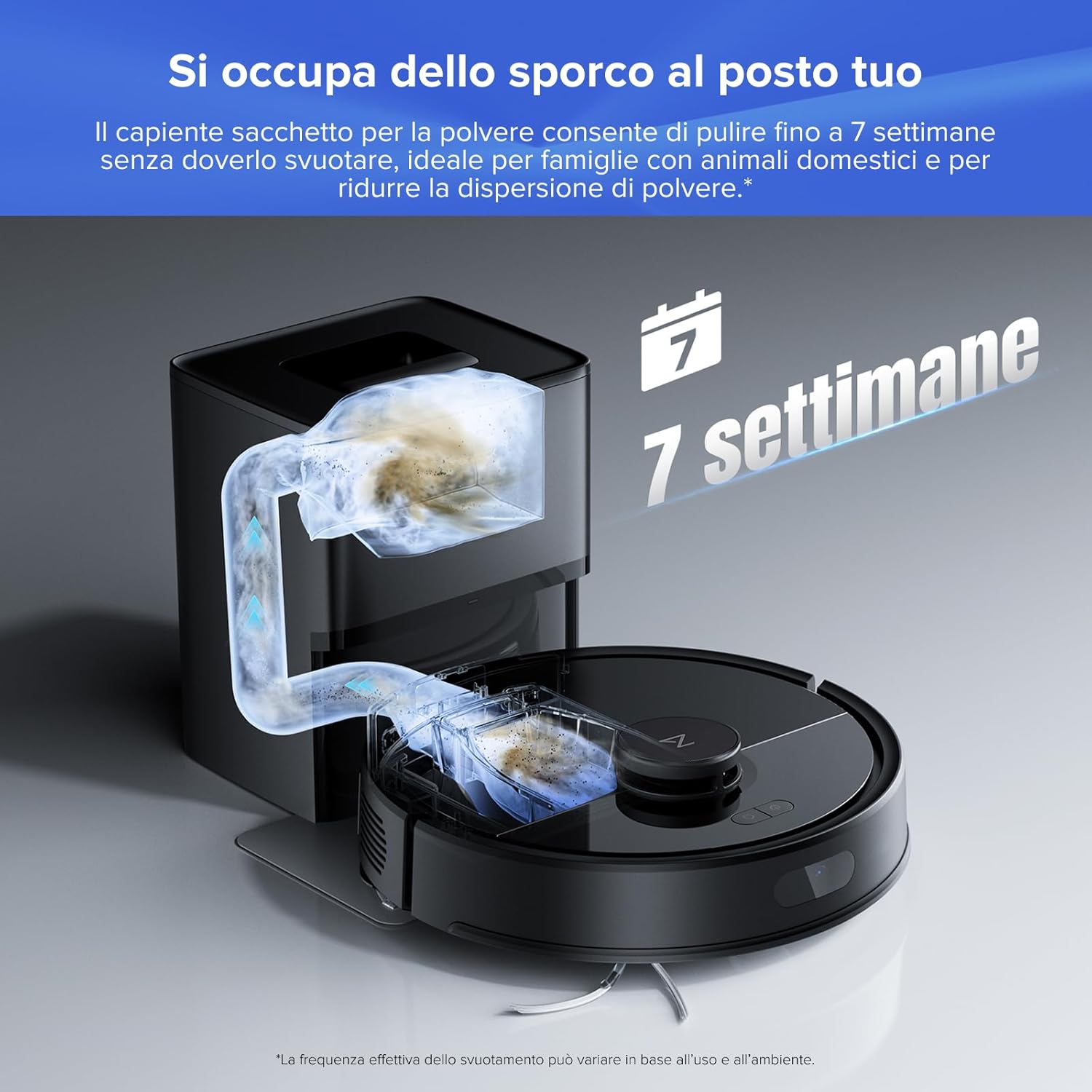
Image 4.1: Auto-Empty Dock for up to 7 weeks of cleaning without manual emptying.
4.2 Пензлі та фільтри
- Основна щітка: The robot features a dual anti-tangle system with JawScrapers to prevent hair from tangling around the main brush. Regularly check and clean the main brush by removing it from the robot and cutting away any tangled hair.
- Бічна щітка: Inspect the side brush for tangled hair or debris. Remove and clean as needed.

Image 4.2: Dual Anti-Tangle System for reduced maintenance.
- Повітряний фільтр: The multi-layered air filter should be cleaned periodically. Tap it gently to remove dust or rinse it with water if it's washable (refer to specific instructions in the full manual). Ensure it is completely dry before re-inserting.
4.3 Резервуар для води та швабра
- Бак для води: After mopping, empty any remaining water from the tank to prevent odor and mold.
- Ганчірка для швабри: Remove the mop cloth after each use and wash it. It can be hand-washed or machine-washed.
5. Вирішення проблем
If you encounter issues with your Roborock Q7 L5+, refer to the following common problems and solutions:
| проблема | Можлива причина | Рішення |
|---|---|---|
| Робот не заряджається | Зарядні контакти брудні; кабель живлення не підключений | Clean charging contacts on robot and dock; Ensure power cable is securely plugged in. |
| Робот часто застрягає | Занадто багато перешкод; нещільно закріплені кабелі/килими | Clear the cleaning area; Use No-Go Zones in the app for problem areas. |
| Погана продуктивність всмоктування | Пилозбірник повний; фільтр засмічений; головна щітка заплуталася | Empty dustbin/replace dust bag; Clean or replace filter; Clean main brush. |
| Швабра залишає смуги | Mop cloth dirty; Insufficient water flow | Wash mop cloth; Increase water flow setting in the app. |
| Проблеми з підключенням програми | Неправильний пароль Wi-Fi; маршрутизатор занадто далеко; мережа 5 ГГц | Ensure correct 2.4GHz Wi-Fi; Move robot closer to router; Reset Wi-Fi on robot and re-pair. |
For more detailed troubleshooting, please refer to the comprehensive user manual available on the Roborock webсайту або зв’яжіться зі службою підтримки клієнтів.
6. Технічні характеристики
Key technical specifications for the Roborock Q7 L5+ Robot Vacuum Cleaner:
| Особливість | Деталь |
|---|---|
| Бренд | роборок |
| Назва моделі | Q7 L5+ Set |
| Колір | чорний |
| Розміри виробу (робот) | 32.5 x 32.5 x 9.9 см (12.8 x 12.8 x 3.9 дюйма) |
| Product Dimensions (Dock) | 21.2 x 17.8 x 25.9 см (8.35 x 7.01 x 10.20 дюйма) |
| вага | 4.8 кг (10.58 фунта) |
| Потужність всмоктування | 18 500 Па ГіперФорс |
| Рівень шуму | 60 децибели |
| Час роботи від батареї | До 2 годин 30 хвилин |
| Mopping Area Coverage | Up to 220 m² (2368 sq ft) in standard mode |
| Тип навігації | LiDAR (PreciseSense) |
| Місткість пилозбірника (док-станція) | 2.7L (up to 7 weeks of use) |
| Сумісні пристрої | Smartphone (Roborock App), Amazon Alexa, Google Home |

Image 6.1: Package contents and product dimensions.
7. Гарантія та підтримка
For warranty information, technical support, or service inquiries, please refer to the official Roborock website or contact Roborock customer service directly. Keep your purchase receipt as proof of purchase for warranty claims.


