
вступ
This manual provides detailed instructions for the setup, operation, and maintenance of your Twisted Minds TM-FUSION-X 4-in-1 Gaming Accessories Kit. This kit includes an 87-key wired mechanical keyboard, a 4-level adjustable DPI gaming mouse, an LED gaming headset, and a large fabric gaming mousepad. Please read this manual carefully before using the product to ensure optimal performance and longevity.

Image: The complete Twisted Minds 4-in-1 Gaming Accessories Kit, including the mechanical keyboard, gaming mouse, LED headset, and large mousepad, set up with a monitor for a full gaming experience.
Інструкції з налаштування
1. Mechanical Keyboard
Connect the USB cable of the mechanical keyboard to an available USB port on your computer. The keyboard is plug-and-play and should be recognized automatically by most Windows operating systems (XP/Vista/7/8/10).

Зображення: Крупний план view of the Twisted Minds 87-key wired mechanical keyboard, highlighting its compact design, blue mechanical switches, and dynamic RGB backlighting.
2. Gaming Mouse
Connect the USB cable of the gaming mouse to an available USB port on your computer. The mouse is also plug-and-play. Drivers will install automatically.

Image: The Twisted Minds gaming mouse, showcasing its ergonomic design, 4-level adjustable DPI button, and vibrant 7-color LED lighting effects.
3. LED Gaming Headset
Connect the headset's 3.5mm audio jack(s) and USB cable (for LED lighting) to the corresponding ports on your computer. Ensure the microphone is positioned correctly for clear communication.
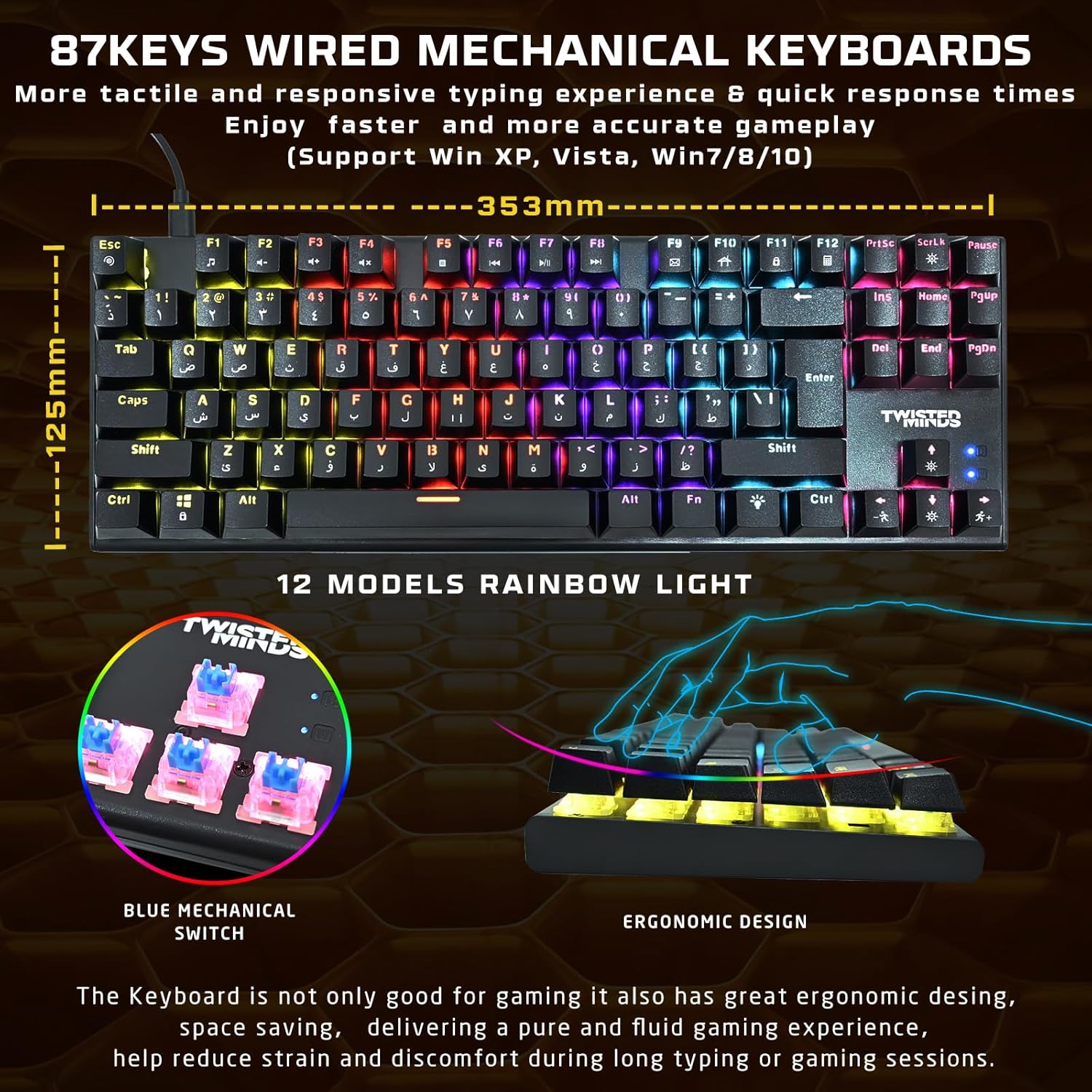
Image: The Twisted Minds LED gaming headset, featuring static rainbow RGB lighting on the earcups, a flexible omnidirectional microphone, and soft PU ear covers for comfort.
4. Gaming Mousepad
Unroll the mousepad and place it on a flat, clean surface. Ensure there are no obstructions for optimal mouse movement.

Image: The Twisted Minds comfy fabric gaming mousepad, illustrating its large dimensions (900mm x 400mm), 3mm extra-thick design, durable edge, RoHS certification, and natural rubber base.
Інструкція з експлуатації
1. Mechanical Keyboard
- Ключові перемикачі: The keyboard features 87 tactile blue mechanical switches for responsive feedback.
- RGB освітлення: Cycle through 12 dynamic rainbow lighting modes using the dedicated lighting control keys (refer to keyboard layout for specific keys, often Fn + a specific key).
- Анти-привиди: The 25-key anti-ghosting feature ensures that multiple simultaneous key presses are registered accurately during intense gaming.
2. Gaming Mouse
- Регулювання DPI: Use the DPI button (usually located behind the scroll wheel) to switch between 4 sensitivity levels: 1200, 1800, 2400, and 3600 DPI. Adjust according to your preference for different games or tasks.
- Світлодіодне освітлення: The mouse features a 7-color LED backlight that changes automatically.
3. LED Gaming Headset
- Аудіо: Enjoy rich stereo sound through the 40mm drivers.
- Мікрофон: The flexible omnidirectional microphone allows for clear voice communication. Adjust its position for optimal pickup.
- Регулювання гучності: Use the in-line volume control to adjust audio levels.
- Світлодіодне освітлення: The headset features static rainbow RGB LED lights, powered via the USB connection.
Технічне обслуговування
- Прибирання: Use a soft, dry cloth to clean the surfaces of the keyboard, mouse, and headset. For the keyboard, you may use compressed air to remove dust and debris from between the keys.
- Mousepad: The fabric mousepad can be gently wiped with a damp cloth and mild soap if necessary. Allow it to air dry completely before use.
- Уникайте рідин: Do not immerse any electronic components in water or other liquids.
- Зберігання: Store the accessories in a cool, dry place away from direct sunlight and extreme temperatures when not in use.
Усунення несправностей
Клавіатура/миша не реагує
- Ensure the USB cables are securely connected to your computer.
- Спробуйте підключитися до іншого порту USB.
- Перезавантажте комп'ютер.
Headset Audio Issues
- Check if the 3.5mm audio jack(s) are fully plugged into the correct ports (audio out, mic in).
- Verify that the in-line volume control is not set to minimum or muted.
- Ensure the headset is selected as the default audio device in your computer's sound settings.
Світлодіодні лампи не працюють
- For the keyboard, ensure you have cycled through the lighting modes using the dedicated keys.
- For the headset, ensure the USB cable is connected to provide power for the LEDs.
- Check USB connections for all devices.
Технічні характеристики
| компонент | Специфікація |
|---|---|
| Клавіатура | ABS material, 87 keys, 12 RGB modes, 25-key anti-ghosting. Compatible with Win XP/Vista/7/8/10. QWERTY layout. |
| миша | 1200-3600 DPI (4 levels), 7-color LED, 1.5m braided cable. |
| Гарнітура | φ40mm drivers, Omnidirectional microphone (φ60 × 50mm), Static RGB light. |
| килимок для миші | 900 × 400 × 3mm (Length × Width × Height), Rubber base + Fabric surface. |
| Підключення | USB (дротовий) |
| Колір | чорний |
| Джерело живлення | Провідний електричний |
| Потрібні батареї | немає |
Інформація про гарантію
Please refer to the warranty card included with your product or contact your retailer for specific warranty terms and conditions. Keep your proof of purchase for any warranty claims.
Підтримка
For technical assistance or further inquiries, please contact the Twisted Minds customer support team or your product retailer. Contact information can typically be found on the product packaging or the official Twisted Minds webсайт.
Демонстрація продукту
Відео: Демонстраційне відео продуктуasing the features and functionality of the Twisted Minds 4-in-1 Gaming Accessories Kit.