1. Вступ
This manual provides essential information for the safe and efficient operation of your DOOGEE V40 Pro 5G Rugged Smartphone. Please read it thoroughly before using your device to ensure proper setup, usage, and maintenance. The DOOGEE V40 Pro is designed for durability and high performance, featuring a Dimensity 7300 4nm 5G processor, a 200MP AI camera, an 8680mAh battery, and a 1.47-inch multi-functional rear screen.
2. Що в коробці
Перевірте наявність усіх елементів в упаковці продукту:
- 1 x DOOGEE V40 Pro Rugged Phone
- 1 USB-кабель Type-C
- 1 x зарядний пристрій
- 1 x Packing Box/ 1 x Manual
Опис відео: An unboxing video of the DOOGEE V40 Pro, showing the phone and its included accessories such as the charger and USB cable.
3. Продукт закінчивсяview
The DOOGEE V40 Pro features a robust design with advanced functionalities. It includes a large main display and an innovative rear screen for quick access to information and controls.
3.1 Передня і задня сторони Views
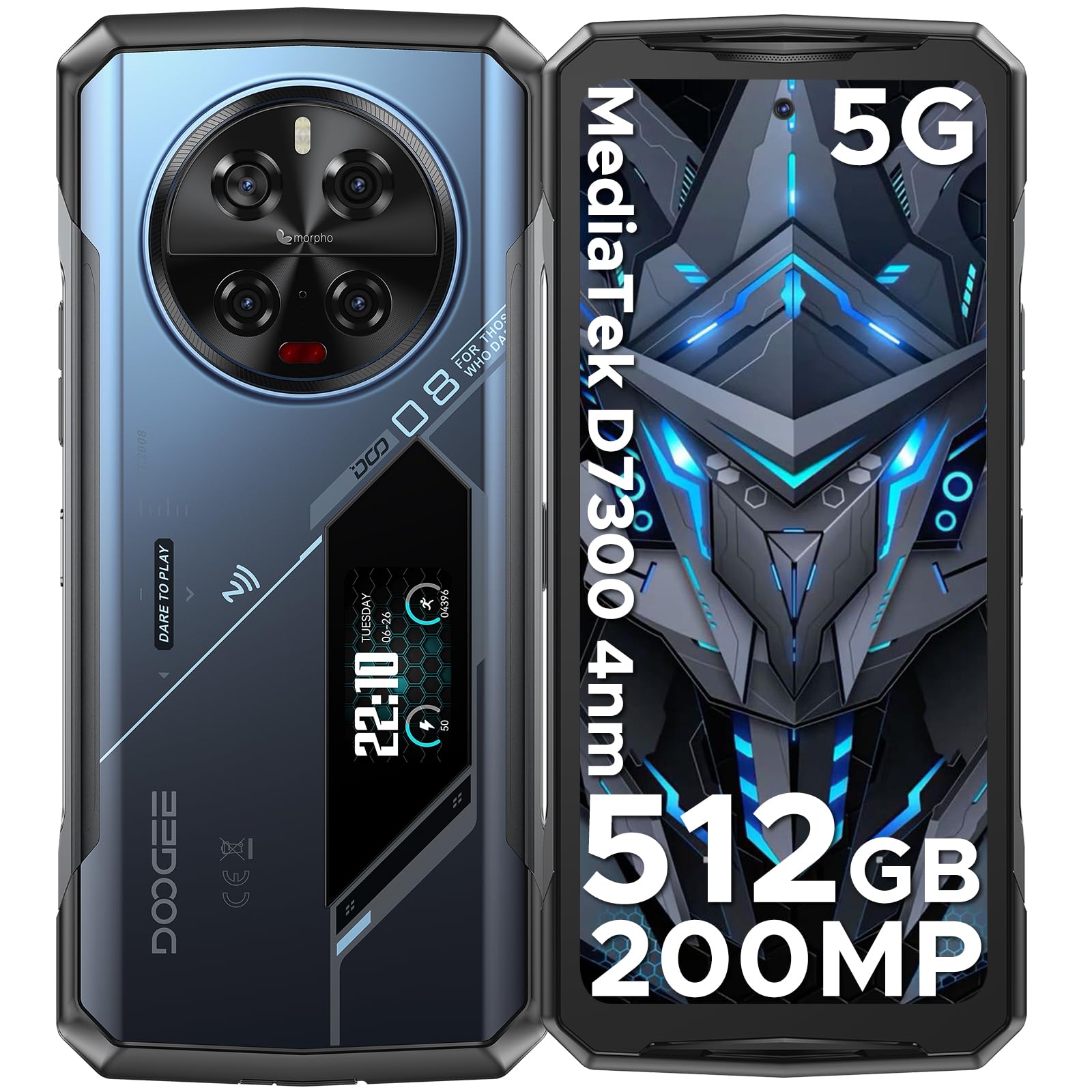
Опис зображення: Комплексний view of the DOOGEE V40 Pro, showcasing its front display and the unique rear panel with the camera module and secondary screen.
3.2 Основний дисплей
The device is equipped with a 6.78-inch FHD+ display offering a 120Hz dynamic refresh rate for smooth visuals and efficient power consumption.

Опис зображення: The DOOGEE V40 Pro's main 6.78-inch FHD+ display, illustrating its vibrant screen quality.
3.3 Multi-functional Rear Display
A 1.47-inch secondary display on the rear provides quick access to essential information and controls without needing to activate the main screen. Functions include time, date, notifications, music control, and battery level.

Опис зображення: A close-up of the DOOGEE V40 Pro's 1.47-inch rear display, showing various customizable widgets and information displays.
Система камери 3.4
The device features a versatile camera setup, including a 200MP AI main camera with OIS, a 20MP night vision camera, an 8MP telephoto camera, an 8MP macro camera, and a 32MP front-facing camera.

Опис зображення: Детальний view of the DOOGEE V40 Pro's circular rear camera module, highlighting its multiple lenses and flash.
4. Налаштування
4.1 Встановлення SIM-картки та TF-картки
To install your SIM card(s) and/or TF card (microSD card for expandable storage), locate the SIM tray on the side of the device. Use the provided SIM ejector tool to open the tray. Carefully place your nano-SIM cards and/or TF card into the designated slots, ensuring correct orientation. Close the tray securely.
4.2 Початкове ввімкнення
Press and hold the Power button located on the side of the device until the DOOGEE logo appears. Follow the on-screen instructions to complete the initial setup, including language selection, network connection, and account configuration.
5. Інструкція з експлуатації
5.1 Основні функції телефону
Navigate the Android 14 operating system using touch gestures. Swipe down from the top for notifications and quick settings. Use the volume buttons on the side to adjust audio levels. The power button can be configured for various actions, including screen lock/unlock and power options.
5.2 Using the Rear Display
The 1.47-inch rear display offers quick access to information and controls. Swipe left or right to cycle through different widgets such as time, date, battery status, music playback controls, and notification alerts. This display can also be used for enhanced selfie previews.

Опис зображення: A person holding the DOOGEE V40 Pro, demonstrating the visibility and utility of the rear display.
5.3 Робота камери
Open the Camera application to access the 200MP AI main camera, 20MP night vision camera, 8MP telephoto, 8MP macro, and 32MP front camera. Select different modes for photos, videos (including 4K recording), and special features like anti-shake and night vision. The rear display can assist with framing selfies using the main camera.
Опис відео: Рекламний відеороликasing the DOOGEE V40 Pro's features, including its camera capabilities and rugged design.
5.4 Продуктивність та ігри
The Dimensity 7300 4nm 5G processor and 36GB RAM (16GB physical + 20GB virtual) provide smooth performance for demanding applications and games. The DOOGEE OS 4.0 includes features like Game Mode Without Disturb for an uninterrupted gaming experience.
Опис відео: A video highlighting the DOOGEE V40 Pro's e-sports design and performance, suitable for gaming enthusiasts.
5.5 DOOGEE OS 4.0 Features
Experience enhanced user interface and features with DOOGEE OS 4.0, including App Cloning, Drama Mode (Video), and Dynamic Capsule for improved multitasking and user interaction.
6. Підключення
The DOOGEE V40 Pro supports a range of connectivity options:
- Мережа: 5G connectivity. Supports AT&T, Verizon, T-Mobile. Not compatible with CDMA carriers such as Cricket, Sprint, Boost Mobile, Straight Talk, or U.S. Cellular.
- Wi-Fi: Wi-Fi 6 for fast and stable wireless internet.
- Bluetooth: Bluetooth 5.2 для підключення бездротових аксесуарів.
- NFC: Near Field Communication for contactless payments and data exchange.
- GPS: Integrated GPS with Beidou, Galileo, and Glonass support for accurate navigation.
7. Керування батареєю
The DOOGEE V40 Pro is equipped with an 8680mAh battery, providing extended usage times. It supports 33W fast charging to quickly replenish power.

Опис зображення: An illustration highlighting the large 8680mAh battery capacity of the DOOGEE V40 Pro.
7.1 Зворотна зарядка OTG
Utilize the OTG (On-The-Go) function to use your V40 Pro as a power bank to charge other compatible devices.
7.2 Intelligent Battery Management
The device features an intelligent battery management system with Ultra Power Saving mode to extend battery life when needed and an option to display battery percentage у рядку стану.
8. Надійні функції
The DOOGEE V40 Pro is built to withstand harsh environments, certified with IP68, IP69K, and MIL-STD-810H ratings.
- IP68: Dust and water resistant up to 1.5 meters for 30 minutes.
- IP69K: Стійкий до струменів води високого тиску та високої температури.
- MIL-STD-810H: Міцність військового класу до падінь, ударів та екстремальних температур.
- Термостійкість: Operates reliably in temperatures ranging from -40°C (-40°F) to +70°C (158°F).

Опис зображення: The DOOGEE V40 Pro submerged in water and being dropped, illustrating its IP68/IP69K and MIL-STD-810H ruggedness ratings.
9. Технічні характеристики
| Особливість | Деталь |
|---|---|
| Розміри продукту | 7.2 x 3.3 x 0.6 дюймів |
| Вага товару | 12.8 унції (0.8 фунта) |
| Операційна система | Android 14 |
| Модель процесора | Dimensity 7300 4nm 5G Octa-core Processor |
| Швидкість ЦП | 2.5 ГГц |
| Розмір встановленої оперативної пам'яті | 36 ГБ (16 ГБ + 20 ГБ віртуальної пам'яті) |
| Ємність пам'яті | 512 ГБ (розширюється до 2 ТБ за допомогою TF-карти) |
| Розмір дисплея стоячого екрана | 6.78 дюймів |
| роздільна здатність | 1080 x 2400 (FHD+) |
| Частота оновлення | 120 Гц |
| Задній дисплей | 1.47" All-Purpose Secondary Display |
| Основна камера | 200MP AI Main Camera with OIS |
| Камера нічного бачення | 20-мегапіксельна камера нічного бачення |
| Other Rear Cameras | 8MP Telephoto Camera, 8MP Macro Camera |
| Фронтальна камера | Фронтальна камера 32 МП |
| Ємність акумулятора | 8680 міліamp години |
| Зарядка | Швидка зарядка 33 Вт, зворотна зарядка OTG |
| Технології підключення | Bluetooth 5.2, NFC, WiFi 6 |
| GPS | Бейдоу, Галілео, ГЛОНАСС, GPS |
| Міцність | IP68, IP69K, MIL-STD-810H |
| Аудіороз'єм | Тип-C |
| Спікер | 1216 Super-linear Waterproof 121dB 1.5W BOX Speaker with SMART PA chip |
| Введення людського інтерфейсу | Сенсорний екран |
| Колір | Синій |
10. Вирішення проблем
If you encounter issues with your DOOGEE V40 Pro, try the following steps:
- Пристрій не вмикається: Переконайтеся, що акумулятор заряджений. Підключіть телефон до зарядного пристрою та зачекайте кілька хвилин, перш ніж спробувати знову ввімкнути його.
- Екран не відповідає: Натисніть і утримуйте кнопку живлення приблизно 10-15 секунд, щоб примусово перезавантажити комп'ютер.
- Проблеми з підключенням до мережі: Check if your SIM card is correctly inserted. Verify that mobile data or Wi-Fi is enabled. Restart the device.
- Несправності програми: Close and reopen the problematic application. If the issue persists, clear the app's cache and data in Settings > Apps.
- Повільна продуктивність: Close unnecessary background applications. Clear cache regularly. Consider a factory reset as a last resort (back up your data first).
11. Гарантія та підтримка
DOOGEE provides comprehensive support for your V40 Pro smartphone:
- 30-денна гарантія повернення грошей: Якщо ви не задоволені своєю покупкою, ви можете мати право на повне відшкодування протягом 30 днів.
- 2-річна обмежена гарантія: Your device is covered by a 2-year limited warranty against manufacturing defects. Please refer to the warranty card included in the box for detailed terms and conditions.
- Цілодобова онлайн -підтримка: For any technical assistance or inquiries, contact DOOGEE customer service available 24 hours a day, 7 days a week.


