1. Вступ
This user manual provides essential information for the safe and efficient operation of your iFFALCON 65U85 4K Mini LED Google TV. Please read this manual thoroughly before using the product and retain it for future reference.
2. Інформація про безпеку
Завжди дотримуйтесь основних запобіжних заходів під час використання цього телевізора, щоб зменшити ризик пожежі, ураження електричним струмом та травмування.
- Не піддавайте телевізор дії дощу або вологи.
- Не відкривайте телевізорasing; звертайтеся до кваліфікованого персоналу з усіма видами обслуговування.
- Ensure proper ventilation and do not block ventilation openings.
- Використовуйте лише шнур живлення та аксесуари, зазначені виробником.
- Тримайте телевізор подалі від джерел тепла та прямих сонячних променів.
3. Вміст упаковки
Перевірте наявність усіх елементів в упаковці:
- iFFALCON 65U85 4K Mini LED Google TV
- Пульт дистанційного керування
- Кабель живлення
- Посібник користувача (цей документ)
- Гарантійний талон
- Wall Bracket (if included)
4. Налаштування
4.1 Розпакування та розміщення
Carefully remove the TV from its packaging. Place the TV on a stable, flat surface or mount it on a wall using a VESA-compatible bracket. Ensure adequate space around the TV for ventilation.
4.2 Підключення живлення та пристроїв
- Підключіть кабель живлення до телевізора, а потім до розетки.
- Connect external devices (e.g., gaming consoles, Blu-ray players) to the HDMI 2.1 ports.
- Для доступу до Інтернету підключіть кабель Ethernet до порту LAN або підготуйте налаштування Wi-Fi.
4.3 Initial Setup and Remote Pairing
Upon first power-on, the TV will guide you through the initial setup process. This includes language selection, network connection, and Google account login.
To pair the Bluetooth remote control:
- Направте пульт дистанційного керування на телевізор.
- Натисніть і утримуйте Налаштування кнопку та додому натиснути кнопку одночасно протягом 4 секунд.
- The TV will display a pairing confirmation message once successful.
4.4 Мережеве підключення
Connect your TV to the internet via Wi-Fi or Ethernet to access Google TV features and streaming services.
- Wi-Fi: Select your network from the list and enter the password.
- Ethernet: Підключіть кабель Ethernet від маршрутизатора до порту LAN телевізора.
5. Керування телевізором
5.1 Інтерфейс Google TV
Your iFFALCON 65U85 features Google TV, providing a personalized experience with access to a vast library of content and apps.

5.2 Голосове керування за допомогою Google Assistant
Use the built-in Google Assistant for hands-free control. Press the Google Assistant button on your remote and speak your commands.
- шукати фільми та шоу.
- Керуйте пристроями розумного дому.
- Отримайте відповіді на запитання.

5.3 Casting Content (AirPlay2 & Chromecast)
Easily share content from your smartphone or tablet to the TV screen.
- AirPlay2: For Apple devices, use AirPlay2 to stream videos, photos, and music.
- Chromecast: For Android devices and Chrome browser, use Chromecast built-in to cast content.

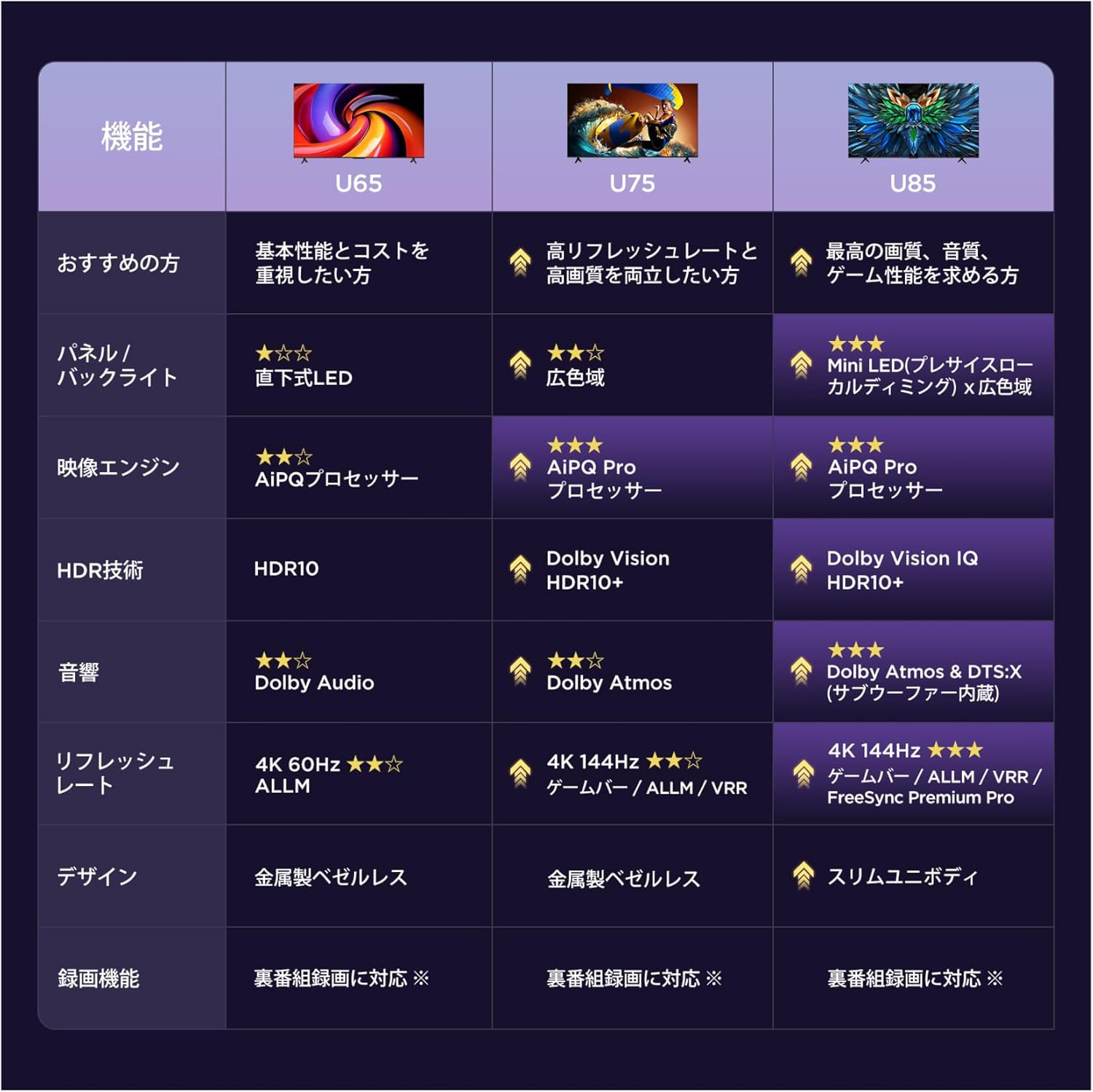
6. Ключові характеристики
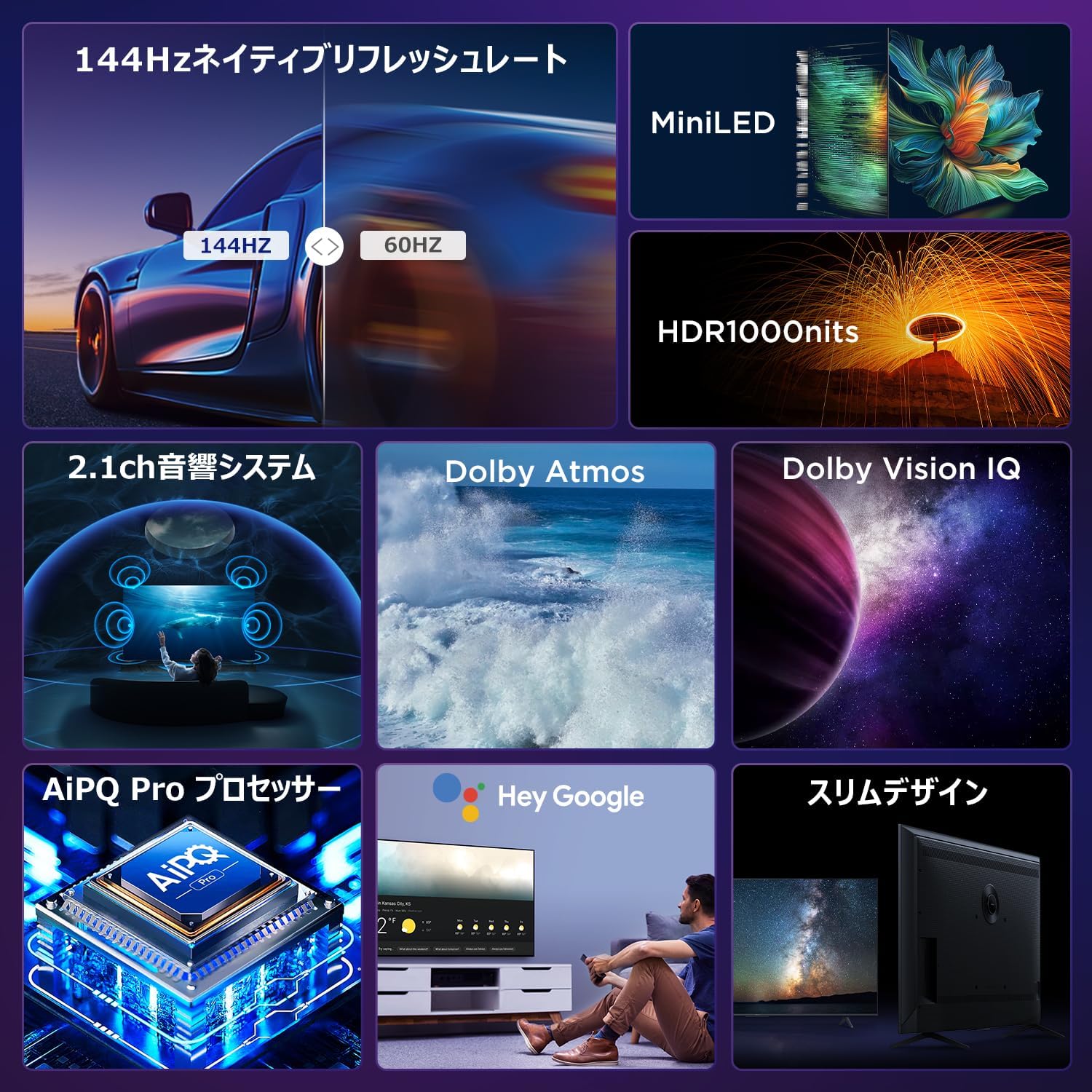
6.1 Display Technology: Mini LED & 4K HDR
Experience stunning visuals with Mini LED backlight technology, delivering 1000 nits peak brightness and enhanced contrast. Combined with 4K resolution, Dolby Vision IQ, and HDR10+, you get precise brightness, vibrant colors, and deep blacks.


6.2 Immersive Audio: Dolby Atmos & DTS Virtual:X
Enjoy a captivating audio experience with Dolby Atmos and DTS Virtual:X, delivering multi-dimensional sound that fills your room. The 2.1ch speaker system provides powerful bass and clear audio.


6.3 Gaming Features: 144Hz VRR & Game Master
Designed for gamers, the 65U85 offers a native 144Hz refresh rate, Variable Refresh Rate (VRR), Auto Low Latency Mode (ALLM), and FreeSync Premium Pro for smooth, tear-free gameplay.


6.4 Процесор AiPQ Pro
The AiPQ Pro processor intelligently optimizes color, contrast, and motion for every scene, delivering a visually stunning and immersive viewнабутий досвід.

6.5 Slim Metal Bezel-less Design
The TV features a sleek, metal bezel-less design that blends seamlessly into any living space, offering a premium aesthetic.

7. Технічні характеристики
| Особливість | опис |
|---|---|
| Розмір екрана | 65 дюймів |
| Тип дисплея | VA Panel, Mini LED |
| роздільна здатність | 4K (3840 x 2160) |
| Частота оновлення | 144 Гц (рідна) |
| Підтримка HDR | Dolby Vision IQ, HDR10+ |
| Аудіо | 2.1ch Speaker System, Dolby Atmos, DTS Virtual:X |
| Платформа Smart TV | Google TV |
| Голосовий помічник | Google Assistant |
| Підключення | 3x HDMI 2.1, 2x USB, Wi-Fi, Bluetooth |
| Розміри (Ш x Г x В) | 144.8 x 32.4 x 89.5 см (з підставкою) |
| вага | 19 кг |
| Сумісність VESA | так |

8. Вирішення проблем
Якщо у вас виникли проблеми з телевізором, зверніться до наступних поширених рішень:
- Немає живлення: Переконайтеся, що кабель живлення надійно підключений, а розетка справна.
- Немає зображення/звуку: Check all cable connections (HDMI, audio). Verify the correct input source is selected.
- Пульт не працює: Replace batteries. Re-pair the remote control as described in Section 4.3.
- Немає підключення до Інтернету: Перевірте маршрутизатор і модем. Знову підключіться до мережі Wi-Fi або переконайтеся, що кабель Ethernet підключено належним чином.
- Проблеми з якістю зображення: Adjust picture settings (brightness, contrast, color). Ensure content source is high quality.
У разі постійних проблем зверніться до служби підтримки клієнтів.
9. Технічне обслуговування
Proper maintenance ensures the longevity of your iFFALCON TV:
- Очищення екрану: Gently wipe the screen with a soft, dry, lint-free cloth. Do not use harsh chemicals or abrasive cleaners.
- Очищення Casing: Використовуйте м'який, damp cloth to wipe the TV casing.
- Вентиляція: Тримайте вентиляційні отвори чистими від пилу та перешкод.
- Вимкнення живлення: Від’єднуйте телевізор від розетки під час грози або якщо його залишають без нагляду протягом тривалого часу.
10. Гарантія та підтримка
Your iFFALCON 65U85 TV comes with a manufacturer's warranty. Please refer to the included warranty card for details on coverage, terms, and conditions.
For technical support, service inquiries, or further assistance, please visit the official iFFALCON website or contact their customer service hotline. Contact information can be found on the warranty card or the official product page.
11. Відео про продукти
11.1 Mini LED Quantum Dot 144Hz 65-inch TV
This video showcases the Mini LED and Quantum Dot display technology of the 65-inch iFFALCON TV, highlighting its 144Hz refresh rate for smooth visuals.


