1. Продукт закінчивсяview
The Nokia G310 5G Smartphone (Model TA-1573) offers lightning-fast 5G connectivity and modern mobile technology. It features a vibrant display for various tasks, a powerful processor for smooth performance, and an advanced camera system for detailed photos. Designed for daily use, it provides a comfortable grip and durable build quality. Enjoy extensive network compatibility, ample storage, a long-lasting battery with quick charging, and a user-friendly interface with regular software updates.
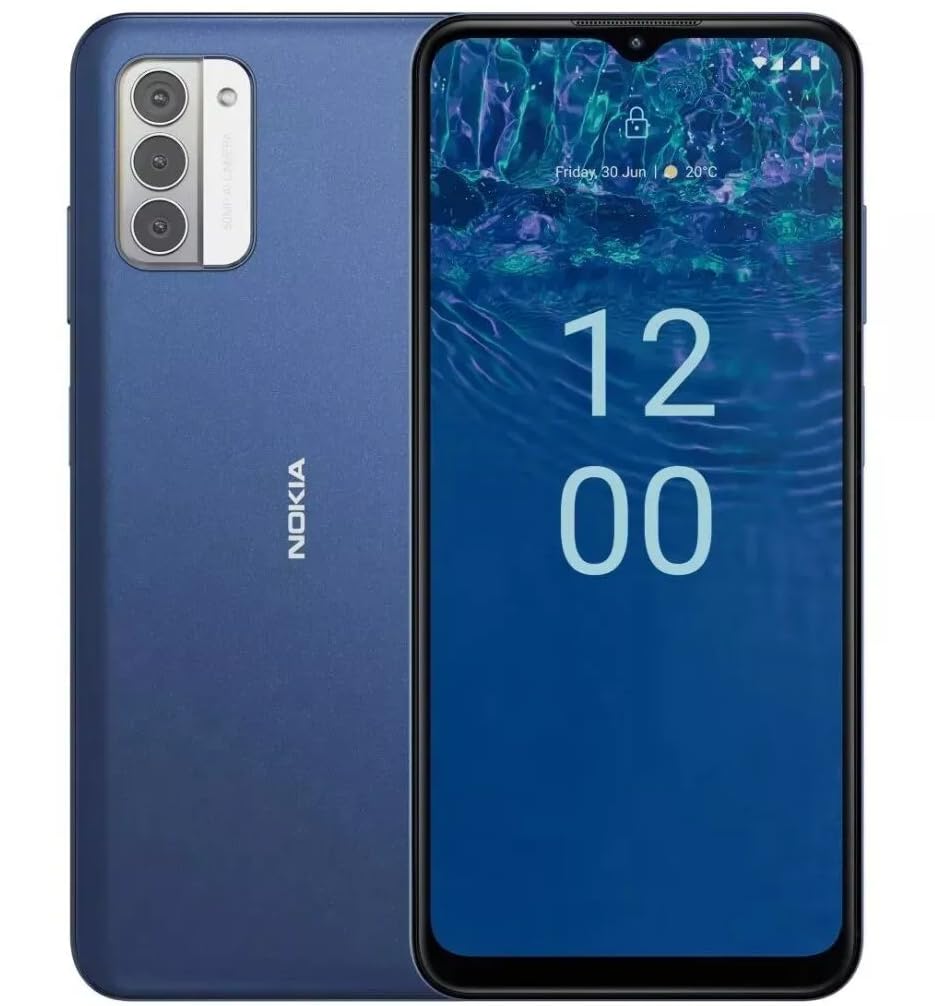
Зображення: Задня частина view of the Nokia G310 5G Smartphone, showcasing the triple camera module and Nokia branding.
Ключові характеристики
- Підключення 5G: Experience ultra-fast mobile data speeds and low latency.
- Яскравий дисплей: Large touchscreen display delivers vibrant colors and sharp visuals.
- Ефективна продуктивність: Processor handles everyday tasks smoothly, from browsing to gaming.
- Міцний дизайн: Sleek and modern smartphone design with durable construction.
2. Початок роботи
Що в коробці
- Смартфон Nokia G310 5G
- Зарядний пристрій
Встановлення SIM-картки та картки MicroSD
Locate the SIM/MicroSD card tray on the side of your device. Use the provided SIM ejector tool to open the tray. Insert your Nano-SIM card(s) and/or MicroSD card into the designated slots. Ensure the cards are correctly oriented. Gently push the tray back into the device until it clicks into place.
Увімкнення/вимкнення
To power on your Nokia G310, press and hold the Power/Fingerprint Sensor button located on the right side of the device until the Nokia logo appears. To power off, press and hold the Power/Fingerprint Sensor button, then select 'Power off' from the options that appear on the screen.
3. Схема пристрою
Physical Buttons and Ports
- Кнопки гучності: Located on the right side, above the Power/Fingerprint Sensor button, for adjusting media and call volume.
- Power/Fingerprint Sensor Button: Located on the right side, used for powering the device on/off, locking/unlocking the screen, and fingerprint authentication.
- Порт USB-C: Розташований внизу, використовується для заряджання та передачі даних.
- 3.5-мм аудіороз'єм: Розташований внизу, для підключення дротових навушників.
- Доповідач: Розташований внизу для виведення аудіо.
- Мікрофон: Інтегровано для дзвінків та голосових команд.
Модуль камери
The rear of the device features a multi-lens camera module, including a main camera, along with a flash for low-light photography. The front-facing camera is discreetly placed within a notch at the top of the display.
4. Інструкція з експлуатації
Основна навігація
The Nokia G310 operates on the Android operating system, offering an intuitive touchscreen interface. Swipe up from the bottom of the screen to access the app drawer, swipe down from the top for notifications and quick settings, and use gestures or navigation buttons (configurable in settings) to move between apps and screens.
Підключення
- Мобільні дані 5G: The device supports 5G connectivity for ultra-fast mobile data speeds. Ensure your SIM card and plan support 5G.
- Wi-Fi: Підключіться до бездротових мереж для доступу до Інтернету. Перейдіть до Налаштування > Мережа та Інтернет > Wi-Fi, щоб керувати з’єднаннями.
- Bluetooth: Pair with other Bluetooth-enabled devices like headphones or speakers. Go to Settings > Connected devices > Bluetooth.
- GPS: Utilize built-in GPS for location services and navigation.
5. Використання камери
The Nokia G310 features an advanced camera system designed to capture memorable moments. Access the camera app from your home screen or app drawer.
Фотографування
Open the Camera app, frame your shot, and tap the shutter button on the screen to take a picture. The advanced AI camera assists in optimizing settings for various scenes.
Запис відео
In the Camera app, switch to video mode, then tap the record button to start and stop recording. The phone supports various video resolutions.
Режими камери
Explore different camera modes available in the camera app, such as Portrait, Panorama, and Night mode, to enhance your photography experience.
6. Керування батареєю
Зарядка вашого пристрою
The Nokia G310 is equipped with a 5000 Milliamp Hours (5000.0 Battery Power Rating) battery. Connect the provided USB-C charger to the port at the bottom of the device. The phone supports quick charging for reduced downtime.
Оптимізація терміну служби батареї
- Налаштуйте яскравість екрана до комфортного рівня.
- Увімкніть режим економії заряду батареї, коли заряд батареї низький.
- Закрийте програми, які не використовуються у фоновому режимі.
- Вимикайте Wi-Fi, Bluetooth або GPS, коли вони не використовуються.
7. Технічні характеристики
| Номер моделі | TA-1573 |
| Операційна система | Android |
| Модель процесора | MediaTek Helio P60T |
| Стільникові технології | 5G |
| Бездротовий оператор | Розблоковано |
| Ємність пам'яті | 4 ГБ |
| роздільна здатність | 1080 х 2340 |
| Введення людського інтерфейсу | Сенсорний екран |
| Ємність акумулятора | 5000 міліamp години |
| Аудіороз'єм | 3.5 мм |
| Колір | Синій |
| Виробник | Nokia |
| Дата першої доступності | 31 січня 2025 р |
8. Вирішення проблем
If you encounter issues with your Nokia G310, try the following common troubleshooting steps:
- Пристрій не відповідає: Натисніть і утримуйте кнопку живлення приблизно 10-15 секунд, щоб примусово перезавантажити комп'ютер.
- Проблеми з підключенням: Toggle Wi-Fi or Bluetooth off and on. Restart your device. Check network settings.
- Додаток не працює: Очистіть кеш і дані програми в Налаштуваннях > Програми. Якщо проблема не зникає, видаліть і перевстановіть програму.
- Акумулятор швидко розряджається: Review battery usage in Settings > Battery to identify power-hungry apps. Adjust screen brightness and enable Battery Saver.
- Пам'ять заповнена: Видалити непотрібне files, photos, or apps. Transfer media to a computer or cloud storage. Consider using a MicroSD card for additional storage.
9. Технічне обслуговування та догляд
- Прибирання: Використовуйте м’яку тканину без ворсу для очищення пристрою. Уникайте агресивних хімікатів або абразивних матеріалів.
- Оновлення програмного забезпечення: Regularly check for and install software updates to ensure your device runs optimally and has the latest security features. Go to Settings > System > System update.
- Управління сховищем: Періодично переview your device's storage to free up space and maintain performance.
- Умови навколишнього середовища: Avoid exposing your device to extreme temperatures, direct sunlight, or excessive moisture.
10. Гарантія та підтримка
For warranty information, please refer to the warranty card included in your product packaging or visit the official Nokia support website. For further assistance, contact Nokia customer support.


