вступ
The STRONG Leap-UNA TV Streaming Stick is a compact and powerful device designed to transform your television into a smart TV, providing instant access to a vast array of streaming content. Powered by Android TV 11, it offers seamless 2K resolution streaming with Wi-Fi 5 connectivity. This manual provides detailed instructions for setting up, operating, and maintaining your Leap-UNA streaming stick to ensure an optimal entertainment experience.
Інформація про безпеку
- Перед використанням пристрою прочитайте всі інструкції.
- Не піддавайте пристрій впливу дощу, вологи або екстремальних температур.
- Забезпечте належну вентиляцію навколо пристрою, щоб запобігти перегріванню.
- Використовуйте лише адаптер живлення, що постачається разом із пристроєм.
- Не намагайтеся розбирати або ремонтувати пристрій самостійно. Звертайтеся до кваліфікованого персоналу для проведення будь-яких робіт з обслуговування.
- Тримайте пристрій подалі від прямих сонячних променів і джерел тепла.
Вміст упаковки
Будь ласка, перевірте наявність усіх предметів та їх належний стан:
- STRONG Leap-UNA 2K Android TV Streaming Stick
- Пульт дистанційного керування
- Power Adapter (or USB cable for power)
- HDMI Extender (if included)
- Посібник користувача (цей документ)
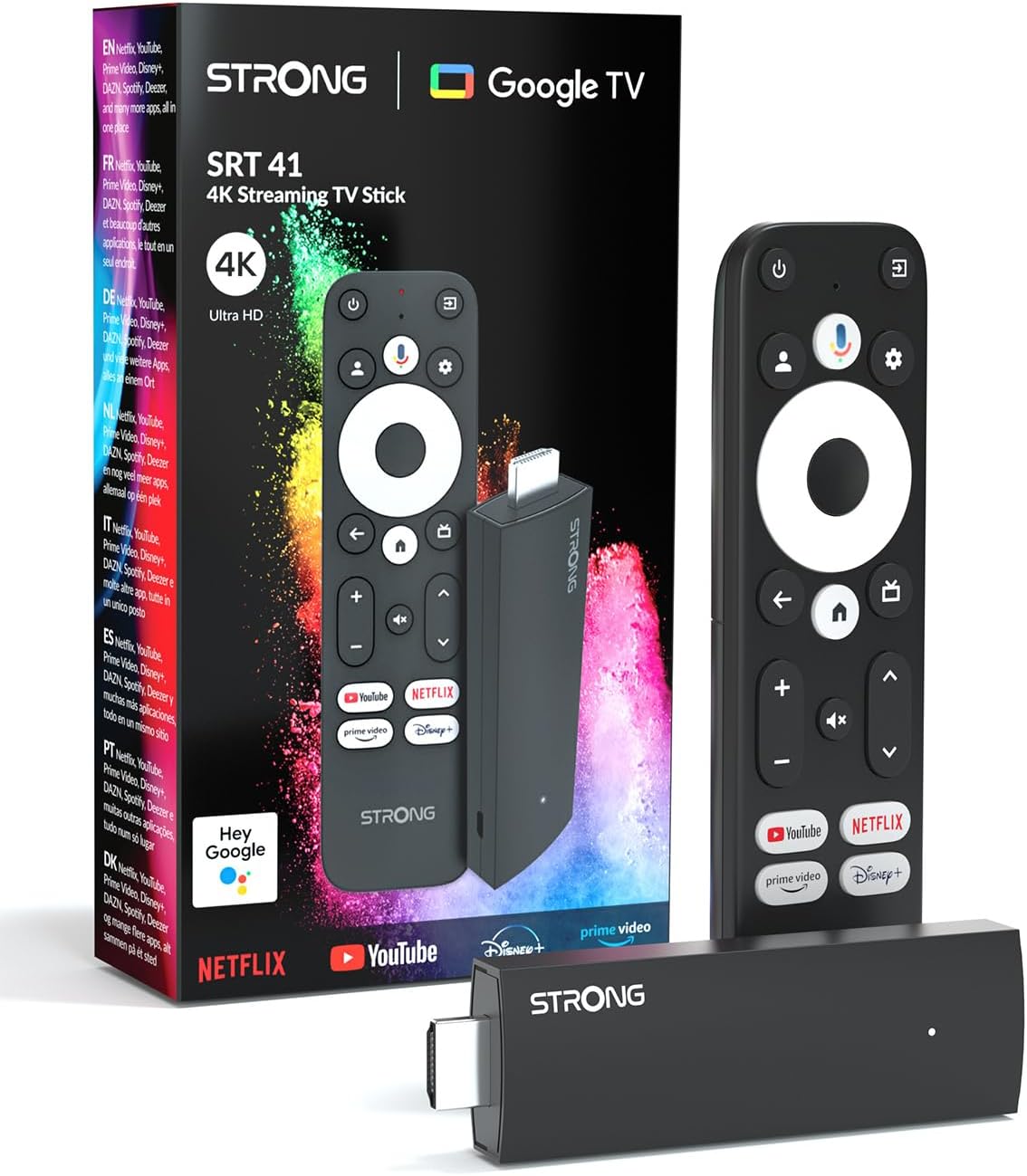
Image: The STRONG Leap-UNA streaming stick, its remote control, and the product packaging. This shows the main components included in the box.
Продукт закінченийview
The Leap-UNA stick is designed for ease of use and portability. It connects directly to your TV's HDMI port.
Компоненти пристрою:
- Streaming Stick: Compact device with an HDMI connector for TV and a Micro USB port for power.
- Пульт дистанційного керування: Features dedicated buttons for power, navigation, volume, Google Assistant, and quick access to popular streaming services like Netflix and YouTube.

Image: A close-up of the STRONG Leap-UNA streaming stick, highlighting its compact design and connectivity options including HDMI and Micro USB ports.
Налаштування
Follow these steps to set up your STRONG Leap-UNA streaming stick:
- Підключення до телевізора: Plug the STRONG Leap-UNA streaming stick directly into an available HDMI port on your television. If space is limited, use an HDMI extender (if provided).
- Увімкнення: Connect the power adapter to the Micro USB port on the streaming stick and then plug the adapter into a power outlet. The device will power on automatically.
- Виберіть вхід HDMI: Use your TV's remote control to select the correct HDMI input source to which the Leap-UNA stick is connected.
- Парний пульт дистанційного керування: Follow the on-screen instructions to pair your remote control. This usually involves pressing and holding specific buttons on the remote close to the stick.
- Підключіться до Wi-Fi: On the screen, select your Wi-Fi network from the list and enter the password. Ensure you have a stable internet connection for optimal streaming.
- Налаштування облікового запису Google: Sign in with your Google account. This is necessary to access the Google Play Store, Google Assistant, and other Google services. If you don't have one, you can create one.
- Встановити програми: After initial setup, you can download and install your favorite streaming applications like Netflix, Amazon Prime Video, YouTube, and Disney+ from the Google Play Store.

Image: Visual representation of the simple setup process: 1. Connect the stick to your TV. 2. Connect to your internet box (Wi-Fi). 3. Start streaming your content.
Інструкція з експлуатації
Використання пульта дистанційного керування:
The included remote control allows you to navigate the Android TV interface and control your streaming experience.
- Навігаційна панель: Use the circular pad to move through menus and select items.
- Кнопка Назад: Повернення до попереднього екрана.
- Кнопка "Додому: Повернення на головний екран Android TV.
- Кнопка Google Асистента: Натисніть, щоб активувати голосові команди.
- Кнопки гучності: Відрегулюйте гучність телевізора.
- Спеціальні кнопки програм: Quickly launch Netflix, YouTube, Prime Video, and Disney+ (if available).

Image: The remote control for the STRONG Leap-UNA, highlighting its dedicated app buttons and the wide range of applications available through Google Play.
Голосове керування за допомогою Google Assistant:
The integrated Google Assistant allows you to control your device and search for content using your voice. Press the Google Assistant button on your remote and speak your command. Exampвключають:
- «Відкрити Netflix»
- «Знайти бойовики»
- "Відтворити [Назва фільму]"
- "Яка погода?"

Image: The STRONG Leap-UNA remote control positioned in front of a TV screen, illustrating the use of Google Assistant for voice commands, such as "Avvia Netflix" (Start Netflix).
Вбудований Chromecast:
With Chromecast built-in, you can cast content directly from your smartphone, tablet, or computer to your TV. Simply open a compatible app on your mobile device and tap the Cast icon ▶ to send the content to your TV.

Image: A TV screen displaying content being cast via Google Cast, with a smartphone in the foreground demonstrating the casting functionality.
Технічне обслуговування
To ensure the longevity and optimal performance of your STRONG Leap-UNA streaming stick, follow these maintenance guidelines:
- Прибирання: Використовуйте м’яку суху тканину для очищення пристрою. Не використовуйте рідкі засоби для чищення або аерозолі.
- Вентиляція: Ensure the device is placed in a well-ventilated area and that its vents are not blocked.
- Оновлення програмного забезпечення: The device may receive automatic software updates. Ensure it is connected to the internet to receive these updates, which improve performance and add new features.
- Зберігання: Якщо пристрій не використовується протягом тривалого часу, зберігайте його в прохолодному, сухому місці.
Усунення несправностей
If you encounter issues with your STRONG Leap-UNA streaming stick, refer to the following common problems and solutions:
| проблема | Можлива причина | Рішення |
|---|---|---|
| Немає живлення/Пристрій не вмикається | Неправильно підключений кабель живлення; несправний адаптер живлення; проблема з розеткою. | Check all power connections. Try a different power outlet. Ensure the power adapter is working. |
| Немає зображення на телевізорі | Incorrect HDMI input selected; Loose HDMI connection; TV compatibility issue. | Ensure your TV is on the correct HDMI input. Reconnect the HDMI cable. Try a different HDMI port on your TV. |
| Пульт дистанційного керування не відповідає | Batteries are low or dead; Remote not paired; Obstruction between remote and stick. | Replace batteries. Re-pair the remote control (refer to Setup section). Ensure no obstructions. |
| Буферизація або низька якість потокового передавання | Weak Wi-Fi signal; Internet speed issues; Network congestion. | Move the stick closer to your Wi-Fi router. Restart your router. Check your internet speed. Reduce other network activity. |
| Збої або зависання програм | App error; Insufficient memory; Software glitch. | Restart the app. Clear the app's cache (Settings > Apps > [App Name] > Clear cache). Restart the streaming stick. |
Технічні характеристики
| Особливість | Деталь |
|---|---|
| Бренд | Сильний |
| Назва моделі | Leap-UNA |
| Операційна система | Android TV 11 |
| роздільна здатність | 2K |
| Технологія підключення | Bluetooth, HDMI, IR, Wi-Fi (Wi-Fi 5) |
| Підтримувані Інтернет-послуги | Netflix, Amazon Prime Video, Disney+, YouTube |
| Розмір оперативної пам'яті | 1 ГБ |
| Розміри | 9 Д x 3 Ш x 1.5 В сантиметрів |
| Сумісні пристрої | TV, smartphone, tablet, personal computer, laptop |
| Колір | чорний |
Гарантія та підтримка
STRONG products are designed for reliability and performance. For warranty information and technical support, please refer to the warranty card included with your product or visit the official STRONG website. You can also contact customer support through the details provided on the packaging or website for assistance with any issues not covered in this manual.
Щоб отримати найновішу інформацію та підтримку, відвідайте: www.strong.tv


