Важлива інформація з безпеки
Please read all instructions carefully before using this monitor. Keep this manual for future reference.
- Не піддавайте монітор впливу дощу або вологи, щоб уникнути небезпеки пожежі чи ураження електричним струмом.
- Не відкривайте монітор casing. Усередині немає деталей, які може обслуговувати користувач. Звертайтеся до кваліфікованого персоналу з будь-яким обслуговуванням.
- Забезпечте належну вентиляцію навколо монітора. Не блокуйте вентиляційні отвори.
- Використовуйте лише адаптер живлення та кабелі, надані виробником.
- Від’єднайте штекер живлення від розетки, якщо монітор не використовуватиметься протягом тривалого часу.
Вміст упаковки
Перевірте наявність усіх предметів у вашій упаковці:
- GIGABYTE MO32U Monitor
- Силовий кабель
- Кабель HDMI 2.1
- DP cable (DisplayPort cable)
- USB cable (USB Type-A to Type-B upstream cable)
- Короткий посібник користувача / Посібник користувача (цей документ)
Налаштування
1. Монтаж стенда
Carefully remove the monitor and stand components from the packaging. Attach the stand neck to the monitor panel, ensuring it clicks securely into place. Then, attach the base to the stand neck and tighten the screws if necessary. The stand allows for height adjustment (up to 130mm) and tilt (-5° to +21°).
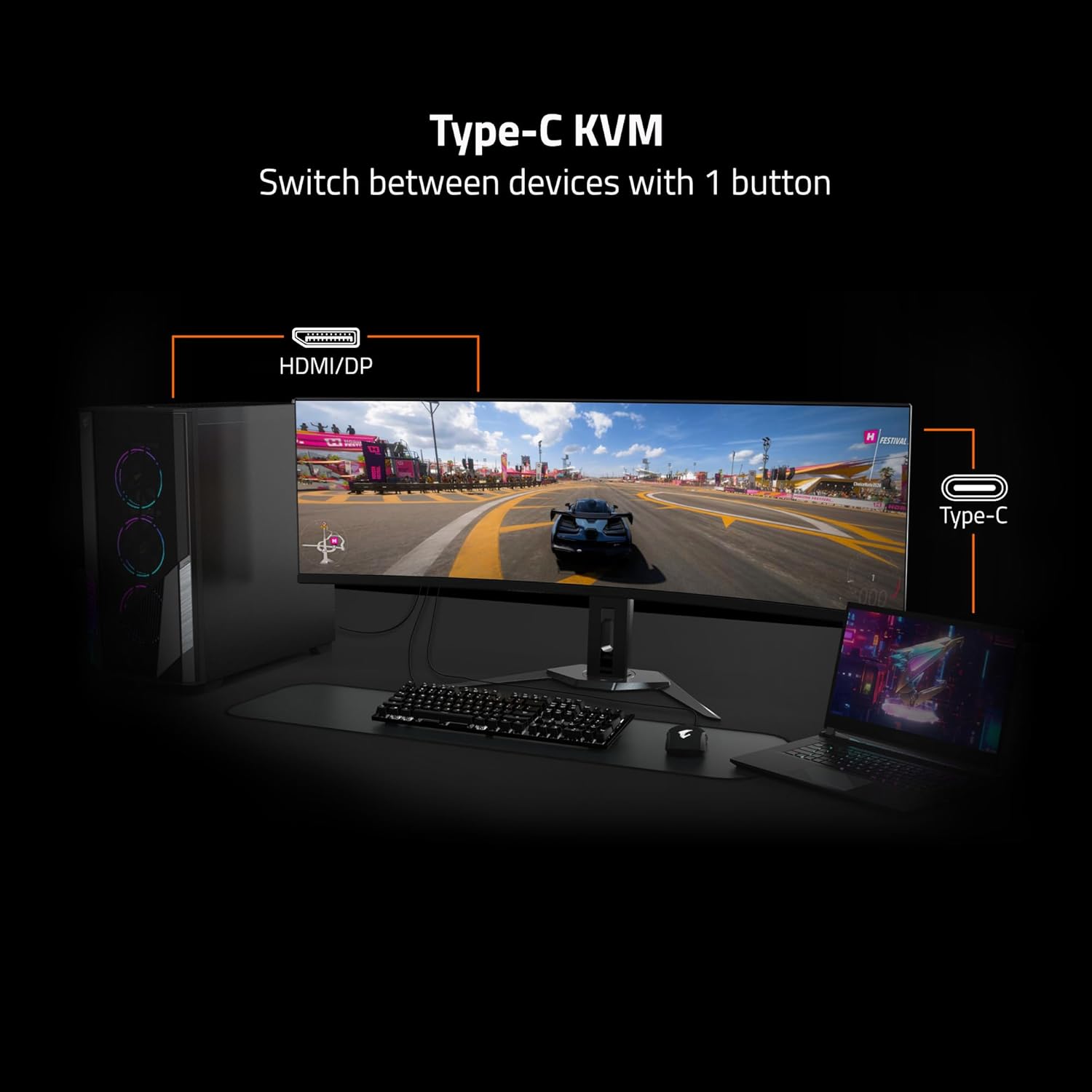
Image: Adjustable Stand and VESA Wall Mount points.
2. VESA Wall Mount Installation
The monitor supports VESA 100x100mm mounting. If using a VESA compatible wall mount or arm, remove the stand from the monitor. Secure the VESA mount to the monitor using appropriate screws (not included) according to the mount manufacturer's instructions. Refer to the image above for VESA mount point location.
3. Підключення монітора
Connect the necessary cables to the corresponding ports on the back of the monitor and to your computer or other devices. Ensure all connections are secure.
- Потужність: Підключіть кабель живлення до монітора та розетки.
- Відео вхід: Use the provided HDMI 2.1 or DisplayPort 1.4 cables to connect to your graphics card. The monitor also supports USB Type-C for video input.
- USB вгору: Connect the USB upstream cable (USB Type-A to Type-B) from your computer to the monitor's USB 3.0 Upstream port to enable the monitor's USB downstream ports and KVM functionality.
- USB Downstream: Connect USB devices (keyboard, mouse, USB drives) to the USB 3.0 Downstream ports.
- Роз'єм для навушників: Підключіть навушники або зовнішні динаміки.

Image: I/O Ports diagram on the back of the monitor.
Керування монітором
1. Увімкнення/вимкнення живлення
Натисніть кнопку живлення, яка зазвичай розташована на задній або нижній панелі монітора, щоб увімкнути або вимкнути монітор. Індикатор живлення світитиметься, коли монітор увімкнено.
3. Функціональність KVM
The GIGABYTE MO32U features a built-in KVM (Keyboard, Video, Mouse) switch, allowing you to control multiple devices (e.g., a desktop PC and a laptop) with a single set of keyboard and mouse connected to the monitor. To use KVM, ensure both devices are connected to the monitor via video inputs (HDMI/DP and Type-C) and the USB upstream cable is connected to the primary device. You can switch between devices using a dedicated KVM button or through the OSD menu.

Image: Type-C KVM setup for switching between devices.
4. Налаштування та функції дисплея
The MO32U monitor offers advanced display features for an optimized viewдосвід роботи:
- Роздільна здатність і частота оновлення: Enjoy a 4K UHD (3840x2160) resolution with a 165Hz refresh rate for smooth visuals.
- Час відгуку: Experience ultra-fast 0.03ms GTG (Gray-to-Gray) response time, minimizing motion blur.
- AMD FreeSync Premium Pro: Синхронізує частоту оновлення монітора з частотою кадрів вашого графічного процесора, щоб усунути розриви та заїкання екрана.
- QD-OLED Panel: Delivers vibrant colors, deep blacks, and high contrast (1.5M:1) with 99% DCI-P3 color gamut and 10-bit color depth.
- VESA DisplayHDR True Black 400: Provides enhanced contrast and color accuracy for HDR content.
- VESA ClearMR 9000: Ensures high motion clarity.
- Функції догляду за очима: Includes Flicker-Free and Low Blue Light technologies, certified by Eyesafe, to reduce eye strain during prolonged use.

Image: Key display features and certifications.

Image: Visual comparison of 0.03ms/165Hz performance versus 5ms/60Hz.
5. GIGABYTE OLED Care
The monitor incorporates GIGABYTE OLED Care, an AI-based algorithm designed to minimize the risk of OLED burn-in issues. This suite of technologies operates in the background with minimal user interference. OLED Care includes various adjustable settings within the OSD menu to help protect the panel and extend its lifespan.
Технічне обслуговування
Правильне обслуговування забезпечує довговічність та оптимальну роботу вашого монітора.
- Очищення екрану: Обережно протріть екран м’якою тканиною без ворсу. Для стійких плям злегка протрітьampПротріть тканину водою або неабразивним засобом для чищення екранів. Не розпилюйте рідину безпосередньо на екран.
- Очищення Casing: Використовуйте м’яку суху тканину для протирання монітора casing. Уникайте використання сильних мийних засобів або абразивних засобів для чищення.
- Догляд за OLED-екраном: Allow the monitor to perform its automatic OLED Care functions. Avoid prolonged display of static images at high brightness settings.
Усунення несправностей
Якщо у вас виникли проблеми з монітором, зверніться до наступних поширених рішень:
- Немає живлення: Переконайтеся, що кабель живлення надійно підключено як до монітора, так і до справної розетки. Перевірте, чи світиться індикатор живлення.
- Немає сигналу: Verify that the video cables (HDMI, DisplayPort, USB-C) are correctly connected to both the monitor and your source device. Ensure the correct input source is selected in the monitor's OSD menu.
- Мерехтіння або спотворене зображення: Check cable connections. Ensure your graphics card drivers are up to date. Try adjusting the refresh rate in your operating system's display settings.
- Залишкове зображення/вигоряння: While OLED Care minimizes this risk, prolonged static images can contribute. Utilize OLED Care features and avoid displaying static content for extended periods.
- KVM не перемикається: Ensure the USB upstream cable is connected to the active source device and that the KVM function is properly configured in the OSD menu.
If the problem persists after trying these steps, contact GIGABYTE customer support.
Технічні характеристики
| Особливість | Деталь |
|---|---|
| Бренд | GIGABYTE |
| Номер моделі | МО32У |
| Розмір екрана | 32 дюймів |
| Тип дисплея | QD OLED |
| роздільна здатність | 4K UHD (3840 x 2160) |
| Частота оновлення | 165 Гц |
| Час відгуку | 0.03 Milliseconds GTG |
| Співвідношення сторін | 16:9 |
| Коефіцієнт контрастності | 1.5M:1 |
| Яскравість | 1000 Candela per Square Meter (Peak) |
| Колірна гамма | 99% DCI-P3 |
| Viewкут нахилу | 178 градусів |
| Підключення | 2x HDMI 2.1, 1x DisplayPort 1.4, 1x USB Type-C, 1x USB 3.0 Upstream, 3x USB 3.0 Downstream, 1x Earphone Jack |
| Адаптивна синхронізація | AMD FreeSync Premium Pro |
| Підтримка HDR | VESA DisplayHDR True Black 400 |
| KVM | Так, KVM Type-C |
| Тип монтажу | VESA 100x100mm, Height Adjustable Stand |
| Споживана потужність | 54 Вт |
| Колір | чорний |
Інформація про гарантію
This GIGABYTE MO32U monitor comes with a 3 роки гарантії виробника. For detailed terms and conditions, please refer to the warranty card included in your product packaging or visit the official GIGABYTE webсайт.
Підтримка
For technical assistance, troubleshooting beyond this manual, or warranty claims, please contact GIGABYTE customer support. You can find contact information and additional resources on the official GIGABYTE webсайт.
Інтернет-ресурси: Visit the GIGABYTE support page for drivers, FAQs, and further documentation.


