Majority Darwin Bluetooth Alarm Clock with 10W Wireless Charging
Model: Darwin | Brand: Majority
вступ
This manual provides detailed instructions for the operation and maintenance of your Majority Darwin Bluetooth Alarm Clock. This device integrates an FM radio, dual alarm clock, 10W wireless charging, and ambient lighting to enhance your bedside experience.
Інформація про безпеку
- Перед використанням уважно прочитайте всі інструкції.
- Тримайте пристрій подалі від води та вологи.
- Не піддавайте екстремальним температурам.
- Не намагайтеся розбирати або ремонтувати пристрій самостійно. Зверніться до кваліфікованого сервісного персоналу.
- Забезпечте належну вентиляцію під час використання функції бездротової зарядки.
Вміст упаковки
Перевірте наявність усіх елементів у коробці:
- Majority Darwin Bedside Clock
- Адаптер живлення від мережі
- Посібник користувача

Image: Package contents of the Majority Darwin alarm clock, including the clock, power adapter, and user manual.
Продукт закінченийview
Familiarize yourself with the main components and control buttons of your Darwin alarm clock.
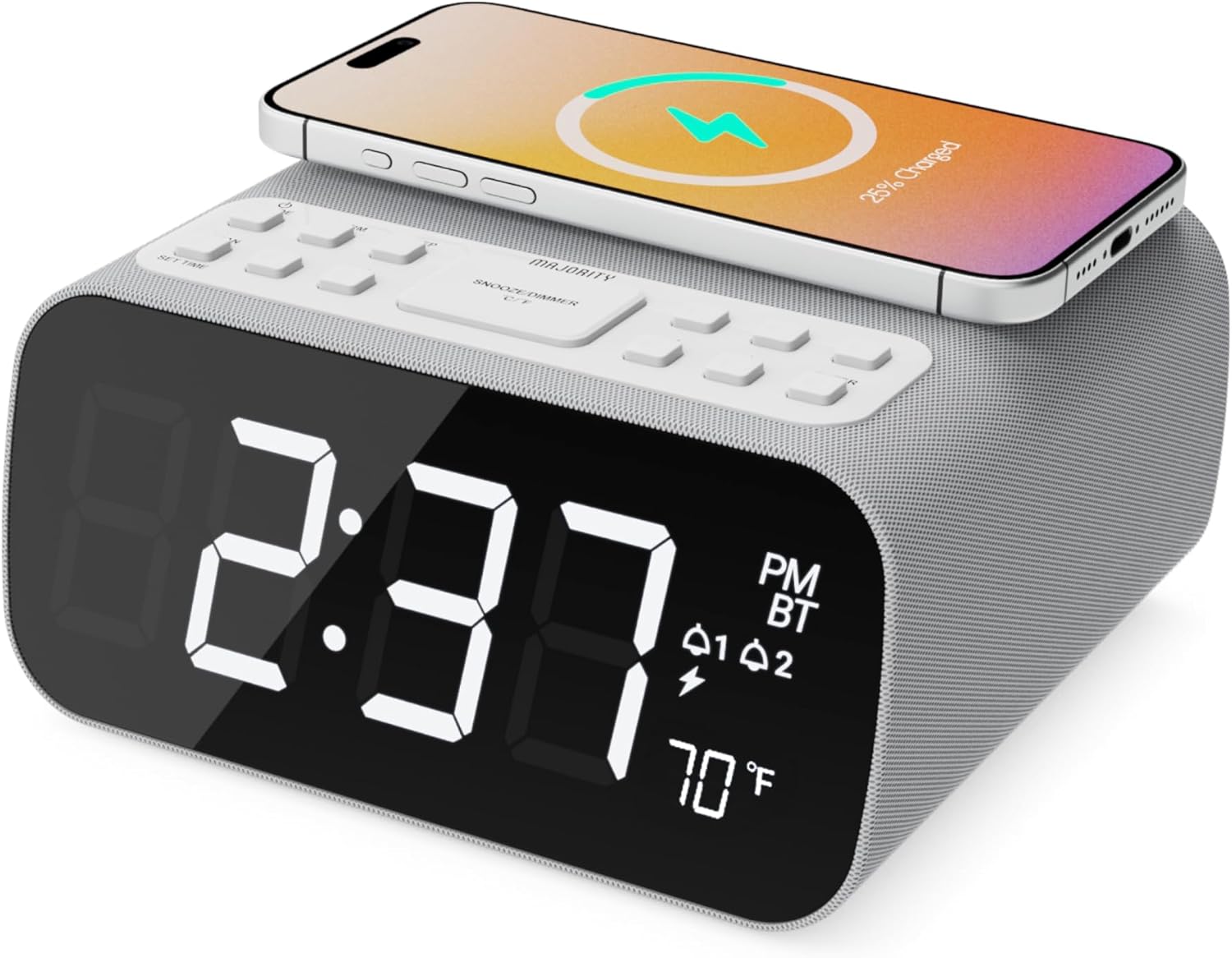
Зображення: спереду view of the Majority Darwin alarm clock showing the large digital display, wireless charging pad on top, and control buttons.

Зображення: Збоку view of the Majority Darwin alarm clock highlighting the control panel with buttons for time, alarm, volume, and light settings.
Елементи керування на верхній панелі
- Бездротова зарядна панель: Place compatible devices here for 10W wireless charging.
- Кнопка відкладення/світла: Short press to snooze alarm; long press to adjust display brightness or cycle through ambient light colors.
- Time/Date Set Button: Press to enter time/date setting mode.
- Кнопки будильника 1/2: Press to activate/deactivate Alarm 1 or Alarm 2. Long press to set alarm time.
- Volume/Tune Buttons: Adjust volume or tune FM radio stations.
- Кнопка режиму: Switch between FM Radio, Bluetooth, and White Noise modes.
Rear Panel Controls & Ports
- Вхід DC 12V: Connect the mains power adapter here.
- Порт заряджання USB: For charging additional devices via USB cable.
- Батарейний відсік: For backup batteries (not for primary power).
- Display Dimmer Slider: Manually adjust the brightness of the main time display.
- Night Light Dimmer: Adjust brightness of the ambient light.
Налаштування
Підключення живлення
Connect the provided mains power adapter to the DC 12V input port on the rear of the alarm clock and plug it into a wall outlet. The display will light up.
For battery backup, open the battery compartment on the bottom and insert 2 x AAA batteries (not included). This will retain time settings during a power outagе, але не живитиме дисплей або не забезпечить функції заряджання.
Зображення: Задня частина view of the Majority Darwin alarm clock with the power adapter connected to the DC 12V input.
Початкове налаштування часу
- Тривале натискання Налаштування часу/дати button on the top panel. The hour digits will start flashing.
- Використовуйте Volume/Tune кнопки для налаштування години.
- Натисніть Налаштування часу/дати знову натисніть кнопку, щоб підтвердити години та перейти до налаштування хвилин.
- Використовуйте Volume/Tune кнопки для налаштування хвилин.
- Repeat this process for setting the year, month, and day.
- Натисніть Налаштування часу/дати натисніть кнопку востаннє, щоб зберегти всі налаштування.
Інструкція з експлуатації
Time Display & Dimmer
Великий світлодіодний дисплей показує поточний час.
Ручне затемнення: Використовуйте Display Dimmer Slider on the rear panel to manually adjust the brightness of the time display.
Автоматичне затемнення: The device features an auto-dimming function that adjusts display brightness at fixed time intervals (e.g., dimming at night, brightening during the day).

Зображення: спереду view of the Majority Darwin alarm clock displaying time, AM/PM, and temperature, highlighting the dual alarm icons.
Налаштування будильника
The Darwin alarm clock supports two independent alarms (Alarm 1 and Alarm 2).
- Long press either the Сигналізація 1 or Сигналізація 2 button. The hour digits for that alarm will flash.
- Використовуйте Volume/Tune кнопки, щоб встановити потрібну годину будильника.
- Натисніть відповідний сигналізація знову натисніть кнопку, щоб підтвердити години та перейти до налаштування хвилин.
- Використовуйте Volume/Tune кнопки для встановлення потрібних хвилин будильника.
- Натисніть сигналізація button again to select the alarm source (FM radio or built-in tone). Use Volume/Tune кнопки для вибору.
- Натисніть сигналізація button again to set the alarm volume.
- Натисніть сигналізація button one last time to activate the alarm. An alarm icon will appear on the display.
Deactivating an Alarm: Short press the corresponding Сигналізація 1 or Сигналізація 2 button to turn it off. The alarm icon will disappear.
Функція відкладення
Коли лунає будильник, коротко натисніть Відкладення/світло button on the top panel to temporarily silence the alarm for 9 minutes. The alarm will sound again after the snooze period.
Робота FM-радіо
- Натисніть Режим кнопку, доки на дисплеї не з’явиться напис «FM».
- Використовуйте Volume/Tune buttons to manually tune to your desired FM station.
- Auto Scan & Store Presets: Тривале натискання Режим кнопку для автоматичного сканування та збереження доступних FM-станцій як попередньо налаштованих станцій.
- Коротко натисніть кнопку Режим кнопку для перемикання між збереженими пресетами.
Bluetooth Pairing & Playback
- Натисніть Режим button until "BT" appears on the display and the Bluetooth indicator starts flashing.
- On your smartphone or other Bluetooth device, enable Bluetooth and search for "Majority Darwin".
- Select the device to pair. Once connected, the Bluetooth indicator on the alarm clock will stop flashing.
- Тепер ви можете відтворювати аудіо зі свого пристрою через динамік будильника. Використовуйте Volume/Tune buttons on the alarm clock or your device to adjust volume.

Image: A smartphone displaying music playback, connected via Bluetooth to the Majority Darwin alarm clock.
Бездротова зарядка
The top surface of the alarm clock features a 10W wireless charging pad.
- Place your Qi-compatible smartphone directly onto the wireless charging pad.
- Ensure the phone is centered on the charging symbol for optimal charging.
- A charging indicator (e.g., a lightning bolt icon) may appear on your phone's screen or the alarm clock's display to confirm charging.
Порт заряджання USB: An additional USB port on the rear allows you to charge other devices using a USB cable.
Image: The Majority Darwin alarm clock with a smartphone placed on top, indicating active wireless charging.
Night Light / Ambient Light
The alarm clock features an ambient light ring around its base.
- Тривале натискання Відкладення/світло button to turn the ambient light on/off.
- Коротко натисніть кнопку Відкладення/світло button to cycle through different color modes (e.g., red, green, blue, purple, white, color cycle).
- Використовуйте Диммер нічного світла on the rear panel to adjust the brightness of the ambient light.

Image: The Majority Darwin alarm clock illuminated with a vibrant ambient light from its base.
Функція білого шуму
The device includes various white noise sounds to aid relaxation and sleep.
- Натисніть Режим button until the white noise mode is activated (indicated by a specific icon or text on the display).
- Використовуйте Volume/Tune buttons to adjust the volume of the white noise.
- Коротко натисніть кнопку Режим button again to cycle through different white noise sounds (e.g., nature sounds, fan noise).
Технічне обслуговування
- Протирайте пристрій м’якою сухою тканиною. Не використовуйте абразивні засоби для чищення або розчинники.
- Тримайте вентиляційні отвори чистими.
- If not in use for an extended period, disconnect from power and remove backup batteries.
Усунення несправностей
Немає живлення / Дисплей вимкнено
- Переконайтеся, що адаптер живлення надійно підключено як до пристрою, так і до справної розетки.
- Перевірте, чи справна розетка.
Бездротова зарядка не працює
- Переконайтеся, що ваш пристрій сумісний з Qi.
- Make sure your phone is centered on the charging pad.
- Remove any thick phone cases or metallic objects between the phone and the charging pad.
Проблеми зі сполученням Bluetooth
- Ensure the alarm clock is in Bluetooth pairing mode (BT flashing).
- Make sure your device's Bluetooth is enabled and searching.
- Спробуйте розірвати пару та знову підключити пристрій.
- Ensure no other devices are currently connected to the alarm clock via Bluetooth.
Сигналізація не звучить
- Перевірте, чи активовано сигнал тривоги (на дисплеї видно значок сигналу тривоги).
- Перевірте налаштування гучності будильника.
- Ensure the correct alarm time is set.
Технічні характеристики
| Особливість | Деталь |
|---|---|
| Бренд | більшість |
| Назва моделі | Дарвін |
| Бездротовий зарядний вихід | 10 Вт |
| Вихідна потужність динаміка | 12 Вт |
| Технологія підключення | Bluetooth |
| Джерело живлення | Mains Power (Battery Backup) |
| Розміри продукту | 13.07 x 8.22 x 6.09 дюймів |
| Вага товару | 1.42 фунта (645 грам) |
| Особливості | Adjustable Volume, Dual Alarm, Bluetooth, Wireless Charging, FM Radio, Dimmable Display, Ambient Night Light, White Noise |
Гарантія та підтримка
The Majority Darwin Bluetooth Alarm Clock comes with a standard manufacturer's warranty. Please refer to the warranty card included in your package for specific terms and conditions.
For technical support, troubleshooting, or warranty claims, please visit the official Majority webсайту або зв’яжіться з їхньою службою обслуговування клієнтів.
Online resources and FAQs may also be available on the product support page.


