1. Вступ
Thank you for choosing the Bennett Read Alphabot Ultra Robotic Vacuum. This cutting-edge cleaning solution combines powerful performance with smart functionality, designed to handle sweeping, vacuuming, and wet-mopping. Equipped with advanced laser navigation and anti-fall sensors, it ensures precise tracking and smooth obstacle avoidance. This manual provides essential information for the safe and efficient operation, maintenance, and troubleshooting of your device.
Будь ласка, уважно прочитайте цей посібник перед використанням виробу та збережіть його для подальшого використання.
2. Техніка безпеки
Щоб зменшити ризик травмування або пошкодження, дотримуйтесь наступних запобіжних заходів безпеки:
- Цим пристроєм можуть користуватися діти віком від 8 років і особи з обмеженими фізичними, сенсорними чи розумовими здібностями або з недостатнім досвідом і знаннями, якщо вони перебувають під наглядом або отримали інструкції щодо безпечного користування пристроєм і розуміють небезпеку, пов’язану з цим. .
- Діти не повинні гратися з пристроєм. Чищення та технічне обслуговування не повинні виконуватися дітьми без нагляду.
- Використовуйте лише оригінальний адаптер живлення, наданий виробником.
- Do not use the product in environments with open flames or fragile objects.
- Do not use the product to clean liquids, burning objects, or sharp objects.
- Переконайтеся, що зарядна док-станція розміщена на рівній поверхні біля стіни, забезпечивши навколо неї вільний простір.
- Тримайте волосся, вільний одяг, пальці та всі частини тіла подалі від отворів і рухомих частин.
- Від’єднайте прилад від мережі перед чищенням або обслуговуванням.
3. Вміст упаковки
Перевірте наявність усіх компонентів в упаковці:
- 1 x Bennett Read Alphabot Ultra Robotic Vacuum with Sweep and Wet-Mop
- Док-станція для зарядки
- Адаптер живлення
- Бічні щітки
- Інструмент для очищення
- Посібник користувача
4. Продукт закінчивсяview
Familiarize yourself with the main components of your Alphabot Ultra Robotic Vacuum.

Зображення 4.1: Топ view of the Bennett Read Alphabot Ultra Robotic Vacuum, showing its sleek black design and control indicators.
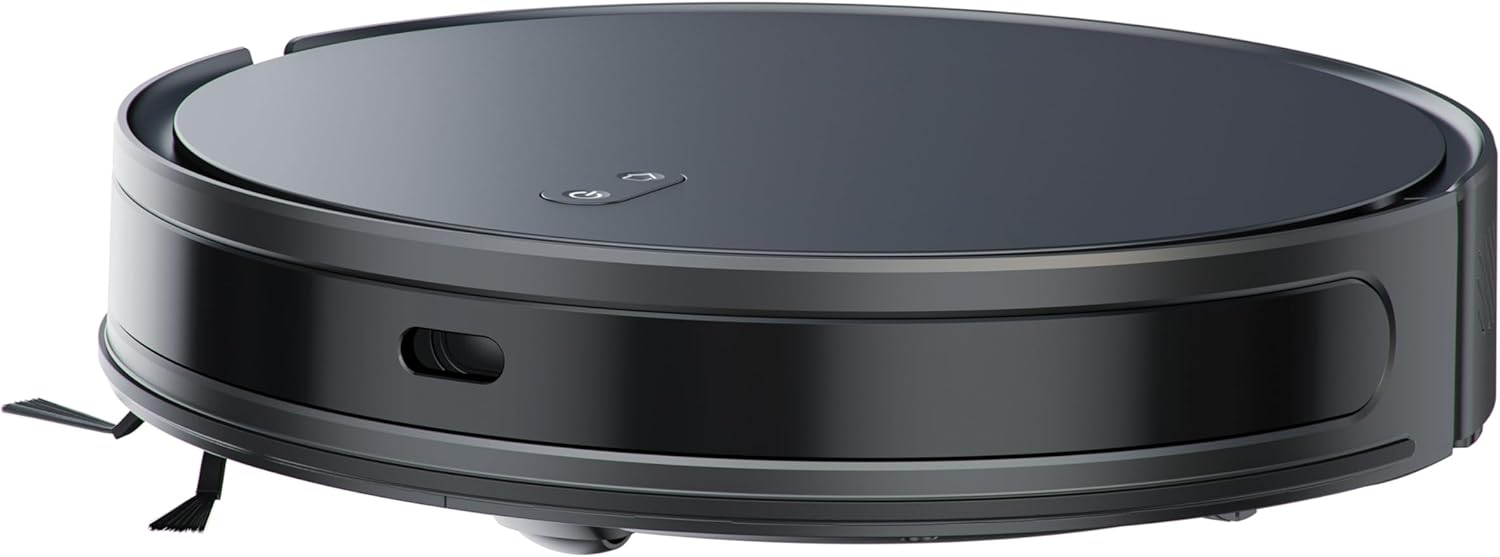
Зображення 4.2: сторона view of the Alphabot Ultra, highlighting its low profile і бічні щітки.

Зображення 4.3: Diagram illustrating the powerful suction path and internal components of the Alphabot Ultra.

Зображення 4.4: Нижня сторона view of the Alphabot Ultra, showing the main brush, side brushes, and mopping pad attachment.
5. Налаштування
5.1 Розпакування
- Remove the robotic vacuum and all accessories from the packaging.
- Remove any protective films or stickers from the device and charging dock.
5.2 Розміщення зарядної док-станції
- Place the charging dock on a hard, level surface against a wall.
- Ensure there is at least 1 meter (3 feet) of clear space on both sides of the dock and 2 meters (6 feet) in front of it for optimal navigation.
- Підключіть адаптер живлення до зарядної док-станції та вставте його в розетку.

Зображення 5.1: The Alphabot Ultra robotic vacuum docked at its self-charging station, illustrating the automatic charging feature.
5.3 Початкова плата
- Place the robotic vacuum onto the charging dock, ensuring the charging contacts align.
- Allow the vacuum to charge completely before its first use. The indicator lights will show charging status. A full charge can take several hours.
5.4 App Connection (Smart Life App)
- Download the 'Smart Life' app from your mobile device's app store.
- Зареєструйтесь або увійдіть до свого облікового запису Smart Life.
- Follow the in-app instructions to add your Bennett Read Alphabot Ultra. Ensure your Wi-Fi network is 2.4GHz, as 5GHz networks are not supported.
- The app allows for scheduling, mapping, and customization of cleaning preferences.

Зображення 5.2: Screenshot of the Smart Life app interface, demonstrating cleaning preference settings for water volume and suction.
6. Інструкція з експлуатації
6.1 Увімкнення/вимкнення живлення
- To power on, press and hold the power button on the vacuum or use the app.
- To power off, press and hold the power button until the indicators turn off, or use the app.
6.2 Режими очищення
The Alphabot Ultra supports multiple cleaning modes:
- Підмітання та пилососіння: Utilizes the side brushes, main brush, and 5000Pa suction power for dry debris removal.
- Wet-Mop: For light wet cleaning of hard floors. Ensure the water tank is filled and the mopping pad is attached.
- Комбінований режим: Sweeps, vacuums, and mops simultaneously for comprehensive cleaning.
6.3 Планування
Use the Smart Life app to set up cleaning schedules. You can customize cleaning times, days, and specific areas for the vacuum to clean automatically.
6.4 Навігація та датчики
The Alphabot Ultra uses advanced laser navigation for precise mapping and efficient cleaning paths. Anti-fall sensors prevent the vacuum from falling down stairs or ledges, while anti-collision sensors help it avoid obstacles.

Зображення 6.1: The Alphabot Ultra demonstrating its anti-fall sensors, preventing it from falling down stairs or ledges.
7. Технічне обслуговування
Регулярне технічне обслуговування забезпечує оптимальну продуктивність та подовжує термін служби вашого робота-пилососа.
7.1 Очищення пилозбірника та фільтра
- Натисніть кнопку вивільнення смітника та вийміть смітник.
- Open the dustbin cover and empty its contents into a waste bin.
- Remove the filter assembly and tap it gently to dislodge dust. Do not wash the HEPA filter with water.
- За потреби промийте пилозбірник водою, переконавшись, що він повністю висох, перш ніж встановлювати його знову.
- Reassemble the filter and dustbin, then reinsert into the vacuum.
7.2 Очищення щіток
- Основна щітка: Remove the main brush cover and lift out the brush. Use the provided cleaning tool to cut and remove any tangled hair or debris.
- Бічні щітки: Gently pull the side brushes to remove them. Clean off any hair or debris. If brushes are damaged, replace them.
7.3 Догляд за шваброю
- After each mopping session, remove the mopping pad from the water tank.
- Wash the mopping pad with water and mild detergent.
- Allow the mopping pad to air dry completely before reattaching or storing.

Зображення 7.1: The Alphabot Ultra with its 2-in-1 tank, designed for both sweeping/vacuuming and wet-mopping functionalities.
7.4 Очищення датчика
- Periodically wipe the cliff sensors, wall sensors, and charging contacts with a clean, dry cloth to ensure proper function.
8. Вирішення проблем
If you encounter issues with your Alphabot Ultra, refer to the following common problems and solutions:
| проблема | Можлива причина | Рішення |
|---|---|---|
| Пилосос не включається | Низький заряд батареї; кнопка живлення натиснута неправильно | Charge the vacuum; Press and hold the power button for a few seconds. |
| Пилосос не заряджається | Забруднені контакти зарядки; зарядна док-станція не живиться | Clean charging contacts on both vacuum and dock; Ensure dock is plugged in and powered. |
| Погана продуктивність всмоктування | Пилозбірник повний; фільтр засмічений; головна щітка заплуталася | Empty dustbin; Clean or replace filter; Clean main brush. |
| Пилосос часто застрягає | Перешкоди на підлозі; датчики перепаду висоти брудні | Clear cables, rugs, and small objects; Clean cliff sensors. |
| Проблеми з підключенням програми | Incorrect Wi-Fi band; Router too far | Ensure 2.4GHz Wi-Fi; Move vacuum closer to router; Restart router and vacuum. |
Якщо проблема не зникає, зверніться до служби підтримки клієнтів.
9. Технічні характеристики
| Особливість | Специфікація |
|---|---|
| Бренд | Беннет Рід |
| Назва моделі | Alphabot Ultra |
| Номер моделі | HVC403 |
| колір | чорний |
| Розміри продукту | 30 Д x 8 Ш x 35 В см |
| Вага товару | 1.8 кг |
| Потужність всмоктування | 5000 Па |
| Тип батареї | 3200 мАг літій-іонної |
| Час виконання | До 180 хвилин |
| Навігація | Advanced Laser Navigation |
| Підключення | Wi-Fi (лише 2.4 ГГц) |
| Тип двигуна | Міцний безщітковий двигун |
| Функції очищення | Sweep, Vacuum, Wet-Mop |
| Джерело живлення | Corded Electric (for charging dock) |
10. Гарантія та підтримка
Your Bennett Read Alphabot Ultra Robotic Vacuum is covered by a manufacturer's warranty. Please refer to the warranty card included in your package for specific terms and conditions.
For technical support, troubleshooting assistance beyond this manual, or to inquire about spare parts, please contact Bennett Read customer service. Contact details can typically be found on the official Bennett Read webсайті або на упаковці вашого продукту.


