вступ
This manual provides essential information for the setup, operation, maintenance, and troubleshooting of your Onn 22 inch 1080P 100 Hz FHD LED Monitor. Please read this guide thoroughly before using the product to ensure optimal performance and safety.
The Onn 22 inch FHD LED Monitor is designed for a variety of applications, offering a vivid 1920x1080 resolution, a 100Hz refresh rate, and a 6.5ms response time for efficient performance. Its slim profile and T-shaped base are ideal for saving desk space.
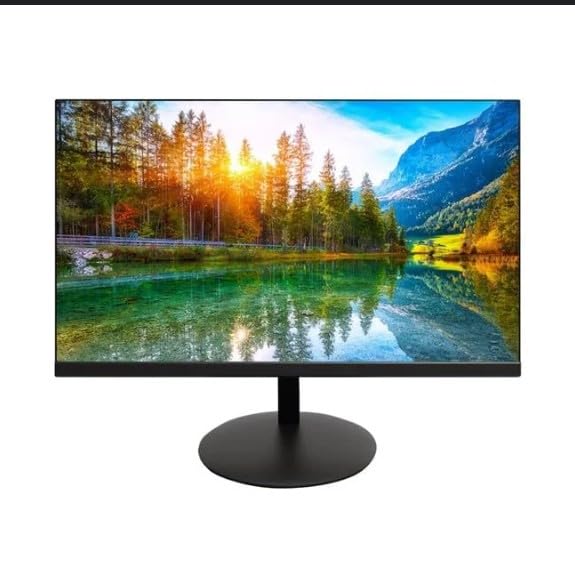
The image shows the Onn 22 inch FHD LED Monitor, highlighting its 100Hz refresh rate and 1080p resolution. The monitor features a slim design and a T-shaped base.
Інструкції з налаштування
- Розпакування: Carefully remove the monitor and all accessories from the packaging. Ensure all components are present: monitor, T-shaped base, HDMI cable, and power adapter.
- Збірка підставки: Attach the T-shaped base to the monitor. The design is screw-less for easy assembly. Ensure it is securely fastened.
- Підключення до пристрою:
The monitor supports both HDMI and VGA inputs. Connect the provided HDMI cable from your computer's HDMI output to the HDMI IN port on the monitor. Alternatively, use a VGA cable for VGA input.

This image displays the rear panel of the Onn monitor, illustrating the available input ports: HDMI IN, VGA IN, and the DC 12V power input. These ports are essential for connecting the monitor to a computer or other devices.
- Підключення живлення: Connect the power adapter to the DC 12V input port on the monitor, then plug the adapter into a power outlet.
- Налаштування монітора: The monitor is capable of swivel, tilt, rotation, and height adjustment. Adjust the screen to your preferred viewкут нахилу для ергономічного комфорту.
- Налаштування двох моніторів: This monitor is suitable for a fully functioning dual monitor setup. Connect a second monitor using the appropriate cables and configure your operating system's display settings.
Інструкція з експлуатації
- Увімкнення/вимкнення живлення: Press the power button, usually located on the bottom or back of the monitor, to turn it on or off.
- Вибір входу: If the monitor does not automatically detect the input source, use the On-Screen Display (OSD) menu buttons to manually select between HDMI and VGA inputs.
- Навігація екранним меню: Use the physical buttons on the monitor (typically on the back or bottom edge) to navigate the OSD menu. This allows you to adjust settings such as brightness, contrast, color temperature, and input source.
- Роздільна здатність та частота оновлення: The monitor supports a native resolution of 1920x1080 at a 100Hz refresh rate. Ensure your computer's display settings are configured to these specifications for the best visual experience.
- Адаптивна синхронізація: The monitor features Adaptive Sync for gaming, which helps to reduce screen tearing and stuttering. Ensure this feature is enabled in your graphics card settings if supported.
Технічне обслуговування
- Очищення екрану: Обережно протріть екран м’якою тканиною без ворсу. Для стійких плям злегка протрітьampen the cloth with water or a non-abrasive, monitor-specific cleaning solution. Avoid spraying liquids directly onto the screen.
- Очищення Casing: Використовуйте м’яку суху тканину для очищення монітора casing. Do not use strong detergents or solvents, as they may damage the finish.
- Вентиляція: Переконайтеся, що вентиляційні отвори монітора не заблоковані, щоб запобігти перегріву.
- Зберігання: Якщо монітор не використовується протягом тривалого часу, зберігайте його в прохолодному, сухому місці, подалі від прямих сонячних променів та екстремальних температур.
Усунення несправностей
- Немає живлення:
- Перевірте, чи кабель живлення надійно під’єднано до монітора та розетки.
- Перевірте, чи розетка працює належним чином.
- Немає сигналу:
- Ensure the video cable (HDMI or VGA) is firmly connected to both the monitor and the computer.
- Виберіть правильне джерело вхідного сигналу за допомогою екранного меню монітора.
- Перевірте, чи ваш комп’ютер увімкнено та не перебуває в режимі сну.
- Flickering Screen or Poor Image Quality:
- Перевірте відеокабель на наявність пошкоджень або нещільних з'єднань.
- Adjust the resolution and refresh rate settings on your computer to match the monitor's specifications (1920x1080, 100Hz).
- Скиньте налаштування монітора до заводських значень через екранне меню.
- Кнопки не відповідають:
- Unplug the monitor from the power outlet, wait for 30 seconds, and then plug it back in.
If problems persist, please refer to the support information provided in the "Support and Warranty" section.
Технічні характеристики
| Бренд | Onn |
| Номер моделі | 100140681 |
| Назва моделі | ОТТО |
| Розмір екрана | 21.5 дюймів |
| Тип дисплея | Світлодіодний, РК-дисплей |
| роздільна здатність | 1920 x 1080 (FHD 1080p) |
| Частота оновлення | 100 Гц |
| Час відгуку | 6.5 мілісекунд |
| Апаратний інтерфейс | HDMI, VGA |
| Особливості | Регулювання висоти |
| Viewкут нахилу | 160 градусів |
| Співвідношення сторін | 16:9 |
| Розміри продукту | 49.2 х 20 х 37.2 см; 3.24 кг |
Підтримка та гарантія
For technical support, product inquiries, or warranty information, please visit the official Onn support webсайту або зв’яжіться з їхньою службою обслуговування клієнтів.
- Офіційна підтримка Webсайт: onnsupport.ca
- Гарантія: Specific warranty details may vary by region and purchase date. Please refer to the documentation included with your product or visit the support webсайт для отримання найактуальнішої інформації про гарантію.


