1. Вступ
This manual provides essential information for the safe and efficient use of your SBS Powerbank 10K Slim. Please read these instructions carefully before using the device and retain them for future reference.
The SBS Powerbank 10K Slim is a portable charging device designed to provide power to various electronic devices, including smartphones, tablets, and other USB-powered gadgets. It features a 10,000 mAh capacity, intelligent charging technology, and multiple output ports for versatile use.
2. Вміст упаковки
Перевірте наявність усіх елементів в упаковці:
- SBS Powerbank 10K Slim
- Кабель USB-A – USB-C
- Посібник користувача
3. Особливості продукту
- 10,000 мАг Ємність: Capable of recharging a smartphone up to 4 times or a tablet up to 2 times.
- Intelligent Charge (IC) 10 Watts: Automatically detects the maximum power your device can accept and adjusts output accordingly, providing protection against overheating and short circuits.
- Тонкий і компактний дизайн: Portable and lightweight for easy transport in a pocket or bag.
- Вхід/вихід USB-C: The USB-C port functions for both charging the power bank and charging external devices.
- Світлодіодні індикатори стану: Easily monitor the remaining charge level of the power bank.
- Кілька вихідних портів: Includes 1x USB-C port and 2x USB-A ports for charging various devices simultaneously.
4. Налаштування
4.1 Initial Charging of the Powerbank
Before first use, fully charge the power bank. Connect the supplied USB-A to USB-C cable to the power bank's USB-C port and the USB-A end to a compatible USB wall charger (not included) or a computer's USB port. The LED indicators will illuminate to show the charging progress.

Image: The power bank being charged using the included USB-C to USB-A cable connected to a laptop.
4.2 Визначення портів
The power bank features various ports for charging and discharging:
- USB 1 (USB-A 1A Standard): Output for standard charging (5W).
- USB-C (Type-C Fast Charge): Input/Output for fast charging (10W).
- USB 2 (USB-A 2.1A Intelligent Charge): Output for intelligent fast charging (10W).

Зображення: Детальне view of the power bank's charging ports, indicating their types and power outputs.
5. Інструкція з експлуатації
5.1 Заряджання зовнішніх пристроїв
To charge your device, connect it to one of the power bank's output ports (USB 1, USB 2, or USB-C) using an appropriate charging cable. The power bank will automatically begin charging. You can charge up to three devices simultaneously.

Image: The power bank actively charging a smartphone and a pair of wireless earbuds.
5.2 Перевірка стану батареї
Press the power button once to activate the LED indicators. The blue LEDs will show the remaining charge level of the power bank. Each LED typically represents approximately 25% of the battery capacity.

Image: The power bank's side with the power button and LED indicators displaying the charge level.
5.3 Intelligent Charge (IC) Function
The Intelligent Charge feature on the USB 2 (USB-A 2.1A) and USB-C ports automatically identifies the connected device and delivers the optimal charging current up to 10W. This ensures efficient and safe charging for a wide range of devices.

Image: The power bank charging a smartphone, highlighting its 10,000 mAh capacity and recharge capability.
6. Технічне обслуговування
6.1 Загальний догляд
- Тримайте портативний зарядний пристрій сухим та подалі від вологи.
- Уникайте екстремальних температур (спеки чи холоду).
- Протирайте пристрій м’якою сухою тканиною. Не використовуйте агресивні хімікати або абразивні матеріали.
- Не кидайте, не розбирайте та не намагайтеся самостійно ремонтувати портативний зарядний пристрій.
6.2 Зберігання
When storing the power bank for extended periods, ensure it is charged to approximately 50-75% capacity. Recharge it every 3-6 months to maintain battery health.
6.3 Заходи безпеки
- This power bank includes built-in protections against short circuits, overcharging, and over-discharging.
- Do not expose the power bank to fire or direct sunlight.
- Зберігати в недоступному для дітей місці.
7. Вирішення проблем
7.1 Зовнішній акумулятор не заряджається
- Переконайтеся, що зарядний кабель надійно підключений як до портативного зарядного пристрою, так і до джерела живлення.
- Спробуйте інший USB-адаптер або USB-порт.
- Перевірте, чи джерело живлення активне.
7.2 Пристрій не заряджається від портативного зарядного пристрою
- Check if the power bank has sufficient charge (press the button to check LEDs).
- Ensure the charging cable connecting your device to the power bank is functional and correctly inserted.
- Спробуйте інший вихідний порт на повербанку.
- Some devices may require a specific charging cable or adapter.
7.3 Повільна зарядка
- Ensure you are using the appropriate port for faster charging (USB-C or USB 2).
- The charging speed can be affected by the cable quality, the device being charged, and the power bank's remaining charge level.
8. Технічні характеристики
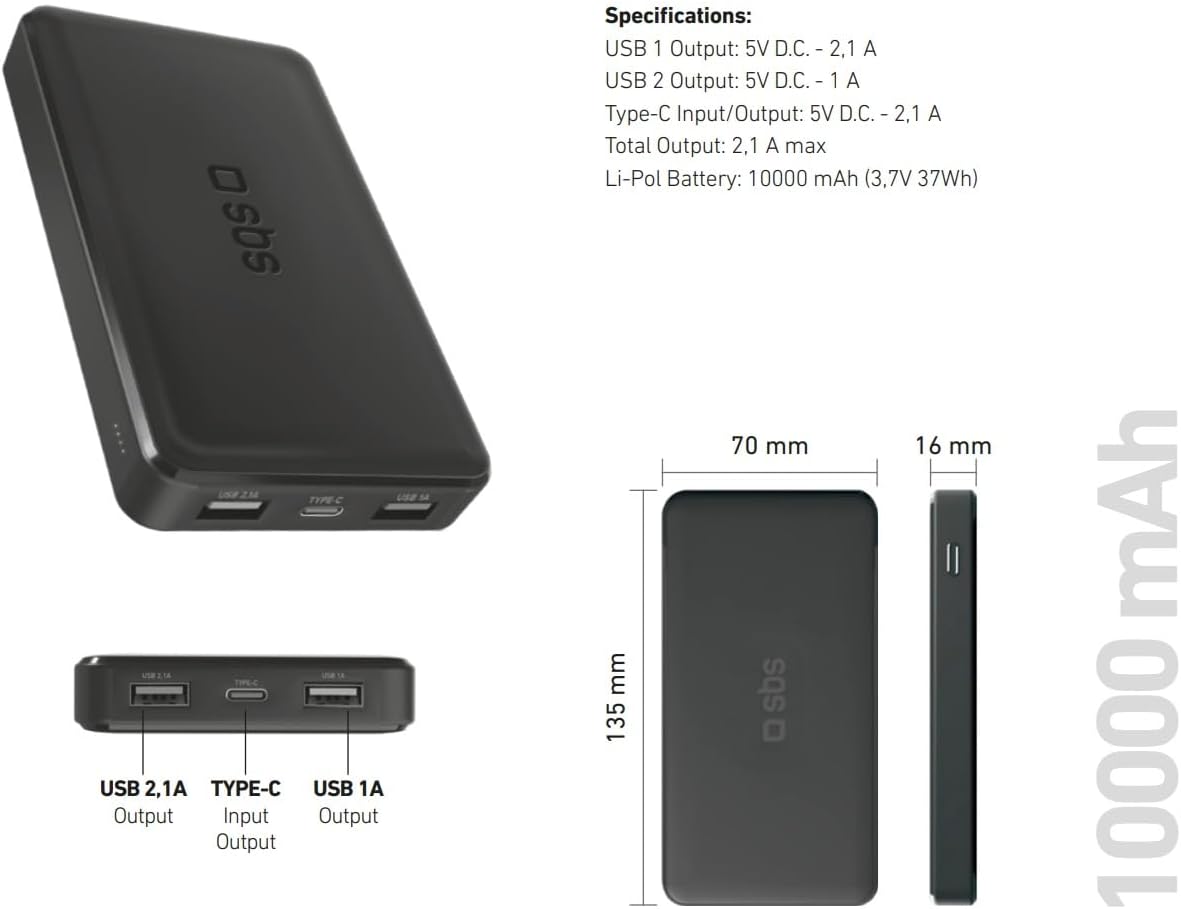
Image: Technical specifications and physical dimensions of the power bank.
| Особливість | Деталь |
|---|---|
| Назва моделі | TTBB10000TCK |
| Ємність акумулятора | 10,000 мАг (3.7 В 37 Вт·год) |
| Тип батареї | Літій-полімерний |
| Вихід USB 1 | 5V D.C. - 1A (5W) |
| Вихід USB 2 | 5V D.C. - 2.1A (10W Intelligent Charge) |
| Вхід/вихід USB-C | 5V D.C. - 2.1A (10W Fast Charge) |
| Загальний вихід | 2.1A макс |
| Колір | чорний |
| Розміри | 135 мм x 70 мм x 16 мм |
| вага | 230 грамів |
| Особливості | Fast Charge, Lightweight, Short-circuit Protection, Over-discharge Protection, Slim Design |
| Сумісні пристрої | Smartphone, Tablet, Smartwatch, Speaker, Laptop (charging only) |
9. Гарантія та підтримка
9.1 Гарантія виробника
This SBS Powerbank 10K Slim comes with a 2-річна гарантія виробникаБудь ласка, збережіть чек про покупку для гарантійного обслуговування. Гарантія поширюється на дефекти матеріалів та виготовлення за умов нормального використання.
9.2 Підтримка клієнтів
For further assistance, technical support, or warranty inquiries, please visit the official SBS website or contact their customer service department. You can find more information and products from SBS by visiting their official store: SBS Brand Store.


