1. Вступ
This manual provides detailed instructions for setting up, operating, and maintaining your BenQ EW2790U 27-inch 4K monitor. Please read this manual thoroughly before using the monitor to ensure proper functionality and to prevent damage.
2. Інформація про безпеку
Завжди дотримуйтесь цих основних запобіжних заходів, щоб зменшити ризик пожежі, ураження електричним струмом та травмування:
- Не піддавайте монітор впливу дощу або вологи.
- Не відкривайте монітор casinг; зверніться до кваліфікованого персоналу для обслуговування.
- Забезпечте належну вентиляцію навколо монітора.
- Використовуйте лише шнур живлення та адаптер, що надаються компанією BenQ.
- Від’єднуйте монітор від мережі під час грози або якщо він не використовується протягом тривалого часу.
3. Вміст упаковки
Перевірте наявність усіх предметів у вашій упаковці:
- BenQ EW2790U 27-inch 4K Monitor
- Шнур живлення
- Кабель HDMI
- Кабель USB-C
- Короткий посібник
- Гарантійний талон
4. Налаштування
4.1 Збірка підставки
- Покладіть монітор екраном вниз на м’яку, чисту поверхню, щоб запобігти подряпинам.
- Прикріпіть основу підставки до шиї підставки та закріпіть її за допомогою наданого гвинта.
- Align the stand assembly with the mounting slot on the back of the monitor and push until it clicks into place.

Figure 4.1: Assembled BenQ EW2790U monitor.
4.2 З'єднувальні кабелі
Підключіть необхідні кабелі до монітора та комп'ютера:
- Потужність: Підключіть шнур живлення до входу живлення монітора, а потім до розетки.
- Відео:
- HDMI: Connect an HDMI cable from your computer's HDMI output to one of the monitor's HDMI ports (HDMI 1, 2, or 3).
- USB-C: Connect a USB-C cable from your computer's USB-C port to the monitor's USB-C (65W) port for video, data, and power delivery.
- USB Downstream: Connect USB-A devices to the USB-A 3.2 downstream ports on the monitor.
- Аудіо: За бажанням підключіть навушники до гнізда для навушників.

Малюнок 4.2: Задня частина view of BenQ EW2790U showing connectivity ports.

Малюнок 4.3: Детально view of BenQ EW2790U input/output ports.
4.3 Adjusting Ergonomics
The EW2790U monitor offers various adjustments for comfortable viewing:
- Регулювання висоти: Підніміть або опустіть монітор до потрібного вам рівня очей.
- Нахил: Відрегулюйте вертикальний кут екрана.
- Поворотний: Поверніть екран по горизонталі.
- Опорна точка: Rotate the screen 90 degrees for portrait mode.

Figure 4.4: BenQ EW2790U monitor pivot adjustment.
5. Експлуатація монітора
5.1 Увімкнення/вимкнення живлення
Press the Power key located on the bottom right of the monitor to turn it on or off.

Figure 5.1: Monitor controls: Scenario hotkey, 5-way controller, and Power key.
5.2 Екранне меню (OSD)
Use the 5-way controller on the bottom bezel to navigate the OSD menu and adjust settings such as brightness, contrast, color mode, and input source.
5.3 Scenario Hotkey
The Scenario hotkey allows quick access to custom or preset optimal monitor settings for various uses like work, studying, gaming, or watching movies.
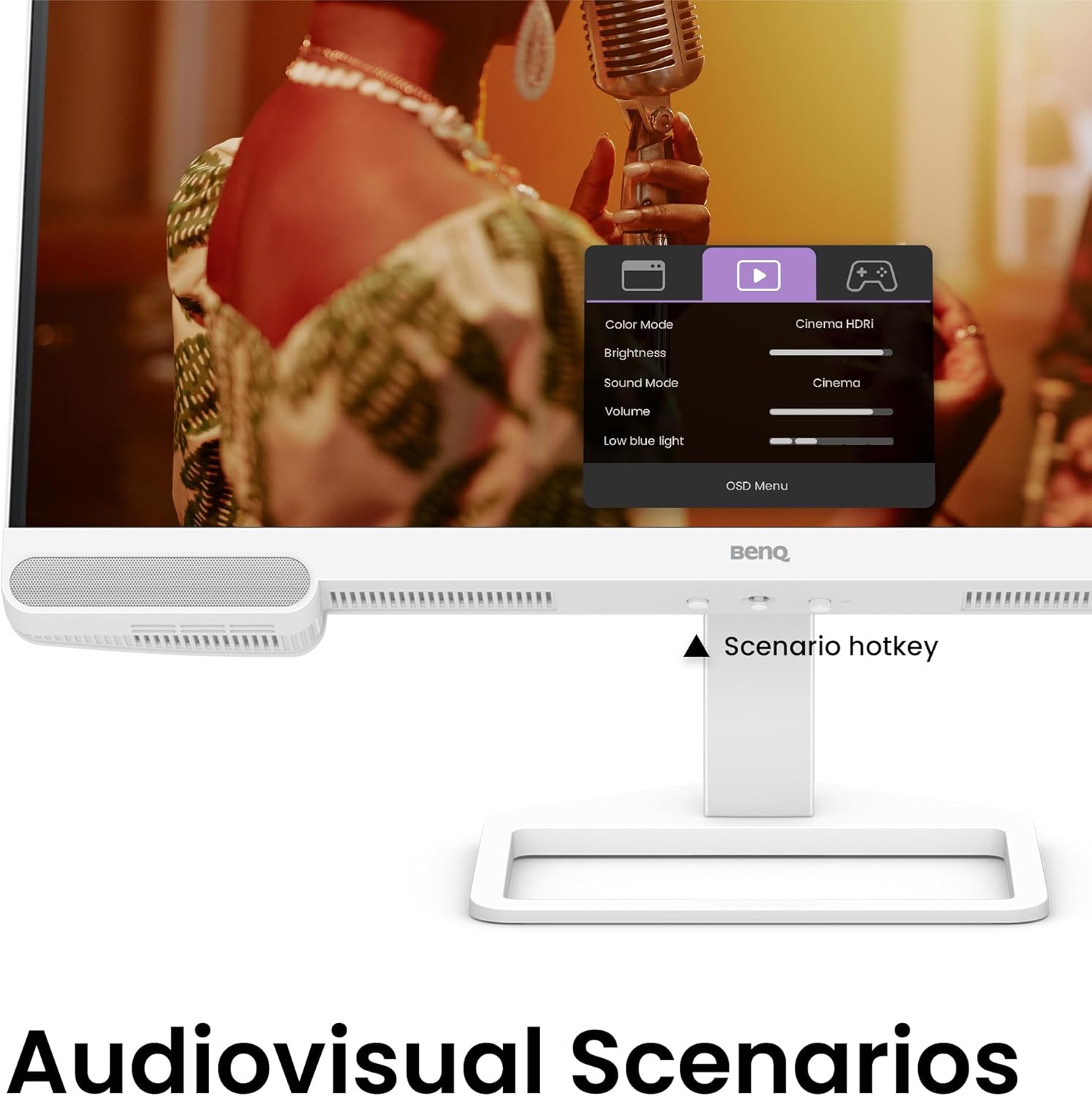
Figure 5.2: OSD menu accessed via Scenario hotkey.
5.4 AI Contrast Technology
The exclusive AI Contrast technology intelligently adjusts the contrast based on the displayed content, optimizing image quality without affecting other areas of the screen.

Figure 5.3: Demonstration of AI Contrast technology.
5.5 Вбудовані динаміки
The monitor includes a pair of 5W built-in speakers for audio output. Adjust the volume through the OSD menu or your connected device.

Figure 5.4: BenQ EW2790U built-in 5W speakers.
6. Технічне обслуговування
6.1 Очищення монітора
- Завжди вимикайте монітор перед чищенням.
- Злегка протріть м’якою тканиною без ворсу dampводою або м’яким, неабразивним засобом для чищення.
- Не розпилюйте засіб для чищення безпосередньо на екран.
- Уникайте використання спирту, аміаку або абразивних засобів для чищення, оскільки вони можуть пошкодити екран абоasing.
6.2 Зберігання
Store the monitor in a cool, dry place away from direct sunlight and extreme temperatures. If storing for an extended period, consider using the original packaging for protection.
7. Вирішення проблем
| проблема | Можлива причина | Рішення |
|---|---|---|
| На екрані немає зображення | Відключено кабель живлення; відключено відеокабель; вибрано неправильне джерело вхідного сигналу. | Ensure power and video cables are securely connected. Press the Scenario hotkey to select the correct input source. |
| Зображення розмите або спотворене | Неправильна роздільна здатність; нещільно прикріплений відеокабель. | Set the display resolution to 3840x2160. Check video cable connections. |
| Немає звуку з динаміків | Занадто низька гучність; звук вимкнено; на комп’ютері вибрано неправильний аудіовихід. | Adjust volume via OSD menu or computer settings. Ensure monitor is selected as audio output device. |
| AI Contrast not working as expected | Feature disabled; Specific content not optimized. | Check OSD settings to ensure AI Contrast is enabled. Performance may vary with different content. |
8. Технічні характеристики
| Особливість | Деталь |
|---|---|
| Розмір екрана | 27 дюймів |
| роздільна здатність | 3840x2160 (4K UHD) |
| Співвідношення сторін | 16:9 |
| Кольорове покриття | 95% P3 |
| AI Contrast Technology | так |
| Вбудовані динаміки | 2 x 5 Вт |
| Підключення | 1x USB Type-C (65W), 3x HDMI (2.0), USB-C 3.2 downstream, USB-A 3.2 downstream, Headphone Jack |
| Ергономічний дизайн | Регулювання висоти, нахил, поворот, шарнір |
| Вага товару | 21.4 фунта |
| Розміри продукту (ДxШxВ) | 17 x 8 x 21 дюймів |
9. Гарантія та підтримка
Your BenQ EW2790U monitor is covered by a manufacturer's warranty. Please refer to the warranty card included in your package for specific terms and conditions. For technical support, product registration, or service inquiries, please visit the official BenQ webсайту або зв’яжіться зі своїм відділом обслуговування клієнтів.
Офіційний BenQ Webсайт: www.benq.com


