вступ
Thank you for choosing the AOLON Curve Smart Watch. This device is designed to enhance your daily life with advanced health monitoring, fitness tracking, and smart communication features. This manual provides essential information for setting up, operating, and maintaining your new smart watch.

Image: The AOLON Curve Smart Watch in Rose Gold, showcasinйого елегантний дизайн та яскравий дисплей.
Що в коробці
Upon opening your AOLON Curve Smart Watch package, you should find the following items:
- AOLON Curve Smart Watch (with Watch Band attached)
- Зарядний кабель
- Посібник користувача (цей документ)

Image: A visual representation of the product packaging contents, showing the watch, charging cable, and user manual.
Налаштування
1. Початкове заряджання
Before first use, fully charge your smart watch. A full charge typically takes approximately 2.5 hours. The watch offers up to 7 days of normal use and over 20 days in power-saving mode on a single charge.
- Підключіть магнітний зарядний кабель до зарядних точок на задній панелі годинника.
- Підключіть USB-кінець кабелю до стандартного USB-адаптера живлення (не входить до комплекту) або USB-порту комп’ютера.
- Дисплей годинника показуватиме стан заряджання.

Image: The smart watch connected to its magnetic charging cable, illustrating the charging process and battery icon.
2. Завантаження програми та створення пари
To unlock the full potential of your AOLON Curve Smart Watch, download the companion app and pair it with your smartphone.
- Scan the QR code in your physical manual or search for "GloryFit" in the Apple App Store (for iOS) or Google Play Store (for Android).
- Встановіть GloryFit додаток на вашому смартфоні.
- Переконайтеся, що Bluetooth увімкнено на вашому смартфоні.
- Open the GloryFit app, navigate to the "Device" section, and tap "Add Device".
- Select "Aolon Curve2" from the list of available devices to pair.
- Дотримуйтеся будь-яких підказок на екрані, щоб завершити процес створення пари.

Image: A step-by-step guide illustrating how to download the GloryFit app and connect the AOLON Curve Smart Watch to a smartphone.
Керування смарт-годинником
1. Основна навігація
The AOLON Curve Smart Watch features a 1.83-inch HD full-view curved display with a responsive touchscreen and an optical rotary button for intuitive navigation.
- Проведіть вгору/вниз: Прокручуйте меню та сповіщення.
- Проведіть вліво/вправо: Доступ до швидких функцій або різних циферблатів годинника.
- Торкніться: Виберіть елемент або підтвердіть дію.
- Натисніть бічну кнопку: Повернення на головний екран або увімкнення/вимкнення живлення.
- Rotate Side Button: Scroll through menus or adjust settings.

Зображення: Детальний view of the smart watch's 1.83-inch HD display with 3D curved glass, highlighting its visual clarity.
2. Налаштування циферблатів годинника
Personalize your watch with over 120 customizable watch faces available through the GloryFit app. You can also set your own photos as watch faces.
- From the watch home screen, long-press the display to quickly change watch faces.
- For more options, open the GloryFit app and navigate to the watch face selection menu.

Image: Various digital and analog watch faces shown on the smart watch, demonstrating customization options.
3. Виклики через Bluetooth
With its built-in microphone and speaker, the smart watch allows you to make and receive calls directly from your wrist when connected to your phone via Bluetooth.
- To make a call, access the dial pad or contact list on your watch.
- To answer an incoming call, tap the green phone icon on the watch screen.
- To reject a call, tap the red phone icon.

Image: A user interacting with the smart watch to manage calls while driving, highlighting the Bluetooth calling feature.
4. Розумні сповіщення
Receive real-time notifications for messages, alarms, and other app alerts directly on your watch. Note that message reply is not supported directly from the watch.
- Ensure notification permissions are granted to the GloryFit app on your smartphone.
- Проведіть пальцем униз по циферблату годинника, щоб view останні сповіщення.

Image: The smart watch displaying various app notifications, indicating its intelligent notification reminder feature.
5. Моніторинг здоров'я
The AOLON Curve Smart Watch provides continuous monitoring of key health metrics.
- ЧСС: Continuous heart rate tracking with alerts for abnormal rates.
- Кисень крові (SpO2): Слідкуйте за рівнем кисню в крові.
- Моніторинг сну: Tracks sleep duration, quality, and stages (deep, light, REM, awake).
- Моніторинг стресу: Надає уявлення про ваш рівень стресу.
- Women's Cycle Tracking: Підтримує відстеження менструальних циклів.
- Сидячі нагадування: Alerts you to move after prolonged periods of inactivity.
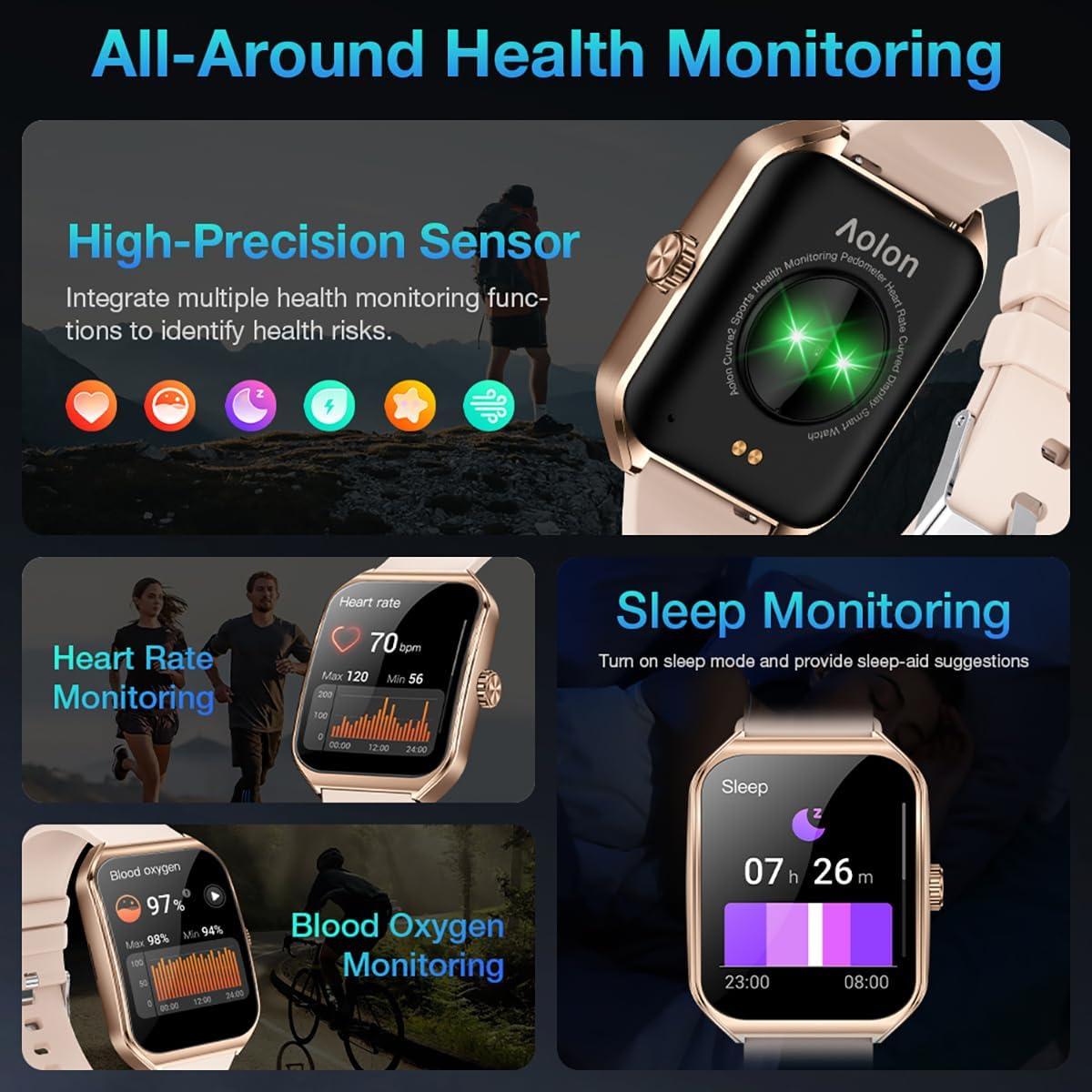
Image: A collage showing the smart watch monitoring heart rate, blood oxygen, and sleep, emphasizing its comprehensive health tracking capabilities.
Video: Demonstrates the 24/7 health monitoring features of the AOLON Smart Watch, including heart rate and SpO2 tracking.
6. Спортивні режими та відстеження активності
The watch supports over 60 sports modes, allowing you to accurately monitor heart rate, calorie consumption, and exercise duration.
- Select your desired sports mode from the watch menu (e.g., outdoor run, indoor run, outdoor walk, ball games, dance, gymnastics).
- When connected to your phone, the watch can record and track your exercise routes using your phone's GPS.
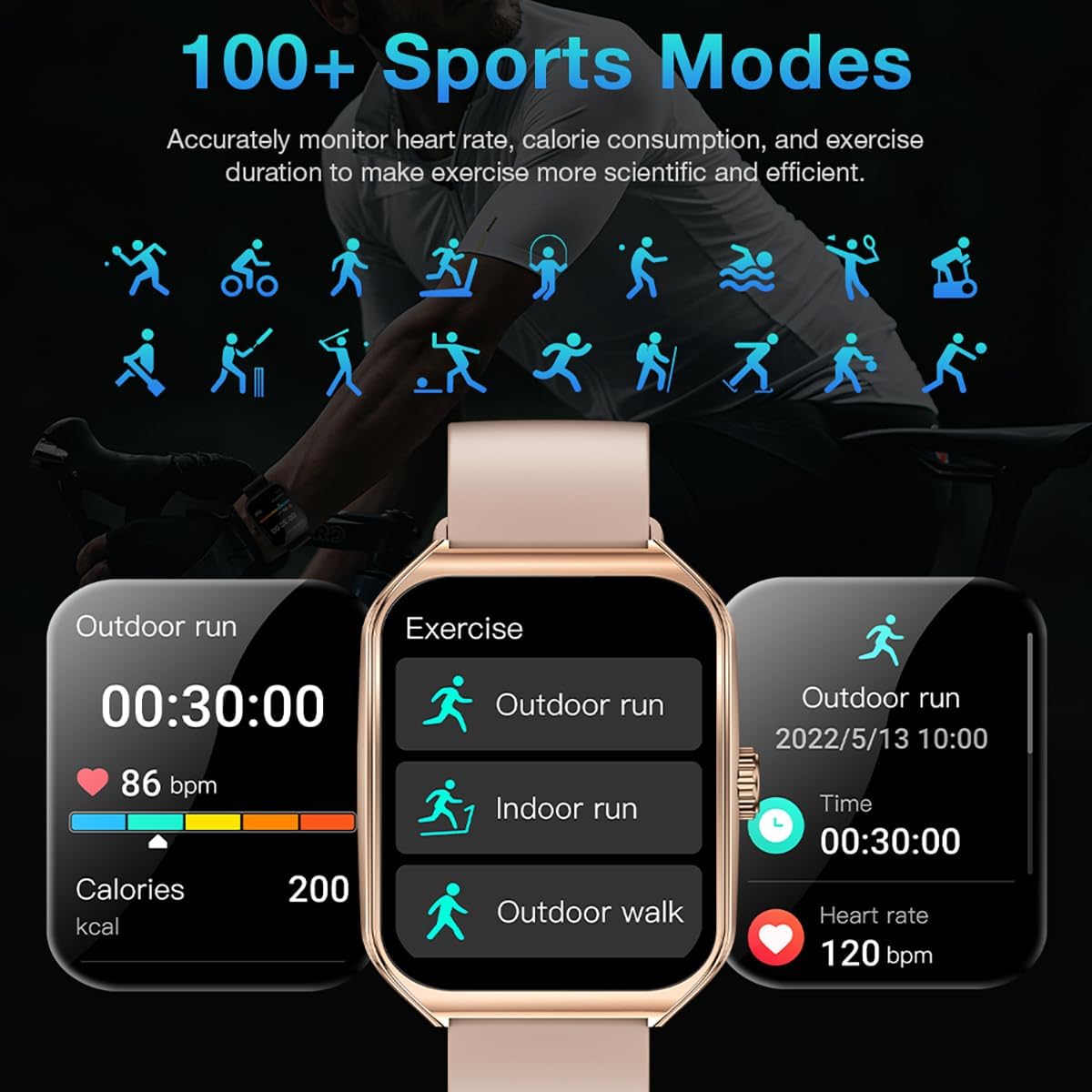
Image: The smart watch interface showing different sports modes and real-time exercise data like heart rate, calories, and distance.
7. Інші розумні функції
The AOLON Curve Smart Watch integrates several convenient features for daily use:
- Голосовий помічник AI: Quickly activate your voice assistant for tasks like making calls, checking weather, or setting alarms.
- Прогноз погоди: Отримуйте оновлення погоди в режимі реального часу.
- Керування музикою: Керуйте відтворенням музики на своєму смартфоні.
- Будильник: Встановлювати та керувати будильниками.
- Секундомір і таймер: Essential timing functions.
- Знайдіть свій телефон: Знайдіть підключений смартфон.
- Ліхтарик: A simple flashlight function.
- Калькулятор: Основні обчислення на зап'ясті.
- Функція SOS: Для надзвичайних ситуацій.
Відео: Оверview of the Curve2 Smart Watch features, including fitness tracking, notifications, and various smart functions.
Технічне обслуговування
1. Чищення годинника
Regular cleaning helps maintain the appearance and functionality of your smart watch.
- Протріть екран і корпус м’якою губкоюamp тканина.
- The silicone strap is washable. You can gently clean it with mild soap and water.
- Уникайте використання агресивних хімікатів або абразивних матеріалів.
2. Водостійкість (IP67)
The AOLON Curve Smart Watch is IP67 waterproof, meaning it is resistant to dust and can withstand immersion in water up to 1 meter for 30 minutes. It is suitable for daily use and light water activities like hand washing or rain exposure.
- Do not use the watch for diving, hot showers, or prolonged submersion in water.
- Уникайте впливу води або пари на годинник під високим тиском.

Image: The smart watch partially submerged in water, illustrating its IP67 water resistance feature.
Усунення несправностей
If you encounter issues with your AOLON Curve Smart Watch, please refer to the following common solutions:
- Годинник не вмикається: Переконайтеся, що годинник повністю заряджений. Підключіть його до зарядного кабелю та дайте йому зарядитися щонайменше 30 хвилин, перш ніж намагатися його ввімкнути.
- Не вдається підключитися до телефону:
- Переконайтеся, що на вашому телефоні ввімкнено Bluetooth, а годинник знаходиться в зоні дії.
- Перезавантажте і телефон, і годинник.
- Check if the GloryFit app has necessary permissions (location, Bluetooth, notifications).
- If previously paired, try unpairing and re-pairing the device through the GloryFit app.
- Неточні дані про стан здоров'я:
- Переконайтеся, що годинник щільно прилягає до зап'ястя, не надто туго і не надто вільно.
- Очистіть датчик на задній панелі годинника.
- Environmental factors or skin conditions can sometimes affect sensor accuracy.
- Сповіщення не відображаються:
- Verify that notification permissions are enabled for the GloryFit app in your phone's settings.
- Переконайтеся, що годинник підключено до телефону через Bluetooth.
- Check the notification settings within the GloryFit app to ensure specific app notifications are enabled.
Технічні характеристики
| Розмір дисплея | 1.83 дюймів |
| Тип дисплея | HD Curved Display with 3D Curved Glass |
| Підключення | Bluetooth 5.0 |
| Ємність акумулятора | 245 міліamp години |
| Термін служби батареї (звичайне використання) | До 7 днів |
| Термін служби батареї (режим енергозбереження) | Понад 20 дні |
| Час зарядки | прибл. 2.5 години |
| Водонепроникність | IP67 |
| Моніторинг здоров'я | Heart Rate, SpO2, Sleep, Stress, Women's Cycle |
| Спортивні режими | 60+ режимів |
| Сумісність | Android і iOS |
| вага | 40g (watch body only) |
| Номер моделі | 5d738664-f1e0-4256-942f-d938b44e5e53 |
Гарантія та підтримка
AOLON provides a Гарантія 12 місяців for your smart watch. If you encounter any issues or require assistance, please contact our customer service team.
- Обслуговування клієнтів: Available 24 hours a day. Please contact us through Amazon Customer Service for prompt assistance.


