вступ
Welcome to your JLab Go Lux ANC Wireless Headphones. This manual provides detailed instructions to help you get the most out of your new headphones, covering setup, operation, maintenance, and troubleshooting.
Що в коробці
- JLab Go Lux ANC Wireless Headphones
- Зарядний кабель USB-C

Image: JLab Go Lux ANC Headphones and included USB-C charging cable.
Продукт закінченийview
Familiarize yourself with the key components and controls of your JLab Go Lux ANC Wireless Headphones.

Зображення: Крупний план view of the right earcup, highlighting the power button, volume controls, and ANC/Be Aware mode button.
Ключові характеристики:
- Гібридне активне шумопоглинання (ANC): Reduces external distractions by up to 30 dB.
- Режим «Будь усвідомленим»: Дозволяє чути навколишній світ під час прослуховування аудіо.
- Cloud Foam Comfort: Ergonomically shaped Form-Fit Earcups with 1-inch Cloud Foam cushions and adjustable hinges for extended comfort.
- JLab App Customization: Personalize ANC/Be Aware settings, touch controls, and sound preferences.
- Crystal Clear Calls: Equipped with noise-canceling microphones for clear communication.
- Bluetooth Multipoint: Підключення до двох пристроїв одночасно.
- Wireless Share Mode: Share audio wirelessly between two Lux headphones.
- Google Fast Pair і Microsoft Swift Pair: Effortless pairing with Android and Windows devices.
- Google Find My Device: Locate your headphones if misplaced.
- Складний дизайн: Rotating earcups for compact storage and portability.
Налаштування
1. Початкове заряджання
Before first use, fully charge your headphones using the provided USB-C cable. The LED indicator will show charging status.
2. Увімкнення/вимкнення живлення
- Увімкнення: Натисніть і утримуйте кнопку живлення, поки не засвітиться світлодіодний індикатор.
- Вимкнення живлення: Натисніть і утримуйте кнопку живлення, доки світлодіодний індикатор не вимкнеться.
3. Підключення Bluetooth
- Turn on your JLab Go Lux ANC headphones.
- The headphones will automatically enter pairing mode (LED will flash blue/red).
- On your device (smartphone, laptop, etc.), open Bluetooth settings and select "JLab Go Lux ANC" from the list of available devices.
- Once connected, the LED will turn solid blue.
Google Fast Pair і Microsoft Swift Pair: For supported Android and Windows 10/11 devices, simply turn on your headphones near the device, and a pop-up notification will prompt you to connect with a single click.
4. JLab App Customization
Download the JLab App from the App Store or Google Play Store to unlock full customization options for your headphones.
- Customize ANC/Be Aware settings.
- Налаштуйте сенсорне керування.
- Fine-tune sound with the equalizer (JLab Signature, Balance, Bass Boost presets available).
- Enable Safe Hearing with volume limits.
- Отримуйте оновлення програмного забезпечення.

Image: The JLab App interface on a smartphone, demonstrating sound and noise control customization options.
Інструкція з експлуатації
1. Active Noise Cancelling (ANC) & Be Aware Mode
Toggle between ANC, Be Aware, and ANC Off modes using the dedicated button on the earcup.
- Гібридний ANC: Eliminates external distractions for an immersive audio experience.
- Режим «Будь усвідомленим»: Пропускає навколишні звуки, допомагаючи вам усвідомлювати навколишнє середовище.

Image: A person wearing the headphones, demonstrating the use of ANC or Be Aware mode in a public environment.
2. Функції виклику
The built-in noise-canceling microphones ensure clear calls.
- Відповісти/закінчити виклик: Одне натискання багатофункціональної кнопки.
- Відхилити виклик: Натисніть і утримуйте багатофункціональну кнопку.
- Активувати голосового помічника: Двічі натисніть багатофункціональну кнопку.

Image: A person engaged in a phone call while wearing JLab Go Lux ANC headphones, emphasizing the clear call feature.
3. Відтворення музики
- Відтворення/пауза: Одне натискання багатофункціональної кнопки.
- Збільшення гучності: Коротко натисніть кнопку «+».
- Зменшення гучності: Коротко натисніть кнопку «-».
- Наступний трек: Довго натисніть кнопку «+».
- Попередній трек: Довго натискайте кнопку «-».
4. Bluetooth Multipoint
Connect your headphones to two devices simultaneously. For example, connect to your laptop for work calls and your phone for music. The headphones will intelligently switch between devices.
5. Wireless Share Mode
Share your audio with another pair of JLab Lux headphones. Refer to the JLab App or JLab support for detailed instructions on activating Wireless Share Mode.
6. Google Find My Device
If you misplace your headphones, use the Google Find My Device feature to locate them. Ensure this feature is enabled and configured on your connected Android device.

Image: A person using the Google Find My Device app on a smartphone to locate their JLab headphones.
Комфорт і посадка
The JLab Go Lux ANC headphones are designed for comfort during extended use.
- Form-Fit Earcups: Ergonomically shaped to the natural outline of the ear.
- Cloud Foam Cushions: 1-inch thick cushions provide plush comfort.
- Adjustable Hinges: Customize the fit for various head sizes and shapes.

Image: A person wearing JLab Go Lux ANC headphones, showcasing the comfortable Cloud Foam earcups.
Зарядка та термін служби батареї
Your JLab Go Lux ANC headphones offer extended battery life.
- Термін служби батареї: Up to 70+ hours of playtime (40+ hours with ANC on).
- Зарядка: Use the included USB-C cable to charge. A full charge typically takes a few hours.
- Світлодіодний індикатор: The LED light on the earcup indicates charging status and battery level.
Технічне обслуговування
- Clean headphones with a soft, damp тканина. Уникайте агресивних хімікатів.
- Зберігайте в прохолодному, сухому місці, коли він не використовується.
- Не піддавайте його дії екстремальних температур або вологи.
- The headphones are not water resistant. Avoid contact with liquids.
- The foldable design with rotating earcups allows for compact storage.
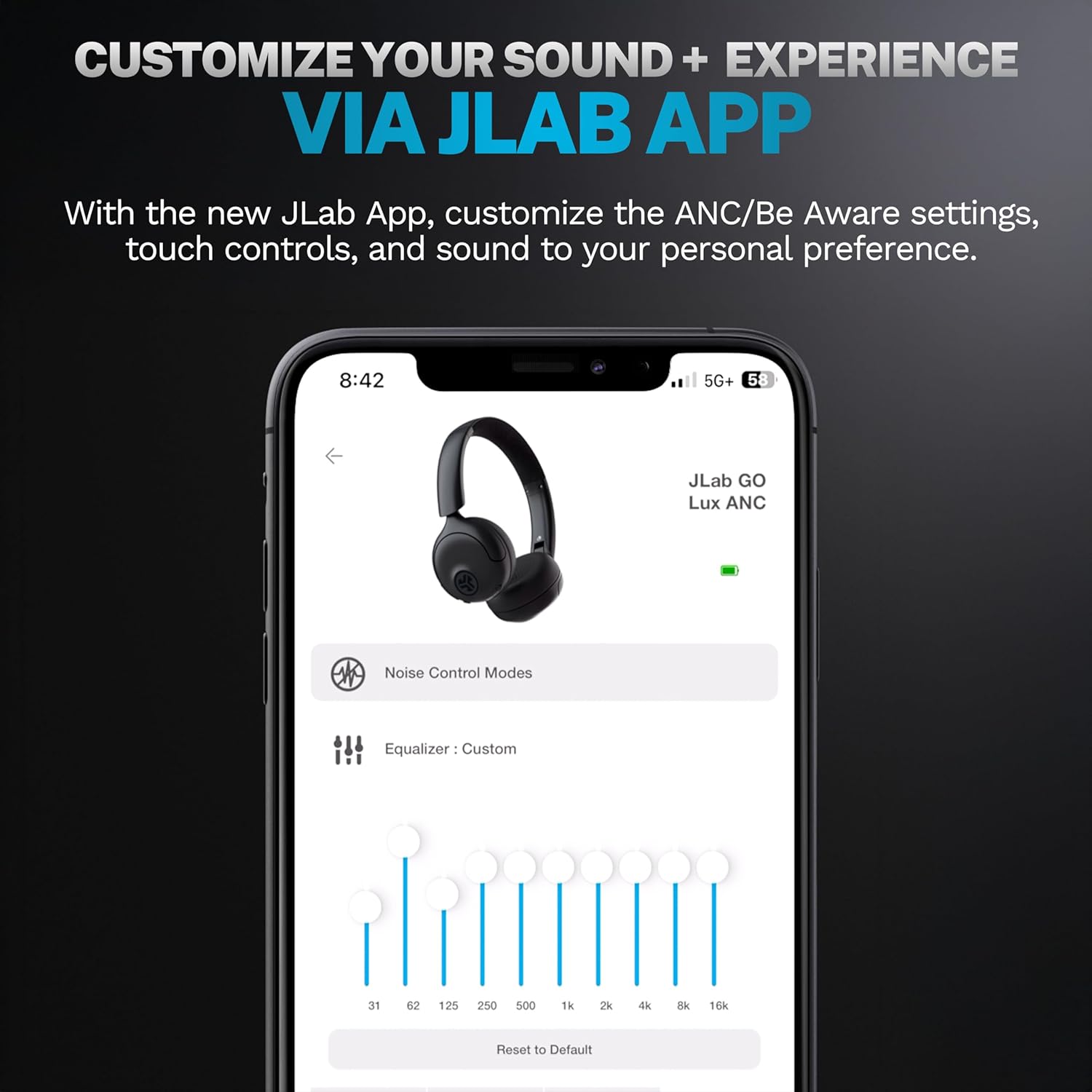
Image: JLab Go Lux ANC headphones in their folded position, demonstrating portability.
Усунення несправностей
| проблема | Рішення |
|---|---|
| Не вмикаються навушники | Ensure headphones are charged. Press and hold the power button for 3-5 seconds. |
| Не вдається підключитися до пристрою | Make sure Bluetooth is enabled on your device. Ensure headphones are in pairing mode (flashing blue/red LED). Forget the device in your Bluetooth settings and re-pair. |
| Ні звуку, ні низької гучності | Перевірте рівні гучності на обох навушниках та підключеному пристрої. Переконайтеся, що навушники правильно підключені. |
| АНК працює неефективно | Переконайтеся, що режим ANC увімкнено. Відрегулюйте розмір навушників, щоб забезпечити щільне прилягання до вух. |
| Проблеми з якістю дзвінків | Ensure microphones are not obstructed. Check your device's connection and signal strength. |
Технічні характеристики
| Особливість | Деталь |
|---|---|
| Назва моделі | HBGOLUXANCMVE20WEB |
| Технологія підключення | Бездротовий (Bluetooth) |
| Версія Bluetooth | 5.0 |
| Форма навушника | На вусі |
| Функції контролю шуму | Hybrid Active Noise Canceling, Be Aware Mode |
| Тип аудіо драйвера | Динамічний драйвер (40 мм) |
| АЧХ | 20 Гц - 20 кГц |
| Чутливість | 104 дБ |
| Термін служби батареї | Up to 70+ hours (40+ hours with ANC) |
| Спосіб контролю | Сенсорне керування, керування застосунками |
| Вага товару | 10.6 унцій (0.3 кілограма) |
| Розміри продукту | 2.95 x 6.1 x 7.48 дюймів |
| Рівень водонепроникності | Не водостійкий |
Гарантія та підтримка
Your JLab Go Lux ANC Wireless Headphones come with a JLab 2 Year Warranty.
For detailed warranty information, product support, or to contact customer service, please visit the official JLab webсайт або зверніться до гарантійного талона, що додається до вашого продукту.
Ви також можете відвідати Магазин JLab на Amazon для отримання додаткової інформації та аксесуарів.


