вступ
This manual provides instructions for the MOFII Bluetooth Wireless Keyboard, Model B0DR2NLFYW. This keyboard is designed for multi-device compatibility, featuring a retro typewriter-style design with round keys and Bluetooth 5.1 connectivity.
Будь ласка, уважно прочитайте цю інструкцію перед використанням виробу, щоб забезпечити його належну роботу та запобігти пошкодженням.
Вміст упаковки
- MOFII Bluetooth Wireless Keyboard
- Посібник користувача
- Знімач ковпачків клавіш (для обслуговування)
Налаштування
1. Встановлення батареї
The keyboard requires batteries for operation. Locate the battery compartment on the underside of the keyboard. Insert the required batteries, ensuring correct polarity.

Image: Underside of the MOFII keyboard, showing the battery compartment and adjustable feet.
2. Adjusting Keyboard Angle
For ergonomic comfort, you can adjust the keyboard's typing angle. Flip the keyboard over and extend the two small feet located at the top corners of the underside.
Refer to the image above for the location of the adjustable feet.
3. Сполучення з пристроями (Bluetooth)
The MOFII Bluetooth Wireless Keyboard supports connecting up to three Bluetooth devices simultaneously. Follow these steps to pair your keyboard:
- Переконайтеся, що клавіатуру увімкнено.
- Press and hold one of the Bluetooth channel buttons (BT1, BT2, or BT3) for 3 seconds until the indicator light flashes, indicating pairing mode.
- On your device (iPad, Laptop, PC, Mac, Smartphone), navigate to Bluetooth settings.
- шукати "CANDY BT" or a similar device name and select it to connect.
- Once connected, the indicator light for the selected channel will stop flashing and remain solid.

Image: The MOFII keyboard illustrating the Bluetooth pairing process with indicator lights for BT1, BT2, and BT3.
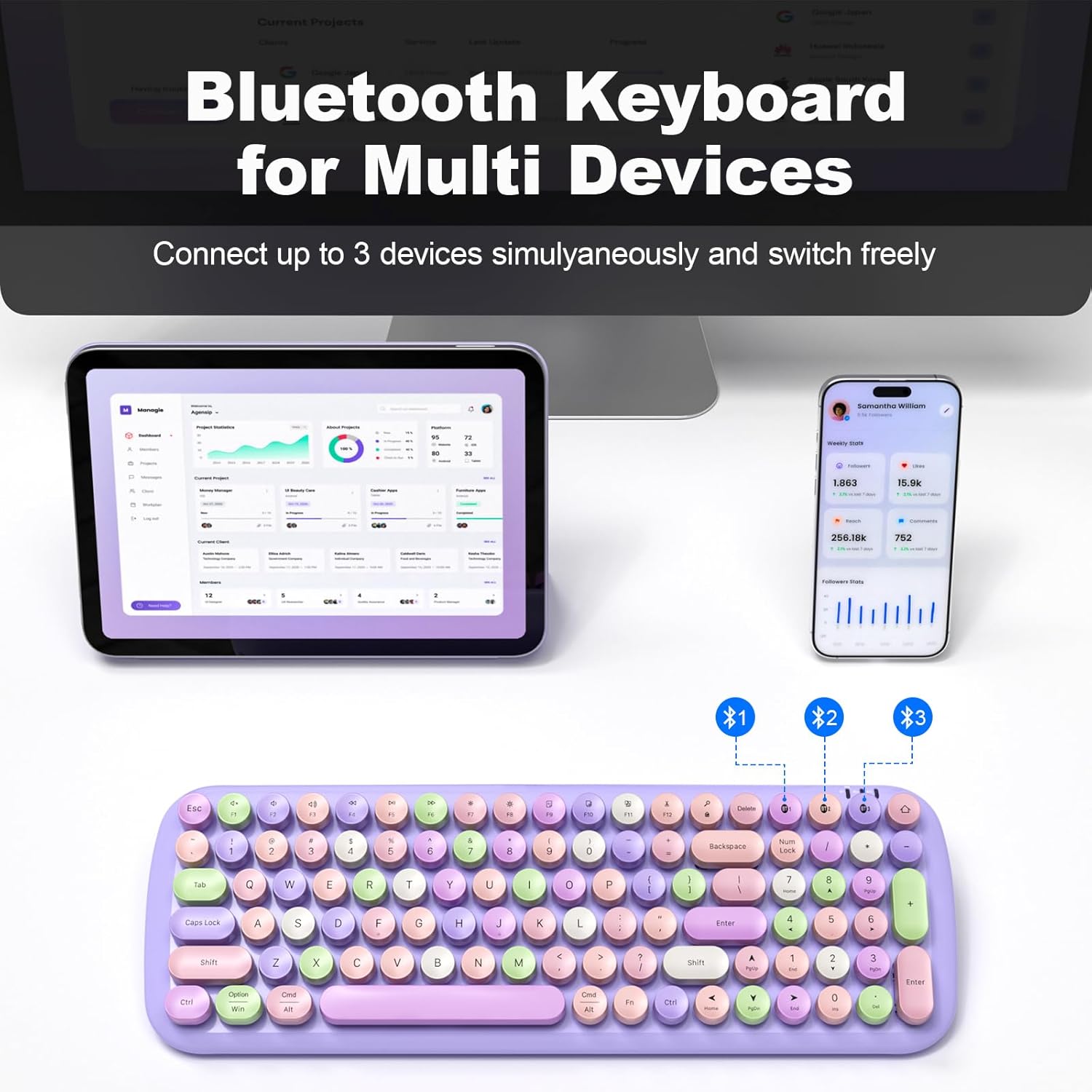
Image: The MOFII keyboard demonstrating multi-device connectivity via Bluetooth, with indicators for three paired devices.
Інструкція з експлуатації
1. Перемикання між підключеними пристроями
To switch between your three paired Bluetooth devices, simply press the corresponding BT1, BT2, or BT3 button. The keyboard will automatically connect to the selected device.
2. Keyboard Layout and Special Functions
The keyboard features a full-size layout with round, retro-style keys. It includes standard alphanumeric keys, a numeric keypad, and function keys (F1-F12) with additional multimedia and system control functions accessible via the Fn ключ.

Зображення: Оверview of the full-size MOFII keyboard layout, highlighting the function keys and their secondary actions.
3. Режим енергозбереження
To conserve battery life, the keyboard will automatically enter sleep mode after 5 minutes of inactivity. To wake it up, press any key.
4. Сумісність
This keyboard is compatible with a wide range of operating systems and devices, including:
- вікна
- Mac OS
- iOS (iPad, iPhone)
- Android (Tablets, Smartphones)

Image: The MOFII keyboard wirelessly connected to a Smart TV, illustrating its use for controlling smart devices from a distance.
Технічне обслуговування
1. Очищення клавіатури
Щоб очистити клавіатуру, обережно протріть її поверхню м’якою губкоюamp тканина. Уникайте використання агресивних хімікатів або абразивних матеріалів.
2. Detachable Keycaps
The keycaps are detachable for easier cleaning. Use the provided keycap puller to carefully remove individual keycaps. Reattach them by aligning and pressing firmly until they click into place.

Зображення: Крупний план view of the MOFII keyboard showing detachable keycaps and the keycap puller tool for easy cleaning.
3. Заміна батареї
When the keyboard's performance diminishes or it fails to power on, it may be time to replace the batteries. Open the battery compartment on the underside and replace with new batteries of the correct type and size.
Усунення несправностей
Клавіатура не підключається/не сполучається:
- Ensure the keyboard has fresh batteries and is powered on.
- Переконайтеся, що на вашому пристрої ввімкнено Bluetooth.
- Confirm the keyboard is in pairing mode (indicator light flashing) by pressing and holding a BT channel button for 3 seconds.
- Спробуйте розірвати та повторно підключити клавіатуру в налаштуваннях Bluetooth вашого пристрою.
- Ensure the keyboard is within the 33-foot (10-meter) operating range of your device.
Клавіші не реагують:
- Перевірте рівень заряду батареї та замініть її, якщо необхідно.
- Переконайтеся, що клавіатура правильно підключена до вашого пристрою.
- Clean under the keycaps if debris is suspected to be interfering with key presses.
Keyboard Enters Sleep Mode Too Quickly:
- This is a power-saving feature. Press any key to wake the keyboard. This setting is not user-adjustable.
Технічні характеристики
| Бренд | MOFII |
| Модель | B0DR2NLFYW |
| Технологія підключення | Bluetooth 5.1 |
| Сумісні пристрої | iPad, Laptop, PC, iPhone, Tablets, Smartphone (Windows, Mac OS, iOS, Android) |
| Робочий діапазон | До 33 футів (10 метрів) |
| Джерело живлення | Працює від батареї |
| Розміри продукту | 15.35 x 5.31 x 1.38 дюймів |
| Вага товару | 1.63 фунта |
| матеріал | пластик |
| Особливість | Round Key, Multi-Device Connectivity |
Гарантія та підтримка
For warranty information and technical support, please refer to the official MOFII webсайт або зверніться безпосередньо до служби підтримки клієнтів. Зберігайте чек про покупку для гарантійних претензій.
Manufacturer: MOFII


