1. Вступ
This manual provides detailed instructions for the installation, operation, and maintenance of your ZUMIMALL BK05 3MP Outdoor Security Camera. Please read this manual thoroughly before using the product to ensure proper functionality and safety.
Вміст упаковки
Перевірте, чи всі перелічені нижче предмети входять до вашої упаковки:
- BK05 Camera x1
- Посібник користувача x1
- Charging Set (10ft USB-C Cable & Adapter) x1
- Набір гвинтів x1
- Warning Card x1
- Наклейка позиціонування x1

Image: Contents of the ZUMIMALL BK05 Security Camera package.
2. Продукт закінчивсяview
The ZUMIMALL BK05 is a 3MP outdoor security camera designed for comprehensive surveillance. It features 360° PTZ (Pan-Tilt-Zoom) auto-tracking, 24/7 continuous recording, dual-band 2.4G/5G WiFi connectivity, color night vision with a built-in floodlight, and two-way audio communication. The camera is also compatible with Alexa for voice control.
Ключові характеристики
- Роздільна здатність 3 МП: Забезпечує чітке та різке відеоtage.
- 360° PTZ Auto-Tracking: Automatically follows moving targets with 355° horizontal and 90° vertical rotation.
- Безперервний запис 24/7: Wired power ensures constant surveillance.
- Дводіапазонний Wi-Fi: Supports both 2.4GHz and 5GHz networks for flexible connectivity.
- Кольорове нічне бачення: Built-in floodlight enables full-color video even in low-light conditions.
- Двостороннє аудіо: Integrated microphone and speaker for real-time communication.
- Motion & Noise Detection: Sends real-time alerts upon detecting activity.
- IP66 Захист від атмосферних впливів: Розроблений для роботи з різними погодними умовами на відкритому повітрі.

Image: Visual comparison highlighting the detail captured by the ZUMIMALL 3MP camera.
3. Налаштування та встановлення
3.1 Фізичне встановлення
The camera supports both ceiling and wall mounting. Use the included positioning sticker and screw set to mark and secure the installation location.
- Choose an ideal spot for mounting, ensuring a clear view і доступ до розетки.
- Use the positioning sticker to mark drill holes.
- Просвердліть отвори та вставте анкери до стіни, якщо необхідно.
- Secure the camera base with the provided screws.
- Connect the camera to the power adapter using the 10ft USB-C cable and plug it into a power outlet. Ensure the Type-C cable connector is waterproofed.

Image: Illustration of the two-step installation process for wall or ceiling mounting.
3.2 Підключення до програми та налаштування Wi-Fi
The ZUMIMALL BK05 camera connects via dual-band 2.4GHz or 5GHz Wi-Fi. For optimal performance, check signal stability via the ZUMIMALL app before setup.
- Download the ZUMIMALL app from your device's app store.
- Створіть обліковий запис або увійдіть.
- Tap 'Add Device' and select your camera model (BK05).
- Follow the in-app instructions to connect the camera to your Wi-Fi network. You will be prompted to select either a 2.4GHz or 5GHz network and enter the password.
- Відскануйте QR-код, що відображається на вашому телефоні, за допомогою об'єктива камери.
- Once connected, the camera will indicate successful pairing, and you can begin live viewінж.
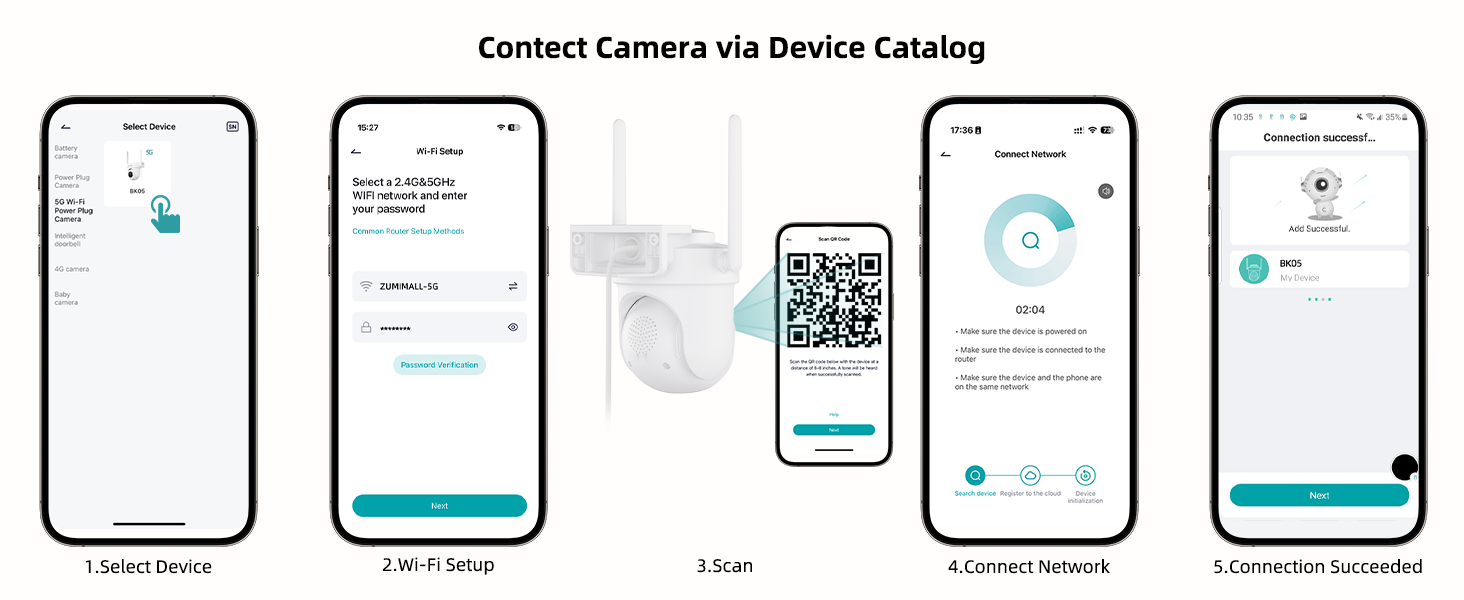
Image: Step-by-step guide for connecting the camera to the ZUMIMALL app.

Image: Explanation of dual-band Wi-Fi support (2.4GHz and 5GHz).
4. Інструкція з експлуатації
4.1 Живий View та керування PTZ
Access the live feed through the ZUMIMALL app. You can remotely control the camera's pan (horizontal) and tilt (vertical) movements to adjust the viewкут.
- From the app's home screen, tap on your camera to view живий корм.
- Use the on-screen controls to pan (355°) and tilt (90°) the camera.

Image: PTZ control in action, showing the camera tracking movement.
4.2 Auto-Tracking and Motion Detection
The camera can automatically detect and track moving objects, sending alerts to your smartphone.
- Enable 'Motion Detection' and 'Auto-Tracking' in the camera settings within the app.
- Customize detection sensitivity (Low, Medium, High) to reduce false notifications.
- Set specific detection zones to monitor critical areas and ignore irrelevant ones.

Image: Demonstration of 360° motion tracking.

Image: Accurate detection settings within the app.

Image: Setting up a custom detection zone.
4.3 Запис і зберігання
Камера підтримує безперервний запис 24/7 та пропонує гнучкі варіанти зберігання.
- Micro SD Card: Insert a Micro SD card (up to 128GB, not included) for local storage. The camera will automatically overwrite old footagе. коли картка заповнена.
- Хмарне сховище: Optional cloud storage plans are available for event recordings (6-second clips, saved for 7 days free). Premium cloud storage offers additional features.

Image: 24/7 continuous recording feature.

Image: Non-subscription storage options with Micro SD card and cloud.
4.4 Night Vision and Floodlight
The camera provides clear night vision, including full-color options with its built-in floodlight.
- The built-in floodlight provides 33ft (10 meters) of color night vision.
- Adjust night vision settings in the app to choose between infrared (black and white) or color night vision.

Image: 2K Color Night Vision with spotlight functionality.
4.5 Двосторонній аудіозв'язок
Communicate with visitors or deter intruders using the camera's two-way audio feature.
- Натисніть значок мікрофона в прямому ефірі view interface to speak through the camera's speaker.
- Мікрофон камери фіксує звук із зони спостереження.

Image: Two-way audio communication feature.
4.6 Smart AI Analysis and Audible Alarm
The camera utilizes AI for intelligent detection and can trigger audible alarms.
- The camera can differentiate between humans, pets, cars, and packages (some features may require premium cloud plans).
- An audible alarm can be triggered when noise exceeds 65 decibels, providing proactive protection.
- When motion or humanoids are detected, the camera can trigger both audio and strobe light alarms.

Image: Smart AI analysis detecting different objects.

Image: Audible alarm feature with noise sensitivity settings.

Image: Audio warning and strobe light feature.
4.7 Інтеграція з Alexa
Connect your ZUMIMALL camera with Amazon Alexa for convenient voice control.
- Ensure the camera is already added to the ZUMIMALL app.
- Відкрийте програму Alexa.
- Tap the "More" button in the bottom left corner.
- Select "Skills & Games" and search for "Zumimall."
- Click on the "Zumimall" skill, then tap "ENABLE TO USE."
- Log in to your Zumimall account and click "Authorize."

Image: Voice assistant integration with Alexa and Google Assistant.
4.8 Спільний доступ до пристрою
Надайте доступ до камери членам родини або довіреним особам.
- The ZUMIMALL app allows sharing with up to 5 online devices.
- There is no limit to the number of users you can share access with.

Image: Device sharing feature for multiple users and devices.
5. Технічне обслуговування
5.1 Стійкість до погодних умов
The ZUMIMALL BK05 camera is IP66-rated, ensuring protection against dust and water jets. It is designed to function in temperatures ranging from -20°C to 50°C.
- Ensure the camera is installed correctly, following the instructions, especially regarding the waterproof Type-C cable connector.
- Do not install the camera upside down to maintain waterproof performance and proper feed display.
5.2 Загальний догляд
- Regularly check the camera lens for dirt or obstructions and clean gently with a soft, dry cloth.
- Ensure the power adapter remains dry for optimal performance.
- Періодично перевіряйте кріплення на стійкість.
6. Вирішення проблем
6.1 Поширені проблеми та рішення
- Камера не підключається до Wi-Fi:
Ensure your Wi-Fi network is 2.4GHz or 5GHz. Check Wi-Fi signal strength at the camera's location using the ZUMIMALL app. Verify the Wi-Fi password is correct. Try restarting your router and the camera. - Часті відключення:
Improve Wi-Fi signal strength by moving the camera closer to the router or using a Wi-Fi extender. Ensure there are no major obstructions (e.g., thick walls) between the camera and the router. - Motion detection alerts are too frequent/infrequent:
Adjust the detection sensitivity settings in the app. Configure specific detection zones to focus on relevant areas. - Night vision is unclear:
Ensure the camera lens is clean. Check if the floodlight is enabled for color night vision. Ensure there are no reflective surfaces close to the camera that could interfere with infrared or floodlight illumination. - Проблеми з двостороннім аудіо:
Check the volume settings in the app. Ensure there are no obstructions blocking the microphone or speaker on the camera. Verify your phone's microphone permissions for the ZUMIMALL app. - Camera not recording 24/7:
Ensure the camera is continuously powered via the included adapter. If using an SD card, verify it is inserted correctly, formatted, and has sufficient storage capacity.
7. Технічні характеристики
| Особливість | Специфікація |
|---|---|
| Назва моделі | BK05 |
| Роздільна здатність захоплення відео | 3 Мп (2K) |
| Технологія підключення | Wireless (2.4G & 5G Wi-Fi), Plug-in Power |
| Viewкут нахилу | 360 градусів (панорамування 355°, нахил 90°) |
| Діапазон нічного бачення | 10 метрів (33 футів) |
| Параметри зберігання | Micro SD (до 128 ГБ), хмарне сховище |
| Стійкість до погодних умов | IP66 |
| Робоча температура | -20°C до 50°C |
| Сумісні пристрої | Alexa, Smartphone (Android, iOS) |
| Джерело живлення | Провідний електричний |
| Розміри предмета (Д x Ш x В) | 5.9 x 5 x 5 дюймів |
| Вага товару | 16 унцій (0.45 кілограма) |
8. Гарантія та підтримка
ZUMIMALL is committed to providing quality products and customer support.
8.1 Підтримка клієнтів
For any technical queries or assistance, please contact ZUMIMALL customer support. The brand offers one-on-one online support to ensure you receive the help you need.
8.2 Плани захисту
Доступні для придбання розширені плани захисту, які покривають ваш пристрій після закінчення стандартного гарантійного терміну:
- 2-річний план захисту
- 3-річний план захисту
- Повний захист (щомісячний план, що покриває відповідні покупки)
For details on these plans, please refer to the product listing or contact ZUMIMALL directly.


