1. Вступ
This user manual provides detailed instructions for the setup, operation, maintenance, and troubleshooting of your ATTACK SHARK X66 Wireless Mechanical Gaming Keyboard. Designed for versatility and performance, the X66 features tri-mode connectivity, hot-swappable switches, and customizable RGB lighting, making it suitable for various uses including gaming, work, and multimedia.
Please read this manual thoroughly before using the keyboard to ensure optimal performance and longevity.
2. Вміст упаковки
Після розпакування, будь ласка, перевірте, чи всі наступні предмети входять до комплекту:
- 1 x ATTACK SHARK X66 Mechanical Keyboard
- 1 x 2-in-1 Keycap and Switch Puller
- 2 x Extra Strawberry Switches
- 1 кабель USB-C
- 1 x Посібник користувача (цей документ)

Figure 2.1: Contents of the ATTACK SHARK X66 package, including the keyboard, USB-C cable, keycap/switch puller, and extra switches.
3. Продукт закінчивсяview і ключові характеристики
The ATTACK SHARK X66 is a compact 66-key mechanical gaming keyboard featuring a gasket-mounted design for a soft and responsive typing experience. It includes a versatile volume knob and supports three connectivity modes for maximum flexibility.

Малюнок 3.1: Закінченоview of the ATTACK SHARK X66's main features, including 3 modes connection, hot-swappable design, gasket structure, 5-layer silencing filling, 66+1 keys, single key slotted PCB, RGB backlight, 3000mAh battery, and customized high-performance chip.

Figure 3.2: The ATTACK SHARK X66 keyboard in Moonlight color, showcasing its compact layout and integrated volume knob.
4. Налаштування та підключення
4.1 Початкове заряджання
Before first use, it is recommended to fully charge the keyboard. Connect the supplied USB-C cable to the keyboard's USB-C port and the other end to a powered USB port (e.g., computer, wall adapter). The charging indicator light will show the charging status.
4.2 Режими підключення
The ATTACK SHARK X66 supports three connection modes: 2.4GHz Wireless, Bluetooth 5.0, and Wired (USB-C). A switch located on the side of the keyboard allows you to select the desired mode.
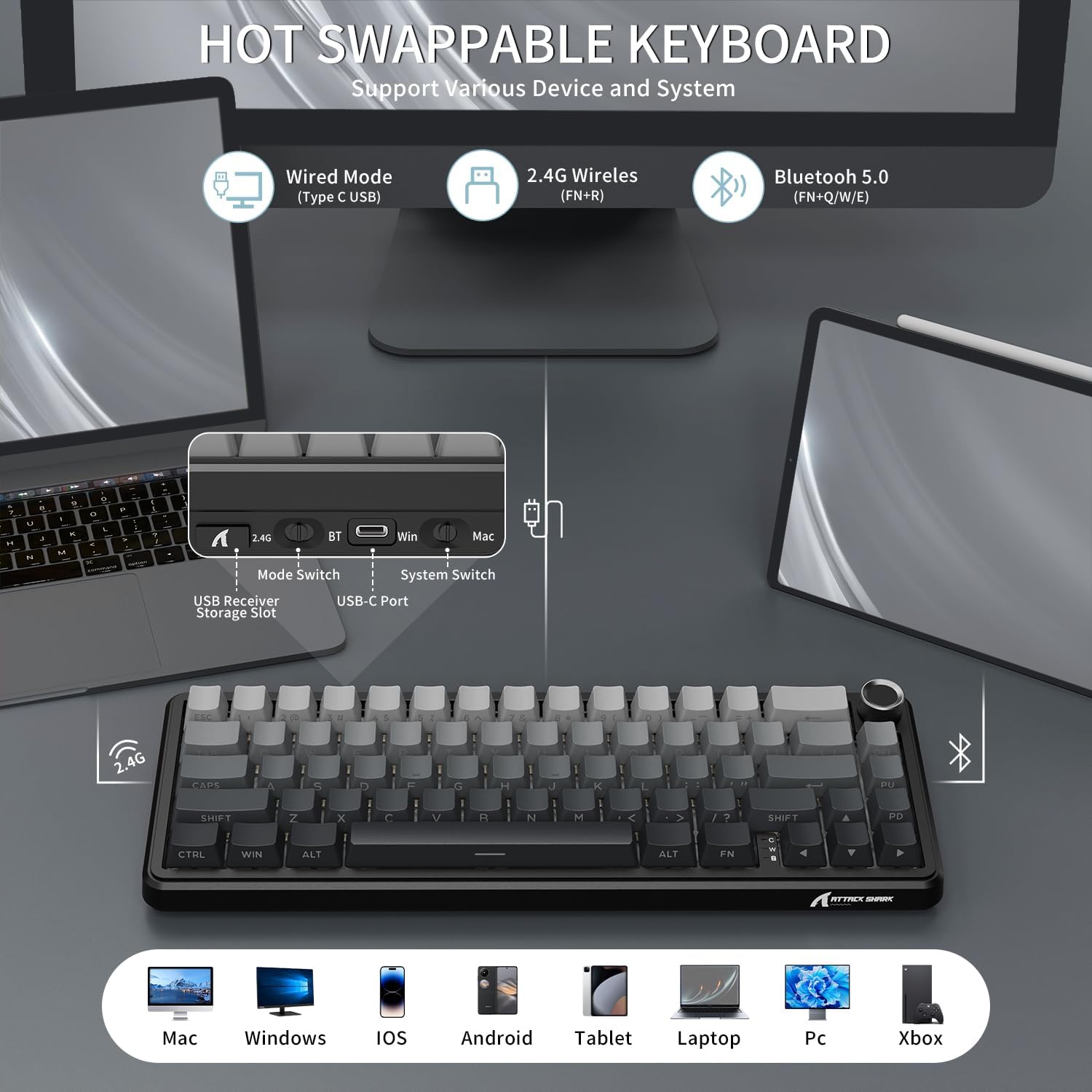
Figure 4.1: The keyboard's side panel illustrating the 2.4G, BT (Bluetooth), and USB-C ports, along with mode and system switches. The USB receiver storage slot is also visible.
- Бездротовий режим 2.4 ГГц:
Locate the 2.4G USB receiver stored in the keyboard's dedicated slot. Plug the receiver into an available USB port on your computer. Switch the keyboard to 2.4G mode. The keyboard should connect automatically.
- Режим Bluetooth 5.0:
Switch the keyboard to BT mode. On your device (PC, tablet, smartphone), enable Bluetooth and search for new devices. Select "ATTACK SHARK X66" from the list to pair. The keyboard can store up to 3 Bluetooth devices (FN+Q/W/E to switch between paired devices).
- Wired (USB-C) Mode:
Connect the USB-C cable from the keyboard to your computer's USB port. The keyboard will automatically switch to wired mode and begin charging.
Відео 4.1: Оверview of the ATTACK SHARK X66 TRI Mode Mechanical Gaming Keyboard, demonstrating its features and connectivity options.
5. Ключові функції та розташування
The X66 features a compact 66-key layout, optimizing space while retaining essential functionality. Many functions are accessed via the FN комбінації клавіш.
5.1 Регулятор гучності
The multi-functional aluminum alloy knob located in the top right corner controls audio volume and mute functions:
- Повернути за годинниковою стрілкою: Збільшити гучність
- Повернути проти годинникової стрілки: зменшити гучність
- Press: Mute/Unmute audio
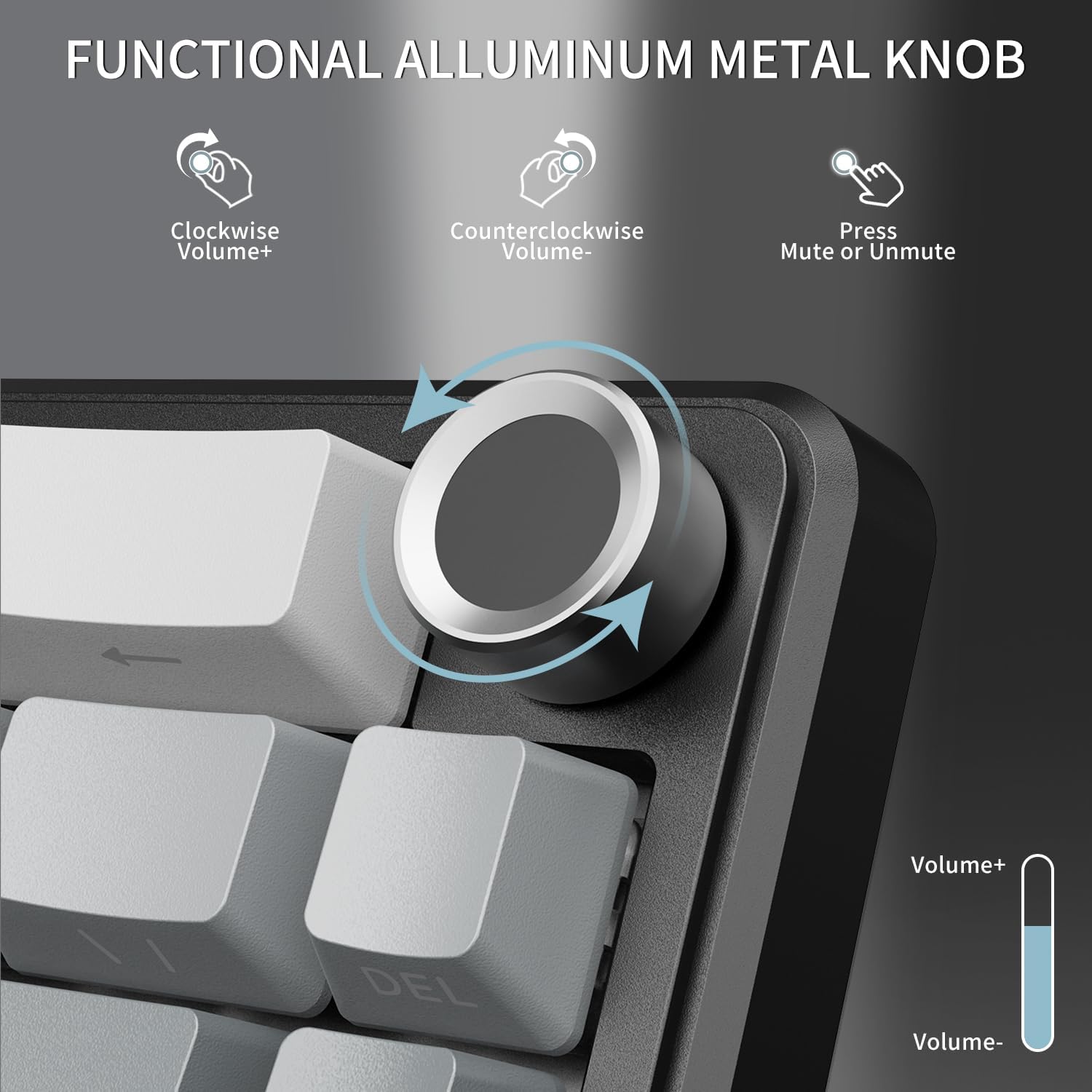
Figure 5.1: The volume knob, demonstrating its functions for increasinг/зменшенняasing volume and muting/unmuting audio.
5.2 Перемикач сумісності системи
The keyboard supports dual system compatibility (Windows/Mac). Use the dedicated switch next to the USB-C port to toggle between Win and Mac modes for optimized key mappings.
5.3 Світлові індикатори
The keyboard features three indicator lights to provide quick status updates:
- Індикатор Caps Lock: Світиться, коли активовано Caps Lock.
- Індикатор блокування перемоги: Illuminates when the Windows key is locked (to prevent accidental presses during gaming).
- Індикатор стану зарядки: Shows the charging status of the keyboard's battery.

Figure 5.2: The indicator lights located near the bottom right of the keyboard, showing status for Caps Lock, Win Lock, and charging.
6. Керування RGB-підсвічуванням
The ATTACK SHARK X66 features vibrant RGB backlighting with multiple customizable effects to enhance your gaming or work environment. The keyboard offers 18 dynamic chroma modes, 7 monochrome colors, and 1 rainbow color light.
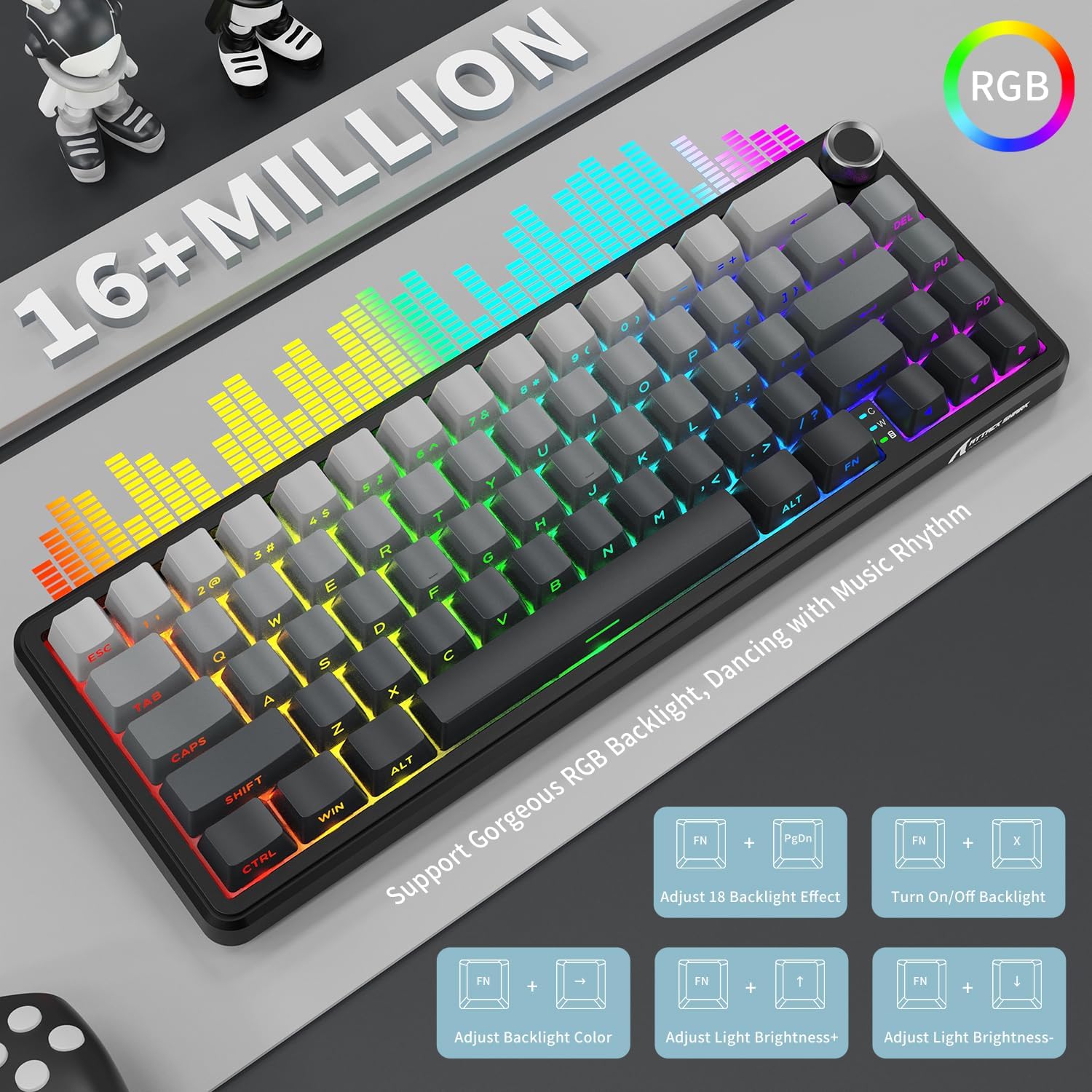
Figure 6.1: Visual representation of the RGB lighting capabilities and the FN key combinations for controlling them.
Use the following FN key combinations to control the RGB lighting:
- ФН + ПгДн: Adjust between 18 preset backlight effects.
- FN + X: Turn On/Off backlight.
- FN + Left/Right Arrow: Налаштуйте колір підсвічування.
- FN + Up/Down Arrow: Відрегулюйте яскравість світла.
7. Hot-Swappable Switches and Gasket Structure
The X66 keyboard is designed with a hot-swappable socket, allowing users to easily change switches without soldering. This feature provides flexibility for customizing your typing feel and sound. It supports most 3-pin and 5-pin mechanical switches.

Figure 7.1: Illustration of the hot-swappable design, showing the custom linear strawberry switches, pre-lubed fine-tune stabilizer, and 1.2mm single key slotted PCB. The image also highlights the Cherry profile Ковпачки клавіш PBT.
The keyboard comes pre-installed with linear Strawberry Switches, known for their smooth and consistent keystrokes. The pre-lubed stabilizers ensure a stable and pleasant typing experience.
7.1 Gasket Mounted Structure
The X66 utilizes a gasket-mounted structure, incorporating 5 layers of high-quality sound-absorbing material. This design effectively reduces hollow sound and provides a pure, stable keystroke feeling, contributing to a "creamy thocky" sound profile.

Figure 7.2: Detailed exploded view of the gasket-mounted structure, showing the various layers of sound-absorbing materials and components like the single key slotted PCB, shaft underpad, silica gel, PET singing pad, and PORON filled cotton.
7.2 Ковпачки клавіш PBT
The keyboard is equipped with durable PBT keycaps featuring side-printed characters. PBT material is known for its resistance to shine and wear over time, ensuring the legends remain clear. The Cherry profile provides an ergonomic typing feel.
8. Керування батареєю
The ATTACK SHARK X66 is powered by a 3000mAh large-capacity battery, providing extended usage time in wireless modes.
8.1 Перевірка рівня заряду батареї
To check the current battery level, long press the FN + Backspace keys. The number keys (1-0) will illuminate to indicate the battery percentage, with 10 representing 100% and lower numbers indicating a lower charge.

Figure 8.1: Instructions for checking the visible battery level by pressing FN + Backspace, showing how the 1-0 keys indicate charge status.
8.2 Зарядка
Connect the keyboard to a power source using the provided USB-C cable. The charging indicator light will confirm that the keyboard is charging. The keyboard can be used while charging in wired mode.
9. Технічне обслуговування
Правильне обслуговування забезпечує довговічність та оптимальну роботу вашої клавіатури.
- Прибирання: Use a soft, dry cloth to wipe down the keyboard. For deeper cleaning, you may use a can of compressed air to remove dust and debris from between the keycaps.
- Keycap and Switch Replacement: Use the included 2-in-1 keycap and switch puller to safely remove keycaps and switches. When replacing switches, ensure they are aligned correctly with the PCB pins to avoid bending.
- Зберігання: Якщо клавіатура не використовується протягом тривалого часу, зберігайте її в сухому, прохолодному місці, подалі від прямих сонячних променів та екстремальних температур.

Figure 9.1: The adjustable double-layer bracket, which can be used to set the keyboard at an ergonomic angle for comfortable typing.
10. Вирішення проблем
If you encounter any issues with your ATTACK SHARK X66 keyboard, please refer to the following common solutions:
| проблема | Можлива причина / рішення |
|---|---|
| Клавіатура не реагує в бездротовому режимі. |
|
| Specific keys not working or feeling stuck. |
|
| RGB-підсвічування не працює або поводиться непередбачувано. |
|
| Keyboard frequently disconnects. |
|
11. Технічні характеристики
| Особливість | Деталь |
|---|---|
| Модель | X66 |
| Опис клавіатури | Механічний |
| Кількість клавіш | 66 |
| Технологія підключення | Tri Mode (2.4Ghz Wireless, Bluetooth 5.0, Type C Wired) |
| Ємність акумулятора | 3000 мАг |
| Матеріал кепки | PBT (Side Printed Characters, Cherry Profile) |
| Тип перемикача | Linear Strawberry Switch (Hot Swappable) |
| Стиль монтажу | Gasket Mount (5-layer sound-absorbing material) |
| Підсвічування | RGB (16+ Million Colors, Multiple Effects) |
| Сумісні пристрої | Laptop, PC, Tablet, Smartphone, Mac |
| Вага товару | 1.98 фунта |
| Розміри упаковки | 13.98 x 6.57 x 2.05 дюймів |
12. Гарантія та підтримка
ATTACK SHARK products are manufactured to the highest quality standards. For warranty information, technical support, or customer service inquiries, please refer to the contact details provided on the product packaging or visit the official ATTACK SHARK webсайт.
Зберігайте підтвердження покупки для гарантійних претензій.


