вступ
This manual provides detailed instructions for the setup, operation, and maintenance of your ATTACK SHARK X66 Wireless Mechanical Gaming Keyboard. Please read this manual thoroughly to ensure proper use and to maximize your keyboard's performance.

Image: The ATTACK SHARK X66 Wireless Mechanical Gaming Keyboard, showcasing its compact 66-key layout and volume knob.
Налаштування
Before using your ATTACK SHARK X66 keyboard, please follow these steps for initial setup.
1. Розпакування та вміст
Обережно вийміть усі предмети з упаковки. Перевірте наявність усіх компонентів:
- 1 x ATTACK SHARK X66 Mechanical Keyboard
- 1 x 2-in-1 Keycap and Switch Puller
- 1 кабель USB-C
- 2 x Spare Strawberry Switches
- 1 х посібник користувача

Image: A visual representation of the ATTACK SHARK X66 keyboard and its included accessories, such as the USB-C cable, keycap/switch puller, and spare switches.
2. Початкове заряджання
For optimal performance, it is recommended to fully charge the keyboard before its first use. Connect the provided USB-C cable to the keyboard's USB-C port and the other end to a power source (e.g., computer USB port, USB wall adapter). The charging indicator light will provide feedback on the charging status.
Режими роботи
The ATTACK SHARK X66 keyboard supports three connection modes: Wired (USB-C), 2.4G Wireless, and Bluetooth 5.0. You can seamlessly switch between these modes.

Image: The side of the ATTACK SHARK X66 keyboard, highlighting the 2.4G, BT, and USB-C connection mode switches, along with the USB receiver storage slot.
1. Wired Mode (USB-C)
Connect the keyboard to your device using the provided USB-C cable. This mode provides a stable connection and charges the keyboard simultaneously.
2. Бездротовий режим 2.4G
- Locate the 2.4G USB receiver, typically stored in a dedicated slot on the keyboard.
- Підключіть USB-приймач 2.4G до вільного USB-порту на вашому комп'ютері.
- Встановіть перемикач режимів на клавіатурі на «2.4G».
- Клавіатура має підключитися автоматично.
3. Режим Bluetooth 5.0
- Set the mode switch on the keyboard to 'BT'.
- На своєму пристрої (комп’ютері, планшеті, смартфоні) увімкніть Bluetooth та почніть пошук нових пристроїв.
- The keyboard will appear as 'ATTACK SHARK X66' or similar. Select it to pair.
- The keyboard supports up to three Bluetooth devices. Switch between paired devices using FN+Q, FN+W, або FN+E.
4. System Switch (Win/Mac)
The keyboard features a dedicated switch to toggle between Windows and Mac operating system layouts, ensuring full compatibility and correct key functions for your chosen system.
Video: An official product video demonstrating the tri-mode connectivity (wired, 2.4G, Bluetooth) and system switching capabilities of the ATTACK SHARK X66 Mechanical Gaming Keyboard.
Ключові функції
The ATTACK SHARK X66 keyboard includes a functional knob and various FN key combinations to enhance usability.
1. Multimedia Knob
The aluminum alloy knob located on the top right of the keyboard provides quick access to multimedia controls:
- Повернути за годинниковою стрілкою: Збільшити гучність
- Повернути проти годинникової стрілки: Зменшити гучність
- Натисніть: Вимкнути/Увімкнути звук

Зображення: Детальний view of the functional aluminum metal knob on the ATTACK SHARK X66 keyboard, illustrating its volume control and mute/unmute capabilities.
2. Комбінації клавіш FN
The Fn key (Function key) allows access to secondary functions printed on various keys. Refer to the keycaps for specific combinations. Common functions include:
- FN + [клавіша]: Activates the secondary function of the key.
- FN + Backspace: Displays battery level (keys 1-0 will light up to indicate charge).
- ФН + ПгДн: Cycles through RGB backlight modes.
- FN + стрілка вгору: Збільшує яскравість підсвічування.
- FN + стрілка вниз: Зменшує яскравість підсвічування.
- FN + стрілка вліво: Changes backlight color.
- FN + стрілка вправо: Changes backlight color.
- FN + X: Вмикає/вимикає підсвічування.
Керування RGB-підсвічуванням
The ATTACK SHARK X66 keyboard features dynamic RGB backlighting with multiple effects and customization options.

Image: The ATTACK SHARK X66 keyboard illuminated with vibrant RGB lighting, demonstrating its 16+ million color capabilities and dynamic effects.
- Зміна режиму підсвічування: Прес FN + PgDn to cycle through 18 dynamic chroma backlit modes, 7 monochrome colors, and 1 rainbow color light.
- Налаштувати яскравість: використання FN + стрілка вгору для збільшення яскравості та FN + стрілка вниз щоб зменшити яскравість.
- Змінити колір: використання FN + стрілка вліво or FN + стрілка вправо to change the backlight color in certain modes.
- Увімкнути/вимкнути підсвічування: Прес FN + X щоб увімкнути або вимкнути підсвічування.
Перемикачі з можливістю гарячої заміни
The ATTACK SHARK X66 keyboard is equipped with hot-swappable sockets, allowing you to customize your typing experience by changing switches without soldering.

Зображення: Детальний view of the hot-swappable sockets and custom Strawberry switches on the ATTACK SHARK X66 keyboard, demonstrating the ease of switch replacement.
- Сумісність: Підтримує більшість 3-контактних та 5-контактних механічних перемикачів.
- Заміна перемикача: Use the provided 2-in-1 keycap and switch puller to carefully remove keycaps and switches. Align new switches with the sockets and press firmly until they click into place.
- Included Switches: The keyboard comes with linear Strawberry switches, known for their smooth and responsive feel.
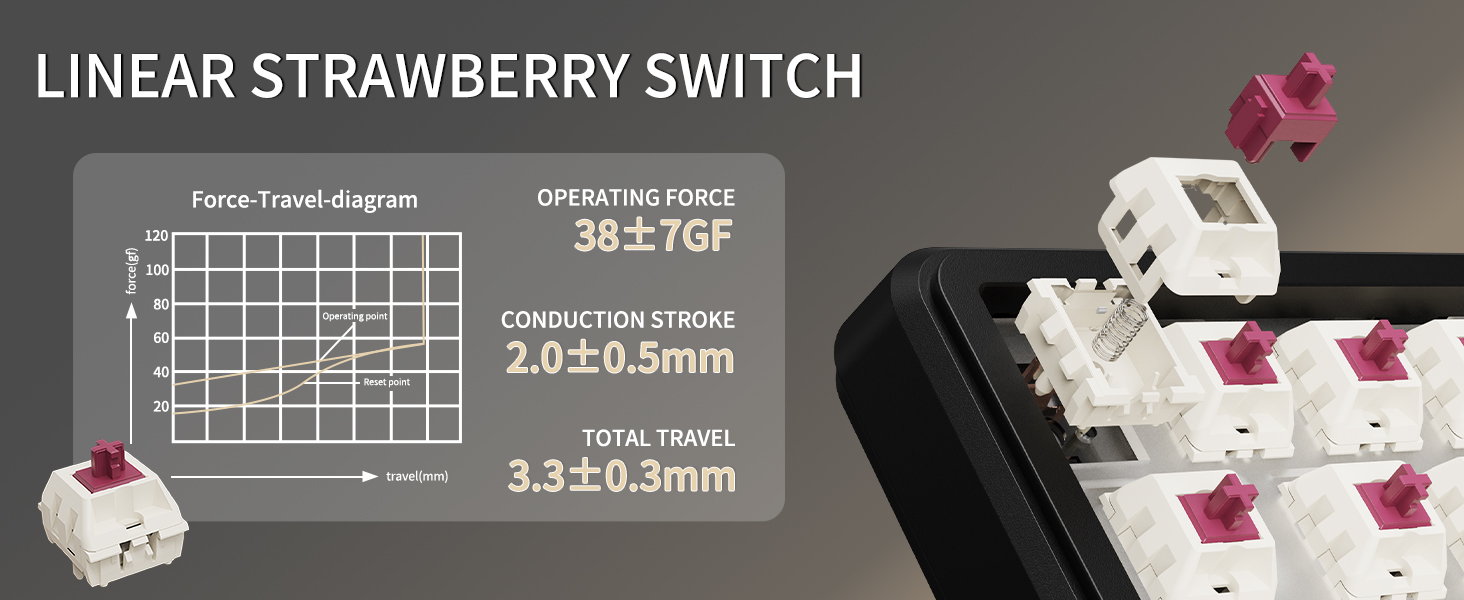
Image: A diagram illustrating the force-travel characteristics of the Linear Strawberry Switch, detailing operating force, conduction stroke, and total travel.
Керування батареєю
The ATTACK SHARK X66 keyboard is equipped with a 3000mAh battery for extended wireless use.

Image: A close-up of the indicator lights on the ATTACK SHARK X66 keyboard, showing status for Caps Lock, Win Lock, and charging.
- Індикатор зарядки: A dedicated indicator light shows the charging status.
- Перевірка рівня заряду акумулятора: Тривале натискання FN + Backspace. The number keys (1-0) will light up to visually represent the current battery level (e.g., 10 keys lit for 100%, 1 key lit for 10%).
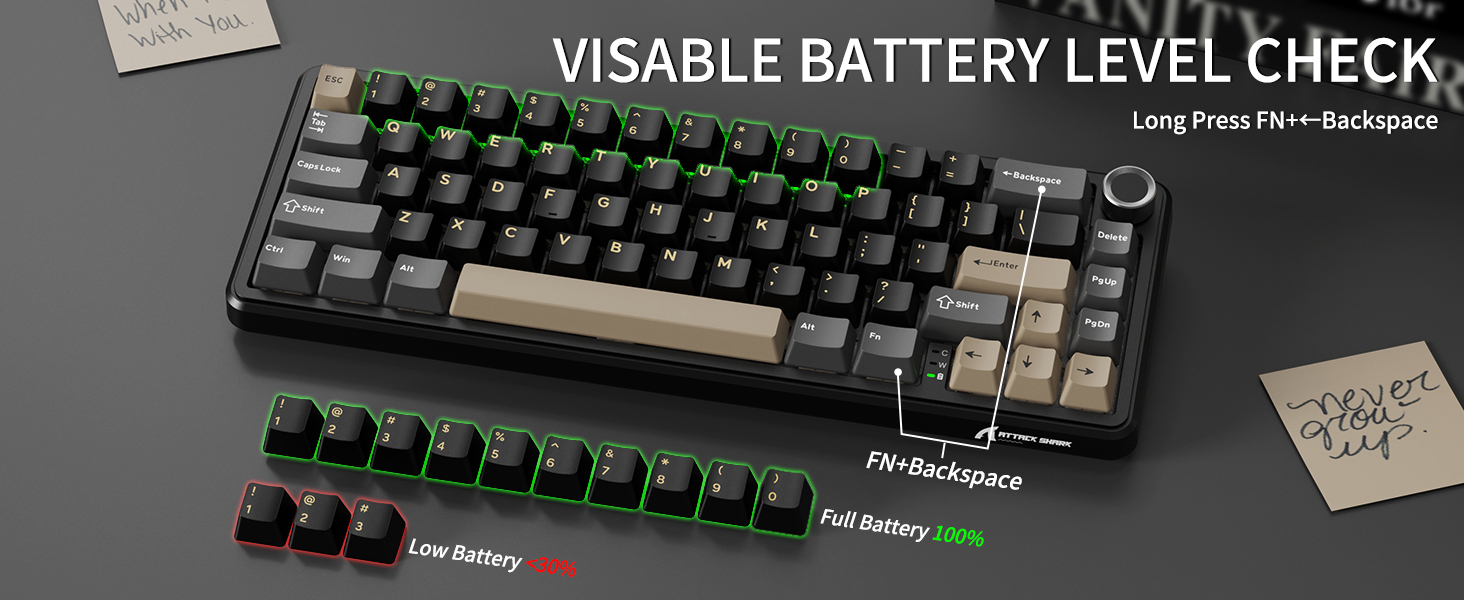
Image: The ATTACK SHARK X66 keyboard demonstrating the visible battery level check feature, where pressing FN+Backspace illuminates number keys to indicate charge percentage.
Технічне обслуговування
Регулярне технічне обслуговування допомагає подовжити термін служби та продуктивність вашої клавіатури.
- Прибирання: Use a soft, dry cloth to wipe the keyboard surface. For deeper cleaning, remove keycaps using the provided puller and use compressed air to clear debris.
- Догляд за клавішами та перемикачами: Avoid excessive force when removing or installing keycaps and switches to prevent damage to the stems or sockets.
- Зберігання: Якщо клавіатура не використовується протягом тривалого часу, зберігайте її в сухому та безпиловому середовищі.
Усунення несправностей
If you encounter issues with your ATTACK SHARK X66 keyboard, refer to the following common solutions:
- Клавіатура не реагує:
- Переконайтеся, що клавіатура заряджена.
- Check the connection mode switch (Wired, 2.4G, BT) matches your intended connection.
- Для 2.4G переконайтеся, що USB-приймач надійно підключено.
- For Bluetooth, ensure the keyboard is paired and selected in your device's Bluetooth settings.
- Спробуйте перезавантажити клавіатуру та пристрій.
- Spacebar Not Functioning: If the spacebar does not register presses, carefully remove the spacebar keycap using the provided puller. Check for any packing foam or foreign objects underneath that might be obstructing the switch's travel. Remove any obstructions and re-install the keycap.
- Проблеми з підсвічуванням:
- Ensure the backlight is not turned off (FN + X).
- Відрегулюйте яскравість за допомогою FN + стрілка вгору/вниз.
- Cycle through modes using FN + PgDn.
- Неправильні функції клавіш (Windows/Mac): Ensure the system switch on the keyboard is set to the correct operating system (Win or Mac).
- Typo in Manual (FN+BiidAb): Please note that some early documentation may contain a typo referring to a 'BiidAb' key. The correct key combination to change backlight modes is FN + PgDn.
Технічні характеристики
| Особливість | опис |
|---|---|
| Модель | X66 |
| Бренд | АТАКА АКУЛИ |
| Підключення | Дротовий USB-C, бездротовий 2.4G, Bluetooth 5.0 |
| Макет | 66-Key, 60% Gasket Mounted |
| Перемикачі | Hot-Swappable (3/5 pin), Linear Strawberry Switches |
| Клавіатури | PBT Keycaps, OEM Profile |
| Підсвічування | RGB (18 dynamic modes, 7 monochrome, 1 rainbow) |
| Ємність акумулятора | 3000 мАг |
| Особливості | Multimedia Knob, Dual System Compatibility (Win/Mac), Gasket Mount, 5-layer Sound Absorbing Material, Adjustable Two-stage Кронштейн |
| Розміри | 14.02 x 6.5 x 2.05 дюймів |
| вага | 1.96 фунта |
Гарантія та підтримка
For warranty information and technical support, please refer to the official ATTACK SHARK webсайт або зверніться безпосередньо до служби підтримки клієнтів. Зберігайте чек про покупку як підтвердження покупки.


