1. Вступ
This manual provides essential information for the proper setup, operation, maintenance, and troubleshooting of your Meizu mblu 21 4G LTE smartphone. Please read this manual thoroughly before using your device to ensure optimal performance and longevity.
The Meizu mblu 21 features a 6.79-inch HD display, a 13MP dual camera system, and runs on Android 14. It is designed for efficient performance and reliable connectivity.
2. Налаштування
2.1 Вміст упаковки
Переконайтеся, що ваш пакет містить такі елементи:
- Meizu mblu 21 Smartphone
- Адаптер живлення
- Короткий посібник користувача (якщо включено)
2.2 Встановлення SIM-картки та картки MicroSD
The Meizu mblu 21 supports Dual Nano SIM cards and a MicroSD card for expandable storage.
- Знайдіть лоток для SIM-картки на боковій стороні пристрою.
- Insert the SIM ejector tool (not included, use a thin pin if necessary) into the small hole on the SIM tray to eject it.
- Place your Nano SIM card(s) and/or MicroSD card into the designated slots on the tray, ensuring proper orientation.
- Обережно вставте лоток для SIM-картки назад у телефон, доки він не клацне на місці.
2.3 Початкове ввімкнення та налаштування мережі
- Press and hold the power button until the Meizu logo appears.
- Дотримуйтесь підказок на екрані, щоб завершити початкове налаштування, включаючи вибір мови, підключення Wi-Fi та налаштування облікового запису Google.
- For cellular connectivity, ensure your SIM card is active. This device is an international version and in the USA market, it operates exclusively on T-Mobile's 4G LTE network. Outside the USA, it is compatible with various carriers worldwide.
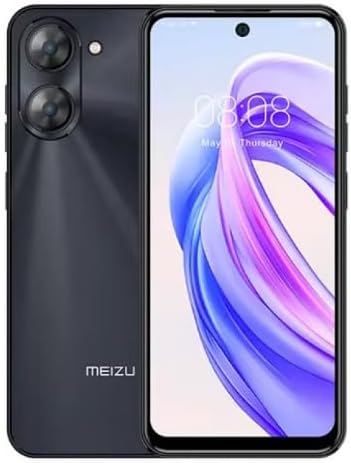
Зображення 2.3.1: Передня і задня view of the Meizu mblu 21 smartphone. The front displays the screen with a punch-hole camera, while the rear shows the dual camera module and the Meizu branding.
3. Інструкція з експлуатації
3.1 Базова навігація (Android 14)
Your Meizu mblu 21 runs on Android 14, offering an intuitive user experience. Use gestures or on-screen navigation buttons to move between apps, access settings, and manage notifications.
3.2 Використання камери
The device features a 13MP Smart Camera on the rear and an 8MP front camera. Open the Camera app to capture photos and videos. Utilize various modes and settings for optimal results.
3.3 Особливості безпеки
Unlock your device using the side-mounted fingerprint sensor for instant access or the 8MP front camera for Smart Face Unlock.
3.4 Підключення
- Wi-Fi: Supports Dual-Band Wi-Fi (2.4GHz and 5GHz) for stable internet access.
- Bluetooth: Bluetooth 5.0 for connecting to wireless accessories.
- VoLTE: Enjoy clearer voice calls with VoLTE HD Calls.

Зображення 3.4.1: Visual representation of key connectivity and operating system features, including Android 14, Dual-Band Wi-Fi, Bluetooth 5.0, and VoLTE HD Calls.
4. Технічне обслуговування
4.1 Загальний догляд
- Тримайте пристрій сухим та подалі від екстремальних температур.
- Протирайте екран і корпус м’якою тканиною без ворсу. Уникайте агресивних хімічних речовин.
- Захистіть екран захисною плівкою, а корпус – захисним чохлом, щоб запобігти подряпинам та пошкодженням.
4.2 Керування батареєю
The 4900mAh battery is designed for all-day performance. To prolong battery life:
- Уникайте частого повного розряджання акумулятора.
- Використовуйте адаптер живлення, що постачається в комплекті, для заряджання.
- Optimize background app usage and screen brightness in settings.

Зображення 4.2.1: Внутрішній view of the Meizu mblu 21 smartphone highlighting the 4900mAh battery, emphasizing its capacity for extended use.
5. Вирішення проблем
5.1 Поширені проблеми та рішення
- Пристрій не включається: Переконайтеся, що акумулятор заряджений. Підключіть адаптер живлення та спробуйте ще раз.
- Проблеми з підключенням до мережі: Check if your SIM card is properly inserted and active. Verify network settings and ensure you are within T-Mobile's coverage area in the USA.
- Повільна продуктивність: Закрийте непотрібні фонові програми. Очистіть кеш та тимчасові files. Restart the device.
- Акумулятор швидко розряджається: Reduce screen brightness, disable unused features like Bluetooth or GPS, and check for power-intensive apps.
If problems persist, consider performing a factory reset (back up your data first) or contacting customer support.
6. Технічні характеристики
| Номер моделі | M416L |
| Операційна система | Android 14 |
| Дисплей | 6.79 Inches HD, 2340 x 1080 Resolution, 90Hz Adaptive Refresh Rate |
| Процесор | Octa Core 1.6GHz ARM Mali-G57 |
| Пам'ять | 64 GB Internal Storage, 4 GB RAM |
| Акумулятор | 4900mAh (4.9E+3 Milliamp Hours) Lithium Polymer |
| Задня камера | 13MP Smart Camera, 5P Precision Lens |
| Фронтальна камера | 8 МП |
| Стільникові технології | 4G LTE FDD: 2,3,4,5,7,8,12,17,26,28,66; 3G WCDMA: 2/4/5/8; 2G Quad Band |
| Тип SIM | Dual Nano SIM + MicroSD |
| Wi-Fi | Дводіапазонний (2.4 ГГц та 5 ГГц) |
| Bluetooth | 5.0 |
| Аудіороз'єм | USB типу C |
| Вага товару | 14 унції |
| ID FCC | 2ANQ6-M416L |

Зображення 6.1: The Meizu mblu 21 smartphone presented in its Titan Black color variant, showcasinйого дизайн.
7. Гарантія та підтримка
For warranty information, please refer to the warranty card included with your product or consult the retailer where the device was purchased. Meizu provides support for its products. For further assistance, please visit the official Meizu webсайту або зв’яжіться з їхньою службою обслуговування клієнтів.


