1. Вступ
This manual provides detailed instructions for the setup, operation, and maintenance of your GIEC G5300 4K Ultra HD Blu Ray Player. Designed for an enhanced home entertainment experience, this player supports true 4K ultra-high-definition picture quality, HDR10, Dolby Vision, BT.2020 color spaces, and Dolby audio decoding for immersive visuals and sound.
2. Інформація про безпеку
- Ensure proper ventilation around the player to prevent overheating.
- Не піддавайте пристрій впливу дощу або вологи, щоб зменшити ризик пожежі або ураження електричним струмом.
- Avoid placing heavy objects on top of the player.
- Не відкривайте casing; звертайтеся до кваліфікованого персоналу з усіма видами обслуговування.
- Keep the player away from direct sunlight, heat sources, and strong magnetic fields.
- Використовуйте лише адаптер живлення, що постачається разом із пристроєм.
3. Вміст упаковки
Будь ласка, перевірте, чи всі перелічені нижче предмети входять до вашої упаковки:
- GIEC G5300 Blu-ray Player (x1)
- Кабель HDMI (x1)
- Пульт дистанційного керування (x1)
- Посібник користувача (x1)
4. Продукт закінчивсяview
4.1 Передня панель

Малюнок 4.1: Спереду view of the GIEC G5300 Blu Ray Player, showing the disc tray, display, USB port, and control buttons (power, play/pause, eject).
- Лоток для диска: Insert Blu-ray or DVD discs here.
- Панель дисплея: Shows playback status and time.
- Порт USB 3.0: Підключіть USB-накопичувачі для відтворення медіафайлів.
- Кнопки управління: Power On/Off, Play/Pause, Eject.
4.2 Задня панель та з’єднання

Малюнок 4.2: Задня частина view of the GIEC G5300 Blu Ray Player, highlighting various input/output ports including LAN, HDMI 2.0, HDMI 1.4, USB 3.0, Coaxial, and Optical outputs.
- Порт LAN: For network connection (e.g., firmware updates).
- HDMI 2.0 Output (Video/Audio): Primary HDMI output for 4K video and audio.
- HDMI 1.4 Output (Audio Only): Dedicated HDMI output for audio to an AV receiver.
- USB 3.0 Input: Підключіть USB-накопичувачі для відтворення медіафайлів.
- Коаксіальний вихід: Цифровий аудіо вихід.
- Оптичний вихід: Цифровий аудіо вихід.
5. Налаштування
5.1 Встановлення батарейок пульта дистанційного керування
Insert two AAA batteries (not included) into the remote control, ensuring correct polarity.
Video 5.1: This video demonstrates how to install batteries into the remote control and connect the Blu-ray player to a TV using an HDMI cable.
5.2 Connecting to a Display Device (TV/Projector)
- Підключіть один кінець кабелю HDMI, що постачається в комплекті, до HDMI 2.0 Output (Video/Audio) порт на задній панелі програвача Blu-ray.
- Connect the other end of the HDMI cable to an available HDMI input port on your TV or projector.
- For separate audio output, connect another HDMI cable from the HDMI 1.4 Output (Audio Only) port to your AV receiver, or use the Coaxial/Optical outputs.
5.3 Підключення живлення
- Connect the power cable to the power input on the rear of the Blu-ray player.
- Підключіть інший кінець кабелю живлення до розетки.
- Turn on your TV/projector and select the correct HDMI input source corresponding to the port you connected the Blu-ray player to.
- Press the Power button on the Blu-ray player or remote control to turn on the unit.
6. Інструкція з експлуатації
6.1 Відтворення диска
- Ensure the player is powered on and connected to your display device.
- Натисніть ВИЙТИ кнопку на передній панелі або пульті дистанційного керування, щоб відкрити лоток для дисків.
- Carefully place a Blu-ray or DVD disc onto the tray with the label side facing up.
- Натисніть ВИЙТИ button again to close the tray. The player will automatically begin loading and playing the disc.
- Use the remote control for playback functions such as Play, Pause, Stop, Fast Forward, and Rewind.
6.2 Відтворення USB-носіїв
The GIEC G5300 supports playback of various media files із USB-накопичувача.
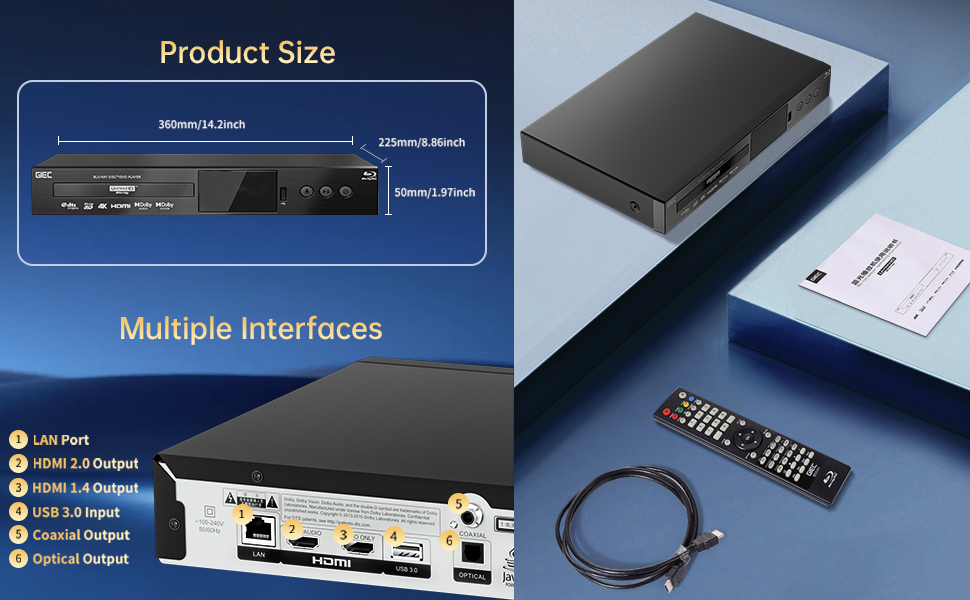
Figure 6.1: Illustration of the multiple disc, video, and audio formats supported by the player.
- Insert your USB storage device into the Порт USB 3.0 на передній або задній панелі.
- Navigate to the "Video," "Music," or "Photo" section on the player's main menu using the remote control.
- Виберіть потрібний file from the USB device to begin playback.
Підтримувані формати:
- Типи дисків: BD, BD-R, BD-RE, DVD-R/RW, DVD+R/RW, DVD-Video, VCD, CD, CD-R/RW.
- Формати відео: MPEG-1, MPEG-2, MPEG-4, VC1, H.264, MOV, MKV, AVI, TS.
- Аудіоформати: AAC, APE, CUE, FLAC, OGG, MP3, WAV.
7. особливості
- 4K Ultra HD Playback: Experience movies and shows in stunning 4K resolution with clearer images and richer colors.
- Підтримка HDR10: Enjoy a wider range of brightness and contrast, revealing more detail in both dark and bright scenes.
- Dolby Vision: Enhances image quality by dynamically adjusting brightness and expanding dynamic range for more detailed and vivid pictures.
- BT.2020 Color Spaces: Provides a broader color gamut than standard 1080p Blu-ray, resulting in purer, more natural, and realistic colors.
- Dolby Sound & DTS Decoding: Supports Dolby audio decoding and DTS effects for an immersive 5.1 stereo surround sound experience.
- 3D Blu-ray Playback: Compatible with 3D Blu-ray discs for an immersive three-dimensional viewing experience (requires a 3D-compatible TV and glasses).
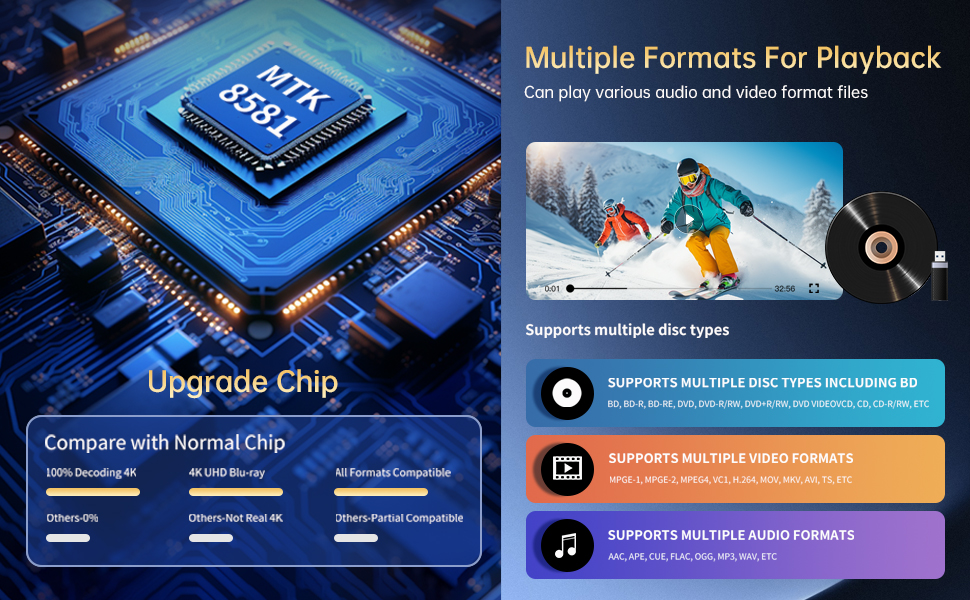
Figure 7.1: Visual comparison illustrating the difference between 8-bit (16.67 million colors) and 10-bit (1.07 billion colors) color depth, highlighting the enhanced detail and delicacy of 10-bit color.

Figure 7.2: The GIEC G5300 Blu Ray Player connected to a TV, showcasing its support for 4K UHD, 3D, HDR, HDR10+, Dolby, and Dolby Vision technologies.
8. Технічне обслуговування
- Прибирання: Використовуйте м’яку суху тканину для очищення зовнішньої частини програвача. Не використовуйте рідкі або аерозольні засоби для чищення.
- Догляд за дисками: Тримайте диски за краї. Протирайте диски м’якою тканиною без ворсу, рухаючись від центру до країв.
- Вентиляція: Ensure the player's ventilation openings are not blocked to prevent overheating.
9. Вирішення проблем
If you encounter issues with your Blu-ray player, please refer to the following common solutions:
- Немає живлення: Check if the power cable is securely connected to both the player and the power outlet. Ensure the outlet is functional.
- Немає зображення/звуку: Verify that the HDMI cable is correctly connected to both the player and the TV/receiver. Ensure the correct HDMI input is selected on your TV/receiver.
- Диск не відтворюється: Check if the disc is clean and free of scratches. Ensure the disc is inserted correctly with the label side up. The player supports Region A Blu-ray discs and all region DVD discs.
- Пульт дистанційного керування не працює: Check the batteries in the remote control and replace them if necessary. Ensure there are no obstructions between the remote and the player.
10. Технічні характеристики
| Особливість | Деталь |
|---|---|
| Торгова марка | GIEC |
| Назва моделі | G5300 |
| Вага товару | 4.18 фунта (1.9 кілограма) |
| Розміри продукту | 14.2 x 8.9 x 2 дюймів |
| Колір | чорний |
| Тип носія | Blu-Ray диск, DVD |
| роздільна здатність | 3840x2160 (4K Ultra HD) |
| Особливості | Anti-Shock, Compact, Dust Proof, Multi-Format Playback, Surround Sound, HDR10, Dolby Vision, BT.2020 Color Spaces |
| Тип роз'єму | HDMI (Dual Outputs), USB 3.0, Coaxial, Optical, LAN |
| Технологія підключення | HDMI |
11. Гарантія та підтримка
For warranty information or technical support, please refer to the documentation included with your purchase or contact GIEC customer service. Keep your proof of purchase for warranty claims.


