1. Вступ
This manual provides essential instructions for the safe and efficient operation of your RadioShack Home Projector. Please read this manual thoroughly before using the device and retain it for future reference.
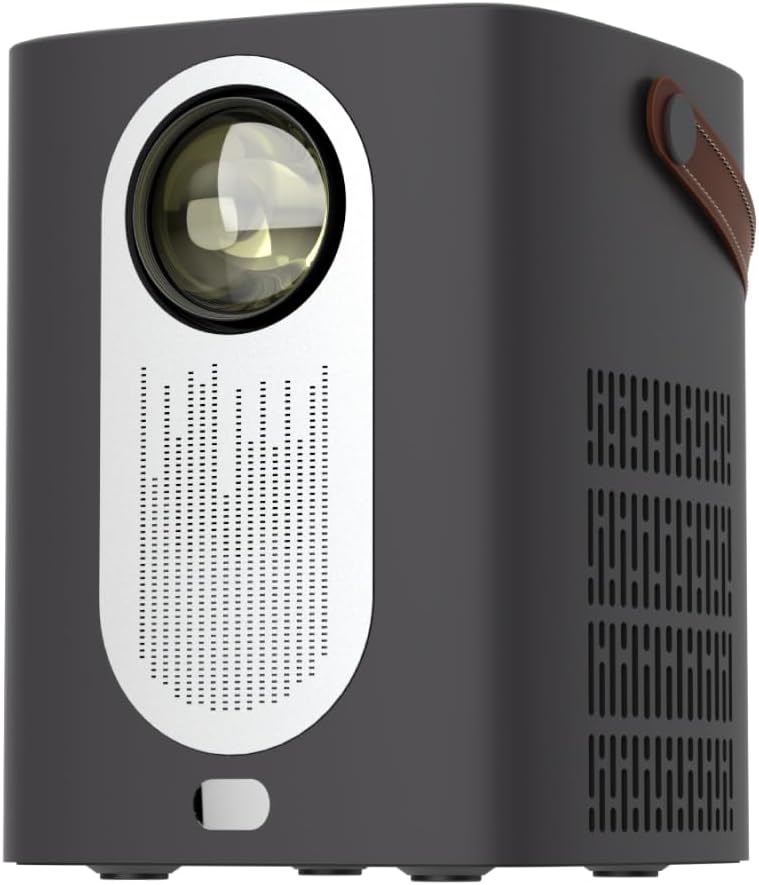
Зображення 1.1: спереду view of the RadioShack Home Projector, showcasing its lens and speaker grille.
2. Вміст упаковки
Перевірте наявність усіх елементів в упаковці:
- 1 x RadioShack Home Projector
- 1 x Пульт дистанційного керування
- 1 х кабель живлення
- 1 x Посібник користувача (цей документ)

Image 2.1: Illustration of the package contents, including the projector, remote control, power cable, and user manual.
3. Продукт закінчивсяview
3.1. Ключові характеристики
- Дисплей з високою роздільною здатністю: Supports full HD resolution for clear and detailed images.
- Bright and Long-Lasting: Features impressive brightness and a durable light source.
- Універсальний підключення: Includes Bluetooth, WiFi, Android Miracast, and iOS Cast for streaming.
- Покращений Viewing: Digital focus and keystone correction for optimal image alignment.
- Компактний і портативний: Lightweight design with a handle for easy transport.
3.2. Порти та елементи керування
Familiarize yourself with the projector's input/output ports and controls.

Зображення 3.1: Ззаду view of the projector showing USB input for media playback, AV input for DVD players, and HDMI input for various devices like video game consoles, streaming sticks, cell phones, tablets, and laptops.

Зображення 3.2: Збоку view illustrating the compact dimensions (approximately 7 inches tall, 5.3 inches wide) and the integrated leather handle for portability.
4. Посібник із налаштування
4.1. Початкове увімкнення
- Connect the power cable to the projector and a suitable power outlet.
- Press the power button located on the top of the projector or on the remote control to turn on the device. The indicator light will illuminate.
- The RadioShack logo will appear on the projection surface, indicating successful power-on.
Video 4.1: A short demonstration showing the unboxing, connecting the power cable, powering on the projector, and the initial display of the RadioShack logo.
4.2. Placement and Focus
- Place the projector on a stable, flat surface, ensuring the lens is unobstructed.
- Adjust the distance from the projection surface (wall or screen) to achieve the desired image size.
- Use the digital focus adjustment (refer to the remote control or on-screen menu) to sharpen the image.
- Utilize keystone correction if the image appears trapezoidal, to achieve a rectangular projection.
5. Інструкція з експлуатації
5.1. Підключення пристроїв
Проектор підтримує кілька джерел вхідного сигналу:
- HDMI: Connect devices such as laptops, gaming consoles, streaming boxes, or Blu-ray players using an HDMI cable. Select HDMI as the input source from the projector's menu.
- USB: Insert a USB drive to play compatible video or audio files. Select USB as the input source.
- AV: Connect older devices like DVD players using an AV cable. Select AV as the input source.
- Bluetooth: Pair with Bluetooth audio devices for wireless sound output.
- WiFi / Casting: Connect to a Wi-Fi network to enable Android Miracast or iOS Cast for screen mirroring from compatible smartphones and tablets.

Image 5.1: A couple enjoying content projected by the RadioShack Home Projector, demonstrating its use in a home cinema setting.
5.2. Функції дистанційного керування
У комплекті є пульт дистанційного керування, що забезпечує зручне керування:
- Потужність: Увімкніть/вимкніть проектор.
- Джерело: Select input sources (HDMI, USB, AV, etc.).
- Навігація: Arrow keys to navigate menus, OK button to confirm.
- обсяг: Налаштуйте рівень вихідного аудіо.
- Фокус/Трапецеїчне спотворення: Access digital focus and keystone correction settings.

Image 5.2: The RadioShack Home Projector placed on a table next to its remote control, ready for use.
6. Технічне обслуговування
- Очищення лінзи: Використовуйте м’яку тканину без ворсу, спеціально призначену для оптичних лінз, щоб обережно протерти об’єктив проектора. Уникайте абразивних матеріалів або агресивних хімікатів.
- Очищення зовнішньої частини: Протріть зовнішню частину проектора м’якою сухою тканиною. Не використовуйте рідкі засоби для чищення безпосередньо на пристрої.
- Вентиляція: Ensure the projector's ventilation openings are clear of dust and obstructions to prevent overheating.
- Зберігання: Якщо проектор не використовується протягом тривалого часу, зберігайте його в прохолодному, сухому місці, подалі від прямих сонячних променів та екстремальних температур.
7. Вирішення проблем
| проблема | Можлива причина | Рішення |
|---|---|---|
| Не відображається зображення | Power cable disconnected; incorrect input source selected; lens cap on. | Check power connection; select correct input source (HDMI, USB, AV); remove lens cap. |
| Зображення розмите | Фокус не налаштовано; проектор занадто близько/далеко від екрана. | Adjust digital focus; reposition projector for optimal distance. |
| Ні звуку | Volume too low; external audio device not connected/paired; incorrect audio output selected. | Increase volume; ensure Bluetooth device is paired or wired audio is connected; check audio output settings. |
| Пульт не працює | Розряджені батарейки; між пультом дистанційного керування та проектором є перешкода. | Replace remote control batteries; ensure clear line of sight to the projector's IR receiver. |
8. Технічні характеристики
- Бренд: RadioShack
- модель: Home Projector (ASIN: B0DP1GFG9L)
- Роздільна здатність дисплея: 1280 x 720 (Supports Full HD)
- Технологія підключення: AV, HDMI, USB, Bluetooth, WiFi (Android Miracast, iOS Cast)
- Особливості: Portable, Digital Focus, Keystone Correction
- Рекомендоване використання: Домашній кінотеатр
- Розміри продукту: 5.31 x 5.31 x 7.09 дюймів
- Вага товару: 3.91 фунта

Image 8.1: The projector displaying content, highlighting its support for full HD resolution and high-quality sound.
9. Гарантія та підтримка
Щоб отримати інформацію про гарантію та технічну підтримку, зверніться до офіційного сайту RadioShack. webсайт або зверніться до служби підтримки клієнтів. Зберігайте чек про покупку як підтвердження покупки.
Інтернет-підтримка: www.radioshack.com


