1. Вступ
This manual provides detailed instructions for the proper use, setup, and maintenance of your Pard NV009-850nm Digital Night Vision Monocular. Please read this manual thoroughly before operating the device to ensure optimal performance and longevity. This device is designed for wildlife observation, hunting, and general outdoor viewing in various light conditions.

Image 1.1: The Pard NV009-850nm Digital Night Vision Monocular. This image displays the compact and ergonomic design of the monocular, highlighting its main body, objective lens, and eyepiece.
2. Продукт закінчивсяview
2.1 Вміст упаковки
Після розпакування перевірте наявність усіх перелічених нижче елементів:
- Pard NV009-850nm Digital Night Vision Monocular
- Захисний футляр для транспортування
- USB-кабель для зарядки
- Wrist Strap / Neck Strap
- Посібник користувача (цей документ)

Image 2.1: Contents of the Pard NV009-850nm package. This image shows the monocular, its carrying case, charging cable, straps, and the user manual, all neatly arranged.
2.2 Основні характеристики
- Daytime and Nighttime Operation: Seamless transition between full-color daytime viewing and monochrome night vision mode.
- Зображення високої роздільної здатності: Features a 1920x1080 FHD CMOS image sensor and a 1024x768 OLED display for clear, detailed visuals.
- Adjustable IR Illuminator: Integrated 850nm IR illuminator with three intensity levels, providing effective illumination up to 200 meters.
- Фото- та відеозапис: Capture 2608x1944 resolution photos and 1920x1080 Full HD videos directly to a Micro SD card.
- Оптичний і цифровий зум: Offers 4.7x optical magnification and 1.5x-3.0x digital zoom for precise target observation.
- З'єднання Wi-Fi: Connects to smart mobile devices via the "PardVision" app for remote viewта передача даних.
- Режим «картинка в картинці» (PIP): Provides a magnified inset view of the central area for enhanced detail without losing the wider field of view.
- Міцний дизайн: IP67 waterproof rating ensures reliability in various outdoor conditions.

Image 2.2: Comparison of day and night vision modes. This image illustrates the monocular's capability to provide full-color images during the day and clear monochrome images at night, featuring a fox in both scenarios.

Image 2.3: Nighttime viewing range illustration. This graphic demonstrates the monocular's effective viewing distance of up to 200 meters (656 feet) in low-light conditions, showing a wild boar as an example target.

Image 2.4: Enhanced image quality demonstration. This image compares a blurred, lower-quality image with a sharp, enhanced image, illustrating the effectiveness of the PARD Visual Light Enhancement Algorithm (VLEA) and OLED display.
3. Налаштування
3.1 Встановлення батареї
- Locate the battery compartment cover, typically on the underside or side of the monocular.
- Відкрийте кришку, повернувши або зсунувши її відповідно до індикатора.
- Insert a fully charged 18650 type battery (not included) with the correct polarity (+/-) as indicated inside the compartment.
- Надійно закрийте кришку відсіку для акумулятора.
3.2 Встановлення карти Micro SD
The device supports Micro SD cards for storing photos and videos.
- Locate the Micro SD card slot, usually protected by a rubber cover.
- Обережно вставте карту Micro SD у гніздо до клацання. Переконайтеся, що карта правильно орієнтована.
- Close the rubber cover to protect the slot from dust and moisture.
3.3 Початкове увімкнення та налаштування фокуса
- Натисніть і утримуйте кнопку живлення, щоб увімкнути пристрій.
- Adjust the diopter ring on the eyepiece until the on-screen display (OSD) text appears sharp and clear to your eye.
- Rotate the objective lens focus ring to bring the observed image into sharp focus.
4. Інструкція з експлуатації
4.1 Увімкнення/вимкнення живлення
- Увімкнення: Натисніть і утримуйте кнопку живлення приблизно 3 секунди.
- Вимкнення живлення: Натисніть і утримуйте кнопку живлення приблизно 3 секунди, доки пристрій не вимкнеться.
4.2 Mode Selection (Day/Night)
The NV009-850nm automatically adjusts to ambient light, but you can manually switch modes:
- В основному viewing interface, short press the Mode button to toggle between Day (color) and Night (monochrome) vision modes.
4.3 Регулювання ІЧ-підсвічування
Вбудований ІЧ-підсвічувач покращує видимість у повній темряві.
- Activate the IR illuminator by pressing its dedicated button (if available) or through the menu.
- Short press the IR button to cycle through the three intensity levels (Low, Medium, High) or to turn it off.

Image 4.1: IR Illuminator functionality. This graphic illustrates the 200m adjustable beam IR illuminator with its three intensity levels, showing how it illuminates a target in darkness.
4.4 Операція масштабування
- Use the designated zoom buttons (often '+' and '-') to adjust the digital magnification. The optical magnification is fixed at 4.7x.
4.5 Фото- та відеозйомка
- Фото: In viewing mode, short press the Photo button to capture an image.
- Відео: Short press the Video button to start recording. Press again to stop recording.

Image 4.2: Video recording and playback function. This image shows the monocular's ability to capture and play back high-definition video, with a simulated screen displaying a recorded scene of a fox.
4.6 Відтворення
- Enter the Playback menu via the main menu.
- Navigate through your recorded photos and videos using the directional buttons.
- Select an item to view it on the OLED display.
4.7 Wi-Fi Connectivity (PardVision App)
- Download the "PardVision" app from your device's app store (Apple App Store or Google Play Store).
- On the monocular, enable Wi-Fi through the system settings. The device will broadcast a Wi-Fi network.
- Connect your smartphone or tablet to the monocular's Wi-Fi network.
- Open the PardVision app to view a live feed, control settings, and transfer files.
4.8 Режим «картинка в картинці» (PIP)
- Activate PIP mode through the quick menu or system settings.
- A magnified window will appear on the main display, showing a zoomed-in view of the central area.
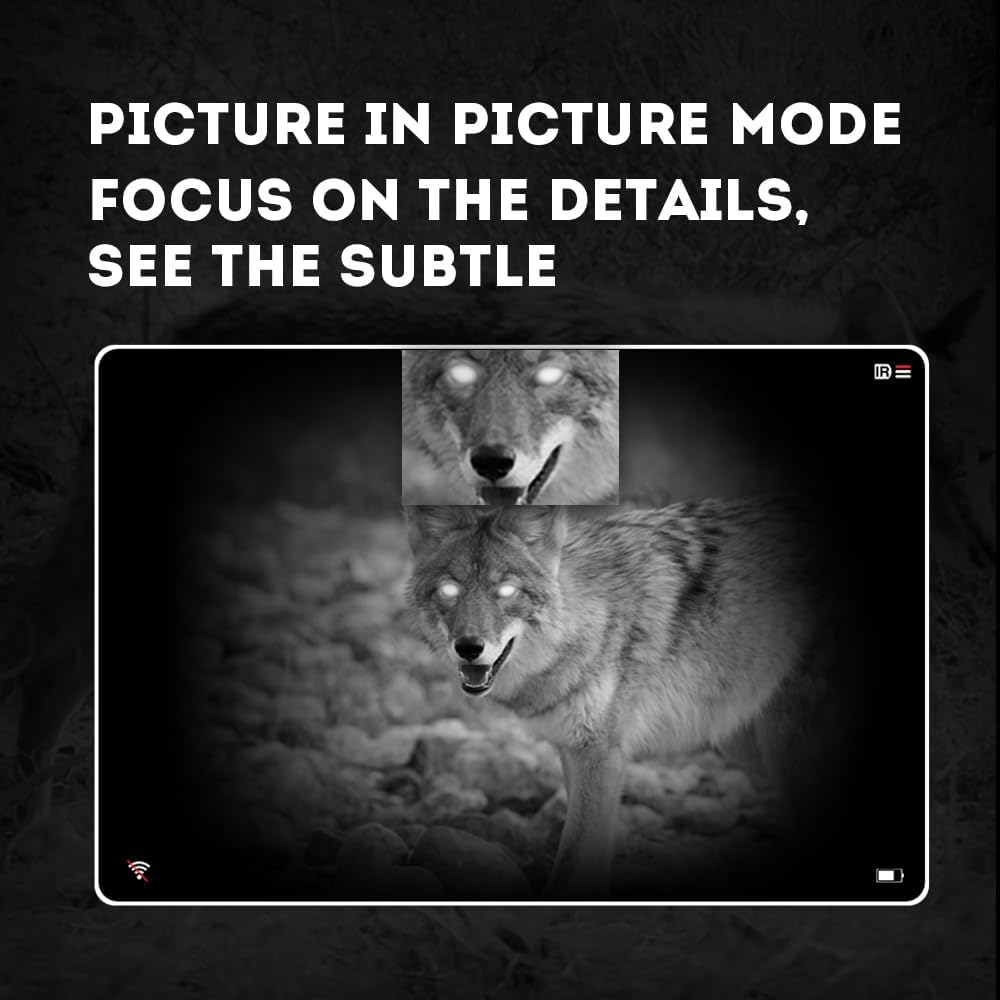
Image 4.3: Picture-in-Picture (PIP) mode. This image demonstrates how PIP mode allows users to focus on specific details within the main view, showing a magnified inset of a coyote's face.
5. Технічне обслуговування
5.1 Очищення пристрою
- Лінзи: Use a soft, lint-free cloth specifically designed for optical lenses. For stubborn smudges, use a small amount of lens cleaning solution. Avoid abrasive materials.
- Тіло: Протріть корпус монокуляра м’якою тканиноюamp тканина. Не використовуйте агресивні хімікати або розчинники.
5.2 Догляд за акумулятором
- Always use high-quality, rechargeable 18650 batteries.
- Вийміть акумулятор, якщо пристрій не використовуватиметься протягом тривалого часу.
- Зберігайте батареї в прохолодному сухому місці.
5.3 Зберігання
- Store the monocular in its protective carrying case when not in use.
- Зберігайте пристрій у сухому місці, подалі від прямих сонячних променів та екстремальних температур.
6. Вирішення проблем
If you encounter issues with your Pard NV009-850nm, refer to the following common problems and solutions:
| проблема | Можлива причина | Рішення |
|---|---|---|
| Пристрій не включається | Низький або розряджений акумулятор; неправильне встановлення акумулятора | Charge or replace the battery; Reinstall battery with correct polarity. |
| Зображення розмите | Improper focus adjustment; Dirty lens | Adjust the diopter and objective lens focus rings; Clean the lenses. |
| No image in night mode | IR illuminator is off or set too low | Turn on the IR illuminator and adjust its intensity. |
| Проблеми з підключенням Wi-Fi | Wi-Fi not enabled on device; Incorrect app settings | Ensure Wi-Fi is enabled on the monocular; Check app permissions and settings. |
| Не вдається записувати фотографії/відео | No Micro SD card; SD card full or corrupted | Вставте карту Micro SD; Видаліть старі дані files or format the card (backup important data first). |
If the problem persists after attempting these solutions, please contact Pard customer support.
7. Технічні характеристики
| Особливість | Деталь |
|---|---|
| Бренд | Pard |
| Назва моделі | PARD Night Vision Monocular |
| Номер моделі | NV009-850nm |
| Колір | чорний |
| Розміри продукту (ДxШxВ) | 7.16 дюйма x 2.24 дюйма x 2.79 дюйма (18.19 см x 5.69 см x 7.09 см) |
| Вага товару | 340 грамів |
| матеріал | Алюміній |
| Діаметр лінзи об'єктива | 25 міліметрів |
| Полегшення очей | 25 міліметрів |
| Можливість нічного бачення | так |
| IR Illuminator Wavelength | 850nm (with 940nm option available in other variants) |
| CMOS Sensor Resolution | 1920x1080 пікселів |
| Екран дисплея | 1024x768 OLED |
| Оптичне збільшення | 4.7x |
| Цифровий зум | 1.5x-3.0x |
| Роздільна здатність фото | 2608x1944 пікселів |
| Роздільна здатність відео | 1920x1080 пікселів |
| Рейтинг водонепроникності | IP67 |
| Сумісні пристрої | Camera (for recording) |
| Тип монтажу | Rail Mount (if applicable for accessories) |
8. Гарантія та підтримка
8.1 Інформація про гарантію
The Pard NV009-850nm Digital Night Vision Monocular comes with a Гарантія 1 рік з дати покупки. Ця гарантія поширюється на виробничі дефекти та несправності за умов нормального використання. Вона не поширюється на пошкодження, спричинені неправильним використанням, нещасними випадками, несанкціонованими модифікаціями або неправильним обслуговуванням.
Зберігайте підтвердження покупки для гарантійних претензій.
8.2 Підтримка клієнтів
For technical assistance, warranty claims, or any questions regarding your device, please contact Pard customer support through the official Pard website or your retailer. When contacting support, please have your model number (NV009-850nm) and purchase date available.


