1. Вступ
This manual provides essential instructions for the safe and efficient operation of your pecron E1000LFP Solar Generator and accompanying 2x200W Solar Panels. Please read this manual thoroughly before using the product to ensure proper function and longevity.

Image 1.1: pecron E1000LFP Solar Generator with two 200W solar panels.
2. Інформація про безпеку
Дотримуйтесь наступних запобіжних заходів, щоб запобігти травмуванню або пошкодженню виробу:
- Не розбирайте, не ремонтуйте та не модифікуйте пристрій.
- Keep the unit away from fire and direct heat sources.
- Уникайте впливу води або підвищеної вологості.
- Do not use the unit if it is damaged or appears to be malfunctioning.
- Забезпечте належну вентиляцію під час використання та заряджання.
- Зберігати в недоступному для дітей та домашніх тварин місці.
3. Вміст упаковки
Перевірте наявність усіх предметів у вашій упаковці:
- pecron E1000 LFP Power Station (1 unit)
- Сонячна панель 200 Вт (2 одиниці)
- AC Charging Cable (1 unit)
- Solar Charging Cable (1 unit)
- Автомобільний зарядний кабель (1 шт.)
- Accessory Bag (1 unit)
- Посібник користувача (1 шт.)
4. Налаштування
4.1 Початкове заряджання
Before first use, fully charge the pecron E1000LFP power station. Connect the AC Charging Cable to the power station's AC input port and then to a standard wall outlet. The display will indicate charging status. A full charge typically takes 1.3 hours.

Image 4.1: The pecron E1000LFP power station connected to an AC wall outlet for fast charging.
4.2 Підключення сонячних панелей
To charge using solar power, unfold the 200W solar panels and position them in direct sunlight. Connect the solar panels to the power station using the provided Solar Charging Cable. The power station's display will show solar input. Charging time varies based on sunlight intensity.

Image 4.2: Various charging methods for the pecron E1000LFP, including AC, solar, and car charging.
5. Інструкція з експлуатації
5.1 Увімкнення/вимкнення
Press and hold the main power button to turn the unit on or off. The LCD display will illuminate upon activation, showing battery level, input/output wattage, and port status.
5.2 вихідних портів
The E1000LFP features 12 output ports to power a variety of devices:
- 5x AC Outlets (1800W total output)
- 2 порти USB-C
- 2 порти USB-A
- 1x вихід XT60
- 1 порт для сигар
- 1x вихід постійного струму 5525
Press the respective AC or DC button to activate the desired output group. Connect your devices to the appropriate ports.
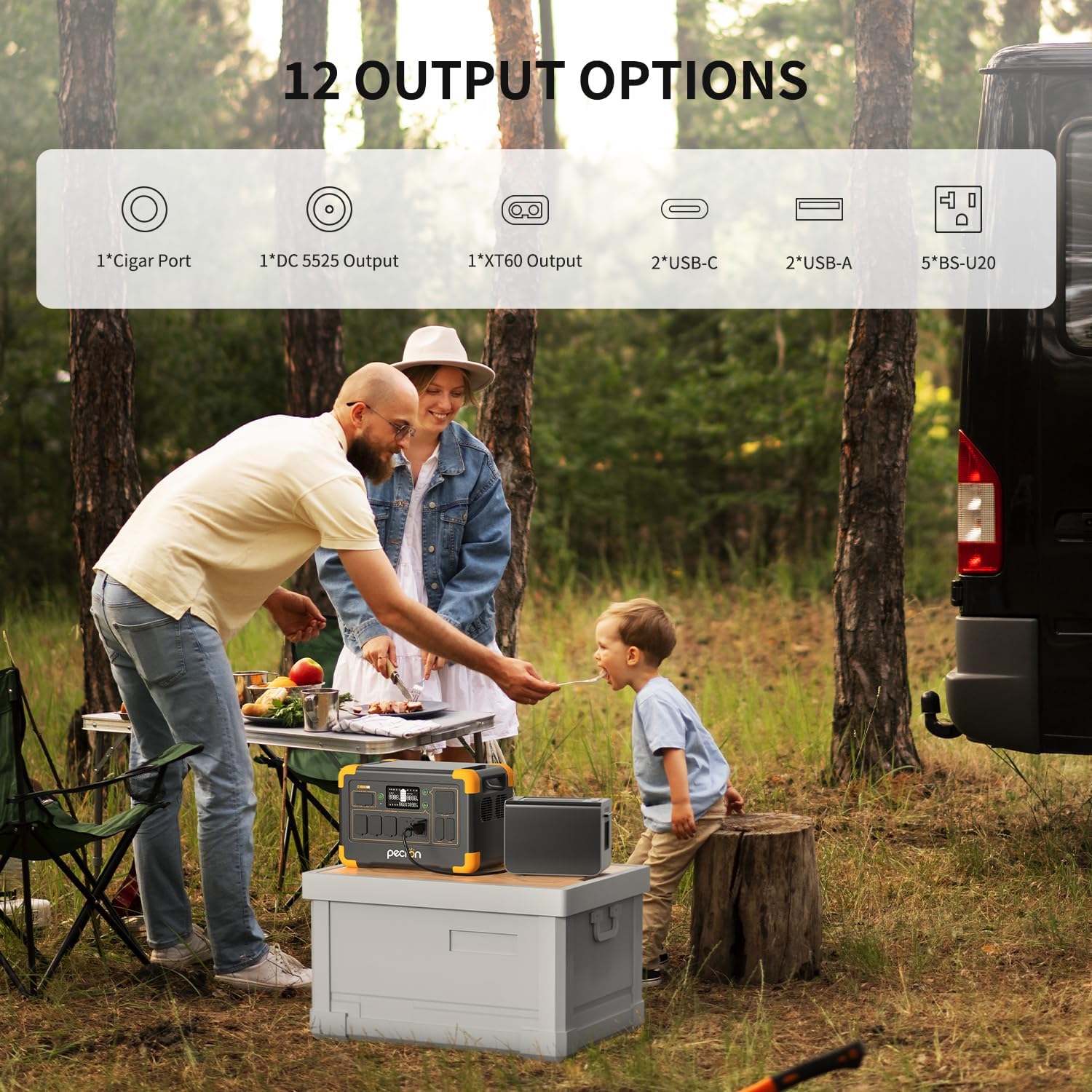
Зображення 5.1: закінченоview of the 12 output options available on the pecron E1000LFP.

Image 5.2: The pecron E1000LFP powering a laptop and other devices in an outdoor setting.
5.3 Розширювана ємність
The E1000LFP's capacity can be expanded up to 4096Wh by connecting an external battery (sold separately). Refer to the external battery's manual for connection instructions.
5.4 Smart App Control
Download the pecron app to monitor and control your power station remotely. The app allows you to view вхідна/вихідна потужність, перевірка рівнів потужності та дистанційне перемикання виходів постійного/змінного струму.
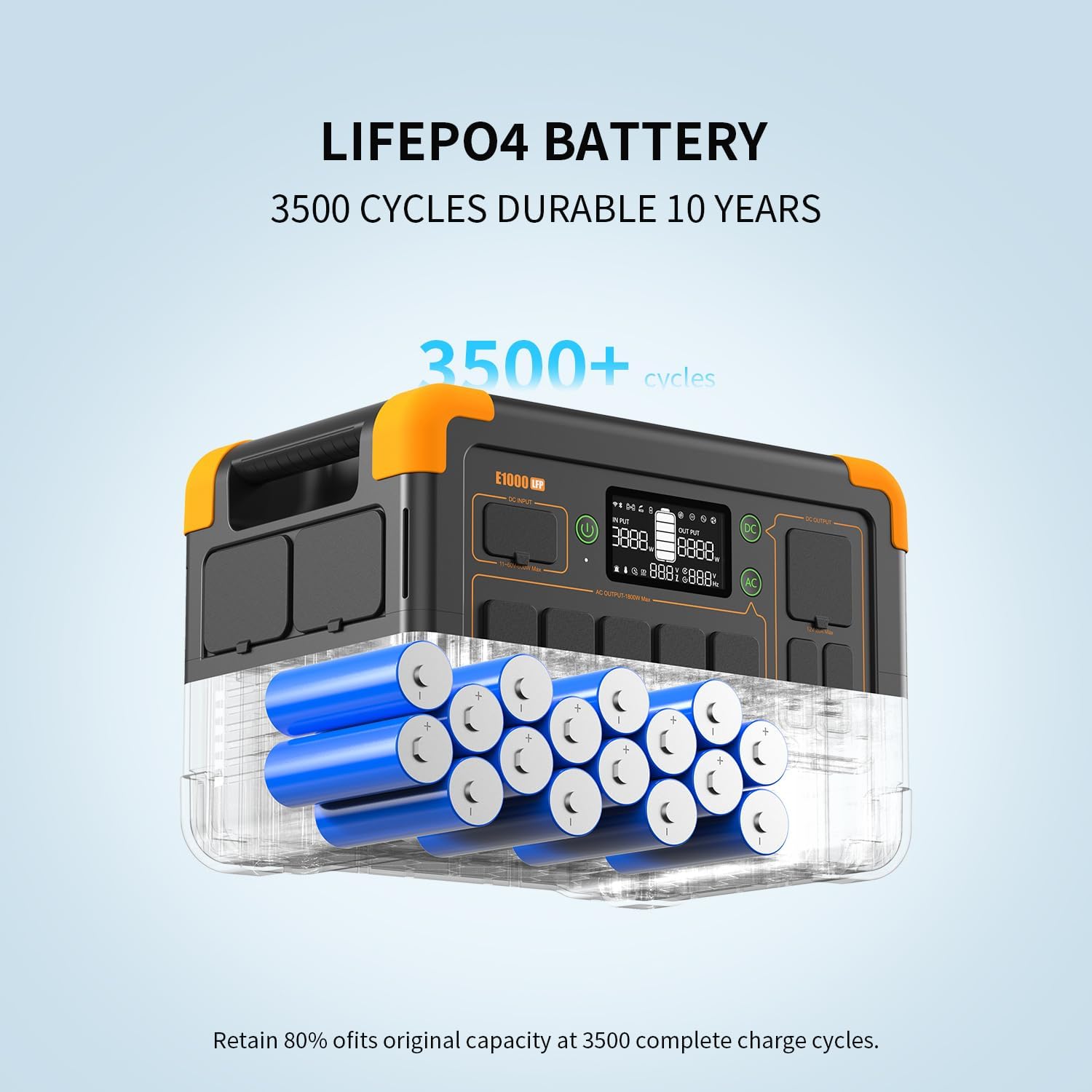
Image 5.3: The pecron mobile application providing smart control over the power station.
5.5 Функція ДБЖ
The E1000LFP features an Uninterruptible Power Supply (UPS) function, providing a seamless power transition within 8-20ms in case of a power outage when connected to an AC source.
6. Технічне обслуговування
6.1 Догляд за акумулятором
The pecron E1000LFP utilizes a 1024Wh LiFePO4 battery, designed for durability with over 3500 charge cycles to retain 80% of its original capacity. For optimal battery life, avoid fully discharging the unit frequently and store it with a partial charge (50-80%).

Зображення 6.1: Внутрішній view of the durable LiFePO4 battery cells within the E1000LFP.
6.2 Підігрів батареї
The unit includes a battery heating module that activates when charging in temperatures between -20°C and 0°C, ensuring the battery heats up above 0°C for safe and efficient charging in cold environments.

Image 6.2: The pecron E1000LFP's battery heating function for reliable cold weather performance.
6.3 Зберігання
When storing the power station for extended periods, ensure it is charged to approximately 50-80% and stored in a cool, dry place away from direct sunlight and extreme temperatures. Recharge every 3-6 months to prevent deep discharge.
7. Вирішення проблем
If you encounter issues with your pecron E1000LFP, consider the following:
- Пристрій не вмикається: Переконайтеся, що акумулятор заряджений. Якщо ні, підключіть його до розетки змінного струму для заряджання.
- Немає виводу з портів: Verify that the specific output group (AC/DC) is activated. Check if the device connected requires more power than the port can supply.
- Повільна зарядка: For solar charging, ensure panels are in direct sunlight and free from obstructions. For AC charging, confirm the cable is securely connected.
- Захист від перевантаження: Якщо пристрій вимикається, це може бути пов'язано з перевантаженням. Від'єднайте деякі пристрої та перезавантажте пристрій.
У разі постійних проблем зверніться до служби підтримки клієнтів.
8. Технічні характеристики
| Особливість | Специфікація |
|---|---|
| Модель | E1000LFP |
| Тип батареї | LiFePO4 |
| Ємність | 1024 Вт-год |
| Розширювана ємність | До 4096 Вт·год |
| Вихід змінного струму | 1800W (Rated), 120V |
| Загальна кількість вихідних портів | 12 |
| Час швидкої зарядки від мережі змінного струму | 1.3 години |
| Сонячна панель в комплекті | 2x 200 Вт |
| Вага товару | 29 фунта |
| Розміри продукту | 14.9 см (Д) x 9.4 см (Ш) x 10 см (В) |
| Особливості | Портативний, Швидка зарядка, Велика ємність, Довговічний, Безпека, Розумне керування, ДБЖ, Підігрів акумулятора |
9. Гарантія та підтримка
Your pecron E1000LFP Solar Generator comes with a 2+1 year warranty, providing peace of mind for your investment. For any questions, technical assistance, or warranty claims, please contact pecron customer service. Our team is available 24 hours a day, 7 days a week to provide friendly support.
For further assistance, please visit the official pecron webсайт або зверніться до контактної інформації, зазначеної у вашому гарантійному талоні.


