Продукт закінченийview
The UBPET F10 Automatic Cat Feeder is designed to provide fresh, timed meals for your pets, accommodating both wet and dry food. It features advanced semiconductor cooling technology to maintain food freshness for up to 24 hours, eliminating the need for ice packs. With programmable feeding times and a 5-meal food tray, it helps establish healthy eating habits for cats and small dogs.

Figure 1: UBPET F10 Automatic Cat Feeder.
Ключові характеристики
- 24-hour Intelligent Fresh-keeping: Utilizes semiconductor refrigeration to keep food fresh at 10 to 15°C for up to 24 hours, removing the need for ice packs.
- Intelligent Feeding Time: Supports 1 instant feeding and 4 scheduled feedings daily, promoting regular and quantitative nutrition.
- 5-meal Food Tray: Features five individual compartments, each with a maximum capacity of 300g (290ml), suitable for wet food, dry food, medicine, or milk.
- Sealed Food-grade Meal Tray: Made from BPA-free ABS material, ensuring safety and durability. The tray is easily disassembled for cleaning and is dishwasher safe.
- Energy-saving & Pet-friendly Design: Low power consumption (approx. 0.2° electricity per day in default cooling mode). Wide-caliber shallow bowl design for comfortable eating. Hidden buttons prevent pets from tampering with settings. Operates at less than 40dB.
Посібник із налаштування
- Розпакуйте годівницю: Carefully remove all components from the packaging. Ensure all parts are present: main unit, food tray, lid, and power adapter.
- Початкове розміщення: Place the feeder in your pet's usual feeding area. It is recommended to place the device at least 4 inches (10cm) away from any wall to ensure proper ventilation for the cooling system.
- Підключення живлення: Connect the power adapter to the feeder and plug it into a standard electrical outlet. The unit will power on.
- Familiarization Period: Before programming, allow your pet to become comfortable with the feeder. You can place a small amount of their favorite treats or food in the open compartment for a few days. This helps them associate the feeder with positive experiences.
- Filling the Food Tray: Lift the lid by pressing the secure locking snaps. Fill the five compartments with your pet's desired wet or dry food. Each compartment has a maximum capacity of 300g (290ml).
- Закріпіть кришку: Close the lid firmly until the secure locking snaps engage. This ensures the food remains fresh and prevents pets from accessing the internal mechanism.

Figure 2: Recommended placement and dimensions of the feeder.

Figure 3: Filling the automatic rotating food tray.

Figure 4: Securely locking the feeder lid.
Інструкція з експлуатації
Setting Time and Feeding Schedule
The control panel with the LCD screen and buttons is located under the lid to prevent accidental changes by pets. Lift the lid to access it.

Figure 5: Hidden control panel for programming.
- Панель керування доступом: Gently lift the top cover to reveal the LCD screen and control buttons.
- Установити поточний час: Use the “Setting button” (gear icon) to enter time setting mode. Use the “Up adjustment button” (triangle up) and “Down adjustment button” (triangle down) to set the current hour and minute. Press the “Setting button” again to confirm.
- Program Feeding Times: The feeder allows for 1 instant feeding and 4 scheduled feedings.
- Press the “Setting button” to cycle through the meal settings (Meal 1, Meal 2, Meal 3, Meal 4).
- For each meal, use the “Up” and “Down” buttons to set the desired feeding time.
- The feeder will automatically rotate to the next available food compartment at the programmed time.

Малюнок 6: Детально view РК-екрана та кнопок керування.

Малюнок 7: Впрample of a programmed feeding schedule.
Режими охолодження
The UBPET F10 features 3 cooling modes to maintain food freshness. These modes adjust the internal temperature to keep food between 10 to 15°C (50-59°F) for up to 24 hours, based on a room temperature of 77°F.
- Регулювання охолодження: Press the “Power button/Cooling button” (snowflake icon) to cycle through the three cooling levels (Level 1, Level 2, Level 3).
- Налаштування температури:
- Level 1: Approximately 73.4°F (23°C)
- Level 2: Approximately 62.6°F (17°C)
- Level 3: Approximately 55.4°F (13°C)
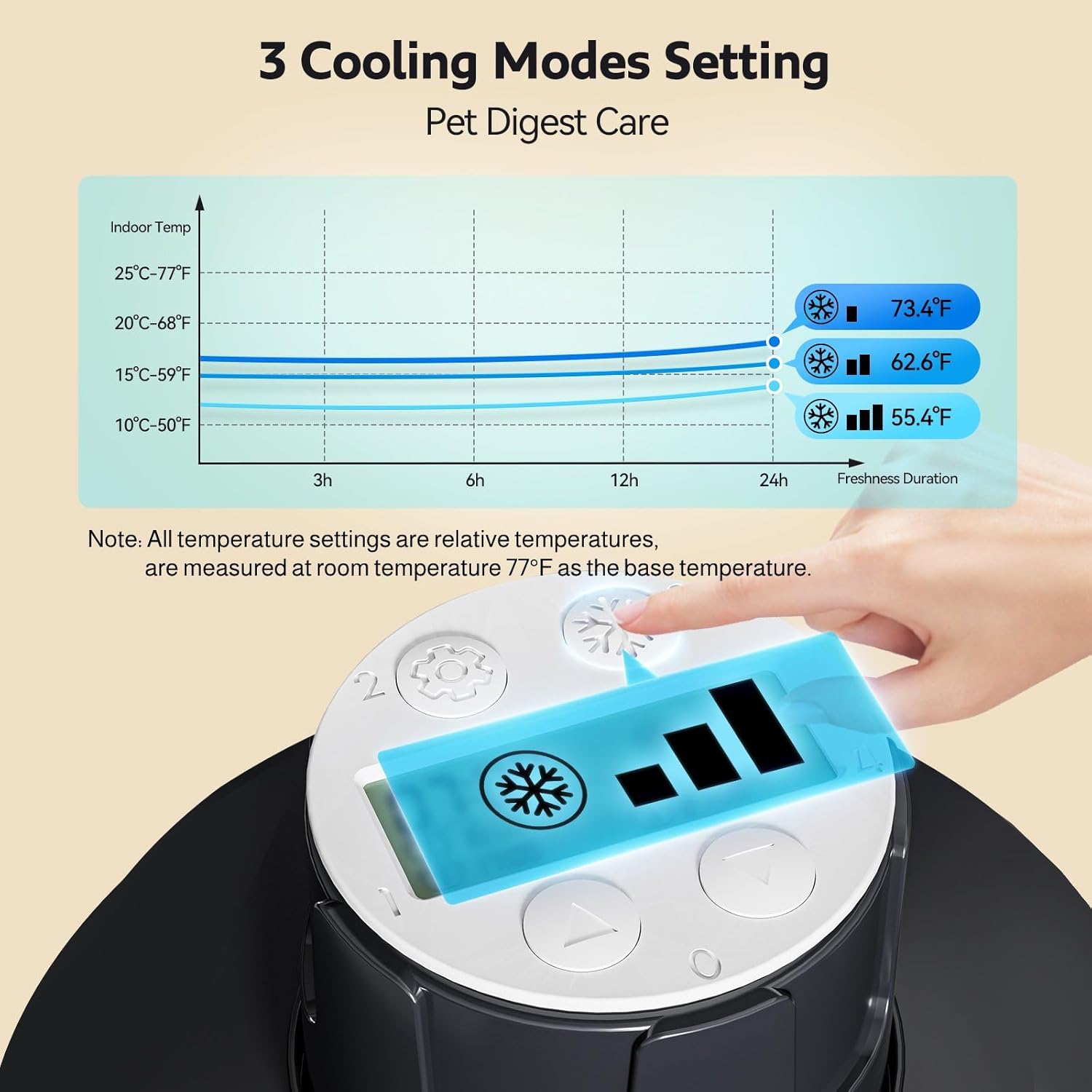
Figure 8: Cooling modes and temperature ranges.

Figure 9: The 24-hour intelligent fresh-keeping system.

Figure 10: Semiconductor cooling technology for continuous freshness.
Pet-Friendly Features
- Paw Protection: If a pet's paw gets into the feeder during rotation, the feeder will stop to prevent injury.
- Shallow Bowl Design: The wide-caliber shallow bowls are designed for easier and more comfortable eating for pets.

Figure 11: Paw protection feature.

Figure 12: Wide-caliber shallow bowl design for pet comfort.
Технічне обслуговування
Інструкції з очищення
Regular cleaning ensures hygiene and extends the life of your feeder. The food tray and lid are designed for easy removal and cleaning.
- Розбирати: Lift the lid and remove the food tray from the main unit.
- Компоненти мийки: The food tray and lid can be rinsed under running water or placed in the dishwasher for thorough cleaning.
- Очищення основного блоку: Протріть основний блок (базу) рекламнимamp cloth. Ensure no water enters the electronic components. Wipe off any water on the base in time.
- Зберіть: Once all parts are dry, reassemble the food tray and lid onto the main unit.

Figure 13: Detachable food tray for easy cleaning.
Important: Do not store wet food in the cat feeder for more than 24 hours.
Усунення несправностей
| проблема | Можлива причина | Рішення |
|---|---|---|
| Feeder not turning on or operating. | Power disconnection; unit not plugged in. | Ensure the power cord is securely connected to the feeder and the wall outlet. Note: There is no battery backup; if power is disconnected, the unit will stop working. |
| Cat is hesitant to use the feeder. | Unfamiliarity with the new feeder; noise from cooling system. |
|
| Їжа не залишається свіжою. | Incorrect cooling mode; food left for too long. |
|
| Feeder making a sound when it turns. | Normal operation of the rotating mechanism. | This is normal. The feeder makes a slight sound when the tray rotates to present the next meal. The noise level is less than 40dB. |
| Only 4 meals can be programmed, but it's a 5-meal feeder. | Design feature. | The feeder is designed for 1 instant feeding (open compartment) and 4 timed feedings, totaling 5 meal opportunities. |
Технічні характеристики
| Особливість | Деталь |
|---|---|
| Модель продукту | F10 |
| Назва продукту | Розумна годівниця для домашніх тварин |
| Температура робочого середовища | -5 ° C ~ 40 ° C (23 ° F ~ 104 ° F) |
| Вологість робочого середовища | 5% ~ 85% |
| Температура зберігання | -10 ° C ~ 60 ° C (14 ° F ~ 140 ° F) |
| Вологість при зберіганні | 5% ~ 85% |
| Розмір продукту | 300 * 350 * 90 мм (11.8 x 14.17 x 3.54 дюйма) |
| Режим живлення | Power direct charging |
| Food Basin Обсяг | 5 grids, maximum capacity 290ml each grid |
| Застосовується до | Ordinary cat, Large Cat, Small Dog (2-10kg) |
| Ситуація використання | Working away from home, short trip, daily feeding |
| матеріал | Polypropylene, BPA-free ABS |
| Особливість | Feeding Schedule, Nonslip, Programmable, Timer, Semiconductor Cooling |
Гарантія та підтримка
For warranty information and customer support, please refer to the documentation included with your product or contact UBPET customer service directly through their official webсайт або платформа, де було придбано товар.


