1. Вступ
The FSP VITA GM 850W Power Supply is designed to provide stable and efficient power for your computer system. Featuring 80 PLUS Gold certification, a fully modular design, and advanced protection features, it is suitable for a wide range of applications, including gaming and professional workstations. This manual provides essential information for the proper installation, operation, and maintenance of your power supply unit.

Зображення 1.1: Зверху вниз view of the FSP VITA GM 850W Power Supply, showcasing its compact design and fan grill.
2. Інформація про безпеку
Please read and understand all safety instructions before installing or operating the power supply. Failure to do so may result in personal injury or damage to your equipment.
- Не відкривайте блок живлення casing. Високий об'ємtages are present inside, even when the unit is unplugged. There are no user-serviceable parts inside. Opening the casing призведе до анулювання гарантії.
- Встановлюйте блок живлення в добре провітрюваному приміщенні, подалі від джерел тепла, прямих сонячних променів та вологи.
- Переконайтеся, що джерело живлення підключено до заземленої електричної розетки.
- Використовуйте лише модульні кабелі, що постачаються з цим блоком живлення. Використання несумісних кабелів може призвести до пошкодження блоку живлення та підключених компонентів.
- Before installation or maintenance, always disconnect the AC power cord from the wall outlet.
- Avoid placing objects on top of the power supply or blocking its ventilation openings.
3. Вміст упаковки
Перевірте наявність усіх предметів у вашій упаковці:
- FSP VITA GM 850W Power Supply Unit
- Modular Cable Set (including 12V-2x6 PCIe cable)
- Шнур живлення змінного струму
- Монтажні гвинти
- Посібник користувача (цей документ)
4. Продукт закінчивсяview
The FSP VITA GM 850W features a fully modular design, allowing for clean cable management and improved airflow within your PC case. Key components include the main power unit, a 120mm hydraulic bearing fan for cooling, and various modular connectors for system components.
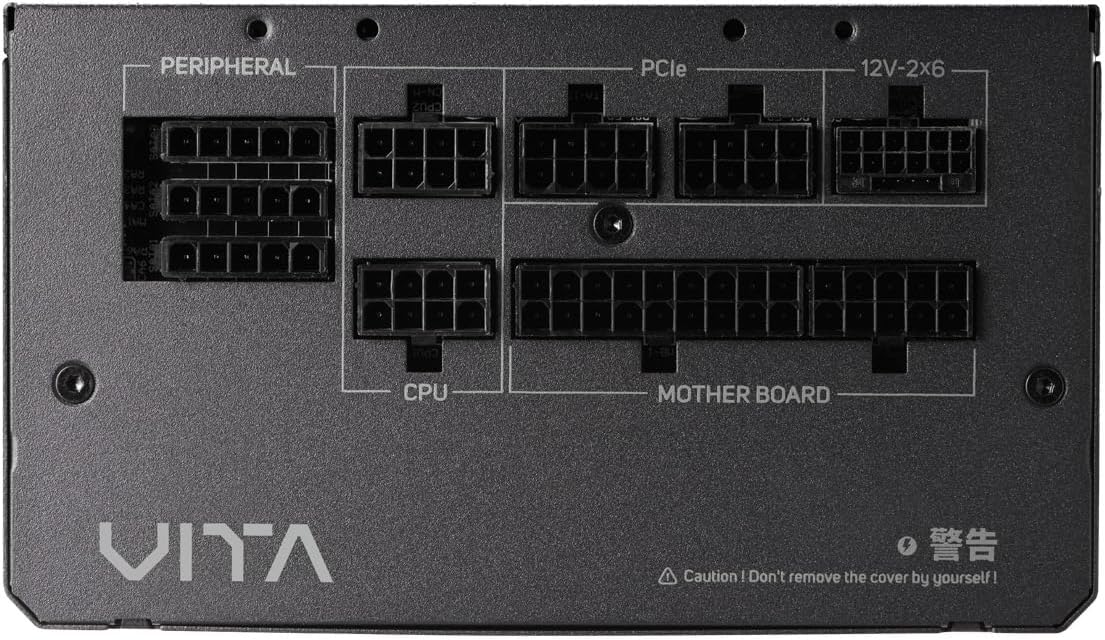
Зображення 4.1: Крупний план view of the modular connector panel on the FSP VITA GM 850W Power Supply, showing labeled ports for Motherboard, CPU, PCIe, Peripheral, and 12V-2x6.
4.1. Modular Connectors
The power supply features clearly labeled ports for connecting various components:
- Материнська плата: Main 24-pin ATX connector.
- ЦП: 8-pin (4+4 pin) EPS connectors for CPU power.
- PCIe: 8-pin (6+2 pin) connectors for graphics cards.
- 12V-2x6: Dedicated 12V-2x6 connector for high-power PCIe 5.1 graphics cards.
- Периферійні: Connectors for SATA and Molex devices.
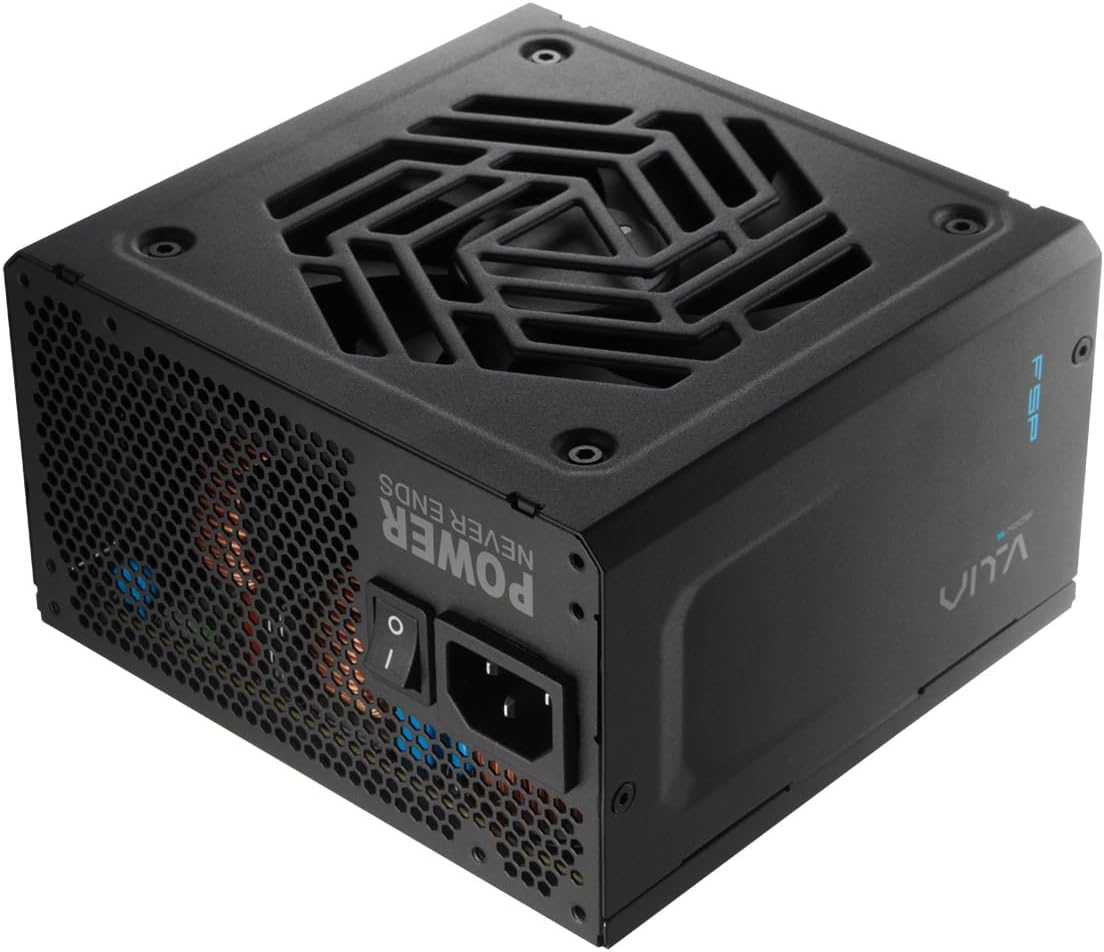
Зображення 4.2: Ззаду view of the FSP VITA GM 850W Power Supply, showing the AC power inlet, power switch, and ventilation grille.
5. Налаштування та встановлення
Follow these steps to properly install your FSP VITA GM 850W Power Supply into your computer system.
5.1. Фізичне встановлення
- Переконайтеся, що ваш комп'ютер вимкнено та від'єднано від розетки.
- Відкрийте корпус комп'ютера, щоб отримати доступ до місця кріплення блока живлення.
- Carefully place the FSP VITA GM 850W Power Supply into the designated bay, ensuring the fan faces the correct direction for optimal airflow (typically facing downwards if there's a bottom vent, or inwards if mounted at the top).
- Закріпіть блок живлення на корпусі за допомогою наданих монтажних гвинтів.
5.2. Кабельні з'єднання
Connect the necessary modular cables to your power supply and system components. Only connect the cables you need to minimize clutter and improve airflow.

Image 5.1: Diagram illustrating the various modular cables included with the FSP VITA GM 850W Power Supply, including Motherboard, CPU, PCIe 6+2 Pin, PCIe 12V-2x6, SATA, and SATA/Molex cables, along with their approximate lengths in millimeters.
- Connect the 24-pin ATX cable from the power supply to the motherboard.
- Connect the 8-pin (4+4 pin) EPS cable(s) from the power supply to the CPU power connector(s) on the motherboard.
- For graphics cards, connect the appropriate 8-pin (6+2 pin) PCIe cables or the 12V-2x6 cable (for compatible PCIe 5.1 GPUs) from the power supply to the graphics card(s).
- Connect SATA power cables to your storage drives (HDDs, SSDs) and other SATA-powered devices.
- Connect Molex cables to any peripheral devices that require them.
- Ensure all cable connections are secure and properly seated.
- Закрийте корпус комп'ютера.
- Підключіть шнур живлення змінного струму до джерела живлення, а потім до заземленої розетки.
6. Інструкція з експлуатації
Once installed, operating your FSP VITA GM 850W Power Supply is straightforward.
6.1. Увімкнення/вимкнення живлення
- Переконайтеся, що вимикач живлення на задній панелі блока живлення знаходиться в положенні «УВІМК.» (I).
- Натисніть кнопку живлення на корпусі комп'ютера, щоб запустити систему.
- To power off, shut down your operating system normally. For complete power disconnection, switch the power supply to the 'OFF' (O) position and unplug the AC cord.
6.2. Efficiency and Fan Operation
The VITA GM 850W is 80 PLUS Gold certified, meaning it operates with over 90% efficiency at typical loads. This reduces wasted energy, heat generation, and noise. The integrated 120mm HYB fan is designed for quiet and efficient cooling, adjusting its speed based on the power supply's temperature and load to maintain optimal performance and acoustics.

Image 6.1: Graph illustrating the fan speed (RPM) and acoustic noise (dBA) of the 120mm HYB fan in the FSP VITA GM 850W Power Supply across different load percentages, demonstrating quiet operation at lower loads.
7. Технічне обслуговування
Правильне обслуговування забезпечує довговічність та оптимальну роботу вашого блоку живлення.
- Прибирання: Periodically clean the exterior of the power supply and its fan grille to prevent dust buildup. Use a soft, dry cloth or compressed air. Ensure the power supply is unplugged before cleaning.
- Потік повітря: Ensure that the power supply's intake and exhaust vents are not obstructed. Good airflow is crucial for efficient cooling.
- Управління кабелем: Maintain tidy cable management within your PC case to promote better airflow and prevent cables from interfering with the power supply fan.
8. Вирішення проблем
If you encounter issues with your FSP VITA GM 850W Power Supply, refer to the following common problems and solutions.
8.1. Поширені проблеми
- Немає живлення:
- Перевірте, чи шнур живлення змінного струму надійно підключено як до джерела живлення, так і до розетки.
- Ensure the power switch on the PSU is in the 'ON' (I) position.
- Перевірте справність розетки, підключивши інший пристрій.
- Check all modular cable connections to the motherboard and components.
- Нестабільність системи/випадкові вимкнення:
- This could indicate an overloaded system or a component issue. Ensure your system's power requirements do not exceed 850W.
- Check for proper ventilation and ensure the power supply fan is spinning. Overheating can trigger protection mechanisms.
- Перевірте надійність усіх кабельних з'єднань.
- Гучний шум вентилятора:
- Ensure the power supply's fan intake/exhaust is not obstructed.
- Clean any dust buildup on the fan blades or grille.
- High system load will naturally increase fan speed. If noise is excessive at low loads, contact support.
8.2. Особливості захисту
The FSP VITA GM 850W Power Supply includes several protection features to safeguard your system:
- ОВП (Overvoltage Захист): Shuts down the PSU if output voltages exceed a safe level.
- OCP (Захист від перевантаження по струму): Shuts down the PSU if current on a single rail exceeds a safe level.
- OPP (Overpower Protection): Shuts down the PSU if the total power draw exceeds its maximum wattage.
- UVP (Undervoltage Захист): Shuts down the PSU if output voltages drop below a safe level.
- SCP (захист від короткого замикання): Shuts down the PSU in case of a short circuit on any output rail.
- OTP (Overtemperature Protection): Вимикає блок живлення, якщо внутрішня температура стає занадто високою.

Image 8.1: Diagram illustrating the comprehensive protection features of the FSP VITA GM 850W Power Supply, including OVP, OCP, OPP, NLO, OTP, SCP, UVP, and SIP.
If any of these protections are triggered, the power supply will shut down. Disconnect the AC power, check your system for faults, and then reconnect power to attempt a restart.
9. Технічні характеристики
Detailed technical specifications for the FSP VITA GM 850W Power Supply:
| Особливість | Специфікація |
|---|---|
| Назва моделі | VITA-850GM |
| Бренд | FSP |
| Вихідна ватtage | 850 Вт |
| Сертифікат 80 PLUS | золото |
| Форм-фактор | ATX |
| Розміри (Д x Ш x В) | 140 x 150 x 86 мм (5.5 x 5.9 x 3.4 дюймів) |
| Вага товару | 3.1 кілограмів (6.82 фунти) |
| Спосіб охолодження | Air (120mm HYB Fan) |
| конденсатори | 105°C Japanese Bulk Capacitors |
| Тип роз'єму | ATX, PCI Express (Full Modular) |
| Сумісні пристрої | Computer, Gaming Console |
| Особливості захисту | OVP, OCP, SCP, OPP, UVP, OTP, NLO, SIP |
10. Гарантія
The FSP VITA GM 850W Power Supply comes with a Гарантія 10 рік from the date of purchase. This warranty covers defects in materials and workmanship under normal use. Please retain your proof of purchase for warranty claims. The warranty does not cover damage caused by improper installation, accident, abuse, misuse, natural disaster, insufficient or excessive electrical supply, abnormal mechanical or environmental conditions, or any unauthorized disassembly, repair, or modification.
11. Підтримка
For technical assistance, troubleshooting beyond this manual, or warranty inquiries, please visit the official FSP website or contact FSP customer support. You can often find FAQs, driver downloads, and contact information on the manufacturer's support pages.
Для отримання додаткової інформації відвідайте: FSP Official Store on Amazon


