1. Продукт закінчивсяview
The MOBAPAD N1 HD is a versatile wireless controller designed for an enhanced gaming experience across multiple platforms. It features advanced technologies such as Hall Effect Joysticks for precise control, ALPS Dual-Axis Motors for immersive HD vibration, and six-axis motion control. This controller is compatible with Nintendo Switch, PC, iOS, and Android devices, offering seamless connectivity and responsive performance.

Зображення: спереду view of the MOBAPAD N1 HD Wireless Controller, showcasinйого ергономічний дизайн та розташування кнопок.
2. Ключові характеристики
- Мультиплатформна сумісність: Fully compatible with Nintendo Switch, PC, iOS, and Android devices, ensuring broad usability.
- Джойстики на ефекті Холла: Provides smooth, precise, and durable control with minimal wear, ideal for accurate gaming.
- ALPS Dual-Axis Motors with HD Vibration: Delivers realistic and immersive haptic feedback for enhanced gameplay.
- Керування рухом по шести осях: Built-in gyroscope enables enhanced motion control for compatible games.
- NFC for Amiibo Scanning: Supports NFC technology for scanning Amiibo figures on Nintendo Switch.

Image: The controller illustrating its immersive motion control capabilities with swirling lines around it.

Image: The controller positioned in front of a collection of Amiibo figures, highlighting its NFC scanning function.

Image: The controller shown alongside icons for Switch, Android/iOS, and PC, demonstrating its multi-device compatibility.
3. Налаштування та підключення
Follow these steps to connect your MOBAPAD N1 HD controller to your desired device.
3.1. Підключення до Nintendo Switch
- У меню HOME виберіть Контролери, тоді Змінити захоплення/порядок.
- While the screen is displaying "Press L + R on the controller", press and hold the кнопка додому on the MOBAPAD N1 HD controller for 3-5 seconds until the player LEDs begin to flash.
- Once connected, the player LED(s) corresponding to the controller number will remain lit.
3.2. Підключення до ПК (Windows)
- Connect the controller to your PC using a USB-C cable. The controller will be recognized as a wired controller.
- For wireless connection, ensure your PC has Bluetooth enabled. Go to Bluetooth & other devices settings.
- Виберіть «Додати Bluetooth або інший пристрій» і виберіть «Bluetooth».
- Натисніть і утримуйте кнопка додому on the controller until the LEDs flash rapidly, indicating pairing mode.
- Select "MOBAPAD N1 HD" from the list of available devices.
3.3. Connecting to iOS/Android Devices
- Увімкніть Bluetooth на пристрої iOS або Android.
- Go to Bluetooth settings and search for new devices.
- Натисніть і утримуйте кнопка додому on the controller until the LEDs flash rapidly.
- Select "MOBAPAD N1 HD" from the list of available devices to pair.
4. Керування контролером
Familiarize yourself with the controller's layout and functions for optimal gameplay.
4.1. Розташування кнопок
- Лівий аналоговий стік: For movement and camera control. Features Hall Effect technology.
- Правий аналоговий стік: For camera control and aiming. Features Hall Effect technology.
- D-Pad: Directional input for menu navigation and specific game actions.
- Кнопки A/B/X/Y: Стандартні кнопки дій.
- Кнопки L/R: Плечові ґудзики.
- Кнопки ZL/ZR: Тригерні кнопки.
- Кнопка мінус (-): Typically for opening in-game menus or specific functions.
- Кнопка плюс (+): Typically for opening in-game menus or specific functions.
- Кнопка "Додому: Returns to the system's home screen. Also used for pairing and NFC scanning.
- Кнопка захоплення: Takes screenshots or video clips (Nintendo Switch).
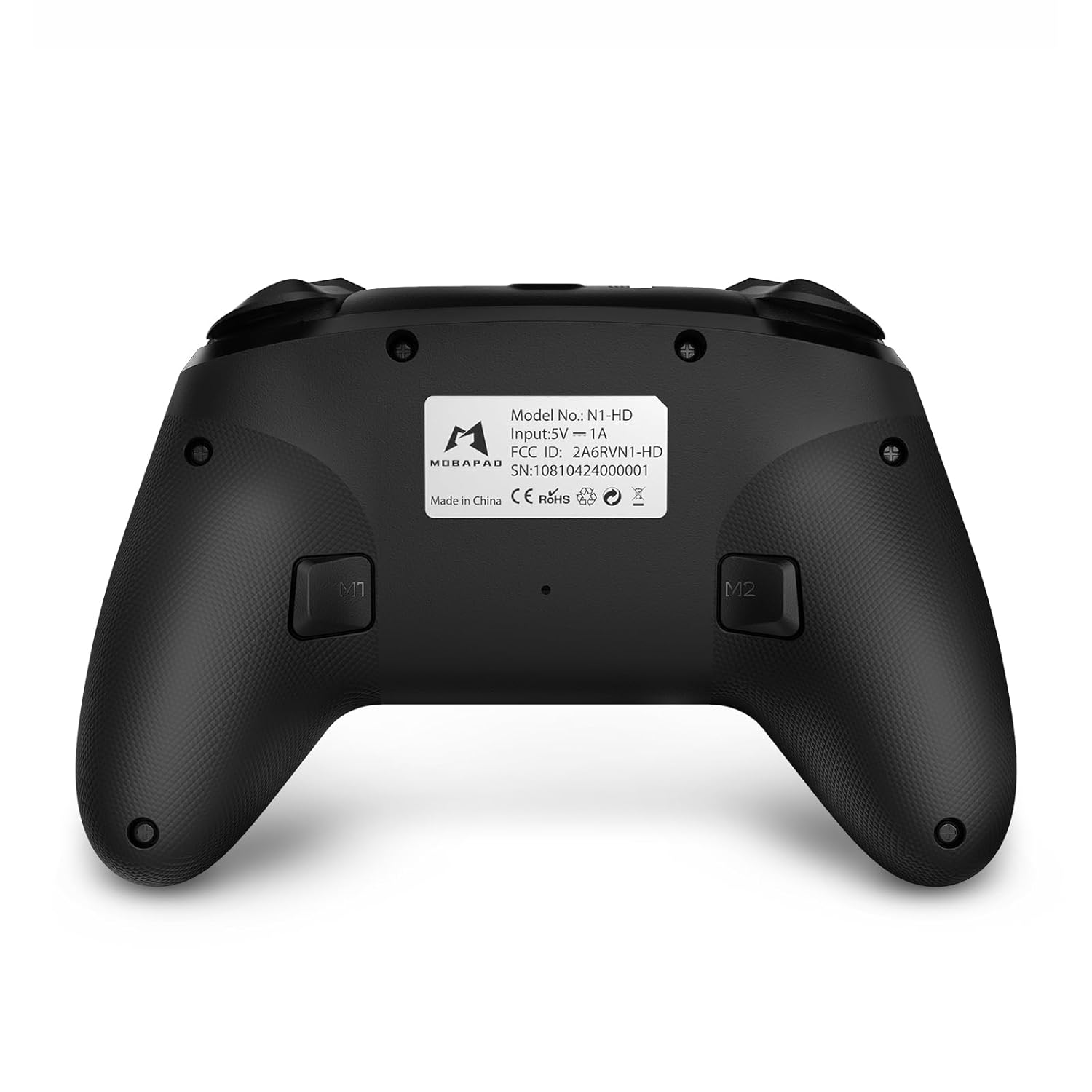
- Кнопки M1/M2: Programmable back buttons for custom macros or remapping.
Зображення: Детальний фронт view of the MOBAPAD N1 HD controller, showing all buttons and joysticks.

Зображення: Спина view of the MOBAPAD N1 HD controller, highlighting the M1 and M2 programmable buttons and product label.
4.2. NFC Functionality (Amiibo Scanning)
To use the NFC function for Amiibo scanning on Nintendo Switch:
- Ensure your controller is connected to the Nintendo Switch.
- In a compatible game, when prompted to scan an Amiibo, place the Amiibo figure directly over the кнопка додому area on the controller.
- Hold the Amiibo in place until the game registers the scan.
5. Технічне обслуговування та догляд
Правильне обслуговування забезпечує довговічність та оптимальну роботу вашого контролера.
- Прибирання: Використовуйте м’яку суху тканину для протирання контролера. Для стійкого бруду злегкаampпрополощіть тканину водою. Уникайте агресивних хімікатів або абразивних матеріалів.
- Зберігання: Зберігайте контролер у прохолодному, сухому місці, подалі від прямих сонячних променів та екстремальних температур.
- Догляд за акумулятором: The controller contains a Lithium Ion battery. Avoid fully discharging the battery frequently. If storing for extended periods, charge the battery to about 50% to prolong its lifespan. Do not expose the battery to fire or extreme heat.
- Обробка: Уникайте падіння контролера або сильних ударів, оскільки це може пошкодити внутрішні компоненти.
6. Вирішення проблем
If you encounter issues with your MOBAPAD N1 HD controller, refer to the following common solutions.
| проблема | Можлива причина | Рішення |
|---|---|---|
| Контролер не підключається. | Low battery, out of range, incorrect pairing mode, interference. | Charge the controller fully. Ensure it is within range of the device. Re-enter pairing mode (hold Home button). Move closer to the device or away from other wireless devices. |
| Кнопки або джойстики не реагують. | Software glitch, physical obstruction, damage. | Restart the controller and the connected device. Check for any debris around the buttons/joysticks. If issues persist, contact customer support. |
| Вібрація слабка або відсутня. | Vibration setting off, game does not support vibration, motor issue. | Check in-game settings and system settings to ensure vibration is enabled. Verify if the game supports vibration feedback. |
| NFC scanning fails. | Incorrect placement, game not prompting scan, controller not connected. | Ensure the Amiibo is placed directly over the Home button area. Confirm the game is prompting for an Amiibo scan. Verify controller is properly connected to the Switch. |
7. Технічні характеристики
| Особливість | Деталь |
|---|---|
| Номер моделі | Mobapad N1 HD Black |
| Розміри (Д x Ш x В) | 5.91 x 2.36 x 3.94 дюймів |
| вага | 7.05 унції |
| Тип батареї | 1 літій-іонний акумулятор (у комплекті) |
| Підключення | Бездротовий (Bluetooth), USB-C (дротовий) |
| Сумісність | Nintendo Switch, PC, iOS, Android |
| Особливості | Hall Effect Joysticks, ALPS Dual-Axis Motors, HD Vibration, Six-Axis Gyroscope, NFC |
8. Гарантія та підтримка
For warranty information or technical support, please contact MOBAPAD customer service. Refer to the official MOBAPAD webна сайті або в документації щодо придбання, щоб дізнатися про умови гарантії та контактну інформацію.
You can visit the official MOBAPAD store on Amazon for more information: MOBAPAD Store


