вступ
This manual provides detailed instructions for the proper use and maintenance of your RCA Wave-55 Wireless Over-Ear Bluetooth Headphones. Please read this manual thoroughly before using the product to ensure optimal performance and longevity. Keep this manual for future reference.
Продукт закінченийview
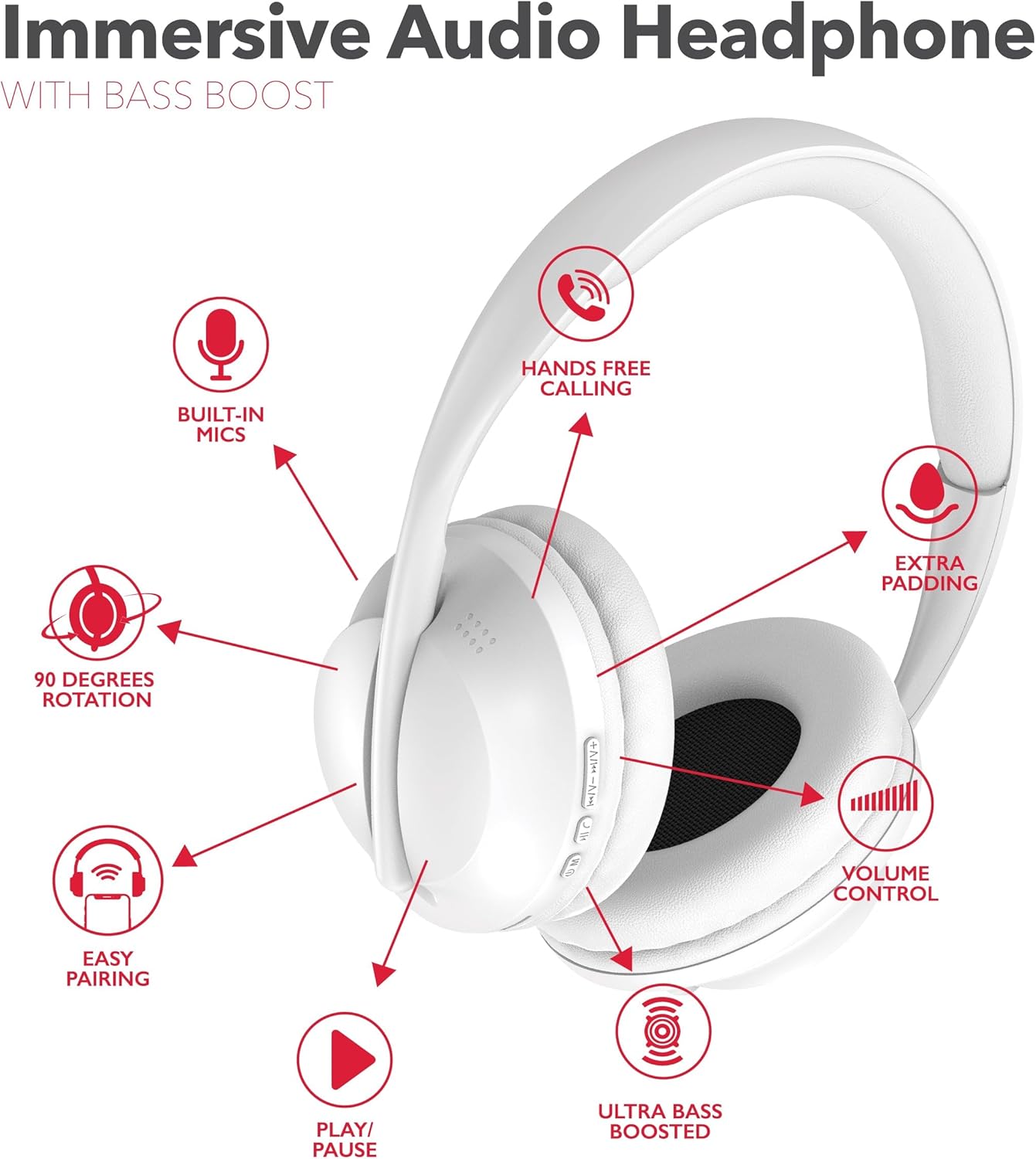
The RCA Wave-55 headphones are designed for an immersive audio experience with features like Hi-Res Audio, deep bass, and a comfortable over-ear design. Familiarize yourself with the components and controls.
Компоненти навушників
- Регульована пов'язка на голову
- Soft Over-Ear Cushions
- Control Buttons (Power, Play/Pause, Volume, Track Navigation)
- Вбудований мікрофон
- Порт для зарядки (USB-C)
- 3.5mm Audio Jack
Макет управління
This diagram illustrates the dual-function buttons located on the earcups. These buttons control power, Bluetooth mode, play/pause, phone calls, previous/next track, and volume.

The image above provides a visual guide to the dual function buttons, allowing you to manage music and calls directly from the headphones.
Налаштування
Зарядка навушників
- Підключіть наданий зарядний кабель USB-C до зарядного порту на навушниках.
- Під’єднайте інший кінець кабелю до джерела живлення USB (наприклад, комп’ютера, настінного адаптера).
- The LED indicator will illuminate to show charging status. It will change color or turn off when fully charged.
- Повного заряду вистачає на 12 годин відтворення.
Note: The headphones cannot be used while charging.
Bluetooth-парування
- Переконайтеся, що навушники повністю заряджені.
- Press and hold the Power/Bluetooth button until the LED indicator flashes, indicating pairing mode.
- На вашому пристрої (смартфоні, планшеті, комп’ютері) увімкніть Bluetooth та знайдіть доступні пристрої.
- Select "RCA Wave-55" from the list of devices.
- Після підключення світлодіодний індикатор перестане блимати та почне світитися постійно.

The headphones offer quick Bluetooth pairing for wireless convenience and also include a 3.5mm audio jack for wired listening options.
Інструкція з експлуатації
Увімкнення/вимкнення живлення
- Увімкнення: Натисніть і утримуйте кнопку живлення приблизно 3 секунди.
- Вимкнення живлення: Натисніть і утримуйте кнопку живлення приблизно 5 секунди.
Відтворення музики
- Відтворення/пауза: Натисніть кнопку Відтворення/Пауза один раз.
- Збільшення гучності: Натисніть кнопку «+».
- Зменшення гучності: Натисніть кнопку «-».
- Наступний трек: Натисніть і утримуйте кнопку «+».
- Попередній трек: Натисніть і утримуйте кнопку «-».
Управління дзвінками
- Відповісти/закінчити виклик: Натисніть кнопку Відтворення/Пауза один раз.
- Відхилити виклик: Натисніть і утримуйте кнопку відтворення/паузи протягом 2 секунд.
- Повторний набір останнього номера: Двічі натисніть кнопку відтворення/паузи.
Режим прозорості
The Transparency Mode allows you to hear your surroundings while listening to audio. This feature is useful for maintaining awareness in busy environments. Refer to your device's specific instructions or the headphone's control layout for activating this mode.
Голосовий помічник
Activate your device's voice assistant (e.g., Siri, Google Assistant) by pressing the dedicated Voice Assistant button or following the instructions in your device's manual.
Технічне обслуговування
прибирання
- Протріть навушники м’якою сухою тканиною.
- Не використовуйте абразивні засоби для чищення, розчинники або сильні хімічні речовини.
- Уникайте потрапляння вологи в будь-які отвори.
Зберігання
- Зберігайте навушники в прохолодному, сухому місці, подалі від прямих сонячних променів та екстремальних температур.
- Уникайте розміщення важких предметів на навушниках.
- The earcups feature 90-degree rotation for compact storage.

The 90-degree rotating earcups and adjustable headband ensure a personalized and comfortable fit, as well as convenient storage.

The enhanced ear cushioning provides extra padding to reduce ear strain, contributing to a more enjoyable listening experience.
Усунення несправностей
If you encounter issues with your RCA Wave-55 headphones, refer to the following common solutions:
- Немає живлення: Переконайтеся, що навушники повністю заряджені. Підключіть їх до джерела живлення та перевірте індикатор заряджання.
- Не вдається створити пару: Make sure Bluetooth is enabled on your device and the headphones are in pairing mode (flashing LED). Move the headphones closer to your device. Try unpairing and re-pairing.
- Немає звуку: Check the volume level on both the headphones and your connected device. Ensure the headphones are properly paired. If using a wired connection, ensure the 3.5mm cable is fully inserted.
- Погана якість звуку: Move closer to your device to avoid interference. Ensure there are no obstructions between the headphones and your device. Try disconnecting and reconnecting.
- Мікрофон не працює: Ensure the headphones are properly connected and selected as the audio input device on your computer or smartphone.
Технічні характеристики
| Особливість | Специфікація |
|---|---|
| Назва моделі | Хвиля-55 |
| Технологія підключення | Бездротовий зв'язок (Bluetooth 5.3) |
| Тип аудіо драйвера | Динамічний драйвер |
| Діапазон частот | 20 Гц - 40 кГц |
| Термін служби батареї | До 12 годин |
| Спосіб контролю | Remote (On-ear buttons) |
| Особливості | 90 Degree Rotation, Built-in Mics, Easy Pairing, Transparency Mode |
| Рівень водонепроникності | Не водостійкий |
| Розміри продукту | 8.66 x 1.97 x 8.07 дюймів |
| Вага товару | 1.1 фунта |
| UPC | 850068964321 |
Гарантія та підтримка
For warranty information or technical support, please refer to the warranty card included with your product or visit the official RCA website. Contact customer service for assistance with product issues or inquiries.


