1. Вступ
Thank you for choosing the RCA Wave-68 True Wireless Earbuds. These earbuds are designed to provide a high-quality audio experience with features such as Hi-Res Audio, deep bass, and Transparency Mode. They offer a stable Bluetooth 5.2 connection, a built-in microphone for clear calls, and up to 20 hours of battery life with the charging case. This manual will guide you through the setup, operation, and maintenance of your new earbuds.
2. Вміст упаковки
Будь ласка, перевірте наявність усіх предметів у вашій упаковці:
- RCA Wave-68 True Wireless Earbuds (Left and Right)
- Портативний зарядний футляр
- Зарядний кабель USB-C
- Різні розміри вушних насадок
- Посібник користувача
3. Продукт закінчивсяview

Figure 3.1: RCA Wave-68 True Wireless Earbuds and Charging Case. The earbuds are securely placed within the compact charging case, ready for use or recharging.

Figure 3.2: Key Features of a Single Earbud. This diagram highlights the various functionalities integrated into each earbud, such as built-in microphones for calls, touch-sensitive controls for playback and volume, and the true wireless design for freedom of movement. It also indicates the capability for ultra-bass sound and high-quality audio output.
Компоненти навушників:
- Область сенсорного керування: Для керування відтворенням, дзвінками та голосовим помічником.
- Мікрофон: Для дзвінків у режимі hands-free та голосових команд.
- Вушний гачок: Забезпечує надійну та комфортну посадку.
- Контакти для зарядки: For recharging the earbuds within the case.
Компоненти зарядного футляра:
- Порт зарядки (USB-C): Для підзарядки кейса.
- Світлодіодний індикатор батареї: Displays the charging status and battery level of the case and earbuds.
- Слоти для заряджання навушників: Надійно тримає та заряджає навушники.
4. Налаштування
4.1. Заряджання навушників та кейса
Перед першим використанням повністю зарядіть навушники та зарядний футляр.
- Вставте навушники в зарядний футляр. Переконайтеся, що вони правильно встановлені у відповідних гніздах.
- Підключіть зарядний кабель USB-C до порту зарядки на корпусі, а інший кінець – до USB-адаптера живлення (не входить до комплекту) або USB-порту комп’ютера.
- The LED indicator on the charging case will show the charging status. Once fully charged, the indicator will typically show a solid light or turn off.
- Повна зарядка забезпечує до 20 годин загального часу відтворення з зарядним футляром.

Figure 4.1: Earbuds in Open Charging Case. The image displays the earbuds inside the charging case with the lid open, revealing digital displays that indicate the battery levels of both the individual earbuds and the charging case itself.
4.2. Сполучення з пристроєм Bluetooth
Навушники автоматично перейдуть у режим сполучення після виймання з зарядного футляра.
- Переконайтеся, що навушники заряджені.
- Відкрийте зарядний футляр і вийміть обидва навушники. Вони автоматично увімкнуться та спробують сполучитися один з одним.
- На вашому пристрої (смартфоні, планшеті, ноутбуці) увімкніть Bluetooth.
- шукати new Bluetooth devices. You should see "RCA Wave-68" in the list of available devices.
- Select "RCA Wave-68" to connect. Once connected, you will hear an audio prompt, and the earbud indicator lights will change (e.g., turn off or flash slowly).
- Якщо сполучення не вдалося, помістіть навушники назад у футляр, закрийте кришку, зачекайте кілька секунд, а потім повторіть кроки.
5. Інструкція з експлуатації
5.1. Основні сенсорні елементи керування
The RCA Wave-68 earbuds feature intuitive touch controls on each earbud. The specific functions are:
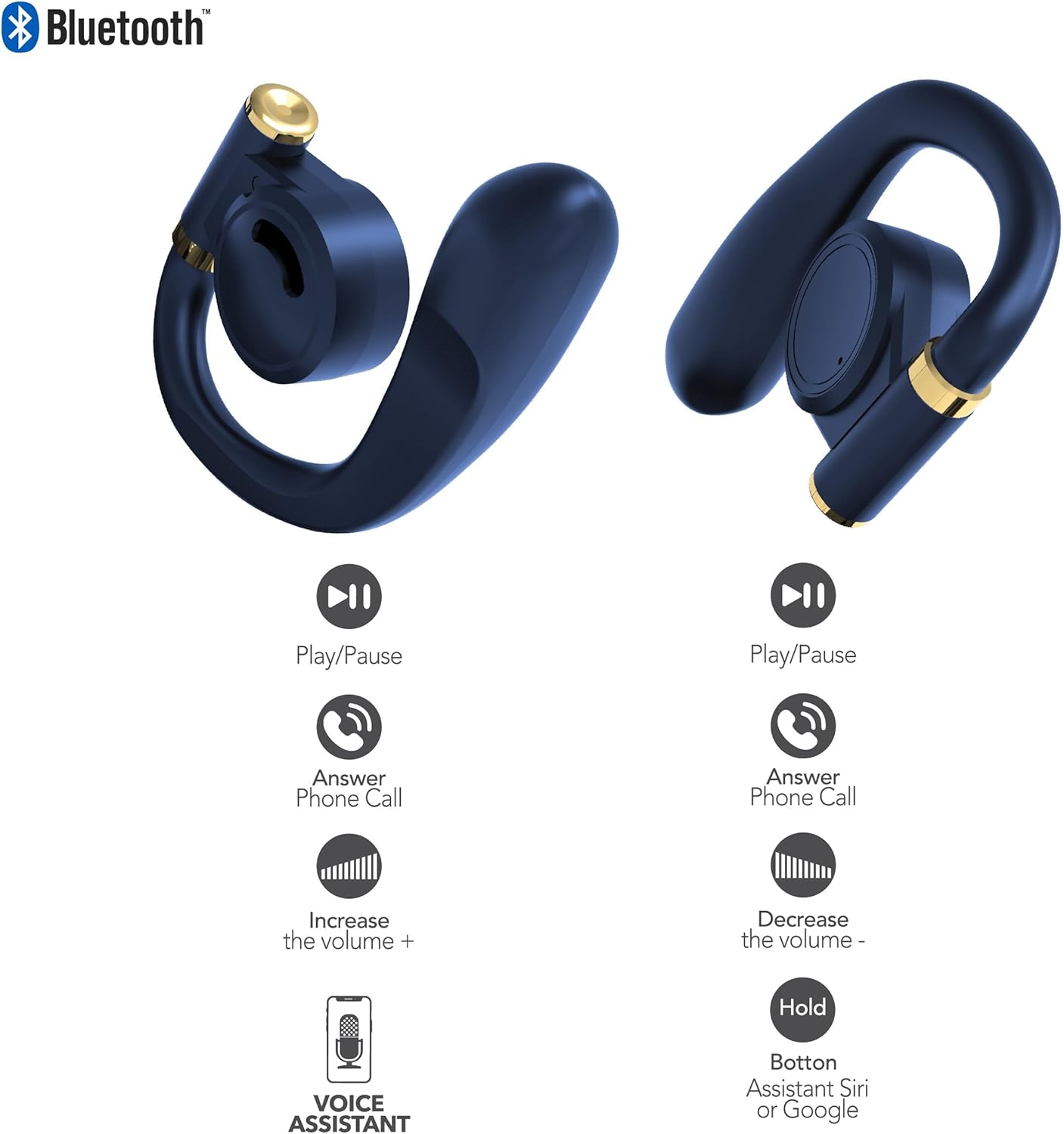
Figure 5.1: Earbud Touch Control Functions. This diagram details the touch-sensitive areas on both the left and right earbuds and their corresponding actions for media playback, call management, volume adjustment, and activating voice assistants.
| Дія | Лівий навушник | Правий навушник |
|---|---|---|
| Відтворення/Пауза | Один дотик | Один дотик |
| Відповісти на телефонний дзвінок | Один дотик | Один дотик |
| Збільшити гучність | Двічі торкніться | N/A |
| Зменшити гучність | N/A | Двічі торкніться |
| Activate Voice Assistant (Siri/Google) | Тримайте | Тримайте |
5.2. Режим прозорості
Transparency Mode allows you to hear your surroundings while still enjoying your audio. This feature is useful for maintaining awareness in environments like busy streets or public transport.
- Activating Transparency Mode: Refer to your specific earbud control diagram or experiment with a triple tap on either earbud. An audio prompt will confirm the mode change.
- Deactivating Transparency Mode: Repeat the activation gesture.
5.3. Увімкнення/вимкнення живлення
- Увімкнення: Навушники автоматично вмикаються після виймання з зарядного футляра.
- Вимкнення живлення: Помістіть навушники назад у зарядний футляр і закрийте кришку. Вони автоматично від’єднаються та вимкнуться.
6. Технічне обслуговування
Proper maintenance ensures the longevity and optimal performance of your RCA Wave-68 earbuds.
- Прибирання: Regularly clean the earbuds and charging case with a soft, dry, lint-free cloth. Do not use harsh chemicals or abrasive materials. Gently clean the charging contacts on both the earbuds and the case to ensure proper connection.
- Вушні наконечники: Remove and clean the eartips periodically with mild soap and water. Ensure they are completely dry before reattaching them to the earbuds.
- Зберігання: When not in use, always store the earbuds in their charging case to protect them from dust, dirt, and damage. Store in a cool, dry place away from extreme temperatures.
- Вплив води: The earbuds are not waterproof. Avoid exposing them to excessive moisture, rain, or sweat.
7. Вирішення проблем
If you encounter issues with your RCA Wave-68 earbuds, try the following solutions:
| проблема | Можливе рішення |
|---|---|
| Навушники не підключаються до пристрою |
|
| Працює лише один навушник |
|
| Ні звуку, ні низької гучності |
|
| Зарядний футляр не заряджається |
|
8. Технічні характеристики
The following are the technical specifications for the RCA Wave-68 True Wireless Earbuds:
| Особливість | Деталь |
|---|---|
| Назва моделі | Хвиля |
| Технологія підключення | Бездротовий |
| Технологія бездротового зв'язку | Bluetooth |
| Версія Bluetooth | 5.3 |
| Сумісні пристрої | Laptops, Smart Speakers, Smartphones, Tablets |
| Діапазон частот | 20 Гц - 20 кГц |
| Спосіб контролю | Пульт дистанційного керування (сенсорне керування) |
| Термін служби батареї | До 20 годин (з зарядним футляром) |
| Тип аудіо драйвера | Динамічний драйвер |
| Форма навушника | Внутрішні |
| Розташування вуха | Вухо |
| Форм-фактор | Вухо |
| Контроль шуму | Adaptive Noise Cancellation (Transparency Mode) |
| Особливість | Built-In Voice Assistant, Smart Button |
| Розміри продукту | 4.06 x 2.87 x 0.79 дюймів |
| Вага товару | 1 фунт |
| UPC | 850068964482 |
9. Гарантія та підтримка
9.1. Обмежена гарантія
RCA warrants this product against defects in material and workmanship for a period of one (1) year from the date of original purchase. This warranty does not cover damage caused by accident, misuse, abuse, improper installation or operation, lack of reasonable care, or unauthorized modification. For detailed warranty terms and conditions, please refer to the warranty card included with your product or visit the official RCA webсайт.
9.2. Підтримка клієнтів
If you have any questions, require technical assistance, or need to claim warranty service, please contact RCA customer support through the following channels:
- Webсайт: Visit the official RCA support webсайт із поширеними запитаннями, посібниками з усунення несправностей та контактними формами.
- Електронна пошта: Refer to your product packaging or the RCA webсайт для адрес електронної пошти служби підтримки клієнтів.
- телефон: Check the RCA website for regional customer support phone numbers.
Please have your product model number (Wave-68) and proof of purchase ready when contacting support.


