1. Вступ
This manual provides comprehensive instructions for the installation, operation, and maintenance of your MOES 30W Power Delivery USB C Wall Electrical Outlet. This ETL Listed outlet features a 15 Amp capacity, an ultra-speed Type C receptacle, and is designed for efficient charging of various compatible devices.

Image 1: MOES 30W Power Delivery USB C Wall Electrical Outlet with its packaging.
2. Інформація про безпеку
WARNING: Risk of electric shock. Improper installation can result in serious injury or death. Always turn off power at the circuit breaker before installation.
- Перелік ETL: This product is ETL Listed, ensuring it meets recognized safety standards.
- TampER-Resistant дизайн: Built-in shutters prevent foreign objects from being inserted into the receptacles, enhancing safety, especially in households with children.
- Захист від перевантаження по струму: Designed to safeguard connected electronics from receiving excessive power.
- томtage: Operates at 120 Volts. Ensure your electrical system is compatible.
- Якщо ви не впевнені щодо будь-якої частини процесу встановлення, зверніться до кваліфікованого електрика.

Зображення 2: закінченоview of the MOES outlet's safety features, including tamper-resistant design and various protections.
3. Вміст упаковки
Перевірте наявність усіх елементів в упаковці:
- 1 x MOES 30W Power Delivery USB C Wall Electrical Outlet
- 1 x настінна пластина
- 4 х гвинти
- 1 х посібник користувача
4. Технічні характеристики
| Особливість | Деталь |
|---|---|
| Бренд | МНС |
| Модель | Type 1C/1A 30WPD 15A Outlet |
| томtage | 120 вольт |
| Ampераж | 15 Amp |
| Вихід USB (всього) | 30W Макс |
| USB Type-C | PD3.0 (Power Delivery) |
| USB Type-A | QC2.0 (швидка зарядка) |
| матеріал | пластик |
| Колір | Білий |
| Сумісні пристрої | Smartphone, Tablet, Laptop (USB-C PD compatible) |
| Сертифікати | ETL внесено до списку |

Image 3: Dimensions of the MOES USB C Wall Electrical Outlet for installation planning.
5. Налаштування та встановлення
- Вимкніть живлення: Locate your circuit breaker panel and turn off the power to the outlet you intend to replace. Use a voltage tester to confirm the power is off before proceeding.
- Видалити стару розетку: Unscrew and carefully remove the existing wall plate and outlet from the electrical box. Disconnect the wires from the old outlet.
- Підготуйте дроти: If necessary, strip approximately 1/2 inch (12-15mm) of insulation from the ends of the electrical wires (Hot, Neutral, Ground).
- Підключіть дроти:
- Підключіть Гарячий провід (usually black or red) to the brass screw terminal.
- Підключіть Нульовий провід (usually white) to the silver screw terminal.
- Підключіть Дріт заземлення (usually green or bare copper) to the green screw terminal.
- Mount New Outlet: Carefully push the wired outlet back into the electrical box. Secure it with the provided screws.
- Встановити настінну пластину: Attach the screwless wall plate by first screwing the clear inner part to the outlet, then snapping the decorative outer plate into place.
- Відновлення живлення: Return to your circuit breaker panel and turn the power back on. Use a voltage tester to confirm power is restored to the new outlet.
Відеоінструкція з встановлення:
Video 1: Step-by-step guide on how to install the MOES wall outlet.
6. Інструкція з експлуатації
The MOES 30W Power Delivery USB C Wall Electrical Outlet provides both traditional AC power and advanced USB charging capabilities.
- Розетки змінного струму: Use the two standard 15 Amp AC outlets for powering appliances and devices requiring 120V.
- USB Type-C Port (PD3.0): Plug in your USB-C compatible devices, such as iPhones (15 Series), MacBooks, iPads, and Samsung Galaxy phones, for rapid charging up to 30W via Power Delivery 3.0.
- USB Type-A Port (QC2.0): Connect devices that use a standard USB-A cable for charging, supporting Quick Charge 2.0 for faster charging where compatible.
- Технологія Smart Chip: The integrated smart chip automatically detects the connected device and delivers the optimal power level for fast and efficient charging.
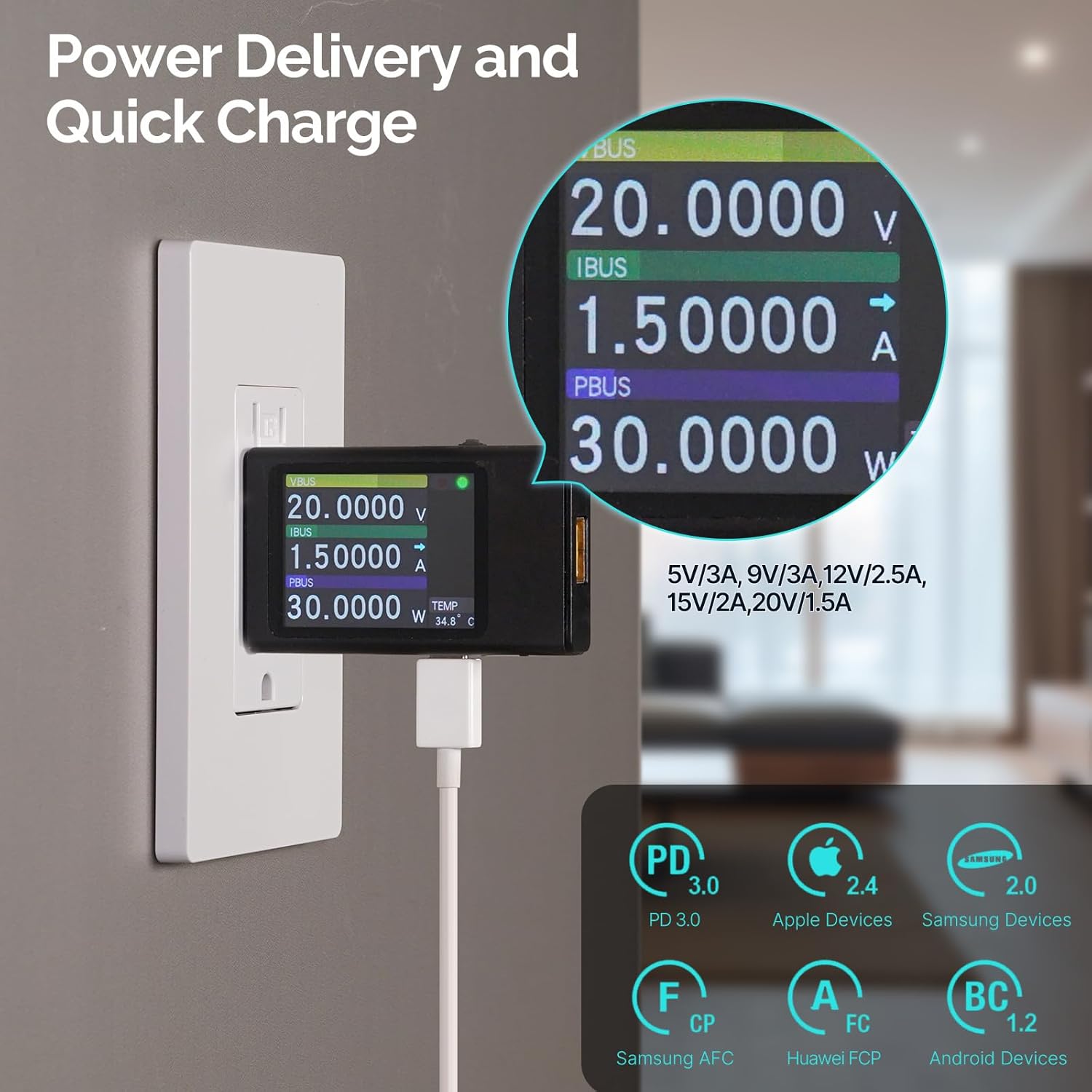
Image 4: Power Delivery and Quick Charge capabilities of the MOES outlet.

Image 5: Universal compatibility of the MOES outlet with various devices.
Продукт закінченийview Відео:
Відео 2: Кінецьview of the MOES 30W PD USB Wall Outlet features and usage.
7. Технічне обслуговування
- Прибирання: Disconnect power before cleaning. Use a soft, dry cloth to wipe the surface of the outlet and wall plate. Avoid using liquid cleaners or abrasive materials.
- Регулярні перевірки: Periodically inspect the outlet for any signs of damage, loose connections, or discoloration. If any issues are found, turn off power and consult a qualified electrician.
8. Вирішення проблем
| проблема | Можлива причина | Рішення |
|---|---|---|
| No power from AC receptacles or USB ports. | Спрацював автоматичний вимикач; нещільне з'єднання проводки. | Check and reset the circuit breaker. If issue persists, turn off power and check wiring connections. Consult an electrician if needed. |
| USB devices charging slowly. | Device not compatible with fast charging; faulty cable; multiple devices drawing power simultaneously. | Ensure your device supports PD3.0 (USB-C) or QC2.0 (USB-A). Try a different, high-quality charging cable. Disconnect other devices to test single-port performance. |
| Розетка тепла на дотик. | Normal operation under heavy load; excessive load. | Slight warmth is normal. If it feels excessively hot, disconnect devices and reduce the load. Ensure proper ventilation. |
9. Гарантія та підтримка
For warranty information or technical support, please refer to the contact details provided in your product packaging or visit the official MOES webсайт. Зберігайте чек про покупку для гарантійних претензій.


