вступ
This manual provides detailed instructions for the installation, operation, and maintenance of your AIDA Single Pole Motion Sensor Light Switch. This device is designed to enhance convenience and energy efficiency by automatically controlling lighting based on occupancy. Please read this manual thoroughly before installation and use to ensure proper function and safety.

Image: The AIDA Single Pole Motion Sensor Light Switch shown alongside its product packaging, highlighting its design and key features.
Важлива інформація з безпеки
WARNING: RISK OF ELECTRIC SHOCK. Improper installation can be dangerous or illegal. Always consult a qualified electrician if you are unsure about any part of the installation process.
- Вимкніть живлення: Завжди відключайте живлення за допомогою автоматичного вимикача або запобіжника перед встановленням або обслуговуванням вимикача.
- Необхідний нейтральний дріт: This device requires a neutral wire for proper operation. If your electrical box does not have a neutral wire, this switch is not compatible.
- Тільки один полюс: This switch is designed for single-pole control only and is not suitable for 3-way or multiple-way circuits.
- UL/CUL Certified: The switch is UL and CUL listed, ensuring compliance with safety standards.
- Робочий випtage: Ensure your electrical system operates at 120 Volts (AC).
Вміст упаковки
Перед початком встановлення перевірте наявність усіх компонентів:
- AIDA Single Pole Occupancy Motion Sensor Light Switch
- Безгвинтова настінна пластина
- Wire Nuts (Terminal caps)
- Монтажні гвинти
- Інструкція з експлуатації (цей документ)
Технічні характеристики продукту
| Особливість | Деталь |
|---|---|
| Вхідний рейтинг | 120/277 В~50/60 Гц |
| Applicable Load Types | 200W LED/CFL, 500W MLV, 500W INC/HAL, 5A Ballast (120V), 1/6HP Fan (4.4A 120V) |
| Тип перемикача | Однополюсний |
| Дротяний датчик | #14 - #12 AWG |
| Тип проводки | Клеммний ковпачок |
| Робоча температура | 32°F до 104°F (0°C до 40°C) |
| Розмір продукту | 4.17"x1.73"x1.77" (106x44x45mm) |
| матеріал | Copper, Brass (Contact Material) |
| Спосіб контролю | Sensor, Touch |

Image: A visual representation of the product dimensions and a detailed table of specifications for the AIDA motion sensor switch.

Image: A chart illustrating the universal compatibility of the AIDA motion sensor switch with various load types including LED/CFL, MLV, INV/HAL, Ballast, and Fan.
Налаштування та встановлення
Перш ніж почати:
- Вимкніть живлення: Знайдіть панель автоматичних вимикачів і вимкніть живлення розподільчої коробки, з якою ви будете працювати. Переконайтеся, що живлення вимкнено за допомогою регулятора гучності.tagтестер.
- Визначення проводів: Carefully remove the existing wall plate and switch. Identify the following wires:
- Line Wire (Black): Передає живлення від автоматичного вимикача.
- Load Wire (Black): Передає живлення до світильника.
- Нейтральний провід (білий): Required for this switch.
- Заземлювальний дріт (зелений або голий мідний): Для безпеки.
- Confirm Neutral Wire: This switch requires a neutral wire. If you do not have a neutral wire (typically white) in your electrical box, this switch is not compatible.
Інструкції з підключення:
Follow the wiring diagram carefully. Use the provided wire nuts to secure connections.
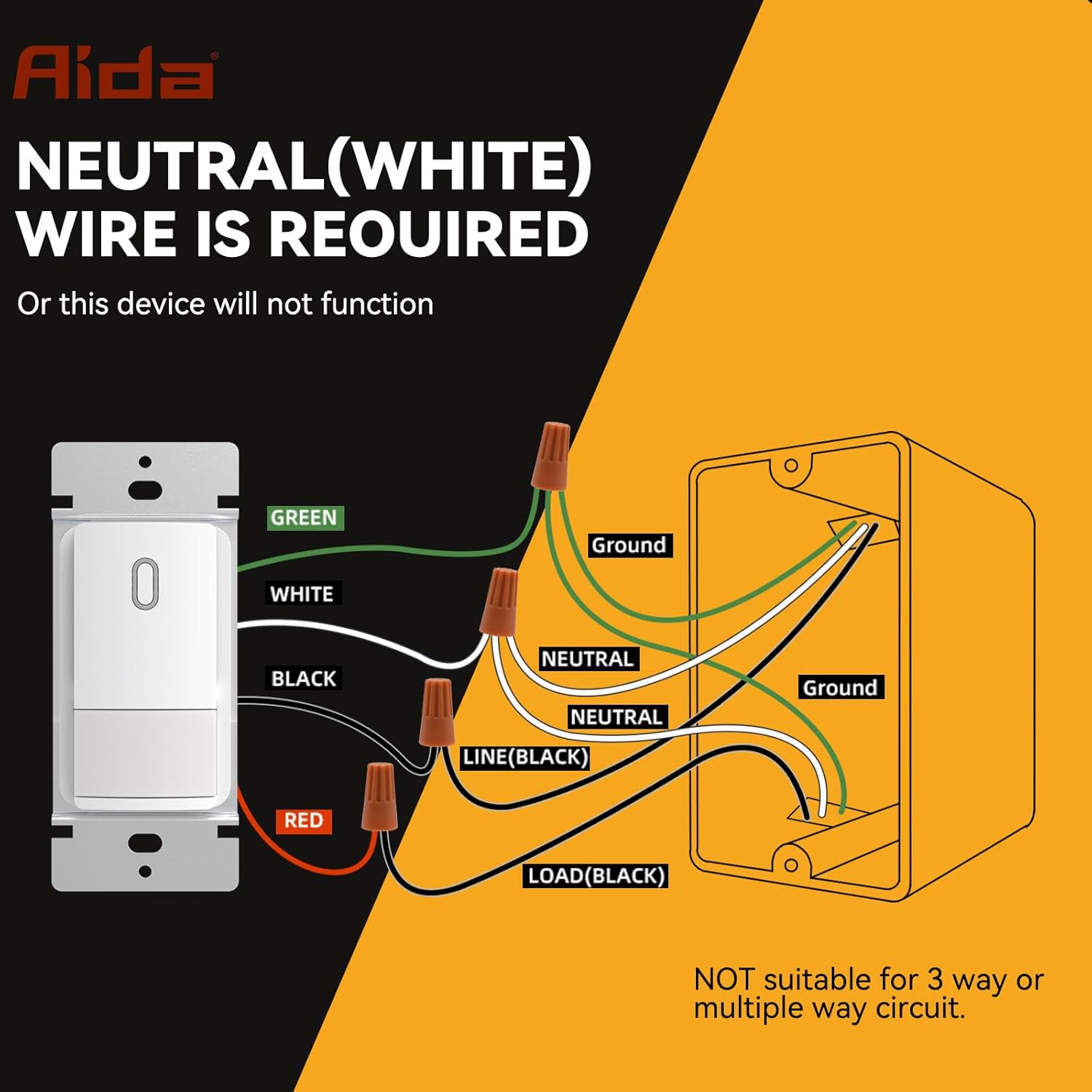
Image: A detailed wiring diagram showing connections for the AIDA motion sensor light switch, including Line, Load, Neutral, and Ground wires. It explicitly states that a neutral wire is required and the switch is not suitable for 3-way or multiple-way circuits.
- Підключіть ЗЕЛЕНИЙ wire from the switch to your house's ЗЕМЛЯ дріт.
- Підключіть БІЛА wire from the switch to your house's НЕЙТРАЛЬНО дріт.
- Підключіть ЧОРНИЙ wire from the switch to your house's ЛІНІЯ (гарячий) дріт.
- Підключіть ЧЕРВОНИЙ wire from the switch to your house's НАВАНТАЖЕННЯ wire (to the light fixture).
Important: Ensure all connections are secure and insulated with wire nuts. This switch is for single-pole applications only. Do not use in 3-way or multi-way circuits.
Монтаж комутатора:
- Carefully fold the wires and push the switch into the electrical box.
- Secure the switch to the electrical box using the provided screws.
- Attach the screwless wall plate.
- Відновіть живлення вимикача.

Image: A diagram showing the precise dimensions of the AIDA motion sensor light switch, its mounting bracket, and the screwless wall plate for easy installation.
Operating Instructions and Customization
The AIDA motion sensor switch offers various modes and adjustable settings to suit your needs.
Режими роботи:
- Occupancy Mode (Auto-On/Auto-Off): Lights automatically turn ON when motion is detected and OFF after a set delay when no motion is detected. Ideal for high-traffic areas like bathrooms, laundry rooms, and kitchens.
- Vacancy Mode (Manual-On/Auto-Off): Lights must be manually turned ON, but will automatically turn OFF after a set delay when no motion is detected. Suitable for bedrooms or TV rooms where you prefer manual control for turning on lights.
Регульовані налаштування:
The switch features internal dip switches for customizing settings. Carefully remove the faceplate to access these controls.

Зображення: Крупний план view of the AIDA motion sensor switch's internal settings, showing dip switches for Adjustable Light Level (Timeout), PIR Sensitivity, and Ambient Light Sensor Mode.
- Adjustable Light Level (Timeout): This setting determines how long the light stays on after the last detected motion. Options typically include 30 seconds, 1 minute, 5 minutes, 15 minutes, or 30 minutes. Refer to the switch's internal labels for specific settings.
- Чутливість до PIR: Adjusts the sensitivity of the Passive Infrared (PIR) sensor to detect motion. Settings range from Low (L) to High (H). A higher sensitivity detects smaller movements or movements at a greater distance.
- Ambient Light Sensor Mode: Controls how the switch reacts to ambient light.
- Низький/Високий: The switch will only turn on lights if the ambient light level is below a certain threshold (e.g., only turn on at night).
- Вимкнено: The ambient light sensor is disabled, and the switch will turn on lights regardless of ambient light.
- Спеціальний: Allows for more specific ambient light level adjustments.
Note: After adjusting any internal settings, reattach the faceplate securely.

Зображення: Детальний view of the AIDA motion sensor switch with its cover removed, showing the dip switches for adjusting timeout, PIR sensitivity, and ambient light sensor mode.
Технічне обслуговування
The AIDA Motion Sensor Light Switch is designed for long-lasting, maintenance-free operation. To ensure optimal performance:
- Прибирання: Periodically wipe the switch and wall plate with a soft, damp тканиною. Не використовуйте абразивні засоби для чищення або розчинники, оскільки вони можуть пошкодити покриття або внутрішні компоненти.
- Обструкція: Ensure the sensor lens is not obstructed by furniture, decorations, or other objects, as this can impair motion detection.
- Немає частин, які обслуговуються користувачем: There are no user-serviceable parts inside the switch. Do not attempt to open or repair the unit beyond adjusting the dip switches.
Усунення несправностей
| проблема | Можлива причина | Рішення |
|---|---|---|
| Світло не вмикається при русі. |
|
|
| Світло постійно горить. |
|
|
| Light turns OFF too quickly or too slowly. |
|
|
| Switch makes a clicking noise. |
|
|
Гарантія та підтримка клієнтів
AIDA products are manufactured to high-quality standards and are backed by a limited warranty. For specific warranty details, please refer to the warranty card included with your purchase or visit the official AIDA webсайт.
If you encounter any issues or have questions regarding your AIDA Single Pole Motion Sensor Light Switch, please contact our customer support team:
- Webсайт: Visit the AIDA Store on Amazon (загальна інформація про продукт)
- Електронна пошта: Зверніться до упаковки продукту або до офіційного webсайт для контактної електронної пошти.
- телефон: Зверніться до упаковки продукту або до офіційного webсайт для контактного номера телефону.
Please have your model number (B0DM4SGNBQ) and purchase date ready when contacting support.


