1. Вступ
The NEDIS WIFICI12CWT SmartLife Indoor Wi-Fi Camera is designed for home surveillance, offering 3MP 1296p Full HD video quality. It features infrared night vision, intelligent motion detection, and two-way audio communication. This camera is compatible with Onvif standards and integrates seamlessly with the SmartLife application for remote access and control. Video recordings can be stored on a microSD card (up to 128 GB) or via an optional cloud storage service. This manual provides essential information for the proper installation, operation, and maintenance of your camera.
2. Що в коробці
- 1x NEDIS WIFICI12CWT Camera
- 1x адаптер живлення
- 1 кабель USB Type-C
- 1x Інструкція з експлуатації
3. Продукт закінчивсяview
Familiarize yourself with the components of your NEDIS WIFICI12CWT camera.

This image displays the front of the NEDIS WIFICI12CWT camera, highlighting its key functionalities such as Wi-Fi connectivity, control via a mobile application, voice control compatibility, infrared night vision, and 3MP Full HD resolution for clear video.
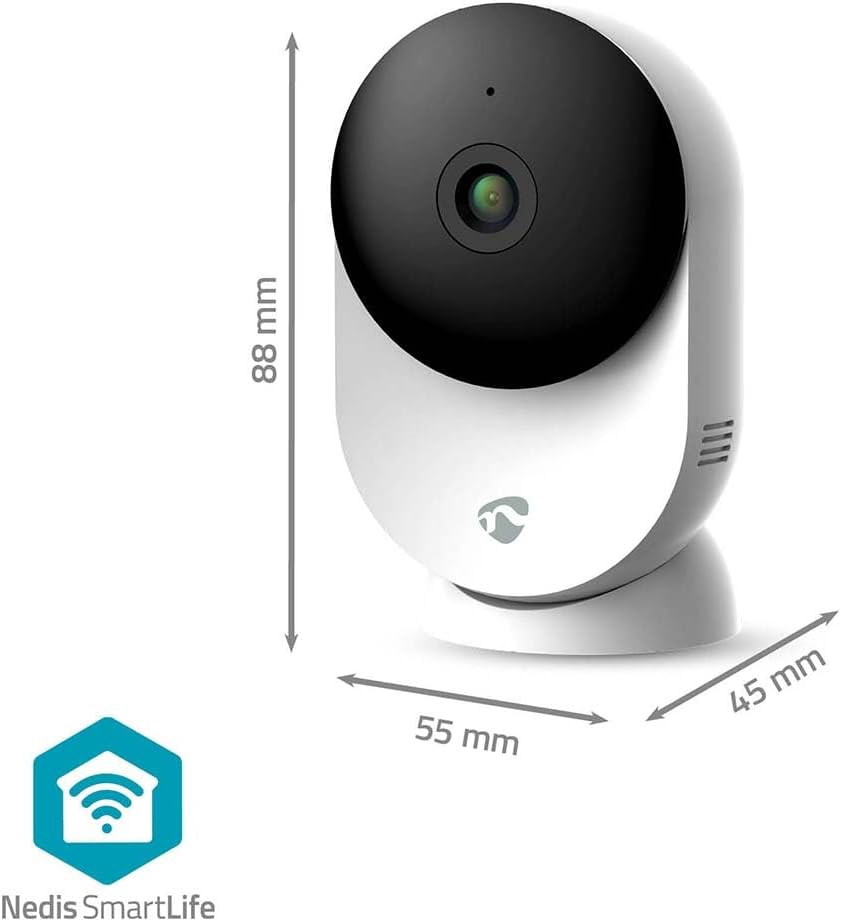
Це зображення забезпечує чітке view of the NEDIS WIFICI12CWT camera along with its physical dimensions: 88 mm in height, 55 mm in width, and 45 mm in depth, aiding in placement planning.

Задній view of the camera is shown, highlighting the speaker grille for two-way audio and the 'PUSH' button, which typically serves as a reset or pairing button.
Ключові компоненти:
- Об'єктив камери: Знімає відео footage.
- Світлодіодний індикатор: Shows camera status (e.g., power, connection).
- Мікрофон: Для аудіовходу та двостороннього зв'язку.
- Доповідач: Для виведення звуку та двостороннього зв'язку.
- Power Port (USB Type-C): Підключається до адаптера живлення.
- Кнопка скидання: Використовується для скидання до заводських налаштувань або режиму сполучення.
- Слот для карт MicroSD: Для локального зберігання відео.
4. Налаштування
Follow these steps to set up your NEDIS WIFICI12CWT camera:
- Завантажте додаток SmartLife: шукати "SmartLife" in your mobile device's app store (iOS or Android) and install it.
- Створити обліковий запис: Open the SmartLife app and register for a new account or log in if you already have one.
- Увімкніть камеру: Connect the USB Type-C cable to the camera's power port and plug the power adapter into an electrical outlet. The camera will power on, and the LED indicator will typically blink, indicating it's ready for pairing.
- Додати пристрій: In the SmartLife app, tap the "+" icon (usually in the top right corner) to add a new device. Select "Security & Video Surveillance" then "Smart Camera (Wi-Fi)" or similar.
- Підключіться до Wi-Fi: Follow the on-screen instructions in the app. Ensure your mobile device is connected to a 2.4 GHz Wi-Fi network. The camera does not support 5 GHz Wi-Fi. You may need to scan a QR code displayed on your phone with the camera lens.
- Повне налаштування: Once the camera connects successfully, you can name it and begin using it.

A user is shown interacting with the NEDIS WIFICI12CWT camera through the SmartLife mobile application on a smartphone, illustrating the remote viewing capability and ease of control.
5. Робота з камерою
Жити View:
Open the SmartLife app and select your camera from the device list to access the live video feed. You can view your space in real-time from anywhere.
Виявлення руху:
The camera features intelligent motion detection. When motion is detected, the camera can send instant notifications to your smartphone via the SmartLife app. You can adjust sensitivity settings within the app.
Нічне бачення:
Equipped with infrared LEDs, the camera automatically switches to night vision mode in low-light conditions, providing clear black-and-white video up to 10 meters.
Двостороннє аудіо:
Use the built-in microphone and speaker for two-way communication. Tap the microphone icon in the app to speak, and listen through the camera's speaker.

A couple is depicted using a tablet to monitor a baby, showcasing the camera's ability to provide live video feed and two-way audio communication, useful for calming a child or general baby surveillance.
Запис і зберігання:
- Картка MicroSD: Insert a microSD card (up to 128 GB, not included) into the designated slot for local storage of recordings. The camera supports continuous recording or event-triggered recording.
- Хмарне сховище: Optional cloud storage services may be available through the SmartLife app for secure off-site storage of your video footage.
Функціональність панорамування/нахилу:
The camera features motorized pan and tilt capabilities, allowing for 360° horizontal and vertical tracking. Control the camera's viewing direction directly from the SmartLife app to cover a wider area.

This image shows the camera placed in a room, with graphical overlays emphasizing its 110-degree viewing angle, intelligent movement detection, and dual-band 2.4/5 GHz Wi-Fi connectivity for flexible placement.
6. Технічне обслуговування
Прибирання:
To clean the camera, gently wipe the exterior with a soft, dry cloth. Do not use liquid cleaners or aerosols, as they may damage the device.
Оновлення прошивки:
Periodically check the SmartLife app for available firmware updates. Keeping your camera's firmware up-to-date ensures optimal performance and security.
7. Вирішення проблем
- Камера не вмикається: Ensure the power adapter is securely connected to both the camera and a working electrical outlet.
- Не вдається підключитися до Wi-Fi:
- Verify your Wi-Fi network is 2.4 GHz. The camera does not support 5 GHz networks.
- Перевірте правильність пароля від Wi-Fi.
- Переконайтеся, що камера знаходиться в зоні дії вашого Wi-Fi роутера.
- Try resetting the camera by pressing and holding the reset button for several seconds until the LED indicator changes.
- Немає запису на карту microSD:
- Переконайтеся, що картку microSD вставлено правильно.
- Check if the microSD card is formatted correctly (usually FAT32). You may need to format it via the app.
- Verify that recording settings are enabled in the SmartLife app.
- Погана якість зображення:
- Очистіть об’єктив камери м’якою сухою тканиною.
- Ensure adequate lighting in the environment, or that night vision is functioning correctly in dark conditions.
- Check your internet connection speed, as a slow connection can affect streaming quality.
8. Технічні характеристики
| Особливість | Специфікація |
|---|---|
| Назва моделі | WIFICI12CWT |
| Роздільна здатність запису відео | 1296p (3 МП) |
| Технологія бездротового зв'язку | Wi-Fi (2.4 ГГц) |
| Viewкут нахилу | 110 градусів |
| Діапазон нічного бачення | 10 метрів |
| Вхідна потужність | 5 вольт |
| Споживана потужність | 4.5 ват-годин |
| Розміри (Д x Ш x В) | 45 x 55 x 88 мм |
| вага | 161 грамів |
| матеріал | Акрилонітрилбутадієнстирол (АБС) |
| Особливості | Two-way audio, Motion detector, Cry detection, Sound-triggered recording, HD resolution, Night vision |
| Середовище використання | закритий |
| Сумісні пристрої | Смартфон, планшет |
| Тип контролера | Android, iOS |
9. Інформація про безпеку
- This product is designed for indoor use only. Do not expose it to rain or moisture.
- Використовуйте лише наданий адаптер живлення, щоб запобігти пошкодженню пристрою.
- Keep the camera away from direct sunlight, heat sources, and strong magnetic fields.
- Не намагайтеся розбирати або ремонтувати камеру самостійно. Зверніться за допомогою до кваліфікованого сервісного персоналу.
- Зберігати в недоступному для дітей та домашніх тварин місці.
10. Гарантія та підтримка
For warranty information and technical support, please refer to the documentation included with your product or visit the official NEDIS website. You can also contact NEDIS customer service for further assistance.


